
Software teams often need to deploy new code before they are ready for every user to see or use it. A new feature may still need testing, approval, gradual rollout, performance monitoring, or coordination with another team. In the past, developers often solved this problem by keeping unfinished code out of production entirely.
Modern software development uses a more flexible technique called feature flags. 🚩💻
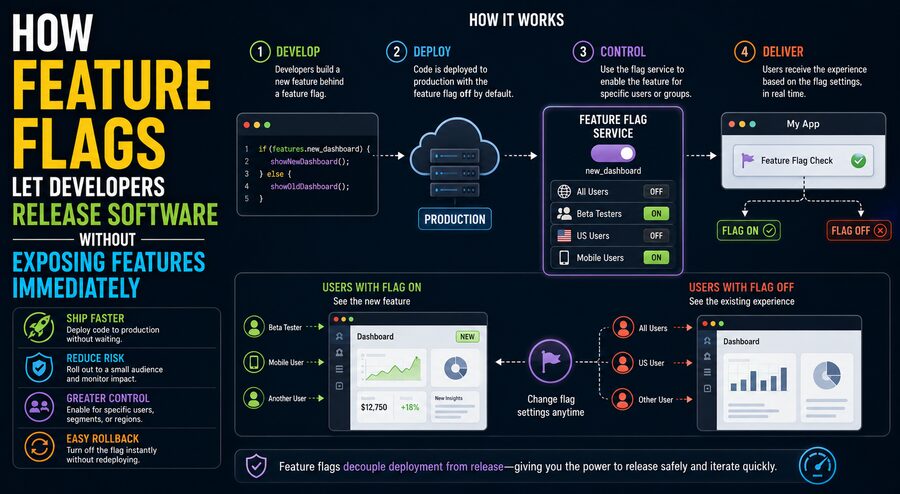
A feature flag, sometimes called a feature toggle, is a software-controlled switch that determines whether a particular feature is active.
Developers can deploy the code for a new feature to production while keeping that feature hidden or disabled for most users.
Later, the team can turn the feature on without deploying the software again.
This separates two activities that used to happen at the same time:
Code deployment and feature release.
That separation gives development teams much more control over how software changes reach users. ⚙️
🚀 Deployment and Release Are Not the Same Thing
A deployment happens when new software code is installed in a production environment.
A release happens when users are actually allowed to access the new functionality.
Without feature flags, these two events are often tightly connected.
For example:
Deploy new code → New feature immediately becomes visibleWith a feature flag, they can be separated:
Deploy new code → Feature remains OFF
                 ↓
        Test and monitor
                 ↓
       Turn feature ON later
This difference may seem small, but it changes how teams manage risk.
A company can deploy software during normal development hours, verify that the code behaves correctly in production, and release the user-facing feature only when the business is ready.
🚩 What Does a Feature Flag Look Like?
At its simplest, a feature flag is a conditional statement.
Imagine developers are building a new dashboard.
The application might contain logic similar to:
if new_dashboard_enabled:
    show_new_dashboard()
else:
    show_old_dashboard()
The important part is that new_dashboard_enabled can be controlled independently of the deployment.
If the flag is set to false, users see the old dashboard.
If the flag is changed to true, the new dashboard becomes available.
In advanced systems, the value may come from a remote configuration service rather than being hard-coded into the application. 🌐
That means teams can change feature availability without rebuilding or redeploying the software.
👥 Feature Flags Can Target Specific Users
Feature flags do not have to be simple global on-or-off switches.
They can be controlled according to rules.
For example, a feature might be enabled only for:
- internal employees,
- beta testers,
- users in a specific country,
- customers on a premium plan,
- 5% of users,
- users with a particular account type,
- developers and quality-assurance teams.
This allows a company to release features gradually.
Suppose a new search system has just been deployed.
The rollout might look like:
Day 1: Internal staff only
Day 2: 1% of users
Day 3: 10% of users
Day 5: 50% of users
Day 7: 100% of users
📈 This is called a progressive rollout or gradual rollout.
If problems appear at any stage, the team can stop or reverse the rollout before every user is affected.
🧪 Testing Features in Production
Development teams usually test software before deployment, but test environments can never perfectly reproduce real production conditions.
Production systems contain:
- real traffic,
- real user behavior,
- actual databases,
- complex network patterns,
- unusual devices,
- unexpected combinations of features.
Feature flags allow teams to deploy code into production while exposing it only to a small controlled audience. 🧪
For example, employees might use the new feature first.
This approach is sometimes called testing in production, although it should still be supported by normal automated testing, staging environments, monitoring, and safety controls.
Feature flags do not replace testing.
Instead, they add another layer of risk management.
🐤 Canary Releases
A rollout to a very small percentage of users is often called a canary release.
The term comes from the historical use of canaries in coal mines as an early warning system.
In software, a small user group receives the new feature first.
Developers monitor metrics such as:
- error rates,
- response time,
- CPU usage,
- memory consumption,
- conversion rates,
- user complaints.
If the new version behaves well, more users are included.
If something goes wrong, the flag can be disabled. 🚨
This can limit the impact of a defective feature.
🛑 Feature Flags Can Act Like Emergency Kill Switches
One of the most valuable uses of feature flags is rapid shutdown.
Suppose a newly released recommendation system unexpectedly causes database overload.
Without a feature flag, developers may need to:
- identify the problem,
- modify the code,
- rebuild the application,
- run tests,
- deploy a corrected version.
That can take significant time.
With a properly designed flag, the team may be able to disable the problematic feature immediately:
Feature ON → Problem detected → Flag OFF
The underlying code remains deployed, but users stop reaching that code path.
This is often called a kill switch. 🛑
It can be extremely useful when reliability matters.
🎯 Feature Flags and A/B Testing
Feature flags are also commonly used in experimentation.
Suppose a company wants to know whether a new checkout page increases purchases.
The application could divide users into two groups:
Group A: Existing checkout
Group B: New checkout
The system then compares outcomes such as:
- purchase completion rate,
- cart abandonment,
- average order value,
- time to checkout.
This type of experiment is called A/B testing. 📊
Feature flags make it easier to control which version each user receives.
However, experimentation systems often require additional statistical tooling beyond the feature-flag mechanism itself.
A flag decides who sees what.
The experimentation platform determines whether the observed difference is meaningful.
🌍 Releasing Features by Region
Some software features cannot be launched everywhere at once.
A company may need to consider:
- legal requirements,
- localization,
- payment systems,
- server capacity,
- customer support readiness,
- regional partnerships.
Feature flags can make a feature available only in certain locations.
For example:
United States → ON
Canada → ON
Germany → OFF
Japan → OFF
Later, other regions can be enabled once the necessary requirements are satisfied.
This gives businesses greater flexibility when coordinating global launches. 🌎
💳 Releasing Features by Customer Plan
Subscription software frequently offers different functionality to different customer tiers.
A feature flag system can help control this access.
For example:
Free plan: Feature disabled
Pro plan: Feature enabled
Enterprise plan: Feature enabled
This is sometimes related to entitlement management.
However, feature flags and security authorization are not exactly the same thing.
A feature flag may control whether an interface or behavior appears, while authorization systems determine whether a user is actually permitted to perform a sensitive action.
Developers should not rely on a simple client-side feature flag as the only security control. 🔐
🔄 Continuous Delivery and Feature Flags
Feature flags are particularly useful in continuous delivery and continuous deployment environments.
Modern engineering teams may deploy code many times per day.
Large features may take weeks to complete.
Keeping a long-lived branch separate from the main codebase can create integration problems.
Feature flags allow developers to merge incomplete work into the main branch while keeping it disabled in production.
For example:
Week 1 → Backend code deployed, feature OFF
Week 2 → Interface code deployed, feature OFF
Week 3 → Internal testing, feature ON for employees
Week 4 → Gradual customer rollout
This enables frequent integration without exposing unfinished functionality. 🔧
🌿 Reducing Long-Lived Development Branches
When teams keep feature development isolated for a long time, their code can drift away from the main application.
Later, merging everything together may create conflicts.
This situation is sometimes called integration debt.
Feature flags support development approaches such as trunk-based development, where developers frequently merge smaller changes into a shared main branch.
Incomplete functionality can remain protected behind flags until it is ready.
This reduces the need for large, long-lived feature branches. 🌿
📱 Feature Flags in Mobile Apps
Feature flags are especially valuable for mobile applications.
Updating a web application may take only minutes because the company controls the servers.
Mobile applications are different.
A new app version may need to pass an app-store review, and users may not install updates immediately.
A remotely controlled feature flag allows developers to ship code in an app update while leaving the feature disabled.
Once enough users have the required app version, the company can enable the feature remotely. 📲
This provides more control over launch timing.
However, developers must design flags carefully because older app versions may not contain the relevant code at all.
🧠 How Feature-Flag Systems Decide What a User Sees
A feature-management system often evaluates several pieces of information.
For example:
Feature: New Search

User ID: 74821
Country: India
Account Type: Pro
Employee: No
Rollout Group: 17%
The system checks configured rules.
A possible rule might say:
Enable the new search feature for Pro users in India who are included in the first 25% rollout group.
If the user matches, the system returns:
ON
Otherwise:
OFF
The application then changes its behavior accordingly.
Some systems calculate percentage rollouts using a stable hash of a user identifier so the same person consistently receives the same experience. 🎯
🧩 Server-Side vs. Client-Side Flags
Feature flags can be evaluated in different places.
🖥️ Server-Side Feature Flags
The server evaluates the flag before sending data or functionality to the user.
These flags are useful for:
- backend algorithms,
- APIs,
- database behavior,
- business logic.
They also provide stronger control because the user typically cannot directly manipulate the server’s decision.
📱 Client-Side Feature Flags
A browser or mobile application may evaluate some flags locally.
These can control:
- interface layouts,
- buttons,
- visual experiments,
- optional screens.
However, client-side flags should not be treated as secure permission systems because technically skilled users may inspect or modify client behavior.
⚡ Local Evaluation vs. Remote Evaluation
Feature-flag systems can also differ in how decisions are obtained.
In remote evaluation, the application contacts a flag service whenever it needs a decision.
This makes centralized control easy but may introduce network latency or dependency concerns.
In local evaluation, configuration rules are downloaded to the application or server and evaluated locally.
This can make flag checks extremely fast.
Many production systems use caching and local configuration so feature decisions do not slow normal application requests. 🚀
📉 Observability Makes Feature Flags More Powerful
Turning a feature on is only useful if developers can see what happens afterward.
Feature flags work best when combined with strong observability.
Teams may monitor:
- request latency,
- failure rates,
- crash frequency,
- database load,
- user engagement,
- revenue,
- support tickets.
Suppose a feature is enabled for 10% of users.
If error rates suddenly increase only for that group, the team has strong evidence that the new feature may be responsible.
The flag can then be disabled while engineers investigate. 🔍
This combination of controlled rollout and monitoring can significantly reduce release risk.
⚠️ Feature Flags Can Create Complexity
Feature flags are powerful, but they are not free.
Every flag introduces another possible system state.
Suppose an application has three independent flags.
In theory, there can be:
2³ = 8 combinations
With ten binary flags:
2¹⁰ = 1,024 combinations
Testing every possible combination quickly becomes unrealistic.
Feature interactions can create bugs that are difficult to reproduce.
Teams therefore need disciplined flag management.
🧹 What Is Feature Flag Debt?
Many feature flags are intended to be temporary.
Once a new feature is fully released and considered stable, the old code path may no longer be needed.
If the flag remains forever, the code can become cluttered.
For example:
if new_checkout_flag:
    new_checkout()
else:
    old_checkout()
If every user has been using the new checkout for months, keeping the old branch increases maintenance work without providing much benefit.
Accumulated obsolete flags are sometimes called feature flag debt or toggle debt. 🧹
Teams should regularly remove flags that are no longer useful.
🏷️ Different Types of Feature Flags
Not every feature flag serves the same purpose.
Common categories include:
🚀 Release Flags
Used to hide unfinished functionality until it is ready.
These are often temporary.
🧪 Experiment Flags
Used for A/B tests and controlled experiments.
🛑 Operational Flags
Used to enable or disable system behavior during incidents or changing conditions.
These may remain long-term.
👤 Permission or Entitlement Flags
Used to make capabilities available to certain customer groups.
⚙️ Configuration Flags
Used to change system behavior without modifying code.
Understanding the flag’s purpose helps determine how long it should exist and how carefully it must be managed.
🔐 Security Considerations
Feature flags can hide functionality, but hidden does not mean secure.
Suppose a banking application hides a new administrative button behind a browser-based flag.
If the server does not separately verify the user’s permissions, someone might bypass the interface and call the underlying API directly.
Sensitive operations should always use proper authentication and authorization.
Feature flags should control availability or rollout—not replace security controls. 🛡️
🗃️ Feature Flags and Database Changes
Some software releases require database schema modifications.
This can make feature-flagged releases more complicated.
Imagine a new feature requires a new database column.
A safe rollout may occur in stages:
- Add the new database column.
- Deploy code capable of using either old or new behavior.
- Keep the feature flag disabled.
- Enable it gradually.
- Verify performance and data integrity.
- Remove the old behavior later.
This type of backward-compatible deployment strategy helps teams avoid dangerous all-at-once changes. 🗄️
🤖 Automated Rollouts
Advanced deployment platforms can connect feature flags to monitoring systems.
For example:
Enable feature for 5%
        ↓
Monitor error rate
        ↓
Healthy?
   ↙           ↘
 Yes           No
 ↓              ↓
Increase      Disable
to 20%         feature
Automated rollout systems can progressively increase exposure while monitoring predefined safety metrics.
If performance becomes unacceptable, they may automatically halt or reverse the rollout.
This approach combines feature management with modern reliability engineering. 🤖📊
🛠️ Best Practices for Managing Feature Flags
Successful feature flagging requires more than adding if statements throughout an application.
Teams usually benefit from clear operational practices.
Important principles include:
- give flags meaningful names,
- document their purpose,
- assign an owner,
- define expected removal dates for temporary flags,
- test both enabled and disabled paths,
- monitor feature performance,
- avoid deeply nested flags,
- remove obsolete code,
- protect sensitive flag controls.
Feature configuration itself should also be audited.
If someone accidentally enables an unfinished feature for every customer, the consequences can be serious.
🌟 Why Feature Flags Have Become So Popular
Modern software development emphasizes rapid iteration.
Teams want to ship code frequently without turning every deployment into a risky public launch.
Feature flags make this possible by introducing a controllable layer between code being present and functionality being available.
Developers can deploy early.
Quality teams can test safely.
Product managers can choose when to launch.
Operations teams can reduce exposure during incidents.
Experimentation teams can compare different experiences.
All of these activities can occur using the same underlying concept: a dynamically controlled decision about whether a particular code path should run. 🚩
🚀 Deploy Today, Release When Ready
Feature flags fundamentally change the meaning of a software release.
Instead of assuming that every deployed line of code must immediately affect every user, developers can deploy functionality in a dormant state.
The software is present, but access remains controlled.
A feature may first be visible only to developers, then employees, then a small percentage of customers, and eventually everyone. If problems appear, the rollout can stop—or the feature can be switched off rapidly. 🔄
This separation makes software delivery safer, more gradual, and easier to coordinate.
Feature flags are especially valuable for continuous delivery, mobile apps, experiments, canary releases, emergency shutdowns, and large distributed systems.
Their central idea is straightforward:
Deployment determines when code reaches production; a feature flag determines when—and for whom—that code becomes active. 🚩💻➡️👥
By separating those two decisions, development teams gain far more control over how new software reaches the real world.