
A department has outgrown its spreadsheets. Orders are slipping through approval gaps, customer data is duplicated, and a manager asks the familiar question: “Can’t our developers build something for this?”
A commercial product may appear expensive because its subscription price is visible. A custom application may appear cheaper because the initial estimate is framed as a project. Neither impression is reliable on its own.
The real decision is not whether software can be built. Almost anything can. The decision is whether building, buying, or combining both choices produces the best outcome over the period the business will actually use the system.
That requires a cost model broad enough to include people, risk, change, integration, and the value of reaching a useful solution at the right time.
🧭 Start With the Decision, Not the Feature List
“Build versus buy” is often treated as a procurement question. It is better understood as an operating-model decision: who will own a business capability, how quickly must it change, and what happens when it fails?
Begin by writing the outcome in plain language. For example: reduce the time needed to approve supplier invoices, give field staff offline access to job details, or enforce a unique pricing workflow. A long list of requested screens does not yet establish that custom software is justified.
The strongest case for building usually rests on a capability that is genuinely distinctive, tightly coupled to internal operations, or poorly served by available products. The strongest case for buying rests on a capability that is common, mature, and not strategically differentiating.
🔍 Define the Problem Boundary
Cost estimates become misleading when the project boundary is vague. “Build a CRM” could mean a simple contact database, or it could include lead routing, marketing automation, customer support, permissions, reporting, data migration, and integrations with finance systems.
Separate the core problem from surrounding needs. The core may warrant custom work while adjacent functions can be handled by a package, an existing platform, or a simpler process.
- Who uses the system and how often?
- Which decisions, records, or transactions must it support?
- What existing systems must exchange data with it?
- What is explicitly out of scope for the first useful release?
A precise boundary makes both vendor comparisons and development estimates far more honest.
🧱 Recognize That “Buy” Has Several Forms
Buying does not mean one thing. A business can subscribe to software as a service, deploy a commercial product in its own environment, adopt an open-source product, or use a low-code platform. Each shifts costs and responsibilities differently.
A subscription commonly includes infrastructure and routine product updates, but may impose recurring fees and configuration limits. Open-source software may remove licence fees while leaving implementation, hosting, security, and support squarely with the organization.
Likewise, “build” ranges from a small internal tool to a regulated, customer-facing platform. Compare like with like before drawing conclusions.
💰 Use Total Cost of Ownership, Not Sticker Price
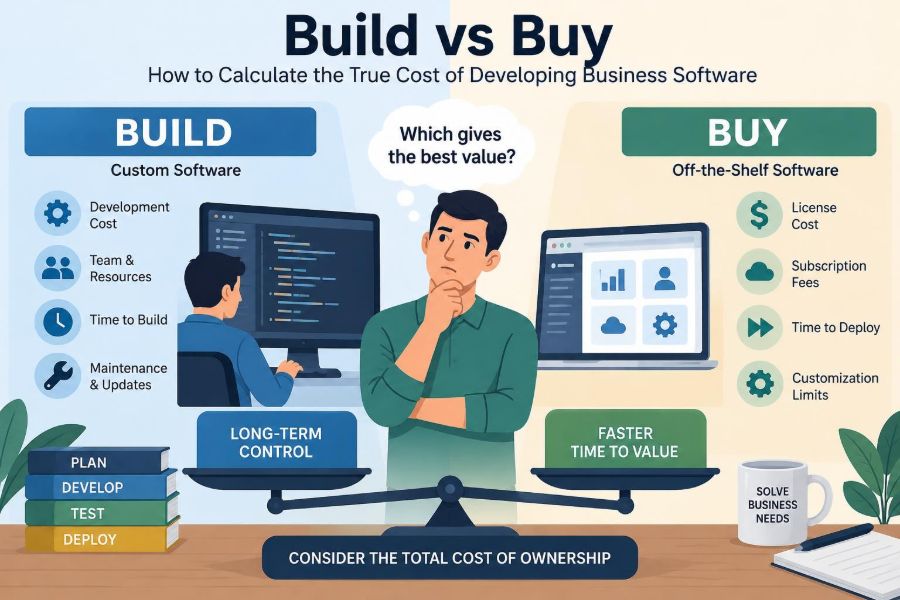
Total cost of ownership (TCO) is the full cost of acquiring, operating, changing, and eventually retiring a system. It prevents a team from comparing a vendor’s annual invoice with only the first release of an internal application.
A practical model covers a chosen time horizon, often several years, because software expenses arrive at different times. A purchased product may cost more immediately but require less internal effort. A custom system may avoid licence fees yet accumulate ongoing engineering work.
The goal is not false precision. A well-documented range of plausible costs is more useful than a single confident number built on untested assumptions.
📋 Map Costs Across the Software Lifecycle
Place every cost in a lifecycle category. This reveals omissions and helps decision-makers see whether a proposal is front-loaded or creates a lasting commitment.
| Lifecycle stage | Build costs | Buy costs |
|---|---|---|
| Evaluate | Discovery, architecture, prototypes | Vendor review, trials, procurement |
| Implement | Design, development, testing | Licences, configuration, implementation partner |
| Operate | Hosting, support, monitoring, security | Subscription, administration, premium support |
| Improve | Enhancements, upgrades, technical debt work | Configuration changes, integrations, plan changes |
| Exit | Migration, archival, decommissioning | Data export, replacement, contract transition |
This comparison also makes hybrid options easier to evaluate.
👥 Price Internal Time at Its Real Opportunity Cost
Internal staff are not free because they are already on payroll. When product managers, subject-matter experts, developers, security specialists, or support staff work on a project, they cannot work on another priority.
Use fully loaded costs where appropriate: salary, benefits, management, equipment, and the organization’s usual overhead method. More importantly, record what work will be delayed. A team diverted from revenue protection or a critical customer release may create a cost that a timesheet alone cannot show.
Subject-matter experts are especially easy to overlook. Their input is necessary to define rules, review prototypes, test edge cases, and train colleagues.
🏗️ Include Discovery and Product Design
Writing code is only one part of building business software. Teams need to learn how work currently happens, identify exceptions, model data, choose workflows, design interfaces, and decide what “correct” looks like.
Skipping discovery does not remove this work. It pushes it into development, where misunderstandings are more expensive to correct. A seemingly simple request such as “approve expenses” quickly raises questions about delegation, thresholds, currencies, audit trails, and rejected claims.
Buying also needs discovery. Configuration choices and vendor demonstrations are only useful when the organization understands its actual requirements rather than merely describing familiar habits.
🧪 Count Quality Assurance as Product Work
A custom application needs more than a demo that works on one laptop. It needs testing of normal flows, unusual inputs, permissions, performance, integrations, and recovery from failures.
Business software often contains rules that matter most at the edges: a backdated contract, a partially shipped order, a user with two roles, or a month-end correction. These scenarios require test cases and knowledgeable reviewers.
Commercial products arrive with established functionality, but configuration and integrations still need acceptance testing. A reliable vendor product can be made unreliable by an incorrect setup or poorly understood process.
🔗 Treat Integrations as Independent Products
Most business systems do not live alone. They exchange identities, customer records, payments, inventory, documents, or events with other tools. Each connection has its own requirements, failure modes, credentials, monitoring, and maintenance.
An application programming interface, or API, allows systems to exchange data programmatically. The presence of an API does not mean integration is effortless. Teams must decide which system owns each record, how duplicates are resolved, and what happens when one system is unavailable.
Ask vendors about integration limits, available events, data access, and error handling. Ask internal teams who will monitor failed synchronizations after launch.
🗃️ Put Data Migration on the Estimate
Moving data is rarely a simple export and import. Old records may be incomplete, duplicated, inconsistent, or encoded in ways the new system does not support. Someone must decide what to clean, archive, transform, or leave behind.
For example, a legacy customer list may contain multiple spellings of the same company, former employees as contacts, and historical fields no longer needed. Migrating these issues can damage trust in the new tool from day one.
Include mapping, cleansing, trial migrations, reconciliation, and a rollback approach. The source system may also need to remain readable for audits or historical reporting.
🔐 Account for Security, Privacy, and Compliance
The right level of protection depends on the data, users, industry, and jurisdictions involved. But every option needs explicit treatment of identity management, access controls, backups, vulnerability handling, and incident response.
A custom system creates responsibility for secure design and timely patching. A purchased system reduces some operational burden but does not eliminate the buyer’s responsibility to configure access properly, assess the provider, and understand where data is processed.
Where legal, contractual, or regulatory requirements apply, involve qualified security, privacy, and legal professionals. Software teams should not assume that a vendor claim or a technical feature alone establishes compliance.
☁️ Calculate Infrastructure and Operations
Custom software may require cloud services, databases, file storage, logging, monitoring, backup retention, domain management, and environments for testing. Small monthly charges can grow as data, traffic, and reliability expectations increase.
Operations also includes people. Someone responds to alerts, manages secrets, approves access, investigates slowdowns, and restores service after an incident. This work does not disappear after launch.
With a hosted product, the provider operates the underlying platform, yet the business still needs administrators and a plan for operational issues within its control.
🛠️ Budget for Support After Launch
Launch is a handoff, not an ending. Users ask questions, request access, report defects, and discover cases that were not anticipated. Managers often want reports that expose new dimensions of the data.
Define a support model before choosing a path. Who receives tickets? What response time is expected? Which issues can a business administrator solve, and which require engineers or the vendor?
If a system supports a time-sensitive operational process, the cost of on-call coverage or vendor support tiers may be material. A low initial cost can be a poor trade if help is unavailable when the business needs it.
🔄 Model Maintenance and Technical Debt
Technical debt is the future work created when a solution takes shortcuts or becomes harder to change. It is not always bad; a deliberate shortcut can be sensible when speed matters. The danger is treating it as invisible.
Custom software needs dependency updates, security patches, framework upgrades, refactoring, and documentation. Without these, routine changes gradually become slower and riskier.
Purchased software has a different form of maintenance. Vendors change interfaces, retire features, adjust pricing, and release updates that may affect configured workflows. Neither route is maintenance-free.
⏱️ Value Time to First Useful Outcome
Time has economic value even when it is hard to express in currency. If a workflow is causing errors or delaying a market opportunity, the time until a safe, useful solution matters.
A configurable product can sometimes address most of the need quickly. A custom build may take longer but fit the process better once complete. Conversely, a package that requires extensive workarounds can delay adoption and create its own productivity cost.
Measure time to the first useful outcome, not just contract signature or project kickoff. A system is useful when real users can complete a meaningful task reliably.
📈 Separate Direct Savings From Business Value
Some benefits are direct: fewer manual entries, lower support effort, or retired infrastructure. Others are strategic: faster experimentation, a differentiated customer experience, or better control of a unique workflow.
Do not claim benefits merely because a project sounds modern. Identify the mechanism. If automation saves staff time, specify which steps disappear and whether the organization can actually redirect that time to valuable work.
Strategic value can justify a higher cost, but it should be discussed openly instead of being hidden inside optimistic savings assumptions.
🎯 Identify What Is Actually Differentiating
A useful test is to ask whether competitors could buy an equivalent capability with reasonable effort. Payroll, routine document signing, commodity accounting, and basic identity management are commonly candidates for purchase.
Unique pricing logic, specialized operational planning, proprietary customer workflows, or a novel product experience may be closer to a company’s competitive advantage. Building can make sense when control over these details creates durable value.
Even then, build only the differentiating layer when possible. Reusing reliable services for commodity functions lets the team focus its scarce expertise.
🧩 Consider the Hybrid Architecture
The choice is rarely binary. A hybrid approach uses purchased platforms for common capabilities and custom code for the distinctive workflow, interface, or orchestration between systems.
For example, a company might use a commercial identity provider and accounting platform while building a portal that applies its unique eligibility rules. This avoids rebuilding mature foundations while preserving control where it matters.
Hybrid systems still need careful integration design. They reduce some costs, not all complexity.
📦 Measure Vendor Fit Beyond the Demo
Demonstrations usually show the smoothest path. Ask to see difficult scenarios: unusual approvals, reporting needs, data corrections, permission boundaries, and integration failures. Better yet, test representative data and workflows in a trial environment.
Assess fit in three categories: what works without change, what can be configured, and what requires customization or a workaround. A small gap may be acceptable; many small gaps can become a fragile operating process.
Also distinguish vendor roadmap promises from current functionality. Purchase decisions should be based on capabilities available under terms the organization can actually accept.
🔒 Evaluate Lock-In on Both Sides
Vendor lock-in occurs when changing providers becomes difficult because of proprietary data formats, custom configurations, contracts, or dependent processes. It deserves attention, but internal software can create lock-in too.
A custom application may depend on a few people who understand its architecture, an obsolete framework, or undocumented business rules. That is knowledge lock-in, and it can be costly during turnover.
Reduce either form of lock-in with documented data models, export procedures, clear ownership, maintainable interfaces, and realistic exit planning.
📜 Read Contracts and Pricing Mechanics Carefully
A vendor’s advertised price may not include implementation support, extra environments, advanced security controls, API access, storage, usage overages, or premium support. Costs may also change with user count, transactions, or feature tiers.
Review renewal terms, notice periods, data export rights, service commitments, and limits on liability with appropriate procurement and legal support. The aim is not to eliminate all risk, but to understand obligations before the system becomes embedded in operations.
For internal builds, create equivalent clarity: who funds ongoing work, who owns the roadmap, and what service level is realistically supported?
⚖️ Compare Risk, Not Just Expected Cost
Two options with similar expected cost can have very different risk profiles. A build may risk delayed delivery because requirements are uncertain. A purchase may risk business disruption if the vendor changes direction or cannot meet a critical requirement.
List important risks, their likely impact, and how each option reduces or transfers them. Include operational outages, data loss, adoption failure, security weaknesses, dependency on a partner, and inability to evolve.
This is not a prediction exercise. It is a way to make uncertainty visible rather than allowing it to hide behind a single total.
🧮 Build a Scenario-Based Cost Model
Use at least three scenarios: an optimistic case, a most-likely case, and a difficult case. Change the assumptions that genuinely drive cost, such as implementation duration, integration effort, adoption rate, support demand, and scope growth.
For each option, calculate a simple total:
Total cost = initial implementation + recurring operating cost + change cost + exit cost + risk allowanceA risk allowance is not a made-up penalty. It is a visible provision for uncertainties that the team can describe but cannot precisely price yet. Record every assumption beside the calculation so it can be challenged and updated.
🧾 Example: A Workflow Tool Decision
Consider a hypothetical operations team that needs to coordinate equipment inspections. A subscription product covers scheduling, mobile forms, reminders, and standard reports. The team also has an unusual rule for prioritizing work based on internal operational data.
Buying the product may involve subscriptions, configuration, migration, training, integration with the asset register, and a small custom service for the prioritization rule. Building may involve all of that integration and migration work plus design, application development, mobile testing, hosting, and long-term support.
The comparison should not assume the package is automatically cheaper or that custom code is automatically more flexible. It should ask whether the unique rule is central enough to warrant owning the whole application. A hybrid solution may be the most proportionate answer.
🚩 Watch for Common Estimation Mistakes
Several patterns repeatedly distort decisions:
- Comparing a one-time build estimate with one year of subscription fees.
- Assuming internal staff have spare capacity without naming displaced work.
- Counting features but ignoring adoption, data quality, and process change.
- Assuming an API removes integration design and operational responsibility.
- Treating future maintenance as someone else’s problem.
- Buying a broad platform to avoid development, then recreating a custom system through brittle configuration.
These are not arguments against either path. They are reasons to make the comparison more complete.
👣 Pilot the Highest-Uncertainty Assumption
When uncertainty is high, do not begin with a full commitment. Run a bounded pilot, proof of concept, or discovery phase designed to answer a specific question.
For a vendor product, test whether the difficult workflow can be configured and whether the integration behaves as needed. For a custom solution, prototype the riskiest technical or user-experience element before estimating the whole program.
A pilot is valuable only when success criteria are explicit. “Try the tool” is vague; “complete three representative workflows with actual users and reconcile data with the source system” is testable.
🗺️ Plan Adoption and Process Change
Software costs money, but failed adoption wastes both money and effort. Users may need new responsibilities, revised approval rules, changed reports, and training that relates directly to their daily work.
Do not preserve every legacy habit simply because it is familiar. A new system is an opportunity to simplify a process, remove duplicate approvals, or clarify data ownership. At the same time, forcing a theoretically elegant workflow on frontline users without consultation can create resistance and workarounds.
Budget time for communication, training materials, champions, feedback, and a transition period in which the old and new processes may coexist.
📊 Make Ownership Explicit
Every system needs a business owner who decides priorities, a technical owner who manages its health, and people accountable for data and operational support. These roles may be held by the same people in a small organization, but the responsibilities should still be clear.
Ambiguous ownership turns small changes into stalled requests and urgent incidents into blame discussions. It also makes custom software look cheaper than it is, because unpaid coordination work goes unrecorded.
For purchased software, ownership includes managing vendor relationships and deciding which product updates or configurations to adopt.
✅ Use a Decision Scorecard, Then Challenge It
A scorecard makes trade-offs visible. Typical criteria include functional fit, time to value, five-year cost range, strategic control, integration fit, security posture, usability, operational burden, and exit difficulty.
Weight criteria according to the business context. A customer-facing product may weight differentiation and speed differently from an internal finance workflow. Avoid turning the score into a machine that “chooses” for you; scores depend on judgment and assumptions.
After scoring, ask what would change the result. If one uncertain integration or pricing term flips the recommendation, investigate that issue before committing.
🏁 Choose the Capability You Can Sustain
The best choice is not the one with the shortest feature list, the most impressive demo, or the lowest first-year number. It is the option that delivers the needed capability with a level of ownership, risk, and ongoing investment the organization can sustain.
Build when the capability is meaningfully differentiating, requirements demand control, and the business is prepared to fund a durable product team. Buy when the need is well served by a mature product and internal effort is better spent elsewhere. Combine approaches when only part of the workflow deserves custom ownership.
A transparent TCO model does more than select software. It creates a shared understanding of what the organization is agreeing to operate over time.
Build versus buy is a long-term commitment decision, so compare complete lifecycle costs and strategic fit—not just initial price tags. That discipline leads to calmer decisions and software that remains useful after the launch excitement has passed. 💻📊🧭