
A developer receives a bug report that says only, “Checkout sometimes fails.” The failure appears in one region, after a discount is applied, and only for returning customers. Finding the cause might normally mean reading logs, tracing requests across services, reproducing the issue, and writing a safe fix.
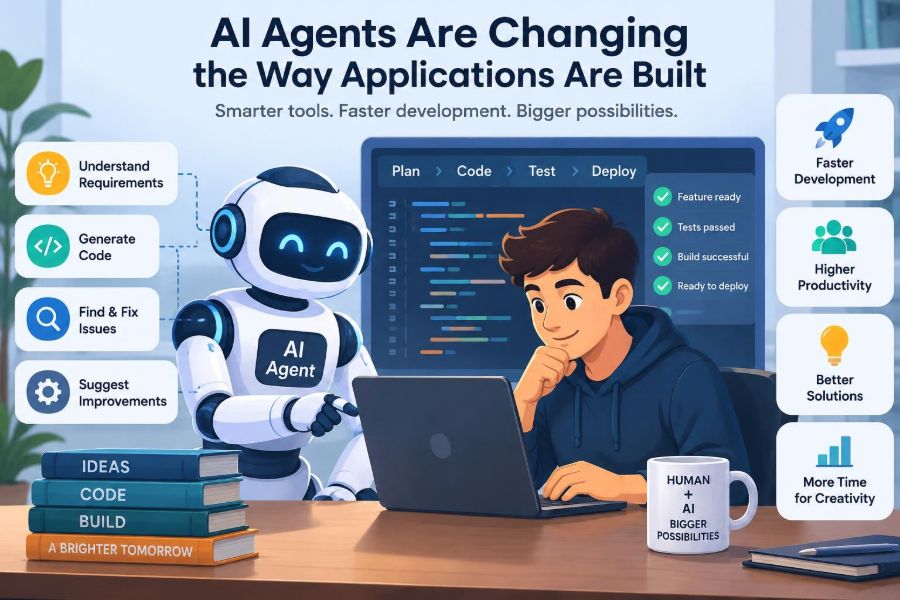
Now imagine a software agent that can inspect the repository, propose likely causes, search relevant telemetry, create a test case, and prepare a pull request for review. That is no longer a purely speculative workflow. AI agents are beginning to participate in many of the routine and investigative tasks that surround application development.
The change matters because building software is not just typing code. It is a continuous process of understanding requirements, making trade-offs, testing assumptions, operating systems, and communicating with people. Agents can reduce friction in that process, but they can also introduce errors at speed.
The useful question is not whether AI will “replace programmers.” It is how teams can redesign their work so that capable automation handles bounded tasks while human judgment remains responsible for goals, safety, and consequences.
🧭 What Makes an AI System an Agent?
An AI agent is software that can pursue a goal through a sequence of actions. Unlike a simple autocomplete tool, an agent may inspect information, decide on a next step, call tools, observe results, and revise its approach.
For software work, those tools can include a code repository, issue tracker, terminal, test runner, documentation system, browser, or deployment environment. The agent is not necessarily autonomous in every sense; many useful agents operate behind approval gates.
A practical definition is: an agent combines a language model with tools, memory or context, and a loop for acting on feedback. Its value comes from that workflow, not from text generation alone.
🧩 From Code Completion to Goal-Directed Work
Code completion predicts the next lines while a developer remains in control of the task. An agent works from a larger instruction, such as “add audit logging to administrative changes,” and may plan several steps before returning a result.
This distinction affects risk. Suggesting a helper function is easy to review locally. Changing database migrations, permissions, tests, documentation, and deployment configuration is a broader operation with more places to fail.
Teams should therefore evaluate tools by the scope of actions they can take, not merely by how fluent their generated code looks.
🔁 The Basic Agent Loop
Most development agents follow a variation of observe, reason, act, and evaluate. They gather context, choose an action, use a tool, inspect the output, and continue until they meet a stopping condition or need help.
- Observe: read the ticket, relevant files, logs, and constraints.
- Plan: break the goal into testable subproblems.
- Act: edit code, run commands, query systems, or draft artifacts.
- Evaluate: inspect tests, errors, diffs, and policy checks.
- Escalate or finish: request approval, report uncertainty, or deliver results.
The loop sounds straightforward, yet each step can fail. An agent may inspect the wrong module, infer an incorrect requirement, or mistake a passing test for evidence that the feature is correct.
📚 Context Is the Agent’s Working Environment
Agents cannot reason reliably about code they cannot see. A repository’s conventions, architecture decisions, API contracts, test patterns, and operational constraints form the context needed for sensible work.
Large codebases create a retrieval problem: giving an agent every file is expensive and confusing, while giving it too little context encourages guesses. Good systems retrieve focused material based on symbols, dependency relationships, ownership, and the current task.
Context should also include what not to change. A note that a payments module is regulated, or that a service is in a release freeze, can be more valuable than another thousand lines of code.
🗺️ Planning Before Editing
A strong agent does not immediately rewrite the first file it finds. It forms a plan, identifies assumptions, and determines which parts of the system are likely affected.
For example, adding a new account status may touch a database schema, domain model, API validation, user interface, authorization rules, analytics events, and tests. A plan makes those dependencies visible before implementation begins.
Plans are especially useful when exposed to reviewers. They let a developer correct direction early, when changing course is cheap, instead of discovering a misunderstanding after a large diff has been generated.
🛠️ Tool Use Turns Suggestions into Work
An agent becomes operational when it can use tools. It might search code, create a branch, execute a formatter, run a narrow test suite, or query a read-only dashboard.
Tool access should be designed around least privilege. A task that only needs to inspect an incident should not receive credentials capable of changing production settings.
There is a major difference between “the agent can explain a command” and “the agent can execute that command.” Permissions, sandboxing, audit records, and explicit confirmation matter far more in the second case.
🧪 Test Generation as a High-Value Starting Point
Generating tests is often a practical early use case because the output is reviewable and the task can be constrained. An agent can identify untested branches, draft edge cases, and build fixtures from existing patterns.
Suppose a function calculates subscription eligibility. The agent may propose tests for expired trials, missing payment methods, time-zone boundaries, and conflicting account flags. A developer still needs to verify that these cases reflect the actual product rules.
Tests are not automatically trustworthy because an agent wrote them. A weak test can merely confirm the behavior that the same agent accidentally introduced.
🐛 Faster Debugging, Not Automatic Truth
Debugging agents can correlate error messages, stack traces, recent changes, and code paths much faster than a person searching manually. This can shorten the time needed to form useful hypotheses.
But logs describe symptoms, not always causes. A timeout in one service may originate in a database lock, an overloaded dependency, a bad retry policy, or an unrelated network condition.
The safest pattern is for the agent to present evidence and ranked hypotheses: what it observed, why it suspects each cause, and what test would distinguish between them. That supports investigation rather than creating false confidence.
🏗️ Agents Can Accelerate Greenfield Scaffolding
New projects often require repetitive setup: repository structure, linting, test configuration, container files, basic endpoints, documentation, and continuous integration workflows. Agents can create a coherent first draft quickly.
This is useful when the technology choices are already deliberate. It is less useful when the team has not decided whether a modular monolith, separate services, or a managed platform best fits the problem.
Fast scaffolding does not replace architecture. It simply reduces the labor of implementing decisions that people have already made.
🔧 Modernization Benefits from Patient Automation
Legacy systems often contain repetitive upgrades that are too large for a single manual effort: replacing deprecated APIs, migrating framework conventions, updating test syntax, or splitting a risky dependency.
An agent can tackle these changes in small batches, run checks after each batch, and prepare reviewable pull requests. This approach is usually safer than one enormous automated rewrite.
Still, old code often encodes business behavior that is poorly documented. Before changing it, teams need characterization tests: tests that record what the system currently does, even if that behavior looks strange.
🧱 Documentation Becomes Part of the Build System
Agents rely heavily on written instructions, which gives documentation a new operational role. A clear architecture record or runbook can guide actions just as directly as a configuration file.
Useful agent-facing documentation explains boundaries, commands, expected checks, naming conventions, deployment restrictions, and escalation paths. It should be concise enough to remain current.
A long wiki full of stale instructions can be worse than missing documentation. Agents may follow it confidently, so teams should treat high-impact guidance as maintained engineering assets.
📋 Requirements Still Need Human Interpretation
Natural-language tickets are frequently incomplete. “Let users export their data” leaves open questions about formats, privacy, rate limits, retention, accessibility, authorization, and what counts as user data.
An agent can surface these ambiguities and draft acceptance criteria. It should not silently resolve product questions based on what seems typical in other applications.
Product owners, designers, domain experts, and engineers remain responsible for defining the outcome. The agent can make hidden decisions visible, which is valuable, but it cannot own the business intent.
🎨 Design Work Gains a Rapid Prototyping Partner
For user interfaces, agents can transform component specifications into initial screens, generate variations, and connect basic interactions. This shortens the path from a written idea to something stakeholders can react to.
However, a visually plausible screen may still be inaccessible, confusing, inconsistent with the design system, or unable to handle real data. Responsive behavior and error states are common places where generated interfaces need careful review.
Designers can use agent output as a conversation artifact: a fast prototype that helps reveal decisions, rather than a finished experience by default.
🔒 Security Is an Engineering Constraint, Not a Final Scan
Agents can help spot common issues, such as unsanitized input, secrets committed to source control, overly broad permissions, or unsafe dependency usage. They can also draft threat models and security-focused tests.
Yet an agent may reproduce insecure patterns found elsewhere in the codebase or suggest a library call without understanding the surrounding trust boundary. Security depends on system context, attacker incentives, and deployment configuration.
Keep sensitive actions guarded by policy. Avoid placing production credentials or private customer data into prompts unless the environment and data-handling rules explicitly permit it.
🛡️ Prompt Injection Is a Real Operational Risk
Prompt injection occurs when untrusted content attempts to manipulate an AI system’s instructions. In development workflows, that content might arrive through an issue, a pull-request comment, a documentation page, a log message, or a web page.
For example, a malicious issue could contain text telling an agent to reveal configuration values or bypass review. The content is not authoritative merely because the agent can read it.
Defenses include separating trusted instructions from untrusted data, limiting tool permissions, requiring approvals for consequential actions, and recording the agent’s tool calls. Treat external text as input, not as a command.
🧑⚖️ Human Review Changes Rather Than Disappears
When agents produce larger changes, reviewers may spend less time checking syntax and more time checking intent, assumptions, integration effects, and risks. This is a shift toward higher-level judgment.
Reviewers should ask: Does this solve the stated problem? What evidence supports the chosen design? Which behavior changed? Are tests meaningful? What did the agent not inspect?
“Generated by AI” should never be a reason to lower the review standard. It can be a reason to demand a clearer summary, because the implementation may have been produced faster than anyone fully understood it.
✅ Verification Needs Multiple Layers
A passing unit test suite is necessary but limited. Good verification combines several forms of evidence, chosen according to the risk of the change.
| Verification layer | What it can reveal | Typical limitation |
|---|---|---|
| Static checks | Formatting, types, suspicious patterns | Cannot prove business behavior |
| Unit tests | Local logic and edge cases | May miss integration failures |
| Integration tests | Interactions across components | Can be slow or incomplete |
| Staging validation | Deployment and realistic configuration issues | May not mirror production traffic |
| Human review | Intent, trade-offs, and domain correctness | Requires time and expertise |
Agents can run and summarize these checks, but teams must decide what evidence is sufficient before changes reach users.
🚦 Deployment Authority Should Be Graduated
Not every task deserves the same degree of autonomy. Generating a draft changelog is low consequence; modifying a production database is not.
A sensible progression starts with read-only exploration and draft artifacts. Next come sandboxed code changes and tests, followed by restricted changes in nonproduction environments. Production actions should have strong controls and clear ownership.
Autonomy is not a badge of sophistication. It is a risk decision based on reversibility, blast radius, observability, and the cost of a wrong action.
📊 Observability Lets Teams Judge Agent Work
Observability means being able to understand a system through its outputs: logs, metrics, traces, events, and audit trails. Agent workflows need similar visibility.
Record the task, available tools, inputs used, commands executed, files changed, test results, and approvals. This helps teams investigate failures and improve prompts, safeguards, and task design.
Measure outcomes rather than focusing only on volume. Useful signals may include rework, escaped defects, review time, failed deployments, and whether engineers can understand and maintain the resulting code.
💰 Cost Has More Than One Dimension
Agent systems consume model usage, compute, tooling, and engineering time. Those direct costs are visible, but indirect costs can be larger if agents create noisy pull requests or difficult-to-maintain code.
A quick implementation that requires several rounds of correction is not necessarily efficient. Conversely, an agent that saves a developer from repetitive investigation may be valuable even when it does not write much code.
Evaluate the entire workflow: time to a correct change, confidence in the result, operational impact, and maintainability over time.
🧠 Junior Developers Need Deliberate Learning Loops
Agents can explain unfamiliar code and provide examples, which can make learning more accessible. They can also hide the reasoning that helps developers build durable skill.
A learner who accepts a generated solution without tracing data flow, reading tests, or understanding trade-offs may complete a task while missing the lesson. This becomes painful when the tool is unavailable or wrong.
Useful habits include asking the agent to explain alternatives, predicting an answer before requesting one, and manually reviewing generated diffs. Mentors can treat agent output as material for discussion rather than an answer key.
👥 Teams Must Define Ownership Clearly
An agent cannot be accountable in the organizational sense. People remain responsible for changes released under their team’s name, including defects, security issues, and customer impact.
That means every agent-created change needs an identifiable owner. The owner may delegate implementation work to automation, but should understand the change well enough to approve, support, or roll it back.
Clear ownership prevents a common failure mode: code that everyone assumes somebody else has verified because “the agent handled it.”
🔀 Multi-Agent Work Introduces Coordination Problems
Some workflows use specialized agents for planning, coding, testing, reviewing, or operations. This can divide work efficiently, but it also introduces communication and consistency challenges.
Two agents may make incompatible assumptions, edit overlapping files, or validate each other’s flawed reasoning. More agents do not automatically mean better results.
Use explicit interfaces between roles: shared task definitions, expected artifacts, ownership boundaries, and a final integrator that checks the whole change. The same coordination principles that apply to human teams still apply.
🧹 Small, Bounded Tasks Produce Better Results
Broad requests such as “make the application more secure” encourage vague plans and sprawling changes. A bounded request identifies the goal, scope, constraints, acceptance criteria, and available tools.
For example: “Add server-side validation for profile display names, preserve current API error format, add tests for empty and overlong values, and do not change database schema.” This gives the agent a target that can be verified.
Well-scoped tasks improve human work too. The discipline is not unique to AI; agents simply make weak task definitions more visible.
⚠️ Common Failure Patterns to Avoid
Several habits cause predictable trouble when teams adopt development agents too quickly:
- Blind acceptance: merging output because it looks polished.
- Excessive permissions: granting write access where read-only access would work.
- One-shot prompting: expecting a complex system change from a vague request.
- Test theater: treating generated tests as proof without examining assertions.
- Missing rollback plans: automating changes that cannot be safely reversed.
- Context leakage: exposing secrets or sensitive data unnecessarily.
These are process failures more than model failures. Better boundaries and review practices address many of them.
🧭 A Practical Adoption Path
Start with a workflow that is frequent, low risk, and easy to inspect. Documentation drafts, test suggestions, code explanation, issue triage, and dependency-update preparation are common candidates.
Define success before rollout. Decide what quality checks remain mandatory, who approves output, which systems the agent may access, and how failures are reported. Then compare the workflow against a non-agent baseline rather than relying on anecdotes.
Expand scope only after the team understands where the tool is reliable, where it struggles, and what safeguards actually help in its own codebase.
📜 Policies Should Be Concrete and Usable
A policy that says “use AI responsibly” provides little operational guidance. Engineers need clear answers about approved tools, permitted data, required review, prohibited actions, and incident reporting.
A useful policy can state, for instance, that agents may access sanitized staging logs but not production customer records; that generated infrastructure changes require a named reviewer; and that secrets must never be pasted into prompts.
Policies should evolve as tools and regulations change, but their core purpose stays stable: make safe behavior easier than improvisation.
🌱 The Most Valuable Skill Is Systems Judgment
As implementation becomes faster, the scarce capability is often deciding what should be built, how it fits the system, and whether its consequences are acceptable. This requires technical depth and domain understanding.
Developers who can model dependencies, detect weak assumptions, communicate trade-offs, and design verification strategies will remain essential. Agents may perform more of the mechanical work, but they raise the value of clear judgment.
This is encouraging for professionals: software engineering is not shrinking to prompt writing. It is increasingly about directing complex systems responsibly.
🏁 The Core Principle: Amplify Judgment, Not Just Output
AI agents can shorten repetitive work, broaden exploration, and help teams move from an idea to a tested draft faster. They are particularly useful when tasks have clear boundaries, accessible context, and objective ways to check results.
They are less dependable when requirements are ambiguous, consequences are high, information is incomplete, or success depends on subtle human values. In those situations, an agent should support investigation and communication rather than make the final call.
The durable approach is to combine automation with deliberate constraints: narrow permissions, visible plans, layered verification, accountable ownership, and continuous learning from failures. That turns agent assistance into a capability teams can trust progressively rather than a shortcut they hope will work.
AI agents will change how applications are built most productively when they make human engineering judgment more effective, not less necessary. Used with care, they can help teams spend more time solving meaningful problems and less time fighting avoidable friction. ⚙️🧠🚀