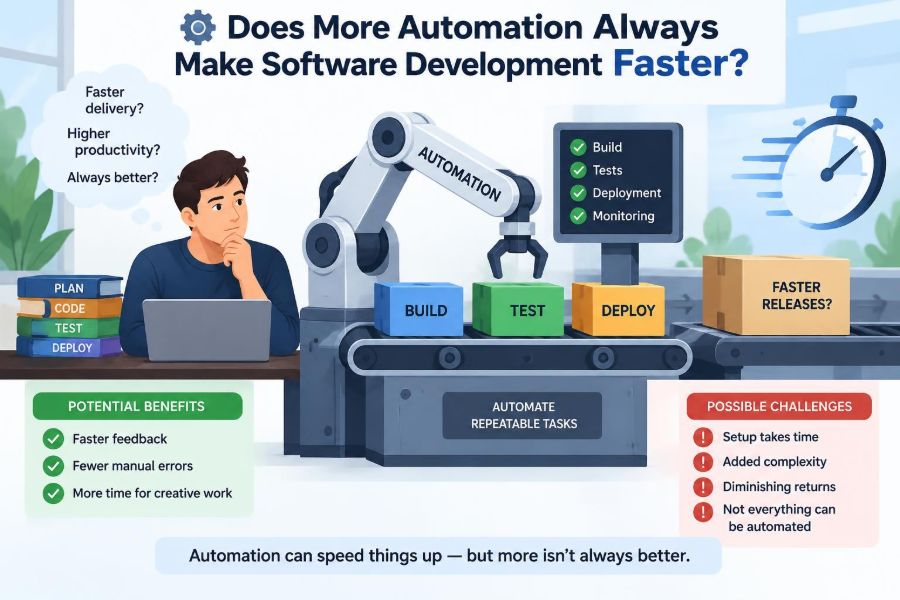

A team adds a new continuous integration pipeline, automated tests, deployment scripts, dependency updates, and a bot that opens pull requests overnight. On paper, this should mean less manual work and faster delivery.
Then a small change fails in three different pipeline stages. Nobody is sure which check matters, the test suite takes forty minutes, and an automated dependency update breaks a service just before a release. The team is moving, but it does not feel faster.
This situation is common because automation is not simply a speed button. It changes where work happens, who understands it, and how quickly a team can notice and correct problems.
Used thoughtfully, automation removes repeated effort and makes reliable delivery easier. Used indiscriminately, it can turn a simple workflow into a slow, opaque machine. The useful question is not whether to automate, but what to automate, why, and at what cost.
🧭 Start with a Clear Meaning of “Faster”
Software development has several clocks. A developer may finish typing code quickly while a customer waits weeks for the feature to reach production. A deployment may be rapid while incidents and rework make the overall outcome slow.
Speed should be measured across the whole path from idea to dependable value. That includes understanding the request, implementing it, reviewing it, testing it, deploying it, observing its behavior, and responding when something goes wrong.
Automation can improve one clock while harming another. A release script that deploys in minutes is valuable, but not if it makes rollback difficult or hides a risky database change.
⚙️ Automation Is Delegated Work, Not Magic
Automation is a repeatable set of instructions carried out by a tool rather than a person. A formatter rewrites code consistently, a build server compiles a project, and an infrastructure tool creates cloud resources from configuration.
Every automated process still needs someone to decide the rules, maintain the inputs, interpret failures, and change the system when reality no longer matches its assumptions. The manual work has often moved upstream or downstream rather than disappeared.
That is not a flaw. It is the trade: invest effort in a dependable mechanism so routine executions require less attention.
📦 Repetition Is the Best Early Target
Tasks with stable steps and frequent repetition are strong automation candidates. Manually running the same build commands, applying the same formatting rules, or copying a release checklist invites inconsistency and consumes focus.
Good candidates usually have three properties:
- The desired outcome is unambiguous.
- The task occurs often enough to recover the setup cost.
- A failure can be detected and handled safely.
For example, automatically checking code formatting is usually safer than automatically deciding whether an ambiguous product request is complete. The former has explicit rules; the latter requires context and judgment.
🧮 The Setup Cost Is Real Work
A script that saves five minutes per run may still be a poor investment if it takes days to build, is used rarely, and only one person can repair it. Automation has a lifecycle: design, implementation, documentation, monitoring, updates, and eventual retirement.
A practical way to think about the decision is: how much recurring effort, delay, or error will this remove compared with the cost of owning the automation? There is no universal threshold because risk and frequency vary by team.
Small scripts can be worthwhile when they prevent dangerous mistakes. Conversely, a highly polished workflow for a task performed twice a year may become abandoned infrastructure.
🏗️ Continuous Integration Speeds Feedback, Not Just Builds
Continuous integration, often called CI, automatically builds and checks code whenever changes are proposed or merged. Its central benefit is not that a computer compiles code faster than a developer can type commands. It is that the team receives consistent feedback before changes accumulate.
When developers integrate small changes regularly, faults are generally easier to locate. A failing check can be connected to a recent change rather than a large batch of unrelated work.
But CI only helps if feedback arrives soon enough to influence behavior. A pipeline that reports a basic compilation error long after its author has moved to another task creates interruption rather than flow.
⏱️ Fast Feedback Has a Different Value Than Full Assurance
Not every automated check belongs in the same pipeline stage. Formatting, type checks, and focused unit tests often provide quick signals. Extensive integration tests, security scans, or performance suites may take longer because they exercise more of the system.
Teams can organize checks by purpose and expected duration rather than making every pull request wait for every possible test. The objective is not to skip important validation; it is to put useful feedback at the right point.
| Check type | Typical purpose | Useful timing |
|---|---|---|
| Formatter and linter | Catch style and common code issues | Editor or early CI |
| Unit tests | Validate isolated behavior | Every proposed change |
| Integration tests | Check components working together | Merge, scheduled, or targeted runs |
| End-to-end tests | Validate key user journeys | Release candidates and critical changes |
🧪 Tests Automate Checking, Not Understanding
An automated test compares actual behavior with an encoded expectation. It is excellent at repeatedly checking known rules, such as whether a discount calculation handles a boundary value.
It cannot independently tell a team whether the encoded rule matches what users need. If the requirement is misunderstood, a green test suite can merely confirm that the misunderstanding was implemented consistently.
Exploratory testing, product conversations, design review, and real-world observation remain necessary because they seek unknown problems. Automation verifies what the team thought to ask; people investigate what they may have missed.
🧱 The Test Pyramid Is a Cost Model
The familiar test pyramid suggests having many fast, focused tests and fewer broad tests that involve browsers, networks, databases, or external services. It is not a rigid quota system. It describes a cost pattern.
Broad tests can reveal failures that unit tests cannot, but they usually take longer to run and are more sensitive to environment problems. A healthy suite uses each level for the questions it can answer well.
A common mistake is attempting to validate every rule through browser-driven tests. This can produce slow feedback and fragile failures, even though a smaller number of well-chosen end-to-end tests is genuinely valuable.
🎲 Flaky Tests Create Automation Debt
A flaky test sometimes passes and sometimes fails without a relevant code change. Common causes include timing assumptions, shared mutable data, unstable external services, order-dependent tests, and insufficient cleanup.
Once people expect a failure to disappear on rerun, the signal from the entire suite weakens. Developers may retry rather than investigate, or delay merging while waiting for luck.
Treat flaky tests as defects in the delivery system. Quarantine them when necessary, identify the source, and restore trust rather than normalizing repeated reruns.
🚦 Quality Gates Need a Purpose
A quality gate blocks progress until specified conditions are met: tests pass, review is completed, a vulnerability scan is acceptable, or required documentation exists. Gates can protect a team from preventable harm, especially around releases and regulated systems.
Yet every gate adds waiting and context switching. A gate that nobody can explain is usually a candidate for review. Ask what risk it addresses, whether the threshold is meaningful, who owns failures, and whether the result is timely.
More gates do not automatically mean more quality. A few trusted checks are often better than a crowded dashboard full of warnings everyone ignores.
🔀 Pull Request Automation Can Improve Review
Automation can prepare a pull request by running checks, showing changed files, enforcing a template, or labeling changes by area. These small supports help reviewers focus on design, correctness, clarity, and risk.
Automated comments become counterproductive when they bury important human discussion under repetitive messages. If a bot reports dozens of minor style issues that a formatter could fix automatically, it is asking reviewers to process noise.
Use automation to make review conversations sharper, not to simulate careful review. Approval remains a judgment about whether a change is appropriate in context.
🤖 Generated Code Requires Human Accountability
Code generators, scaffolding tools, and AI-assisted coding systems can rapidly create boilerplate, tests, migration files, or initial implementations. They are especially helpful when a pattern is established and the output can be checked cheaply.
Speed at generation is not the same as speed to maintainable software. Generated code can contain unsuitable assumptions, duplicated logic, insecure patterns, or APIs that do not fit the surrounding system.
The developer who accepts the output is still accountable for understanding it well enough to modify, test, and support it later. A useful rule is simple: do not merge code that the team cannot reasonably explain.
📚 Standardization Makes Automation Cheaper
Automation works best where conventions are clear. A common project layout, predictable build command, shared logging approach, and consistent deployment interface reduce the number of special cases a tool must handle.
This does not mean every service must be identical. It means variation should be intentional. When each repository invents its own commands, configuration format, and release process, platform automation becomes an endless collection of exceptions.
Good standards give teams a paved path: an easy, supported default that can be departed from when a real need exists.
🛣️ Platform Engineering Removes Repeated Friction
A platform team may provide reusable CI templates, deployment capabilities, observability tools, and secure defaults. This is automation at an organizational level: instead of every product team solving the same operational problems independently, shared capabilities reduce duplicated effort.
The risk is building a platform so abstract or restrictive that teams cannot ship without filing tickets. A platform succeeds when it offers self-service with sensible guardrails, not when it centralizes every decision.
Listen to the actual developer journey. The most useful improvement may be a clear error message or a documented local command, not a large new portal.
☁️ Infrastructure as Code Improves Repeatability
Infrastructure as code defines resources such as networks, databases, permissions, and compute services in version-controlled files. The same desired environment can then be reviewed, recreated, and changed through a visible process.
This reduces the risk of undocumented manual changes and makes environments less dependent on one person remembering a sequence of console clicks. It also creates new responsibilities: protecting secrets, reviewing permissions, managing state, and planning safe changes.
Automating infrastructure does not make infrastructure harmless. A mistaken configuration can be applied consistently and at scale, which makes review and safeguards even more important.
🔐 Security Automation Finds Patterns, Not Every Threat
Dependency scanners, secret detectors, static analysis tools, and policy checks can catch known risky patterns early. They are useful because manual reviewers cannot reliably inspect every dependency update or recognize every exposed token.
Still, tool output needs interpretation. A reported issue may be unreachable in a particular application, while a serious design weakness may not match any scanner rule. Treat findings according to exploitability, exposure, and the system’s role rather than blindly counting alerts.
Security automation is strongest when paired with ownership: someone must triage results, tune rules, and ensure urgent findings do not disappear into a backlog.
🗂️ Dependency Bots Reduce Delay but Add Review Load
Automated dependency updates can keep libraries current and reduce the pain of large, infrequent upgrades. They work particularly well for low-risk updates with dependable tests and clear compatibility information.
However, a flood of separate update requests can overwhelm reviewers. It can also conceal a meaningful change among routine version bumps.
Configure update tools deliberately: group compatible updates, set sensible schedules, prioritize security-relevant changes, and define which updates can be merged automatically only after appropriate checks. Automation should reduce maintenance work, not convert it into notification management.
🚀 Deployment Automation Makes Releases Routine
A repeatable deployment pipeline removes fragile handoffs and reduces the chance that someone forgets a step during a stressful release. It also makes small releases more practical, which limits the amount of change bundled into any one deployment.
But deployment is not a finish line. A pipeline should make it clear what version was released, where it went, whether key checks passed, and how to stop or reverse a bad rollout.
The fastest deploy button is unsafe if its outcome cannot be observed or controlled.
🧯 Rollback Is Not Always the Right Recovery Plan
Teams often speak of rollback as though every release can simply be undone. In reality, database migrations, messages already sent to users, changed data formats, and external side effects may make a reversal incomplete or risky.
Safer automated delivery often uses techniques such as backward-compatible schema changes, feature flags, gradual rollout, and explicit recovery procedures. These methods create room to learn before a change affects everyone.
A deployment process should be designed for failure as well as success. The question is not “Can we deploy?” but “What do we do when this behavior is wrong?”
🎛️ Feature Flags Separate Release from Exposure
A feature flag is a runtime switch that controls whether a capability is visible or active. It lets a team deploy code before exposing it broadly, or enable a feature for a small group while observing effects.
Flags can reduce release risk, but they add conditions to the codebase. Old flags make behavior hard to reason about, and combinations of flags can create states that were never tested.
Every flag needs an owner, a purpose, and a removal plan. A temporary safety mechanism becomes permanent complexity when cleanup is not scheduled.
📈 Observability Turns Automation into Feedback
Observability means being able to understand a system’s behavior through signals such as logs, metrics, traces, and user-facing outcomes. Automated deployment without observability is like sending a package without a tracking number or delivery confirmation.
After a release, teams need useful answers: Are errors increasing? Are requests slower? Is a queue growing? Are customers completing the workflow? The exact signals depend on the service, but they should connect technical behavior to meaningful outcomes.
Alerting should be selective. Alerts that do not lead to action train people to mute the system that was meant to help them.
🧑💻 Developer Experience Is a Throughput Constraint
A developer experience includes setup, local feedback, documentation, test reliability, permissions, and the ease of finding help. If engineers spend hours waiting for environments or deciphering pipeline failures, delivery slows even when many steps are automated.
Measure friction through real journeys. Can a new team member run the application? Can someone identify why a build failed? Can a developer safely test a change without needing a specialist?
Automation should make the common path understandable. A tool that works only for the people who built it does not scale its benefit.
🧠 Cognitive Load Can Erase Time Savings
Cognitive load is the mental effort required to understand and operate a system. A complex chain of bots, dashboards, configuration layers, and hidden rules can overwhelm people even if each individual tool is useful.
When an automated workflow fails, the team needs a clear route to diagnosis: what happened, where it happened, what changed, and who can act. Opaque failures create expensive interruptions because engineers must reconstruct a process they do not regularly see.
Prefer visible defaults, plain language, and fewer moving parts. A slightly less sophisticated workflow that people can repair may outperform a clever one that only specialists understand.
🧑🔧 Ownership Prevents Orphaned Automation
Scripts, pipelines, and bots need named owners just as production services do. Ownership does not mean one person is blamed for every failure; it means responsibility for maintenance, decisions, and escalation is clear.
Without ownership, tools accumulate after team changes. Credentials expire, versions drift, warnings multiply, and no one feels authorized to remove obsolete checks.
Document the purpose, inputs, outputs, failure behavior, and support path for significant automation. This modest discipline makes systems easier to operate and retire.
🧹 Automation Needs Deletion, Too
Teams are often better at adding automation than removing it. An old nightly job may still consume resources, a legacy deployment step may no longer protect anything, and a bot may comment on a workflow the team abandoned.
Regularly review automated processes as part of technical maintenance. Remove unused jobs, consolidate overlapping checks, update stale documentation, and retire temporary exceptions.
Deletion is not a sign that the original work was wasted. It is evidence that the team is keeping its operational system aligned with current needs.
⚖️ Local Optimization Can Slow the Whole System
Suppose a team automates ticket creation whenever monitoring detects a small anomaly. The monitoring group saves time, but another team now receives hundreds of low-value tickets. The local process is faster; the organization is slower.
This is a systems problem. Work moves through queues, handoffs, approvals, and dependencies. Optimizing one stage can create a bottleneck elsewhere.
Look for end-to-end outcomes: time to resolve a meaningful issue, time from approved change to safe release, and effort spent on rework. Avoid judging a workflow solely by the number of manual steps removed.
🧩 Exceptions Reveal Where Designs Are Weak
When an automated workflow repeatedly requires people to bypass it, the instinct may be to add another exception. Sometimes that is appropriate, especially for unusual systems or urgent incidents.
Repeated exceptions are useful evidence. They may reveal that the standard path does not reflect actual work, that classifications are too coarse, or that a critical decision cannot be reduced to a fixed rule.
Record why overrides happen. Patterns in overrides point to better tooling, better policy, or cases that should deliberately remain human-led.
🛑 High-Impact Decisions Deserve Human Control
Automation is less suitable when an action is difficult to reverse, affects many people, or relies on incomplete context. Examples may include deleting customer data, disabling a major service, approving unusual payments, or changing broad access permissions.
Human control does not always mean a slow committee. It can mean a clear approval step, a two-person review for sensitive changes, or an on-call engineer confirming an automated recommendation.
The appropriate level of control depends on the blast radius: the scope of harm if an action is wrong. High blast radius calls for stronger safeguards and clearer accountability.
📊 Choose Metrics That Expose Trade-Offs
Counting deployments, pipeline runs, or automated tickets may show activity, but these measures can be gamed and do not necessarily reflect customer value. Pair speed-oriented measures with reliability and quality signals.
Useful questions include:
- How long does meaningful feedback take after a change?
- How often do automated checks fail for reasons unrelated to the change?
- How much rework follows a release?
- Can the team diagnose and recover from a failed automation quickly?
- Are developers bypassing the intended workflow, and why?
Metrics should start conversations, not replace judgment. A metric is a partial view of a complex system.
🪜 Automate in Small, Observable Steps
Large automation projects can lock teams into assumptions before they know whether the workflow helps. Start with a narrow problem, define the desired outcome, and observe what changes.
For instance, before building a broad release platform, automate one repeatable deployment for one service. Capture failure cases, simplify the interface, and expand only when the pattern holds.
This approach reduces risk and produces learning. It also makes it easier to stop when the cost of further automation exceeds the value.
📝 A Practical Automation Decision Checklist
Before automating a workflow, use a short review to make assumptions visible:
- What specific manual effort, delay, or error are we trying to reduce?
- How often does this situation occur, and how variable is it?
- Can the desired result be stated as clear rules?
- What happens when the automation is wrong or unavailable?
- Who will maintain it, and how will failures be understood?
- What evidence will tell us that it improved the overall workflow?
- When should we reconsider, simplify, or delete it?
If these questions cannot be answered, the team may need to understand the process better before encoding it in a tool.
🌱 Build Automation as a Product for Its Users
Internal tools have users: developers, reviewers, release managers, support engineers, and on-call responders. Their time and attention are part of the automation’s cost model.
Provide useful messages, stable interfaces, examples, and feedback channels. Treat confusing failures as product defects rather than expecting users to adapt indefinitely.
When the people using an automated workflow can shape it, adoption improves and workarounds become valuable feedback instead of hidden resistance.
🎯 The Core Principle: Automate for Better Flow
The purpose of automation is not to maximize the number of tasks performed by machines. Its purpose is to improve the flow of safe, understandable work through a software system.
That usually means automating repetitive, well-defined activities; preserving human judgment for ambiguity and high-impact decisions; keeping feedback fast; and maintaining the tools that make all of this possible.
More automation makes development faster only when it reduces total friction without creating greater delay, risk, or confusion elsewhere. A dependable process is not the one with the fewest humans in it, but the one where people and tools each do the work they are suited to do.
Choose automation that makes the next correct action easier, the wrong action harder, and recovery clearer when things fail. That is how teams gain speed they can actually sustain. ⚙️🧠🚀