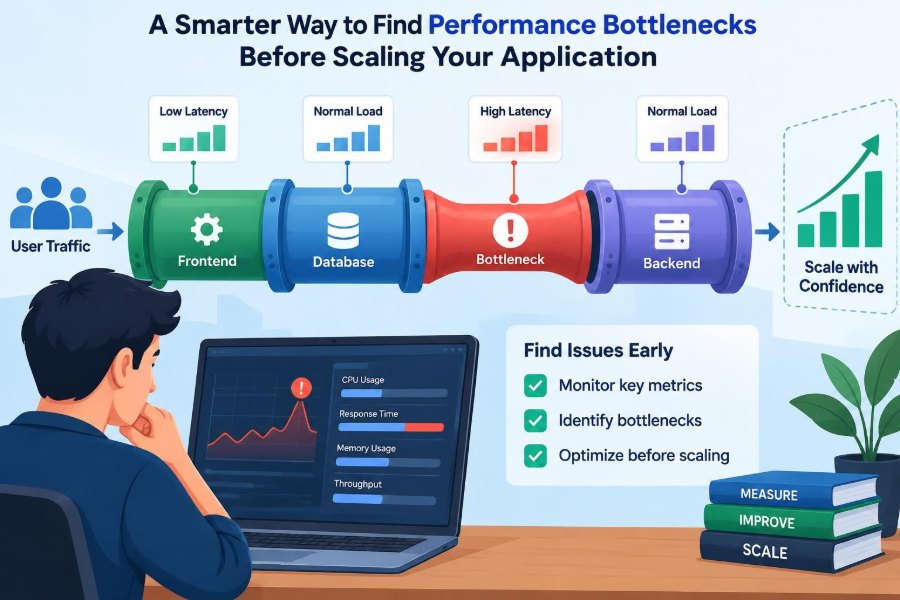

It is a familiar moment: a product demo goes well, user activity begins to grow, and someone asks whether the application can handle ten times the traffic. The instinctive answer is often to add servers, increase database capacity, or begin planning a move to more elaborate infrastructure.
Sometimes that is the right answer. Often, it is an expensive way to make the same slow operation happen in more places.
Performance failures rarely arrive as one obvious problem. A checkout page may feel slow because of an unindexed query, a worker queue may lengthen because one dependency is timing out, or a service may consume CPU because it repeatedly serializes a large response that few users need.
The smarter question before scaling is not “What should we add?” It is “Where does time, capacity, and contention actually go?” Finding that answer turns performance work from guesswork into engineering.
🧭 Start With the Bottleneck, Not the Architecture
A bottleneck is the limiting part of a system: the resource or operation that constrains the useful work the whole system can complete. Adding capacity elsewhere does little while that limit remains.
Think of a restaurant with plenty of tables and waiters but one slow payment terminal. Hiring more waiters does not make customers leave faster. In software, the constrained point may be CPU, a database connection pool, a remote API, a lock, disk I/O, or a team-owned operational process.
Scaling is valuable when demand truly exceeds a measured resource limit. It is wasteful when it simply spreads an inefficient path across more machines.
📏 Define What “Slow” Means for Your Users
Performance is not one number. A user loading a dashboard, a customer submitting an order, and a nightly import job have different expectations and failure costs.
Choose a small set of meaningful outcomes. For an interactive application, these may include request latency, error rate, and successful requests per second. For background processing, queue age, completion time, retry rate, and throughput are often more revealing.
Define the operation and context precisely: “time from clicking Pay to receiving a confirmed order,” not merely “application response time.” A broad metric can hide the painful step users actually experience.
📊 Use Percentiles Instead of Trusting Averages
An average response time can look healthy while a meaningful group of users waits far too long. If nine requests take 100 milliseconds and one takes 10 seconds, the average does not describe either typical experience particularly well.
Percentiles show the distribution. The 50th percentile is the midpoint; the 95th percentile is the value below which 95% of observed requests completed. Teams commonly inspect p50, p95, and p99 together.
A rising p99 can reveal queuing, contention, or intermittent downstream failures long before the median moves. Percentiles still need context: a rare administrative job and a high-volume checkout route should not be blended into one chart.
🗺️ Map the Critical Request Path
Before opening a profiler, sketch what happens during a valuable user action. Follow the request from browser or client through the edge, application, cache, database, message broker, and external services.
Mark synchronous calls separately from asynchronous work. A welcome-email job may be important, but it should not delay the response that confirms account creation unless the product genuinely requires that dependency to finish first.
This map creates useful hypotheses. If a request performs three database queries, calls a payment provider, and renders a large payload, each stage needs enough visibility to rule in or rule out.
🔎 Instrument the Work, Not Just the Servers
Host-level metrics answer whether a machine is busy. They do not explain why one endpoint is slow or which customer action caused a queue to grow.
Application instrumentation should attach measurements to meaningful work: route names, job types, query patterns, cache lookups, dependency calls, and business outcomes. Record duration, success or failure, and carefully chosen dimensions such as region or plan type.
Be cautious with high-cardinality labels. A metric label containing every user ID, order ID, or URL parameter can create excessive monitoring data and make analysis harder. Prefer bounded categories, then use logs or traces for individual cases.
🧵 Trace a Request Across Service Boundaries
Distributed tracing connects spans of work under a shared trace identifier. A trace might show that an API request spent 20 milliseconds in application code, 400 milliseconds waiting for a database query, and 1.5 seconds waiting on a third-party service.
That breakdown is much more actionable than knowing the total was 1.9 seconds. It distinguishes time spent computing from time spent waiting.
Tracing has overhead and requires disciplined propagation across services, workers, and message queues. Sample intelligently, but ensure slow and failed requests are retained often enough to investigate the cases users notice.
🪵 Make Logs Correlatable and Safe
Logs are most useful when they can answer a specific question: what happened to this request, job, or transaction? Include a request or trace ID, operation name, duration where appropriate, error category, and relevant dependency result.
Structured logs—records with named fields rather than only free-form sentences—make filtering and aggregation more reliable. They also make it easier to compare a slow operation with a normal one.
Do not solve observability by logging sensitive data. Credentials, access tokens, payment details, and unnecessary personal information should never become diagnostic breadcrumbs. Redaction and retention policies are part of performance engineering too.
⏱️ Separate Waiting Time From Compute Time
A service can be slow while using little CPU. This often means it is waiting: for network responses, disk access, locks, available connections, or a full worker pool.
Conversely, high CPU can indicate expensive computation, excessive serialization, compression, encryption, image processing, garbage collection, or a tight loop. These are different failure modes and need different fixes.
When examining a slow operation, ask where elapsed time went. Wall-clock time is the total observed duration; CPU time is time actually scheduled to execute. The gap between them often points toward I/O or contention.
🗄️ Inspect Database Queries Before Adding Replicas
Databases are frequent bottlenecks because they hold shared state and must coordinate many requests. Yet “the database is slow” is usually too vague to guide a fix.
Find the specific query shapes with high total cost, long duration, or high call counts. A query that takes a few milliseconds but runs thousands of times per request can matter more than one rare slow report.
Use the database’s query plan tools to see whether it scans many rows, uses an index, joins inefficiently, or sorts a large intermediate result. Test proposed indexes against realistic write load; every index can also add storage and write maintenance cost.
🔁 Recognize the N+1 Query Pattern
An N+1 pattern occurs when code loads a collection with one query and then runs an additional query for each item. For example, a page might fetch 50 orders and then fetch each customer separately.
It may seem harmless in development with a few records. Under real data and concurrent traffic, repeated round trips can dominate latency and saturate database connections.
Batch loading, joins, preloading relations, or reshaping the response can remove the repeated work. Verify the result with query counts and timing rather than assuming an ORM optimization changed the generated SQL.
🧊 Treat Caches as Measured Trade-Offs
Caching can reduce repeated computation and database reads, but it is not a universal speed button. It adds questions about freshness, invalidation, memory limits, cache stampedes, and behavior during cache misses.
Start with data that is expensive to produce, frequently requested, and acceptable to serve slightly stale under defined conditions. Track hit rate, miss cost, eviction behavior, and the latency of the cache itself.
A cache that has a low hit rate or stores enormous serialized objects may add complexity without relieving the actual bottleneck. Cache a known hot path, not a vague hope of faster performance.
🌐 Measure Dependency Calls as First-Class Work
Payment gateways, identity providers, maps APIs, email platforms, and internal services all sit on your critical path when called synchronously. Their performance is part of your user experience even though you do not operate them.
Measure their latency, timeout rate, error categories, and retry behavior separately. A single broad “external API time” metric hides the dependency that is causing trouble.
Use explicit timeouts and bounded retries. Retrying immediately and repeatedly can turn a slow dependency into an internal traffic surge. Where the product allows it, move nonessential calls off the request path.
🚦 Watch Queues, Pools, and Backpressure
Queues form whenever demand temporarily exceeds the rate at which work can be served. They appear in message brokers, thread pools, database connection pools, load balancers, and even synchronized code sections.
A queue is not automatically a defect; it can absorb short bursts. Trouble begins when it grows persistently, approaches a capacity limit, or adds unacceptable waiting time.
Backpressure is the mechanism that prevents upstream components from producing unlimited work when downstream components are saturated. Limits, admission control, and bounded queues protect recovery better than letting every layer accept work until it fails.
🔒 Find Lock Contention and Shared-State Hotspots
Concurrency can make a system slower when many workers wait for the same resource. Database row locks, file locks, synchronized blocks, leader elections, and shared counters can all serialize work that appears parallel in design diagrams.
Look for increased waiting during traffic peaks, long transactions, deadlock reports, and operations whose latency rises sharply with concurrency. A lock is often a symptom of a business rule or data model that forces too much work through one key.
Possible fixes include shortening transactions, reducing lock scope, partitioning data, changing update patterns, or accepting eventual consistency for work that does not need immediate global agreement.
🧮 Profile CPU and Memory With Production-Like Workloads
A profiler shows where code spends CPU time and, depending on the tool, where memory is allocated. It can expose expensive JSON conversion, repeated regular-expression work, inefficient sorting, or unexpected object creation.
Profiling only a developer laptop can mislead because data size, hardware, runtime settings, and concurrency differ. Use a safe production sample or an environment that resembles production behavior as closely as practical.
For memory, distinguish a genuine leak from a cache growing as designed, a temporary workload spike, or delayed garbage collection. The key signal is whether retained memory continues to grow under a stable workload.
📦 Reduce Payload and Serialization Costs
Applications frequently do more work than the screen needs. An endpoint may return deeply nested objects, unused fields, repeated metadata, or thousands of records where pagination would suffice.
Large payloads consume CPU to serialize, bandwidth to transmit, memory to buffer, and time to parse on clients. The cost appears across multiple layers, not just in network charts.
Design responses around the consumer’s task. Select fields deliberately, paginate or stream large results where appropriate, and avoid compressing already-compressed media without measuring whether the extra CPU is worth it.
📈 Load Test the Shape of Real Demand
A load test is useful when it represents meaningful behavior, not when it generates the biggest possible number. Include realistic request mixes, authentication paths, data sizes, cache states, and think time where relevant.
Test steady traffic and bursts separately. A system can sustain a modest rate yet fail during a rapid spike because connection pools, autoscaling, or queues need time to react.
Use synthetic data carefully. Uniform records may miss skew, such as one popular account receiving many updates or a few customers owning very large datasets. Real systems often have uneven demand.
🧪 Establish a Baseline Before Changing Anything
Without a baseline, an optimization is a story rather than evidence. Capture the current latency distribution, throughput, error rate, resource use, and relevant business success measures under a known workload.
Then change one meaningful variable and compare the same measurements. A query optimization that lowers database CPU but raises application CPU may still be worthwhile—or it may simply move the bottleneck.
Keep the baseline with the experiment notes. Months later, it helps explain why a limit, index, cache policy, or architectural decision exists.
🧷 Reproduce the Slow Case, Not an Ideal Case
“The endpoint is fast for me” is weak evidence when the incident occurs for a particular tenant, region, data volume, or concurrent workload. Find the characteristics shared by slow requests.
For example, a hypothetical reporting page may be slow only for accounts with years of history. Testing it with a fresh account will validate neither the diagnosis nor the fix.
Use anonymized or generated data that preserves relevant scale and relationships. Reproduction narrows the search and protects teams from optimizing a different, easier problem.
🧯 Design Timeouts, Retries, and Fallbacks Together
Timeouts place an upper bound on waiting, but an arbitrary short timeout can create errors during normal variance. An excessively long timeout can exhaust threads and connections while callers wait for work that will not succeed.
Retries are safest for operations that are idempotent, meaning repeating them does not create an unintended second effect. Payment capture, account creation, and message delivery may require idempotency keys or other safeguards.
Fallbacks should preserve an honest product experience. Showing cached data, deferring a recommendation, or accepting an order for later confirmation can be sensible; silently claiming a completed action when it has not completed is not.
🪜 Scale the Constrained Resource Deliberately
Once evidence identifies the bottleneck, scaling can be precise. More application instances can help CPU-bound stateless request handling, while a slow shared database query may need indexing, query redesign, or a different data-access pattern first.
Vertical scaling increases resources on one machine. Horizontal scaling adds instances. Both have limits: vertical capacity is finite, and horizontal systems introduce coordination, routing, data consistency, and operational complexity.
The right choice follows the workload. Scaling a component that is not saturated may raise cost without improving the user-visible metric you chose.
🧱 Keep Performance Budgets in the Design
A performance budget is a constraint set before a feature becomes expensive. It might limit the number of synchronous dependency calls, the size of an API response, the queries allowed on a page, or the time available for a background task.
Budgets are not rigid predictions. They are prompts to make cost visible during design and review, when changing an API contract is easier than repairing a production incident.
Document assumptions: expected data size, likely traffic pattern, consistency needs, and what happens when a dependency is slow. These assumptions become test cases as the product grows.
🛡️ Avoid Observability Blind Spots During Incidents
Monitoring dashboards can fail at exactly the moment they are needed: sampling may omit the affected route, logs may be rate-limited, or a service may expose only aggregate metrics.
Prepare for this by monitoring the user journey from more than one angle. Combine application metrics, dependency metrics, infrastructure signals, trace samples, and synthetic checks for key actions.
Also verify clock synchronization and consistent naming. If one service calls an operation createOrder and another calls it order-create-v2, correlation becomes slower when time matters.
🧑💻 Make Performance Work a Team Habit
Performance is not solely an operations concern or a late-stage testing task. Product decisions determine payload size and freshness needs; backend design determines query behavior; frontend choices affect client work; platform teams shape limits and visibility.
Review costly paths in pull requests and design discussions. Ask simple questions: What is called synchronously? How does this behave with ten times the data? What does failure look like? Which metric would show a regression?
Small, regular checks are more sustainable than a dramatic optimization sprint after every release.
⚠️ Resist Common Premature Scaling Moves
Several responses feel productive but often postpone diagnosis:
- Adding instances before checking whether all instances wait on the same database or API.
- Increasing connection-pool limits without confirming that the downstream service can handle more concurrent work.
- Adding a cache without a clear invalidation policy or a measured hot key.
- Optimizing code based only on intuition rather than profiles and traces.
- Testing maximum throughput while ignoring tail latency, failures, and recovery behavior.
These actions are not always wrong. They become risky when used as substitutes for identifying the limiting resource.
🔄 Treat Optimization as a Controlled Feedback Loop
Performance work is iterative because systems change. A fix that removes database work may expose CPU work; a new customer segment may change data distribution; a vendor update may alter dependency behavior.
A practical loop is straightforward:
- Choose a user-visible outcome and a suspected limiting path.
- Measure a baseline under representative conditions.
- Form one testable hypothesis about the dominant cost.
- Make the smallest safe change that tests it.
- Compare results, watch for regressions, and repeat if necessary.
This loop encourages learning rather than attachment to a preferred solution.
🎯 The Core Principle: Remove Constraints Before Expanding Capacity
Scaling is most effective when it follows measurement. A clear request path, useful percentiles, traces, query evidence, queue visibility, and representative tests reveal whether the system is computing, waiting, contending, or simply doing unnecessary work.
The goal is not to eliminate every slow operation or maximize every benchmark. It is to protect the important user experience at a reasonable operational cost, with enough headroom to handle expected change.
When teams diagnose the current constraint first, they can choose a smaller, safer fix—or scale the one component that genuinely needs it—with confidence.
Before you scale your application, make the bottleneck observable, measurable, and specific; then spend effort on the constraint that actually limits your users. ⚙️📈🔍