
Modern software teams are expected to release applications quickly, reliably, and repeatedly. In traditional development environments, software might be built manually, tested on individual machines, and deployed through long release processes involving many handoffs.
Cloud-native development changes that model.
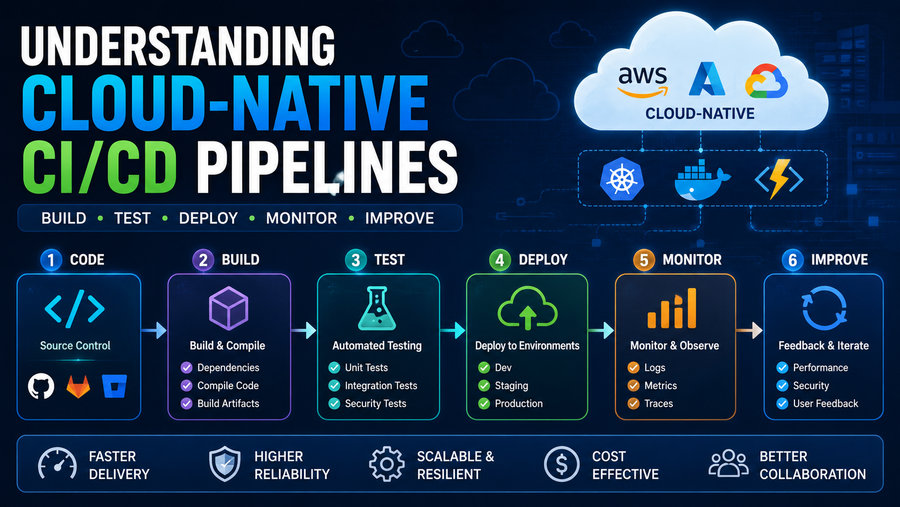
Applications are increasingly built as microservices, packaged into containers, deployed to platforms such as Kubernetes, and operated across elastic cloud infrastructure. To support this way of working, organizations use Continuous Integration and Continuous Delivery/Deployment pipelines, commonly known as CI/CD pipelines. 🔄💻
A cloud-native CI/CD pipeline automates much of the journey from a developer’s code change to a tested, secure, deployable application running in a cloud environment.
Instead of treating deployment as a rare event, cloud-native teams attempt to make software delivery a repeatable, automated, observable, and low-risk process.
☁️ What Does “Cloud-Native” Mean?
Cloud-native does not simply mean that an application runs on a cloud server.
The term generally describes software designed to take advantage of modern cloud characteristics such as:
- Elastic infrastructure
- Containers
- Microservices
- Declarative configuration
- Automated deployment
- Distributed systems
- Infrastructure as code
- Observability
- Rapid scaling
Cloud-native applications are commonly designed to tolerate infrastructure changes rather than depending on one permanently configured server.
For example, instead of manually installing an application on a specific machine, a team might package the application into a container image and let an orchestration platform create or replace instances automatically.
This philosophy strongly influences how CI/CD pipelines are designed.
🔄 What Is CI/CD?
CI/CD usually refers to several related software-delivery practices.
🧩 Continuous Integration — CI
Continuous Integration means developers frequently merge code changes into a shared source-code repository.
Each change automatically triggers processes such as:
🛠️ Building the application
🧪 Running automated tests
🔍 Checking code quality
🔐 Scanning for vulnerabilities
The goal is to detect problems early.
Instead of allowing developers to work separately for months and then discover that their code does not integrate properly, CI continuously verifies that the shared codebase remains healthy.
📦 Continuous Delivery
Continuous Delivery means software changes are automatically prepared so that they can be released safely.
A successful pipeline might automatically:
- Build the software
- Test it
- Package it
- Scan it
- Deploy it into test environments
- Produce a releasable artifact
The final production deployment may still require human approval.
🚀 Continuous Deployment
Continuous Deployment goes one step further.
Changes that successfully pass all required automated checks may be deployed directly into production without a manual release step.
Continuous deployment requires extremely mature:
✅ Automated testing
✅ Monitoring
✅ Rollback capabilities
✅ Security controls
✅ Operational discipline
Not every organization needs continuous deployment, but many benefit from continuous delivery.
🧑💻 1. The Pipeline Usually Starts With Source Control
A CI/CD pipeline typically begins when a developer changes code stored in a version-control system such as Git.
The developer may:
- Create a branch
- Modify code
- Commit the changes
- Push the branch
- Open a pull or merge request
This event can trigger the CI pipeline automatically.
The repository may contain more than application code.
Cloud-native projects often store:
📄 Application source code
🐳 Container definitions
☁️ Infrastructure configuration
⚙️ Deployment manifests
🧪 Automated tests
🔐 Security policies
This creates a documented, version-controlled history of how both the application and its infrastructure are expected to behave.
⚙️ 2. Build Automation
The first major pipeline stage is often the build.
The build system may compile source code, download dependencies, generate files, and package the application.
For example:
Source Code → Dependencies → Compilation → Application Artifact
A Java application might produce a JAR file.
A Go project might produce a compiled binary.
A frontend application might generate optimized JavaScript and CSS assets.
The important concept is consistency.
The pipeline should produce the application in the same way every time.
This reduces the classic problem:
“It worked on my machine.”
🧪 3. Automated Testing
Testing is one of the most important parts of CI/CD.
Different testing levels identify different types of problems.
🔬 Unit Tests
Unit tests examine relatively small pieces of software.
For example, a test may verify that a pricing function produces the correct output for a given input.
These tests are usually fast and can run on almost every commit.
🔗 Integration Tests
Integration tests determine whether multiple components work correctly together.
For example:
Application → Database
or:
Service A → Service B
A unit test may prove that each component works separately while an integration test reveals that the connection between them is broken.
🌐 End-to-End Tests
End-to-end tests simulate complete user workflows.
For example:
User logs in → adds item to cart → places order → receives confirmation
These tests are more realistic but usually slower and more expensive to run.
A mature pipeline combines different testing levels rather than relying on only one.
🐳 4. Containerization
Containers are a major part of cloud-native CI/CD.
After an application is built, the pipeline may create a container image.
A container image contains the application together with many of the files and dependencies required to run it consistently.
The general process looks like:
Source Code → Build → Container Image → Registry
The image is then uploaded to a container registry.
Registries act as storage systems for versioned container images.
Each build may receive an identifier such as:
payment-service:1.8.4
or a unique commit-based tag.
This makes it possible to trace exactly which version is deployed.
📦 5. Artifact Repositories
Container images are one type of software artifact.
CI/CD systems may also store:
- Application packages
- Libraries
- Binary files
- Helm charts
- Test reports
- Software bills of materials
Artifacts should ideally be immutable.
That means the artifact tested in the pipeline should be the same artifact eventually deployed.
If the production package is rebuilt separately, subtle differences could appear.
A common principle is:
Build once, promote many times.
The same tested artifact moves through development, staging, and production environments.
🔐 6. Security Scanning in the Pipeline
Cloud-native CI/CD increasingly incorporates security throughout the development process.
This approach is often associated with DevSecOps.
Instead of waiting until the end of development for a security review, automated controls evaluate software continuously.
Possible security checks include:
🔍 Static code analysis
📦 Dependency vulnerability scanning
🐳 Container-image scanning
🔑 Secret detection
☁️ Infrastructure configuration scanning
📜 Policy validation
For example, the pipeline might block a deployment if the application image contains a known critical vulnerability.
The goal is to identify security problems when they are easiest to fix.
🧾 7. Software Supply-Chain Security
Modern applications depend on enormous numbers of third-party packages.
An application may contain code originating from:
- Open-source libraries
- Package repositories
- Base container images
- External build tools
This creates a software supply chain.
Attackers may attempt to compromise dependencies, repositories, or build systems instead of attacking the finished application directly.
Cloud-native pipelines therefore increasingly use techniques such as:
🔐 Artifact signing
📋 Software Bills of Materials
✅ Provenance verification
🔒 Protected build environments
An SBOM, or Software Bill of Materials, lists components included in a software package.
It can help organizations determine whether they are affected when a vulnerability is discovered in a specific dependency.
☁️ 8. Infrastructure as Code
Cloud-native applications depend heavily on infrastructure.
Instead of manually creating servers, networks, storage systems, and permissions through a web interface, teams increasingly define infrastructure using code.
This practice is known as Infrastructure as Code, or IaC.
A configuration might describe:
- Virtual networks
- Compute resources
- Databases
- Load balancers
- Storage
- Access policies
The CI/CD pipeline can validate and apply these definitions automatically.
This provides major benefits:
✅ Version history
✅ Repeatability
✅ Reviewable changes
✅ Reduced manual configuration
✅ Faster disaster recovery
Infrastructure becomes part of the software-delivery lifecycle rather than a completely separate activity.
☸️ 9. Kubernetes and Cloud-Native Deployment
Kubernetes is frequently used to run cloud-native applications.
A CI/CD pipeline may deploy an application by updating Kubernetes resources describing:
- Deployments
- Services
- ConfigMaps
- Secrets
- Ingress rules
Kubernetes then attempts to make the real environment match the declared configuration.
If a deployment specifies:
5 application replicas
Kubernetes attempts to maintain five healthy application instances.
If one crashes, Kubernetes can start a replacement.
This declarative model works naturally with automated CI/CD systems.
🔄 10. GitOps
A popular cloud-native deployment model is GitOps.
In GitOps, Git acts as the source of truth for the desired state of the environment.
Instead of a pipeline directly issuing many commands to production, the process may work like:
Developer changes configuration → Git repository updated → GitOps controller detects change → Cluster synchronizes
The controller continuously compares:
Desired state in Git
with:
Actual state in the environment
If they differ, the system attempts to reconcile them.
GitOps offers several advantages:
📜 Clear history
↩️ Easier rollback
👥 Review through pull requests
🔍 Better auditability
It also reduces the need for developers to have direct administrative access to production clusters.
🌍 11. Environment Promotion
Most organizations do not deploy new code directly from a developer laptop into production.
Changes typically move through multiple environments.
For example:
Development → Testing → Staging → Production
Each environment serves a purpose.
🧪 Development
Rapid testing by developers.
🔍 Testing
Automated and manual validation.
🎭 Staging
An environment designed to resemble production closely.
🚀 Production
The live environment used by customers.
Cloud-native pipelines automate promotion between these environments while applying required approvals and policies.
🟦 12. Blue-Green Deployments
Deploying a new version always introduces risk.
A blue-green deployment reduces that risk by maintaining two environments.
Suppose:
🔵 Blue = current production version
🟢 Green = new version
Users initially access Blue.
The new release is deployed to Green and tested.
If it works correctly, traffic is switched:
Blue → Green
If serious problems appear, traffic can potentially be switched back quickly.
This creates a much faster rollback strategy than rebuilding the old application from scratch.
🐤 13. Canary Deployments
A canary deployment exposes a new release to only a small percentage of users initially.
For example:
95% users → Version 1
5% users → Version 2
Engineers monitor the new version.
If error rates and performance remain acceptable, traffic may gradually increase:
10% → 25% → 50% → 100%
If problems appear, the rollout can stop.
This technique reduces the impact of unexpected bugs because only a small group of users encounters the new software initially.
🚩 14. Feature Flags
Another useful release technique is the feature flag.
A feature can be included in deployed code but remain disabled.
For example:
new_checkout = false
Developers can later enable the feature for:
👩💻 Internal employees
🧪 Beta testers
🌍 A percentage of users
👥 Selected customer groups
Feature flags separate deployment from feature release.
This allows teams to deploy code safely without immediately exposing every new capability.
📊 15. Observability After Deployment
CI/CD does not end when deployment succeeds.
A release can pass every automated test and still fail under real production traffic.
Teams therefore monitor applications using observability tools.
Three major categories are:
📈 Metrics
Numerical measurements such as:
- CPU usage
- Request rate
- Error rate
- Response time
📜 Logs
Detailed records of events generated by applications and infrastructure.
🔗 Traces
Distributed traces show how one request moves through multiple microservices.
Together, these signals help teams understand whether a deployment is healthy.
🚨 16. Automated Rollbacks
Suppose a new deployment causes the error rate to increase dramatically.
A mature CI/CD system may automatically detect the problem and roll back.
For example:
Version 2 deployed → error rate exceeds threshold → rollout stopped → Version 1 restored
Automated rollback reduces the time users are exposed to faulty software.
However, rollback becomes more complicated when a release changes databases or persistent data structures.
Teams therefore need careful database migration strategies.
🗄️ 17. Database Changes Are Harder Than Application Rollbacks
Application containers can often be replaced easily.
Databases hold persistent information.
Suppose Version 2 changes a database table and then needs to be rolled back to Version 1.
The old application may no longer understand the new database structure.
Cloud-native teams therefore often use backward-compatible database migrations.
Instead of immediately deleting an old column, they may:
- Add the new structure
- Update applications gradually
- Verify stability
- Remove the old structure later
This approach reduces deployment risk.
🔐 18. Secrets Management
CI/CD systems frequently need credentials for:
- Container registries
- Cloud platforms
- Databases
- Deployment environments
- External services
These credentials are known as secrets.
Secrets should not be stored directly in source-code repositories.
Instead, organizations use dedicated secret-management systems or protected CI/CD variables.
Good secret management includes:
🔄 Credential rotation
👤 Least-privilege access
📋 Auditing
⏳ Short-lived credentials where possible
Compromising a CI/CD system can be extremely dangerous because pipelines often have significant deployment privileges.
🛡️ 19. Least Privilege
A pipeline should receive only the permissions it actually needs.
For example, a service responsible for deploying one application should not automatically receive administrative access to every production environment.
This principle is called least privilege.
It limits the damage that can occur if:
🔑 Credentials are stolen
🦠 A build process is compromised
⚠️ A configuration error occurs
Cloud-native security increasingly relies on fine-grained identities rather than broad shared credentials.
🧪 20. Ephemeral Test Environments
Cloud platforms make it possible to create temporary environments automatically.
When a developer opens a pull request, the CI/CD system may create an isolated environment containing:
☸️ Application services
🗄️ Temporary database
🌐 Preview URL
Reviewers can test the proposed change.
When the pull request is closed, the environment is destroyed.
These are sometimes called:
Preview environments
or:
Ephemeral environments
They improve testing while avoiding the cost of maintaining permanent environments for every development branch.
📏 21. Pipeline as Code
Modern CI/CD pipelines are often defined using configuration files stored alongside application code.
This concept is known as pipeline as code.
Instead of manually configuring dozens of pipeline steps through a graphical interface, the team defines:
- Build commands
- Test stages
- Security checks
- Deployment rules
inside version-controlled files.
This means pipeline changes can be:
✅ Reviewed
✅ Versioned
✅ Tested
✅ Reproduced
The delivery process becomes part of the application’s engineering documentation.
🧱 22. Why Microservices Make CI/CD More Important
A monolithic application may have one main deployment package.
A microservices system can contain dozens or hundreds of independently deployable services.
For example:
🛒 Shopping service
💳 Payment service
📦 Inventory service
📧 Notification service
👤 Identity service
Manually deploying all these components would be extremely difficult.
CI/CD provides the automation required to manage independent service releases safely.
However, microservices also increase complexity because teams need to manage:
🔗 Service dependencies
📡 APIs
📊 Observability
🔐 Distributed security
Automation becomes essential.
🧭 23. CI/CD Pipeline Example
A simplified cloud-native pipeline might look like this:
1. Developer pushes code
⬇️
2. Unit tests run
⬇️
3. Static code analysis runs
⬇️
4. Application is compiled
⬇️
5. Container image is built
⬇️
6. Dependency and image scans run
⬇️
7. Image is signed
⬇️
8. Artifact is stored in registry
⬇️
9. Application deploys to staging
⬇️
10. Integration tests run
⬇️
11. Production deployment begins
⬇️
12. Metrics and logs are monitored
⬇️
13. Deployment continues or rolls back
A process that might once have required many manual steps can now happen consistently through automation.
⚠️ Common CI/CD Challenges
Cloud-native CI/CD introduces its own difficulties.
🧩 Pipeline Complexity
Pipelines can become difficult to maintain if every team creates different processes.
Standardized templates can help.
🕒 Slow Pipelines
If tests require an hour, developers may receive feedback too slowly.
Teams often parallelize tests or divide them by importance.
🔐 Security Risks
CI/CD systems hold valuable credentials and deployment authority.
They must be treated as critical infrastructure.
🧪 Flaky Tests
A flaky test sometimes passes and sometimes fails without a real code change.
Too many flaky tests cause developers to stop trusting the pipeline.
☁️ Cloud Cost
Temporary environments, test clusters, build workers, and artifact storage can generate significant cloud expenses.
Automation should include cost controls.
📊 Important CI/CD Metrics
Teams can measure whether their delivery system is improving.
Useful metrics include:
🚀 Deployment Frequency
How often does the organization successfully deploy changes?
⏱️ Lead Time for Changes
How long does it take for a code change to reach production?
🚨 Change Failure Rate
What percentage of deployments cause incidents or require rollback?
🔧 Mean Time to Restore
How quickly can service be restored after a failure?
These measurements help teams evaluate both speed and reliability.
A fast pipeline that constantly causes outages is not successful.
🤖 AI and the Future of CI/CD
Artificial intelligence is increasingly appearing in software-delivery workflows.
AI-assisted systems may help:
🧪 Generate test cases
🔍 Review code
📊 Analyze pipeline failures
🛡️ Prioritize vulnerabilities
🚨 Identify abnormal deployments
📝 Summarize incidents
However, AI does not eliminate the need for controlled pipelines.
Automatically generated code still needs testing, security review, observability, and governance.
In fact, faster code generation may make automated CI/CD controls even more important.
🏁 Final Thoughts
Cloud-native CI/CD pipelines form the automated backbone of modern software delivery. ☁️⚙️🚀
They connect source control, testing, security, containerization, infrastructure management, deployment, and monitoring into one repeatable workflow.
A well-designed pipeline helps teams:
✅ Detect problems early
✅ Release software more frequently
✅ Reduce manual errors
✅ Improve security
✅ Standardize deployments
✅ Roll back failures faster
✅ Maintain clear audit trails
Cloud-native CI/CD is especially powerful when combined with technologies and practices such as containers, Kubernetes, infrastructure as code, GitOps, automated testing, observability, and progressive deployment strategies.
The most important idea is that software delivery should not depend on a sequence of fragile manual steps.
Instead, every change should travel through an automated system that continuously asks:
Does it build?
Does it work?
Is it secure?
Can it be deployed safely?
Is it healthy after release?
When those questions are answered automatically and consistently, organizations can move faster without treating reliability as an afterthought. ☁️🔄🛡️