
A customer opens a banking app to transfer money. A student submits an assignment minutes before a deadline. A warehouse scanner directs a worker to the next package. In each case, people expect the software to work quietly in the background.
When it does not, the failure is rarely experienced as a “bug.” It feels like a missing payment, lost work, a delayed delivery, or an inexplicable error message. That gap between an internal programming mistake and a real-world consequence is why bug prevention matters.
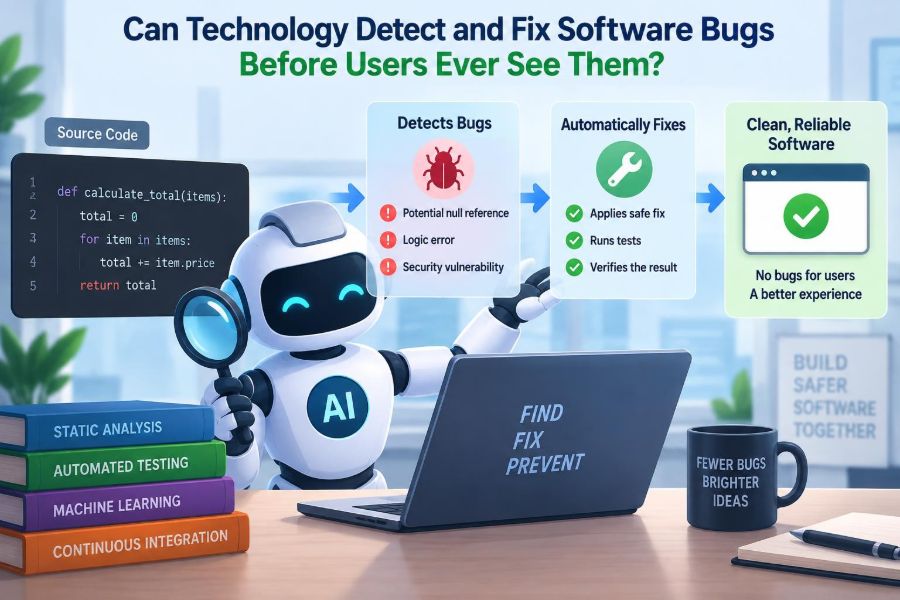
Modern teams have far more help than a programmer manually rereading every line of code. Automated tests, code scanners, production monitoring, and AI-assisted tools can all find suspicious behavior earlier—sometimes while code is still being written.
But detecting a problem is not the same as understanding it, and generating a fix is not the same as safely deploying one. The useful question is not whether technology can eliminate bugs completely. It is how it can move the discovery and repair of bugs as far left as possible, before users are affected.
🪲 What “Before Users See It” Actually Means
Software passes through several environments before it reaches the public: a developer’s machine, a shared test environment, a staging environment that resembles production, and finally the live system. A bug found in any earlier stage is less likely to become a user-facing incident.
“Before users see it” can therefore mean several things. It may mean blocking flawed code before it is merged, catching a failure during automated testing, or detecting an abnormal release quickly enough to roll it back before most people encounter it.
The distinction matters because no tool has perfect visibility. A system can be thoroughly tested and still fail under a rare combination of real data, network timing, browser version, and user behavior.
🧩 Why Bugs Exist in the First Place
A bug is behavior that differs from what the system should do. Sometimes that comes from a typo or a mistaken condition. More often, it comes from an incomplete understanding of the requirement, an overlooked edge case, or two individually reasonable components interacting badly.
Consider a checkout rule: “shipping is free for orders over $50.” Does exactly $50 qualify? Is the threshold measured before tax, after discounts, or in a local currency? Code can be syntactically correct while still implementing the wrong interpretation.
That is why prevention is not solely a coding problem. It also involves clear product decisions, reliable system design, realistic test data, and feedback from people who understand the domain.
🔍 The Earlier a Defect Is Found, the Smaller Its Blast Radius
Finding a defect early usually makes it easier to diagnose. The author still remembers the intended behavior, the change is small, and fewer dependent systems have incorporated it.
Once a defect reaches production, it can create extra work beyond changing code. Teams may need to restore data, communicate with customers, investigate security exposure, pause a deployment, and write safeguards against recurrence.
This is the motivation behind shift-left testing: performing quality checks earlier in the delivery process rather than reserving testing for the end. It does not remove later checks; it layers earlier feedback on top of them.
🧪 Unit Tests Check Small Promises
A unit test exercises a small piece of code, such as a function that calculates a discount or validates a password. It supplies known inputs and checks that the output matches the expected result.
For example, a pricing function should be tested with an ordinary basket, an empty basket, a discounted basket, and values at the rule boundary. These tests turn expected behavior into executable checks that run repeatedly.
Unit tests are fast and inexpensive to run, which makes them ideal for catching local regressions. They cannot prove that the application works as a whole, because they often replace databases, network services, or clocks with controlled substitutes.
🔗 Integration Tests Expose Broken Connections
Integration tests examine whether components work together: an API and database, a web form and authentication provider, or a service and message queue. Many expensive failures occur at these boundaries.
A function may correctly construct an order object, while the database rejects it because a field is too long. An API may return valid data, while the client assumes a field is never absent. Neither unit test necessarily reveals the mismatch.
These tests tend to run more slowly and require more setup, but they are valuable because real applications are systems of relationships, not collections of isolated functions.
🖥️ End-to-End Tests Follow a User Journey
End-to-end tests simulate a complete workflow through the deployed application. A test might create an account, sign in, add an item to a cart, complete a payment in a test environment, and confirm the resulting order.
They are especially useful for critical paths where a broken journey has immediate consequences. However, they can be fragile if they depend on timing, changing test data, or external services. A large suite of unreliable end-to-end tests can slow delivery while producing little confidence.
A balanced test strategy uses them selectively for important flows, rather than treating them as a substitute for focused unit and integration coverage.
📏 Test Coverage Is a Clue, Not a Guarantee
Coverage tools report which lines or branches of code were executed while tests ran. Low coverage may reveal untested areas. High coverage, however, only shows that code was visited—not that the test checked the right outcome.
A test can execute every line of a payment calculation and still miss that the expected total is wrong. It may also miss behavior that was never specified, such as what should happen when an exchange-rate service times out.
Useful teams treat coverage as a diagnostic signal. They ask whether important decisions, failure paths, boundaries, and business rules are exercised with meaningful assertions.
🧱 Static Analysis Finds Risk Without Running the Program
Static analysis examines source code or compiled code without executing the application. Linters can flag suspicious patterns, style violations, unused variables, and likely mistakes. More advanced analyzers trace how data may move through a program.
For instance, a tool may identify a value that can be null before it is dereferenced, a resource that is opened but not closed, or a string concatenated into a database query. These checks are particularly effective for recurring, recognizable error patterns.
Static analysis is strongest when its rules reflect real risks in the team’s language and architecture. A flood of low-value warnings teaches developers to ignore the tool, including the warning that actually matters.
🔐 Security Scanners Look for Dangerous Patterns
Some bugs are security vulnerabilities: mistakes that could allow unauthorized access, data exposure, or disruption. Security-focused tools inspect application code, dependencies, configuration, and sometimes running systems.
Dependency scanners can alert teams when a library version is associated with a publicly reported vulnerability. Secret scanners can prevent passwords, API keys, and private tokens from being committed to a repository. These are useful guardrails, not a complete security review.
A scanner cannot reliably determine every exploit path or whether an alert is reachable in a specific application. Teams still need threat modeling, secure design decisions, patch prioritization, and human investigation.
📦 Dependency Management Prevents Inherited Defects
Most software is assembled partly from third-party packages. This saves time, but it means a project can inherit bugs and vulnerabilities from code it did not write.
Automated dependency checks compare declared packages against known advisories and identify outdated versions. Lockfiles help make builds repeatable by recording the precise versions selected, reducing surprises between machines.
Updating automatically is not always safe. A new version can change behavior, remove an API, or introduce a different defect. Sensible automation proposes updates, runs the relevant tests, and lets maintainers review changes with appropriate urgency.
🔄 Continuous Integration Makes Checks Routine
Continuous integration, often shortened to CI, is the practice of automatically building and testing changes when developers push code or open a proposed merge. Instead of relying on someone to remember every command, the delivery system applies a repeatable checklist.
A typical pipeline may format code, run static analysis, execute unit and integration tests, build a deployable artifact, and scan dependencies. If a required check fails, the change can be prevented from entering the shared branch.
CI is powerful because it shortens feedback loops. A developer learns about a broken test while the relevant change is still fresh, rather than after unrelated work has accumulated.
🚦 Quality Gates Decide What May Move Forward
A quality gate is a rule that a change must satisfy before it can advance. Examples include “all required tests pass,” “no newly introduced critical security alert,” or “a reviewer approves the change.”
Good gates protect meaningful standards while keeping the path understandable. A vague rule such as “code quality must be high” invites disagreement; a concrete rule can be automated and discussed when exceptions are necessary.
Overly rigid gates can create workarounds, especially when checks are slow or noisy. The goal is not to make a pipeline look strict. It is to block credible risks without turning every small change into an obstacle course.
👀 Code Review Catches Context That Tools Miss
Automated checks are good at repeated patterns. Human reviewers are better at asking whether a feature matches the intended workflow, whether a name conceals a dangerous assumption, or whether a change complicates future maintenance.
A useful review is not merely proofreading. It examines design choices, error handling, test quality, data migration effects, and whether the code fits surrounding conventions. Small, focused changes are easier to review carefully than large mixed-purpose pull requests.
Reviewers also need psychological safety. People should be able to question an approach without making the review feel like a judgment of the author. That encourages early discussion instead of silent approval.
🧠 AI Can Suggest Code, Tests, and Explanations
AI coding assistants can generate boilerplate, explain unfamiliar code, propose tests, summarize logs, and suggest likely fixes. For a routine task, this can reduce the time needed to reach a first working draft.
They are especially useful as an additional perspective: “What edge cases might this parser miss?” or “Generate test cases for these input rules.” The output can prompt useful thinking even when it is not used directly.
But generated code can be wrong, insecure, outdated, or mismatched to local conventions. An assistant does not take responsibility for the system’s behavior. Developers must review its output, understand it, and run the same safeguards they would apply to human-written code.
🤖 Automated Program Repair Has Narrow but Real Uses
Automated program repair attempts to generate a patch that makes a failing test pass or satisfies a specified constraint. It may change a condition, add a null check, alter a configuration value, or select a known-compatible dependency update.
This works best when the failure is tightly defined and the acceptable behavior is well represented by tests or rules. A tool can often propose several patches quickly, which helps a maintainer investigate.
The central limitation is the specification problem. If the test suite does not express the full intended behavior, a patch can pass the test by hiding the symptom rather than correcting the underlying rule.
🧾 A Passing Test Can Still Approve the Wrong Fix
Imagine a login test fails because an expired session causes an exception. A simplistic automated patch might catch the exception and return a generic success response. The test may pass if it only checks that the application does not crash.
Yet the system may now accept a user without verifying their session. The repair removed visible failure while violating a security requirement. This is why tests need assertions about correct outcomes, not only the absence of errors.
For consequential changes, teams should review the patch, add a regression test that captures the original defect, and consider nearby cases that reveal whether the proposed logic is genuinely sound.
🧬 Property-Based Testing Searches Beyond Handwritten Examples
Traditional tests use chosen examples: a date, a username, a basket total. Property-based testing generates many inputs and checks broad rules that should always hold.
For example, sorting a list should preserve the same elements and produce a sequence where no later item is smaller than an earlier one. A date parser should not crash on arbitrary input, even if it rejects most strings.
This approach is effective for algorithms, parsers, financial calculations, and data transformations. It does not replace examples, because examples often communicate a business rule more clearly. Instead, it explores the space between the examples humans thought to write.
🎲 Fuzzing Sends Software the Inputs Nobody Planned For
Fuzzing is an automated technique that feeds a program huge numbers of unusual, malformed, oversized, or randomized inputs. The goal is to trigger crashes, hangs, unexpected memory behavior, or invalid states.
A file reader, network protocol handler, image parser, or API endpoint may work perfectly with well-formed input yet fail on a truncated file or strange Unicode sequence. Those are exactly the cases an attacker or an unpredictable integration may produce.
Fuzzing is most valuable when failures are captured with the input that caused them. Developers can then reproduce the issue, fix it, and retain that input as a regression test.
🧪 Feature Flags Separate Deployment From Release
A feature flag is a runtime switch that enables or disables behavior without requiring a new deployment. Teams can deploy code while keeping a new feature inactive, then expose it gradually to internal users or a limited audience.
This reduces risk because a problematic feature can often be disabled quickly. It also allows controlled experiments, provided the team handles privacy, fairness, and product decisions responsibly.
Flags are not free. Old flags create confusing combinations of behavior and can leave unreachable code behind. Every flag should have an owner, a reason, and a planned removal date once the rollout is complete.
🌊 Canary Releases Limit the Size of a Mistake
In a canary release, a new version is sent to a small portion of traffic before it reaches everyone. Teams compare error rates, latency, resource use, and business-relevant behavior between the new and existing versions.
For example, if a new search service increases timeouts for the first small group of requests, the rollout can pause before the change affects the broader user base. This is containment, not prediction.
Canaries work best when the initial traffic is representative and the team has clear rollback criteria. A tiny sample may not include the region, device type, or workflow where a defect lives.
📈 Observability Reveals What Tests Could Not Predict
Observability is the ability to infer a system’s internal state from its outputs, commonly logs, metrics, and traces. Logs record events, metrics measure values over time, and traces follow a request across services.
These signals help teams detect failures after deployment and, crucially, understand them. A checkout timeout may originate in a database query, an inventory service, a network dependency, or a queue that is filling more quickly than it drains.
Good observability avoids both silence and noise. Recording every detail can be expensive and may expose sensitive data; recording too little turns investigation into guesswork.
🚨 Alerts Need to Signal Actionable Problems
An alert should mean that someone needs to investigate or act. Alerts based on user-facing symptoms—such as sustained failed requests or a breached service objective—are often more useful than alarms for every minor infrastructure fluctuation.
If a team receives frequent alerts that do not require action, alert fatigue develops. Eventually, an urgent signal may be treated as another false alarm.
Each alert should have a practical response path: a dashboard, a runbook, an owner, and a decision such as scale, roll back, disable a flag, or investigate a dependency. Detection without a response plan only shifts stress to the on-call engineer.
🔁 Rollbacks and Roll-Forwards Are Safety Mechanisms
When a deployment causes harm, a rollback restores a previous known version. It is often the fastest way to reduce user impact, but it is not always possible—especially when the release changed a database schema or data format.
A roll-forward fixes the issue in a new release. This may be safer when reverting would conflict with already-written data, but it takes time and requires confidence in the new correction.
Teams prepare for both by making changes small, using backward-compatible migrations, keeping deployable artifacts available, and practicing incident procedures before an urgent moment arrives.
🗃️ Data Bugs Demand Extra Caution
Code defects can often be patched and redeployed. Data defects may persist after the code is fixed: duplicate invoices, incorrectly calculated balances, records written to the wrong account, or deleted information that needs recovery.
Preventing these failures involves validation rules, transaction design, backups, audit trails, migration rehearsals, and access controls. For critical workflows, teams may use reconciliation jobs that compare expected and actual records.
Automation can flag anomalies, but automated correction deserves a higher bar. Changing customer or financial data at scale without review can turn a small logic error into a broad integrity problem.
🧯 Self-Healing Systems Repair Known Failure Modes
A self-healing system automatically responds to selected, understood conditions. It might restart a failed process, replace an unhealthy instance, retry a transient request with limits, or route traffic away from an unavailable region.
These mechanisms improve resilience when a failure is temporary and the response is safe. They do not “fix bugs” in the general sense. Repeated restarts can mask a memory leak, and unlimited retries can overload an already struggling dependency.
Safe self-healing includes limits, timeouts, circuit breakers, and observability. The system should recover where it can while leaving evidence for engineers to investigate the underlying cause.
🧑⚖️ Human Approval Depends on the Risk
Not every change needs the same process. A typo in an internal help message and a modification to authorization logic should not receive identical levels of automation and review.
| Change type | Useful automation | Typical human safeguard |
|---|---|---|
| Routine formatting or generated code | Formatter, build, tests | Normal code review |
| Feature behavior | Tests, flags, staged rollout | Product and engineering review |
| Security or permission logic | Static analysis, security tests | Specialist review and threat analysis |
| Data correction at scale | Validation, dry run, reconciliation | Explicit approval and rollback plan |
Risk-based controls direct attention where an incorrect automated decision would be costly or hard to reverse.
🧭 Better Requirements Are a Form of Bug Prevention
Many defects begin before implementation, when a requirement leaves important behavior unstated. Acceptance criteria, examples, and decision tables can make expectations testable before code exists.
For a subscription cancellation feature, useful questions include: When does access end? What happens to unused credit? Which emails are sent? Can a canceled account be restored? Who is allowed to cancel on another person’s behalf?
Writing these answers down does not eliminate ambiguity, but it turns hidden assumptions into conversations. That is much cheaper than discovering conflicting interpretations after deployment.
🧰 A Practical Prevention Stack for Small Teams
A small team does not need every advanced technique on day one. Reliability improves most when a few safeguards are consistently maintained rather than when an elaborate toolchain is installed and ignored.
- Run formatting, linting, and focused unit tests on every proposed change.
- Use CI to build the application and run integration tests for important boundaries.
- Require review for changes that affect behavior, security, or data.
- Deploy gradually when possible, with logs, metrics, and a simple rollback path.
- Turn each meaningful production incident into a regression test, monitor, runbook, or design improvement.
This stack creates feedback at multiple points without assuming that any one check is enough.
⚠️ Common Mistakes That Create False Confidence
Teams can have many tools and still be poorly protected. One common mistake is measuring activity rather than outcomes: counting tests, warnings, or deployment checks without asking whether they catch relevant failures.
Another is treating the pipeline as an opponent. Developers may skip slow checks, silence warnings, or avoid improving flaky tests when the system feels punitive. Quality practices work better when failures are understandable and fixing them is supported.
Finally, do not confuse automation with accountability. Someone must decide what correct behavior means, assess trade-offs, and own the consequences of a release.
🌐 Why Production Will Always Contain Surprises
Production combines scale, real user behavior, changing dependencies, imperfect networks, and data accumulated over time. It can reveal conditions that are difficult or impractical to reproduce completely in a test environment.
This is not an argument against testing. It is an argument for designing software to fail safely: validate inputs, isolate failures, preserve data, use timeouts, degrade gracefully where appropriate, and make recovery possible.
The mature goal is not a claim that bugs will never escape. It is a system in which escaped defects are detected quickly, contained effectively, understood honestly, and less likely to recur.
🏁 The Core Principle: Layered Defenses Beat a Single Perfect Tool
Technology can detect many bugs before users see them, and in limited, well-specified cases it can even generate or apply safe repairs. Tests catch expected regressions, analyzers catch recognizable patterns, gradual releases limit exposure, and monitoring detects what earlier stages missed.
Each layer has blind spots. Tests depend on what was specified, scanners depend on known patterns, AI depends on the quality of its context and output, and production signals arrive only after some real behavior has occurred.
The strongest approach combines automation with careful engineering judgment. It makes correct behavior explicit, checks it repeatedly, releases changes cautiously, and treats every failure as information for improving the next layer.
Technology does not make software bug-free; it helps teams build a faster, safer learning system that catches and contains mistakes before they become someone else’s problem. ⚙️🧪🛡️