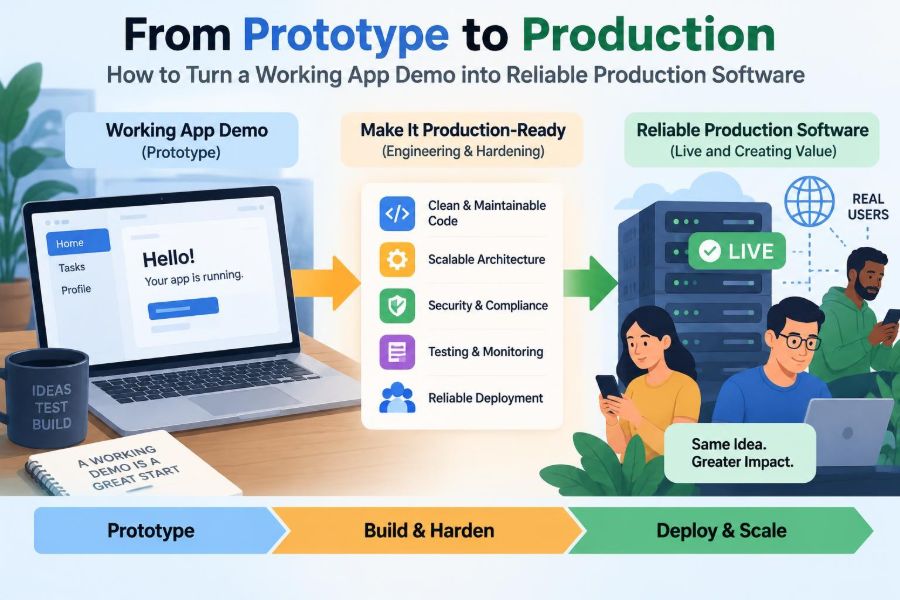

The demo works. A user can sign in, fill out a form, and see the right result appear on screen. The team can show it to a manager, a client, or an interview panel—and it feels close to finished.
Then someone asks what happens when ten thousand people use it at once, when a payment provider is unavailable, or when a deployment must be reversed at 2 a.m. Suddenly, “working” means something much larger than a successful click-through.
A prototype proves that an idea can be built. Production software must prove that it can keep serving real people under ordinary mistakes, unusual inputs, changing requirements, and imperfect infrastructure.
The path between those two states is not simply a cleanup phase at the end. It is a deliberate engineering process: defining expectations, reducing uncertainty, and building systems that are observable, recoverable, and safe to change.
🧭 Recognize the Prototype’s Actual Job
A prototype answers a narrow question, such as “Can we generate a schedule from these inputs?” or “Will this interface make sense to users?” Its code is often optimized for speed of learning, not longevity.
That is not a failure. Throwaway shortcuts can be sensible when the team is still testing an uncertain idea. Trouble begins when prototype decisions silently become permanent architecture.
Start by documenting what the demo has actually proven and what remains unproven. A screen recording may demonstrate a workflow, but it says little about security, data integrity, cost, support, or operation under load.
🎯 Define What “Production Ready” Means Here
There is no universal finish line called production-ready. A personal internal tool and a public service handling financial records need different safeguards.
Define readiness in terms of the system’s context: expected users, data sensitivity, availability needs, acceptable response times, support hours, regulatory obligations, and consequences of incorrect behavior. These are non-functional requirements: qualities of the system rather than visible features.
For example, a report may be allowed to take a minute to generate, while an API request used during checkout may need a much tighter response expectation. Make such trade-offs explicit before design decisions harden.
🗺️ Map the System Beyond the Screen
A polished user interface can hide a fragile system. Production planning begins with a map of everything involved in delivering a user outcome.
Identify the browser or mobile client, backend services, databases, queues, file storage, identity provider, third-party APIs, background jobs, deployment pipeline, and operational dashboards. Include people and manual procedures too.
This map exposes dependencies that demos commonly overlook. If a shipping quote comes from an external service, the app’s behavior during that service’s outage is part of your product design, not someone else’s problem.
📋 Turn Assumptions into Explicit Requirements
Prototype code is full of assumptions: every account has an email address, uploaded files are small, a request arrives only once, and a network call eventually returns. Production systems cannot safely depend on unstated assumptions.
Write down business rules, input limits, ownership rules, retention expectations, and failure behavior. For each important workflow, ask what happens when data is absent, duplicated, stale, malformed, or submitted out of order.
- Who may create, view, change, and delete a record?
- What should happen if a user retries after a timeout?
- Can two users edit the same item at the same time?
- Which actions must be auditable or reversible?
These questions often reveal product decisions that cannot be solved by code alone.
🧱 Choose Boundaries Before Adding More Features
As a demo grows, a single route handler or component can accumulate validation, database access, business rules, email delivery, and formatting. It works until any one concern changes.
Create boundaries around responsibilities. A common approach separates presentation, application workflow, domain rules, and infrastructure access. The exact pattern matters less than ensuring that a pricing rule is not buried inside a database query or a UI callback.
Good boundaries make the system easier to test and replace. They also help teams reason locally: changing notification delivery should not require rediscovering the rules for approving an order.
🧹 Refactor for Change, Not Elegance Alone
Refactoring is restructuring code without intentionally changing its external behavior. Its value is not aesthetic purity; it lowers the risk and cost of the next change.
Prioritize code that is central to high-value workflows, frequently modified, difficult to test, or responsible for past defects. Avoid an open-ended rewrite driven only by discomfort with the prototype’s style.
A useful sequence is to protect current behavior with tests, extract one responsibility, deploy a small change, and repeat. This provides feedback while preserving momentum.
🗃️ Design Data as a Long-Term Contract
Demo databases are often treated as disposable. Production data is different: users expect it to survive deploys, schema changes, and developer turnover.
Define ownership, uniqueness, relationships, required fields, and lifecycle states. Use database constraints where they can enforce facts that must always hold, such as a unique external identifier or a required relationship.
Plan schema migrations as versioned changes rather than manual edits. A safe migration may add a new column first, deploy code that can handle both old and new values, backfill data, and only later remove the obsolete path.
🔒 Protect Data at Every Boundary
Security is not a final checklist item because sensitive data crosses many boundaries: browser to API, service to database, application to vendor, and developer workstation to deployment platform.
Validate and authorize requests on the server even if the user interface already restricts them. Client-side checks improve usability; they do not establish trust. Use established libraries and platform controls for password handling, session management, encryption, and access policy where possible.
Keep secrets out of source code, screenshots, logs, and client bundles. Rotate exposed credentials promptly, and grant services only the permissions they need. This is the principle of least privilege.
🪪 Separate Authentication from Authorization
Authentication answers “Who is this?” Authorization answers “May this identity perform this action on this resource?” A demo often implements the first and accidentally assumes the second.
Consider a project-management app. Being signed in does not mean a user can read every project, invite members, or change billing settings. These checks belong close to the server-side action and data access path.
Model roles and permissions according to real responsibilities, but avoid creating a complicated permission language before the product needs it. Start with clear rules, test them, and evolve the model when use cases demand finer control.
✅ Build a Testing Pyramid That Fits the Risk
Tests are automated checks of expected behavior, not proof that software has no defects. A useful suite gives fast feedback on common failures and focused confidence in critical user journeys.
| Test level | Best for | Typical trade-off |
|---|---|---|
| Unit tests | Business rules and edge cases in isolation | Fast, but can miss integration problems |
| Integration tests | Database, API, queue, and service interactions | More realistic, usually slower to set up |
| End-to-end tests | Critical flows through the user interface | High confidence, but slower and more brittle |
Do not aim for a decorative coverage number. Test behavior that would create meaningful user harm, financial loss, security exposure, or expensive support work if it failed.
🧪 Test the Unhappy Paths Deliberately
Demo testing usually follows the happy path: valid input, responsive network, available database, and one user acting at a time. Real conditions are less cooperative.
Add cases for invalid formats, expired sessions, duplicate submissions, missing permissions, interrupted uploads, slow dependencies, and partially completed workflows. For a payment-like action, test what happens when the client times out after the server may already have processed the request.
This is where idempotency matters. An idempotent operation can be repeated without causing an unintended additional effect, such as charging twice because a user pressed “Pay” again.
⚡ Measure Performance Instead of Guessing
“Fast enough” depends on the user task and the system’s expected workload. Measure realistic paths rather than optimizing based on intuition or a single developer laptop.
Profile slow operations to find the actual bottleneck. It may be an unindexed query, repeated calls to a vendor API, a large response payload, or rendering too much data at once. Each needs a different remedy.
Set practical performance budgets for the most important interactions, and revisit them as usage changes. Premature optimization wastes effort, but ignoring known slow paths until launch creates avoidable uncertainty.
📈 Plan for Load, Spikes, and Resource Limits
Scalability means a system can handle increased demand without unacceptable degradation. It does not always require elaborate distributed architecture; many products scale well by improving database queries, caching stable data, and adding capacity to a simple design.
Identify what limits each component: connection pools, memory, CPU, database throughput, third-party quotas, or queue depth. A load test is valuable when it represents meaningful usage patterns, including bursts rather than only steady traffic.
Also decide how the system should degrade. During overload, it may be better to delay a report or reject a nonessential request clearly than to let every request become slow and unreliable.
🧯 Design Failure Paths and Timeouts
Networks fail, processes restart, and third-party services sometimes return incomplete or delayed responses. Production software should treat these as normal operating conditions.
Set timeouts on remote calls. Without them, requests can wait too long and consume resources that other users need. Use retries selectively, with delays and limits, because aggressive retries can amplify an outage.
For noncritical work, queues can separate a user-facing request from slower tasks such as sending email or generating documents. The user receives a clear status, while a worker processes the task with its own retry and monitoring policy.
🔁 Make State Transitions Safe
Many serious defects arise from state changes: draft to submitted, inventory available to reserved, invitation pending to accepted. Treat these transitions as business operations with rules, not just updates to a status field.
Define which transitions are legal and who can trigger them. Consider concurrency: two requests may read the same old state before either writes a new state.
Use transactions or optimistic concurrency controls where appropriate. The right choice depends on the database and workflow, but the goal is consistent: prevent the system from recording combinations of facts that should not coexist.
🧾 Add Observability Before You Need It
Observability is the ability to understand what a running system is doing from its outputs. In production, a developer cannot rely on a local debugger or ask every user what happened.
Build three complementary signals: logs for detailed events, metrics for counts and timing trends, and traces for following a request across components. Attach request or correlation IDs so related events can be connected.
Log useful context without recording passwords, tokens, full personal details, or confidential payloads. A detailed log that leaks data is not a successful operational tool.
🚨 Alert on User Impact, Not Every Noise
An alert should prompt a clear response. If every minor warning wakes someone up, teams learn to ignore the channel, and significant incidents become harder to recognize.
Alert on conditions tied to user impact or urgent action: sustained error rates, failed background work beyond a threshold, unavailable dependencies, or an approaching capacity limit. Dashboards can show less urgent trends without demanding immediate attention.
Each alert benefits from a short runbook: what the alert means, where to investigate, likely mitigations, and when to escalate. This turns knowledge from an individual memory into a team capability.
🚀 Automate Builds, Checks, and Deployments
A repeatable delivery pipeline reduces variation between “works on my machine” and the deployed service. At minimum, it should build the application, run relevant tests, check configuration, and produce an identifiable artifact.
Automation does not remove judgment. It gives humans reliable evidence and frees them from error-prone manual sequences. Keep configuration outside the artifact when possible so the same build can move through controlled environments.
Require review for changes that carry higher risk, but avoid process that delays small safe fixes without adding useful scrutiny.
🌱 Use Environments to Reduce Release Surprises
Development, test, staging, and production environments serve different purposes. A staging environment can validate deployment behavior and integrations, but it rarely reproduces every production condition.
Keep environments similar in architecture where practical, especially around authentication, background processing, and network boundaries. Differences should be intentional and documented, not accidental leftovers.
Never assume test data is harmless enough to copy casually into lower environments. Data handling should reflect its sensitivity, and access should be restricted accordingly.
🛟 Release in Small, Reversible Steps
A deployment is a change to a live system, not a ceremonial final button. Smaller changes are easier to understand, verify, and undo.
Use techniques suited to the platform: gradual rollout, feature flags, canary releases, or blue-green deployment. A feature flag allows code to be present while the behavior remains disabled or limited to selected users.
Reversibility must include database changes. If new code writes data in a format older code cannot read, rolling back the application alone may not restore service. Design compatibility windows deliberately.
↩️ Rehearse Rollback and Recovery
“We can roll back” is only credible if the team knows exactly what rollback means and has tested the procedure. A rollback may involve code, configuration, schema compatibility, queued jobs, caches, and external side effects.
Backups matter, but restoration also needs practice. Verify that backups are usable, understand recovery time expectations, and document who can perform the process.
For irreversible actions, prevention is better than recovery. Confirmation steps, approval workflows, soft deletion, and audit trails can reduce the chance that a simple interface mistake becomes permanent loss.
💸 Understand the Cost of Operating the System
A prototype may use generous defaults, frequent polling, verbose storage, or expensive managed services without consequence at small scale. In production, usage patterns turn design choices into recurring cost.
Track the resources that drive spending: database capacity, compute time, data transfer, log retention, file storage, and third-party requests. Cost visibility is not only for finance; it helps engineers spot inefficient behavior.
Do not optimize solely for the lowest bill. A cheaper design that requires constant manual intervention or creates slow user experiences can cost more overall.
♿ Build Accessibility into the Product, Not a Patch
Accessibility improves whether people can perceive, understand, navigate, and operate the software using different devices and abilities. It also frequently improves general usability.
Check keyboard navigation, visible focus, meaningful labels, readable contrast, semantic controls, error messages, and behavior at different zoom levels. A custom control that looks polished but cannot be used without a mouse is incomplete.
Automated checks can catch some issues, but they cannot fully assess whether a workflow makes sense with a screen reader or keyboard. Include human testing where possible, especially for critical journeys.
📚 Write Operational Documentation That Gets Used
Documentation should reduce repeated questions and shorten recovery time. The most useful documents are usually concise, specific, and close to the work.
- How to run and test the application locally
- How configuration and secrets are supplied
- How to deploy, verify, and roll back
- What major components own and depend on
- How to investigate common failures
Keep documentation in the same change process as code. A deployment step that exists only in one person’s memory is a production risk.
🤝 Define Ownership and Support Boundaries
Reliable software needs clear ownership after launch. Someone must know who responds to defects, monitors health, approves access, manages dependencies, and decides whether an incident requires communication to users.
Ownership does not mean one person works alone. It means responsibilities are visible enough that issues do not disappear between product, engineering, operations, and support.
Set realistic support expectations. A small team may not offer around-the-clock response, but users should not be led to assume that it does. Align promises with staffing and system design.
🔍 Learn from Incidents Without Hunting for Blame
An incident is evidence about how the system behaved under real conditions. After service is restored, review the timeline, contributing conditions, detection gaps, decisions made, and follow-up changes.
A blameless review does not mean avoiding accountability. It means examining the system of incentives, tooling, documentation, and safeguards rather than stopping at “someone made a mistake.” People make mistakes; robust systems expect that possibility.
Prioritize a few concrete improvements, such as adding an alert, making an action idempotent, or clarifying a runbook. A long list with no owner is not a learning process.
🧩 Avoid the Big-Bang Rewrite Trap
When a prototype becomes difficult to maintain, a full rewrite can sound cleaner than incremental work. Sometimes replacement is justified, especially when core assumptions are wrong or the platform cannot meet requirements.
More often, a rewrite delays user value and recreates forgotten edge cases. Prefer gradual replacement behind stable interfaces: improve one workflow, extract one service, or migrate one data path at a time.
The question is not “Is this code beautiful?” Ask whether the current design blocks a required capability, creates unacceptable risk, or costs too much to change safely.
⚖️ Balance Speed, Quality, and Scope Honestly
Production engineering involves trade-offs, not a checklist that every project completes at maximum depth. A team with a fixed launch date may reduce scope, limit integrations, or defer a convenience feature to protect security and core reliability.
What should not be deferred casually are risks with severe consequences: unauthorized access, corrupted essential data, no recovery path, or no way to detect major failures. The appropriate threshold depends on the product, but the decision should be conscious.
Make trade-offs visible to stakeholders. “We are launching with manual reconciliation for this rare case” is more responsible than silently hoping the case never occurs.
🛠️ Use a Practical Readiness Review
Before a significant release, gather product, engineering, and operational perspectives. The goal is not to certify perfection; it is to surface unresolved risks while there is still time to act.
- Confirm critical user journeys and their failure behavior.
- Review access controls, secrets, and sensitive-data handling.
- Verify tests, monitoring, alerts, dashboards, and runbooks.
- Check deployment, rollback, backups, and schema migration plans.
- Assign owners for support, incident response, and follow-up risks.
Record exceptions with an owner and review date. A known, tracked gap is safer than an invisible one.
🏁 Treat Production as a Capability, Not a Destination
The core shift is simple: a prototype demonstrates possibility, while production software earns trust repeatedly. It does so through clear requirements, defensive design, disciplined delivery, and feedback from real operation.
Reliability does not come from adding every available tool or building the most complex architecture. It comes from matching safeguards to real risks, making behavior visible, and improving the system as evidence accumulates.
Teams that make this shift stop treating launch as the end of engineering. They treat it as the point when the software begins its most demanding job: serving people dependably.
A working demo becomes production software when its team can explain how it behaves, detect when it fails, recover safely, and change it with confidence. Build that capability step by step, and reliability becomes a practical habit rather than a last-minute promise. ⚙️🛡️🚀