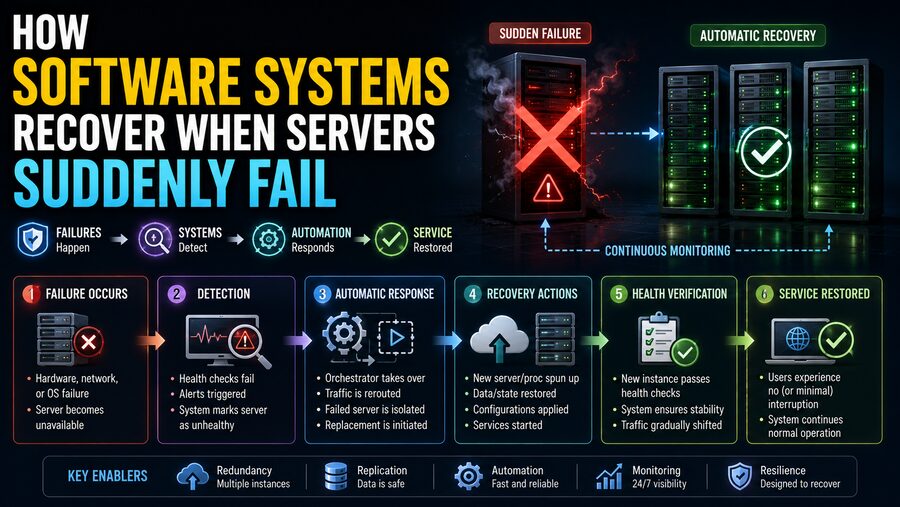

Modern software services are expected to remain available almost all the time. 🌐 Whether someone is making an online payment, streaming a movie, sending a message, booking a flight, or loading a business dashboard, users generally expect the system to keep working even if individual computers fail behind the scenes.
But servers do fail.
A physical machine can lose power. A disk can stop working. A network connection can disappear. An operating system can crash. A software process can freeze. An entire data center can even become unreachable.
The reason many large online services continue operating is that engineers design them with failure in mind.
Instead of assuming every server will remain healthy forever, distributed software systems are built around a different principle:
Individual components may fail, so the overall system must be able to continue. 🛡️
This is achieved using techniques such as redundancy, replication, health checks, failover, load balancing, leader election, retry logic, data recovery, and geographic distribution.
💥 Why Servers Fail
A server is ultimately a physical or virtual computer running software.
Like any complicated system, it can fail for many reasons.
Common causes include:
- Hardware failure
- Power loss
- Operating system crashes
- Memory exhaustion
- Software bugs
- Network outages
- Disk failures
- Overheating
- Misconfiguration
- Unexpected traffic spikes
Sometimes the server itself remains healthy, but the application running on it becomes unresponsive.
From the user’s perspective, the distinction may not matter.
If the service cannot respond, the system must detect the problem and route requests somewhere else.
🛡️ Redundancy Is the Foundation of Reliability
The most basic rule of resilient software architecture is:
Do not depend on only one critical machine.
If an entire website depends on a single server, that server becomes a single point of failure.
If it stops working, the website disappears.
Instead, engineers run multiple servers capable of performing the same job.
For example:
Server A → Application
Server B → Application
Server C → Application
If Server A fails, Servers B and C can continue serving users.
This duplication is known as redundancy.
Redundancy does not guarantee that nothing will ever fail. Instead, it ensures that one failure does not automatically become a complete service outage.
⚖️ Load Balancers Distribute User Requests
When several servers provide the same application, users need a way to reach them efficiently.
This is often handled by a load balancer.
A load balancer sits in front of a group of servers and distributes incoming requests among them.
Imagine three application servers:
Users → Load Balancer → Server A / Server B / Server C
The load balancer may send one request to Server A, the next to Server B, and another to Server C.
More sophisticated systems also consider:
- Current server load
- Response times
- Geographic location
- Connection count
- Server health
The load balancer therefore performs two important jobs:
Distribute work and avoid unhealthy servers.
❤️ Health Checks Detect Failures
How does the system know that a server has failed?
It performs health checks.
A health check is a repeated test that asks whether a server or application is working correctly.
For example, a load balancer might send a request every few seconds to:
/health
A healthy server may reply:
200 OK
If the server stops responding, returns repeated errors, or takes too long, the load balancer may mark it as unhealthy.
New user requests are then sent to other servers.
This can happen automatically without users knowing that anything failed.
🔄 Failover Moves Work to Healthy Systems
The process of switching from a failed component to a functioning replacement is called failover.
A simplified sequence looks like:
Server fails → Monitoring detects failure → Traffic is redirected → Healthy server takes over
Failover can happen at several levels.
For example:
- Application server failover
- Database failover
- Network failover
- Storage failover
- Entire data-center failover
The objective is the same:
Restore service with as little disruption as possible.
🧩 Stateless Applications Make Recovery Easier
Some applications are designed to be stateless.
A stateless server does not keep important user-session information only in its own local memory.
Suppose a user sends Request 1 to Server A and Request 2 to Server B.
If both servers can handle the requests independently, the system becomes much easier to scale and recover.
Important state might instead be stored in:
- A shared database
- A distributed cache
- An object store
- A session service
If Server A suddenly fails, Server B can continue serving the user because the essential information was not trapped inside Server A.
This is one reason stateless architecture is common in large web systems.
🧠 Stateful Systems Are More Complicated
Not every service can be stateless.
Databases, message queues, and certain distributed services must maintain important state.
Imagine a database containing customer orders.
If its server fails, simply starting an empty replacement server is not enough.
The new server needs access to the same data.
This is where replication becomes critical.
📚 Replication Creates Multiple Copies of Data
Replication means maintaining copies of important data on multiple machines.
For example:
Primary Database → Replica 1
Primary Database → Replica 2
When data changes on the primary server, those changes are copied to the replicas.
If the primary database fails, one of the replicas may be promoted to become the new primary.
This protects the system from losing access to data because of a single machine failure.
However, replication introduces difficult engineering questions:
- How quickly are updates copied?
- What happens if replicas disagree?
- Which copy is considered authoritative?
- What if the network is split?
Distributed systems spend enormous effort answering these questions reliably.
👑 Leader Election Chooses a New Primary
Many distributed systems use a leader, sometimes called a primary.
The leader coordinates certain operations, such as accepting writes.
Suppose three database nodes are running:
Node A — Leader
Node B — Follower
Node C — Follower
If Node A disappears, the remaining nodes need to decide which one should become the new leader.
This process is called leader election.
A distributed consensus protocol may allow the surviving nodes to agree on a replacement.
For example:
Node A fails → B and C detect failure → Election occurs → Node B becomes leader
The application can then continue writing data through Node B.
🗳️ Why Consensus Is Important
Distributed servers do not share one perfect view of reality.
A server may appear dead because:
- It actually crashed,
- the network connection failed,
- or the responding message was delayed.
This creates a difficult question:
How do several machines agree on what happened?
Distributed consensus algorithms are designed to help groups of servers agree on important decisions despite failures and delays.
Well-known examples in distributed computing include algorithms such as Raft and Paxos.
These techniques are used in systems that need reliable agreement about:
- Leadership
- Configuration
- Ordering of operations
- Metadata
- Cluster membership
Consensus is one of the foundations of fault-tolerant distributed systems.
🌐 Network Failures Can Look Like Server Failures
One of the hardest problems in distributed computing is that a remote computer cannot always know why another computer stopped responding.
Suppose Server A sends a message to Server B but receives no answer.
Several things could have happened:
- Server B crashed.
- The request was lost.
- The response was lost.
- The network became slow.
- Server B is still processing the request.
From Server A’s perspective, these situations may initially look identical.
That uncertainty is why distributed software depends heavily on timeouts, retries, idempotency, and consensus mechanisms.
⏱️ Timeouts Prevent Endless Waiting
Software should not wait forever for a failed server.
Instead, requests often have a timeout.
For example, an application might decide:
If this service has not responded within two seconds, treat the request as failed.
The application can then:
- Retry the request
- Contact another server
- Return a controlled error
- Use cached data
Timeouts prevent one slow or unreachable component from freezing an entire chain of services.
Choosing the correct timeout is important.
Too short, and healthy but temporarily slow requests may be abandoned.
Too long, and failures take too long to detect.
🔁 Retries Can Recover From Temporary Problems
Many failures are temporary.
A network packet may be lost.
A server may be overloaded for a fraction of a second.
A database may briefly reject a request during failover.
Software can often recover by simply trying again.
This is called a retry.
However, retries must be designed carefully.
If thousands of clients immediately retry at the same time, they can create even more load on an already struggling system.
For this reason, resilient systems often use exponential backoff.
Instead of retrying continuously:
Retry → wait → retry → wait longer → retry
A small random delay, called jitter, may also be added so all clients do not retry simultaneously.
🔂 Idempotency Makes Retries Safer
Imagine an online payment request.
The client sends:
“Charge this customer $50.”
The server processes the payment, but its response is lost.
The client sees a timeout and retries.
Without protection, the customer might be charged twice.
Systems prevent this using idempotent operations or unique request identifiers.
For example, the payment request may include an idempotency key:
Transaction ID: ABC123
If the system receives the same request again, it can recognize that the transaction was already completed.
This allows retries without duplicating the operation.
Idempotency is extremely important in reliable distributed software.
🚦 Circuit Breakers Stop Cascading Failures
Suppose Service A repeatedly calls Service B.
Service B becomes unhealthy and begins responding very slowly.
If Service A continues sending thousands of requests, it may consume all of its own threads, memory, or network connections while waiting.
Eventually Service A may fail too.
Then services depending on A may also fail.
This is known as a cascading failure.
A circuit breaker helps prevent this.
After enough failures, the circuit breaker temporarily stops sending requests to the unhealthy service.
Conceptually:
Normal → Failures detected → Circuit opens → Requests blocked or redirected → Recovery test → Circuit closes
This gives the troubled service time to recover while protecting the rest of the system.
🧱 Bulkheads Isolate Problems
Another resilience pattern is called a bulkhead.
The term comes from ships, where separate watertight compartments prevent one leak from sinking the entire vessel.
Software systems use a similar idea.
Resources are separated so one overloaded function cannot consume everything.
For example, an application might maintain separate connection pools for:
- Payments
- Search
- Notifications
If the notification service becomes overloaded, the payment system can still have resources available.
Isolation helps contain failures instead of allowing them to spread.
📦 Queues Help Systems Absorb Interruptions
Message queues are another powerful recovery tool.
Instead of requiring two services to communicate at exactly the same moment, one service can place a message into a queue.
For example:
Order Service → Queue → Inventory Service
If the Inventory Service temporarily fails, the messages can remain in the queue.
When the service recovers, it processes the waiting messages.
This makes the system more tolerant of temporary outages.
Queues are commonly used for:
- Email delivery
- Order processing
- Video processing
- Analytics
- Notifications
- Background jobs
They help separate systems in both time and workload.
💾 Write-Ahead Logs Protect Data
Databases must be especially careful during crashes.
Imagine a database is updating an account balance when the server suddenly loses power.
The update must not leave the data in an unpredictable half-finished state.
Many databases therefore use techniques such as write-ahead logging.
Before modifying the main data structures, the system records the intended change in a durable log.
After a crash, the database can inspect this log and determine which operations need to be completed or rolled back.
This helps preserve consistency.
🔐 Transactions Keep Related Changes Together
Databases often group related operations into transactions.
Suppose money is transferred between two accounts.
The system must:
Subtract from Account A
and:
Add to Account B
It would be dangerous if a crash occurred after only the first step.
Transaction mechanisms help ensure that related operations either complete together or are treated as incomplete.
This is a major reason databases can recover safely after unexpected failures.
🗄️ Backups Protect Against Larger Disasters
Replication protects against many server failures, but replicas are not the same as backups.
Why?
Because some mistakes can be copied to every replica.
For example:
- An operator accidentally deletes a table.
- Corrupted data is replicated.
- A software bug changes records incorrectly.
Backups provide historical copies that can be restored.
Reliable systems often combine:
Replication + Backups + Recovery procedures
This provides protection against both hardware failure and logical data loss.
🌍 Geographic Redundancy Protects Against Data-Center Failure
Duplicating servers inside one building is not enough to protect against every disaster.
An entire data center can fail because of:
- Power problems
- Network outages
- Flooding
- Fire
- Cooling failures
- Regional infrastructure problems
Large systems may therefore operate across multiple geographic locations.
For example:
Region A — active
Region B — standby or active
If Region A becomes unavailable, traffic can be redirected toward Region B.
This is known as multi-region architecture or geographic redundancy.
🌎 Active-Active vs. Active-Passive
Geographically distributed systems can be designed in several ways.
🟢 Active-Active
Multiple locations serve users at the same time.
If one region fails, surviving regions continue operating.
Advantages can include:
- Fast failover
- Better geographic performance
- Efficient use of infrastructure
However, keeping data consistent across regions can be difficult.
🟡 Active-Passive
One location handles normal traffic while another remains ready as a backup.
If the primary fails, the standby environment takes over.
This can be simpler in some scenarios, although failover may take longer.
🧭 DNS Can Help Redirect Traffic
The Domain Name System, or DNS, translates names such as:
example.com
into network addresses.
In some architectures, DNS can help redirect users away from a failed region toward healthy infrastructure.
Other systems use global traffic managers or anycast networking to achieve similar goals.
The goal is to make the recovery transparent.
Users continue typing the same website address while the underlying destination changes.
☁️ Cloud Platforms Automate Recovery
Cloud infrastructure has made many resilience techniques easier to automate.
A cloud application might use an auto-scaling group.
Suppose one virtual server fails.
The platform detects the failure and automatically launches a replacement.
Conceptually:
Healthy cluster: 5 servers
1 server fails
Platform removes failed server
New server starts
Cluster returns to 5 servers
Container orchestration systems can perform similar actions.
📦 Containers Can Be Restarted Automatically
Modern applications are often packaged in containers.
A container orchestration system such as Kubernetes can continuously compare the desired state of an application with reality.
For example, engineers might specify:
“Always run six copies of this service.”
If one container crashes:
Desired: 6
Running: 5
The orchestration platform starts a new container.
This is sometimes described as self-healing infrastructure.
The system automatically repairs certain failures without waiting for a human administrator.
🔍 Monitoring Detects Problems Before Users Report Them
Automatic recovery depends on good monitoring.
Engineers collect information such as:
- CPU usage
- Memory usage
- Disk capacity
- Request latency
- Error rates
- Database performance
- Network health
Monitoring systems can trigger alerts when values become abnormal.
For example:
Error rate exceeds threshold → Alert generated
Monitoring is often combined with logs and distributed tracing to help engineers understand why a failure occurred.
📜 Logs Explain What Happened
Applications produce logs containing events and diagnostic information.
A log may record:
- When a service started
- Errors
- Database failures
- User requests
- Timeouts
- Recovery actions
After a server failure, engineers can examine logs to reconstruct what happened.
Centralized logging is particularly useful because logs from a failed machine may otherwise become difficult to access.
Large systems often send logs to separate storage systems so they remain available even if an application server disappears.
🧵 Distributed Tracing Follows Requests Across Services
Modern applications can involve dozens or hundreds of microservices.
One user request might travel through:
API Gateway → Authentication → Orders → Payments → Database
If something becomes slow or fails, it can be difficult to identify the cause.
Distributed tracing assigns an identifier to a request and follows it across services.
Engineers can then see:
- Which services were called
- How long each step took
- Where an error occurred
Tracing is valuable both during outages and during normal performance optimization.
🚨 Not Every Failure Should Be Hidden
Sometimes the safest response is not to pretend everything is normal.
If a recommendation system fails, an online store may still display products without personalized recommendations.
If an image-processing service fails, users might temporarily see original images instead of optimized versions.
This is called graceful degradation.
The system intentionally provides reduced functionality while preserving critical services.
Instead of:
One feature fails → Entire website fails
engineers aim for:
One feature fails → Feature becomes limited → Core service continues
🧊 Cached Data Can Keep Services Running
Caching can also help during failures.
Suppose an application normally retrieves product information from a database.
If the database becomes temporarily unavailable, the application may still have recently used information stored in a cache.
The service can serve that cached data temporarily.
This may be slightly out of date, but it can be better than displaying nothing.
Some systems deliberately use stale-but-available data during outages.
The tradeoff depends on the application.
For a news article, slightly old cached information may be acceptable.
For a bank balance, stale information could be much more problematic.
📊 Recovery Time and Data Loss Are Measured
Engineers often describe disaster-recovery goals using two concepts.
⏱️ Recovery Time Objective — RTO
RTO describes how quickly a service should be restored after a serious failure.
For example:
RTO = 10 minutes
means the organization aims to restore the service within that recovery window.
💾 Recovery Point Objective — RPO
RPO describes how much recent data loss may be acceptable.
For example:
RPO = 5 minutes
means recovery procedures should generally avoid losing more than roughly five minutes of committed data.
Critical financial systems may require extremely aggressive objectives.
Less critical systems may tolerate longer recovery times.
🧪 Chaos Engineering Tests Failure Recovery
One interesting reliability technique is chaos engineering.
Instead of waiting for failures to happen unexpectedly, engineers deliberately introduce controlled failures into systems.
They might:
- Stop a server
- Disconnect a service
- Increase latency
- Simulate a network failure
- Remove a database replica
The purpose is not to damage the service.
The goal is to confirm that recovery mechanisms actually work.
A failover process that has never been tested may contain hidden assumptions.
Controlled failure testing helps reveal these weaknesses before a real emergency occurs. 🧪
🚀 Deployments Must Also Be Failure-Tolerant
Software updates themselves can create outages.
Suppose a new version contains a serious bug.
If every server is updated simultaneously, the entire service could fail.
Resilient deployment strategies reduce this risk.
🟦 Blue-Green Deployment
Two versions of the application are maintained.
Traffic can switch between them.
If the new version fails, traffic can quickly return to the previous version.
🐤 Canary Deployment
The new version is initially sent only a small percentage of traffic.
Engineers monitor its behavior.
If it performs correctly, deployment gradually expands.
If problems appear, the rollout can be stopped.
🔁 Automatic Rollbacks Protect Availability
Deployment systems can monitor metrics after releasing software.
Suppose the normal error rate is 0.1%, but after an update it jumps to 15%.
An automated system may detect the problem and return to the previous software version.
This is known as a rollback.
Combining monitoring with automated rollbacks can significantly reduce the impact of bad software releases.
🧠 A Simple Example of Server Recovery
Imagine an online shopping site with three application servers.
Initially:
Load Balancer
↳ Server A
↳ Server B
↳ Server C
Now Server B experiences a hardware failure.
The recovery process might look like this:
1. Server B stops responding. 💥
2. Health checks fail. ❤️
3. The load balancer marks Server B unhealthy. ⚖️
4. New requests go only to A and C. 🔄
5. An orchestration platform starts Server D. ☁️
6. Server D loads the application. 📦
7. Health checks confirm Server D is ready. ✅
8. The load balancer begins sending traffic to Server D.
Users may notice nothing at all.
The system has automatically replaced a failed machine while continuing to operate.
🏦 Critical Systems Use Multiple Layers
For high-value services such as banking, healthcare, transportation, and large-scale commerce, engineers rarely rely on only one recovery mechanism.
A resilient architecture may contain:
Multiple servers → Load balancing → Health checks → Replicated databases → Queues → Backups → Multi-region infrastructure → Monitoring → Automated failover
Each layer addresses a different kind of failure.
This principle is often summarized as defense in depth for reliability.
⚠️ Redundancy Alone Is Not Enough
Simply adding more servers does not automatically create a reliable system.
If every server depends on the same database, that database can still be a single point of failure.
If all replicas are located in the same building, a regional outage can affect all of them.
If the same software bug exists everywhere, every redundant server may fail in exactly the same way.
Engineers therefore look for correlated failures.
True resilience requires independence between important failure domains.
🔥 What Is a Failure Domain?
A failure domain is a group of components that could fail together because of one event.
Examples include:
- One server
- One rack
- One power circuit
- One availability zone
- One data center
- One geographic region
Engineers deliberately spread critical systems across multiple failure domains.
For example, database replicas might run in different availability zones so one building-level power issue does not remove every copy.
👨💻 Humans Still Matter
Automation can recover from many failures, but people remain essential.
Site Reliability Engineers, infrastructure engineers, database administrators, and software developers investigate incidents that automation cannot resolve.
During a serious outage, teams may:
- Examine monitoring dashboards
- Analyze logs
- Disable faulty features
- Shift traffic
- Restore backups
- Roll back software
- Repair infrastructure
Afterward, many organizations conduct a post-incident review.
The objective is to understand what happened and improve the system so similar failures are less likely to cause disruption again.
📈 Reliability Is Designed, Not Accidental
Highly available software does not stay online simply because its servers rarely fail.
It stays online because engineers assume failure will eventually occur.
They ask questions such as:
What happens if this machine disappears?
What happens if this database becomes unavailable?
What happens if the network splits?
What happens if an entire region goes offline?
By answering those questions during system design, teams build recovery mechanisms before they are needed.
✅ Final Thoughts
Servers are not immortal. 🖥️💥 Hardware breaks, software crashes, networks fail, data centers lose connectivity, and unexpected problems inevitably occur.
The remarkable reliability of modern online services comes from the fact that the system is often designed to survive these individual failures.
Load balancers stop sending traffic to unhealthy machines. Health checks detect problems. Redundant servers take over workloads. Replicated databases preserve access to data. Leader-election mechanisms choose replacements. Queues hold work during temporary outages. Retries handle transient failures, while circuit breakers help prevent failures from spreading.
At larger scales, software can operate across multiple data centers or geographic regions, with backups providing protection against more serious data loss. Cloud orchestration platforms can even create replacement servers automatically when machines disappear. ☁️🔄
Monitoring, logs, tracing, controlled deployments, and chaos engineering help teams find weaknesses before they become major incidents.
The most important principle is simple:
Reliable software is not built by trying to prevent every component from ever failing. It is built so that individual failures do not bring down the entire system. 🛡️
That shift in thinking—from preventing all failures to detecting, containing, and recovering from them quickly—is what allows modern software systems to keep serving millions of users even while machines behind the scenes are constantly being restarted, replaced, and repaired. 🌐⚙️