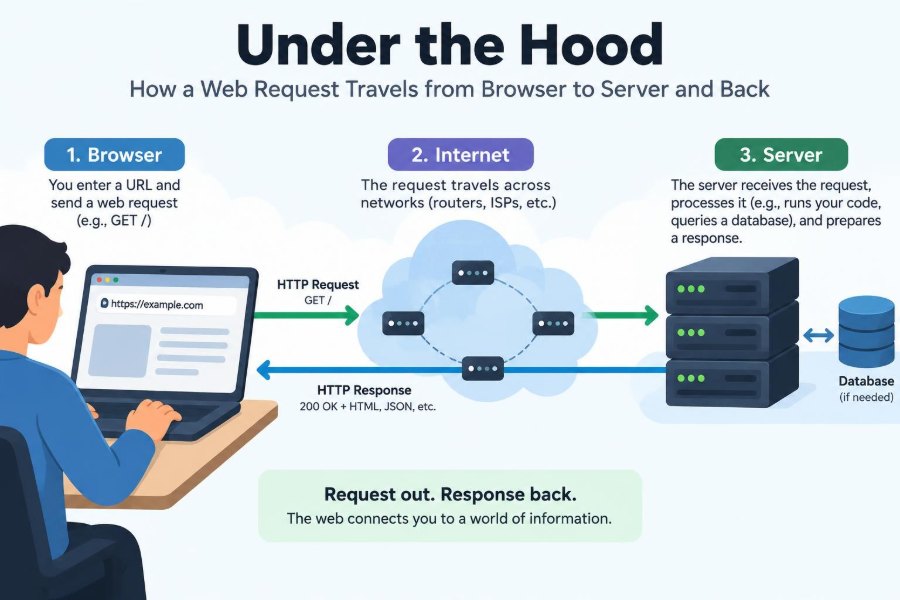

You type a web address, press Enter, and a page appears. The interaction feels immediate: a product catalog loads, a dashboard updates, or a message is sent.
Behind that apparently simple moment is a carefully coordinated trip across several systems. Your browser must identify a destination, establish a secure connection, ask for the right resource, and turn the response into something you can read and use.
Understanding this journey makes web development less mysterious. It also gives you a practical way to investigate slow pages, login failures, broken APIs, caching surprises, and production incidents.
Let’s follow one hypothetical request: a browser loading https://shop.example/products. Real systems vary, but the path below captures the major pieces that work together.
🗺️ The Request Is a Chain, Not a Single Jump
A web request is not usually one computer talking directly to one other computer. It is a chain of decisions and handoffs: browser code, operating system networking, local router, internet providers, DNS services, security layers, load balancers, application servers, databases, and caches.
Each layer solves a different problem. DNS finds an address, TLS protects the conversation, HTTP describes the request, and the application decides what response to create. This separation lets the web scale, but it also means a failure can occur at many points.
⌨️ A URL Gives the Browser Instructions
The URL is more than a name. In https://shop.example/products?sort=price, the scheme is https, the host is shop.example, the path is /products, and the query string is sort=price.
The scheme tells the browser which protocol family to use and, by convention, which port is likely involved. HTTPS normally uses port 443, while HTTP normally uses port 80. The path and query help the server select or generate the requested resource.
🧠 The Browser Checks What It Already Knows
Before using the network, the browser may satisfy part of the request locally. Its HTTP cache can contain a still-fresh copy of an image, stylesheet, script, or even an HTML document.
It may also reuse an existing connection to the same origin, which is the combination of scheme, host, and port. Reusing connections avoids repeating setup work, especially on pages that require many files.
A cached result is not necessarily stale. Servers can provide caching rules that specify how long a response can be reused and when the browser should ask whether its copy is still valid.
📇 DNS Translates a Name into an Address
Computers route traffic using IP addresses, not memorable host names. The Domain Name System, or DNS, translates shop.example into one or more addresses such as an IPv4 or IPv6 address.
The browser and operating system first check local caches. If no useful answer is available, a configured DNS resolver performs the lookup, often consulting authoritative DNS servers for the domain.
DNS answers have a time-to-live value, commonly called a TTL. Caches can retain the answer for that period, reducing lookup time and DNS traffic, but a changed address may not become visible everywhere instantly.
🧭 DNS Can Return More Than One Destination
A hostname can resolve to multiple addresses. This supports resilience, geographic routing, and distribution across infrastructure. The address may represent a content delivery network, a reverse proxy, or a load balancer rather than the application machine itself.
That is why “the server” is useful shorthand but often incomplete. The browser is asking for a named service; infrastructure decides which healthy, suitable machine should handle the request.
📡 Packets Leave the Local Network
Once an address is known, the operating system sends network data toward the local network’s gateway, typically a home router or corporate network device. The router forwards it toward the wider internet through its configured route.
Data is divided into small units called packets. Routers along the way make forwarding decisions based on destination addresses. They do not need to understand the page, the JSON payload, or the meaning of your button click.
Routes can differ between requests and between outbound and return traffic. The internet is a network of interconnected networks, not a single fixed road.
🔌 TCP Creates a Reliable Conversation
Many web requests use TCP, the Transmission Control Protocol. TCP provides a reliable ordered byte stream: it detects missing data, retransmits when necessary, and presents received bytes in the correct order to the application.
Traditionally, a new TCP connection begins with a three-way handshake. Client and server exchange messages to confirm that both sides can send and receive and to agree on initial sequence numbers.
Reliability has a cost. Waiting for acknowledgments, recovering lost packets, and responding to congestion all add behavior that developers may notice as latency or uneven performance.
🚀 QUIC and HTTP/3 Take a Different Transport Path
Some sites use HTTP/3, which runs over QUIC rather than TCP. QUIC uses UDP packets underneath but implements reliability, congestion control, encryption integration, and multiple independent streams at a higher layer.
A practical benefit is that loss affecting one stream does not necessarily hold up unrelated streams in the same connection. Support depends on the browser, server, network conditions, and deployment, so TCP-based HTTP/2 remains widely relevant.
🔐 TLS Proves Identity and Encrypts Traffic
For HTTPS, the browser and server perform a TLS handshake. TLS encrypts data in transit and helps the browser verify that it is talking to the holder of a certificate for the requested hostname.
During this setup, the server supplies its certificate chain. The browser checks details such as hostname matching, validity periods, trust chains, and revocation information where applicable. A warning page appears when this trust process cannot be completed safely.
TLS does not make an application automatically secure. It protects the connection against many network-level threats, but vulnerable server code can still expose data after it receives the request.
🤝 Connection Reuse Reduces Setup Costs
Opening TCP and TLS connections repeatedly adds round trips. Browsers therefore try to reuse secure connections when allowed, and TLS can sometimes resume a previous session with less setup work.
HTTP/2 and HTTP/3 can carry multiple requests concurrently over one connection. This is especially useful when an HTML page references scripts, styles, fonts, images, and API calls that all target the same origin.
✉️ HTTP Defines the Actual Request
Once a connection is available, the browser sends an HTTP request. HTTP is an application protocol: it defines methods, headers, status codes, and message semantics so client and server can communicate predictably.
A simplified request might look like this:
GET /products?sort=price HTTP/1.1
Host: shop.example
Accept: text/html
Cookie: session=...
The exact wire format differs with HTTP versions, but the core meaning remains: request a resource, describe relevant context, and optionally send a body.
🧰 Methods Express Intent, Imperfectly
GET commonly retrieves data, while POST commonly submits data that may cause a change. PUT, PATCH, and DELETE are often used by APIs to express replacement, partial changes, and deletion.
These conventions matter for caching, retries, and safety. A browser can often repeat a safe read request more confidently than a payment submission. Still, method names alone do not guarantee behavior; server implementation determines what actually happens.
🏷️ Headers Carry Context and Rules
Headers carry metadata rather than the primary content. They can describe accepted formats, compression support, language preferences, authentication credentials, caching directives, origin information, and more.
For example, Accept: application/json expresses a preference for JSON, while Content-Type: application/json tells the receiver how to interpret a sent body. Confusing these two is a common API integration mistake.
🍪 Cookies Reattach Browser State
HTTP is stateless: each request can be understood independently at the protocol level. Cookies let a server ask a browser to store a small value and return it on later requests that match the cookie’s rules.
A session cookie may contain an opaque identifier. The server maps that identifier to session data, such as an authenticated user or a shopping cart. Good designs avoid placing sensitive information directly in readable, unprotected cookie values.
Attributes such as Secure, HttpOnly, and SameSite help limit exposure and cross-site behavior. They are valuable controls, but they must be selected to fit the application’s login and embedding flows.
🛡️ The Edge Often Receives the Request First
The first infrastructure component to receive a request may be a CDN edge location, web application firewall, reverse proxy, or cloud load balancer. It can terminate TLS, reject clearly malicious traffic, serve cached static assets, or forward the request inward.
Keeping this work at the edge protects application servers from unnecessary load and puts reusable content closer to users. However, it adds configuration layers, so headers, redirects, and cache rules need careful debugging.
⚖️ Load Balancers Choose a Healthy Backend
A load balancer distributes requests across available backend instances. Its decision may account for health checks, current connections, location, weights, or session affinity requirements.
Health checks are essential because a machine can be reachable at the network level while its application is unable to serve meaningful traffic. A well-designed check verifies enough to detect failure without turning the check itself into expensive production work.
🚪 Reverse Proxies Shape Internal Traffic
A reverse proxy sits in front of one or more services. It may route /api to an API service and /images to a static asset service, normalize headers, compress responses, and enforce request-size or timeout limits.
Forwarded headers deserve attention. Applications often need the original client IP or original HTTPS scheme, but they should trust these headers only when a known proxy has set or sanitized them. Blindly trusting client-supplied forwarding headers creates security risks.
🧩 Routing Finds the Application Handler
Inside the application, a router maps the method and path to code. A request for GET /products/42 might match a product controller, while POST /orders might match an order-creation endpoint.
Frameworks usually run middleware before and after the handler. Middleware can parse bodies, authenticate users, log request IDs, apply rate limits, handle errors, or add response headers. Order matters because later code depends on earlier setup.
🔑 Authentication Is Not Authorization
Authentication answers “who is making this request?” A session, API key, token, or client certificate may provide that identity. Authorization answers “may this identity perform this action?”
These are easy to blur together. A valid logged-in user may be authenticated but still forbidden from editing another user’s profile. Checking authorization only in the user interface is insufficient; the server must enforce it for every sensitive operation.
✅ Validation Makes Incoming Data Usable
Request input is untrusted, including values from forms, JSON bodies, query strings, cookies, and headers. Validation checks that required fields exist, types and formats are acceptable, ranges are sensible, and values meet business rules.
Validation is not just a security feature. Clear validation prevents confusing downstream failures, such as a database error caused by an empty required field. Error messages should be useful to clients without revealing internal implementation details.
🧠 Business Logic Applies the Product Rules
Business logic is where the application performs work meaningful to the product: calculating a price, checking stock, creating a booking, choosing recommendations, or deciding whether an account can access a report.
For an order request, the server may verify inventory, calculate taxes according to configured rules, reserve items, and record the order. These steps often need careful transaction boundaries so partial failures do not leave inconsistent data behind.
🗄️ Databases and Caches Supply Data
The handler may read or write a database, retrieve a cached value, or call another internal service. A cache can return frequently used data quickly, but it introduces a freshness question: when should old values expire or be invalidated?
Databases provide durable storage and query capabilities, but queries can become a bottleneck when they scan excessive data, wait on locks, or execute repeatedly for each item in a list. Observability tools and query analysis are more reliable than guessing.
🔗 One Request May Trigger More Requests
Modern applications are often composed of services. A page request might call an identity service, product service, pricing service, and recommendation service before it can respond.
This design can separate responsibilities, but each remote call adds latency and a new failure mode. Timeouts, bounded retries, fallback behavior, and propagation of request IDs help prevent a small downstream problem from becoming a broad outage.
📦 The Server Builds a Response
The application returns a response with a status code, headers, and usually a body. A successful HTML page might use 200 OK; a newly created resource may use 201 Created; missing resources commonly use 404 Not Found.
Status codes communicate broad outcome categories, not every detail. A response body can include structured error information, while headers can define caching, cookies, security policy, content type, and compression.
| Status range | General meaning | Typical example |
|---|---|---|
| 2xx | Successful handling | 200 OK |
| 3xx | Redirect or cache-related instruction | 302 Found |
| 4xx | Problem with the request or permissions | 403 Forbidden |
| 5xx | Server-side failure or unavailable dependency | 503 Service Unavailable |
🗜️ Compression and Streaming Change Delivery
Text responses can often be compressed before transit, reducing transferred bytes. The server indicates this with headers, and the browser decompresses the result. Compression is less useful for formats that are already compressed, such as many images and videos.
Some responses are streamed: the server begins sending data before the full response is ready. Streaming can improve perceived responsiveness, but it complicates error handling because headers and already-sent content cannot simply be rewritten later.
↩️ The Response Travels Through the Same Layers
The response passes back through application middleware, proxies, load balancers, and networks to the browser. Intermediaries may add headers, log timing, cache a response, or transform it according to configured rules.
Return packets do not necessarily follow the exact same physical route as outbound packets. What matters to TCP or QUIC is that the data arrives correctly; the network can choose routes dynamically.
🧾 The Browser Interprets Status, Headers, and Bytes
On receipt, the browser checks the response metadata and interprets bytes according to the declared content type. HTML becomes a document, JSON becomes data for JavaScript, and an image type invokes an image decoder.
Redirect responses can cause another request. A 301, 302, 307, or 308 tells the browser to use another location, with details about method handling varying by status code and browser behavior.
🎨 HTML Parsing Starts Rendering Before Everything Finishes
The browser parses HTML into a Document Object Model, or DOM. As it discovers stylesheets, scripts, images, fonts, and other referenced resources, it may start additional requests.
CSS helps build the render tree, which represents what can be displayed. JavaScript can modify the DOM and may block parsing in certain loading patterns. The browser then calculates layout, paints visual elements, and combines layers for display.
This is why a single navigation commonly becomes dozens or hundreds of requests. The first HTML response is often an instruction sheet for everything else the page needs.
⏱️ Latency Is the Sum of Several Waits
“The server is slow” is often an incomplete diagnosis. Total waiting time can include DNS lookup, connection setup, TLS negotiation, network round trips, proxy queues, application processing, database work, response transfer, and browser rendering.
A large response may have a fast time to first byte but take longer to download. Conversely, a tiny response can wait a long time before its first byte if a backend dependency is slow. Measure the stage that is actually causing the delay.
🔍 Developer Tools Turn the Journey into Evidence
Browser developer tools provide a network panel that shows requests, status codes, headers, transferred sizes, timing, and initiators. It is usually the fastest place to begin when a page behaves unexpectedly.
- Check whether a request was sent and whether it was blocked before sending.
- Compare the requested URL, method, headers, and body with what the API expects.
- Inspect status codes and response bodies before assuming a frontend bug.
- Look for redirects, duplicate requests, unexpectedly large assets, and failed preflight requests.
On the server, structured logs, traces, and metrics should share a correlation or request ID where possible. That makes one user-visible failure traceable across proxies and services.
🚧 Common Failures Have Distinct Meanings
A DNS failure means the name could not be resolved; it is different from a connection refusal, where an address was reached but no service accepted the connection. A TLS certificate error is different again: a connection may exist, but the browser cannot establish trust.
At the HTTP level, a 401 usually indicates missing or invalid authentication, while a 403 indicates that the server understood the identity but refuses the action. A 500 signals an unexpected server failure, but good monitoring should uncover the underlying exception rather than treating the code as the diagnosis.
🧱 Design for Timeouts, Retries, and Partial Failure
Networks and dependencies fail in ordinary operation. Clients and services need timeouts so they do not wait indefinitely, but a timeout must be chosen with the user experience and normal service behavior in mind.
Retries can help with transient failures, especially for operations designed to be safely repeated. They can also multiply traffic during an outage. For state-changing requests, idempotency keys or carefully designed semantics help the server recognize a retried operation rather than performing it twice.
🛠️ A Practical Debugging Order
When a request fails, debug from the outside inward. Start with the visible URL and browser network record, then confirm DNS and TLS behavior, inspect edge or proxy logs, and finally investigate application and dependency traces.
This order narrows the search space. There is little value tuning a database query if the browser never completed DNS resolution, and little value changing frontend parsing if the API returned an authorization error.
🎯 The Core Principle: Follow the Boundaries
A web request crosses boundaries between browser and operating system, private network and internet, edge and application, service and database, then back to rendering. Each boundary has a contract: names resolve to addresses, encrypted connections protect bytes, HTTP conveys meaning, and application code enforces product rules.
The most effective engineers do not treat the journey as magic or memorize every packet detail. They identify the boundary where expectations first diverge, inspect the evidence there, and work outward with a clear model of the layers involved.
Every web page and API call is a coordinated conversation: understanding its layers turns slow, broken, or surprising behavior into a problem you can systematically investigate. ⚙️🌐🔎