
You open a familiar shopping app and product images appear almost immediately. Then you visit a new category, and the experience slows down: placeholders linger, results arrive in stages, and the interface feels less responsive.
Often, the difference is not that one screen contains simpler code. The application may already have some of the information it needs close at hand. On the slower screen, it must travel farther—perhaps to a database, another service, or a server across a network.
Caching is the practice of keeping reusable results in a faster-to-reach place. It is one of the reasons modern applications can feel smooth even when the systems behind them are large and distributed.
But a cache is not simply a speed button. It introduces questions about freshness, memory, failures, and consistency. Understanding those trade-offs helps engineers design systems that are not only fast, but trustworthy.
⚡ What Caching Means
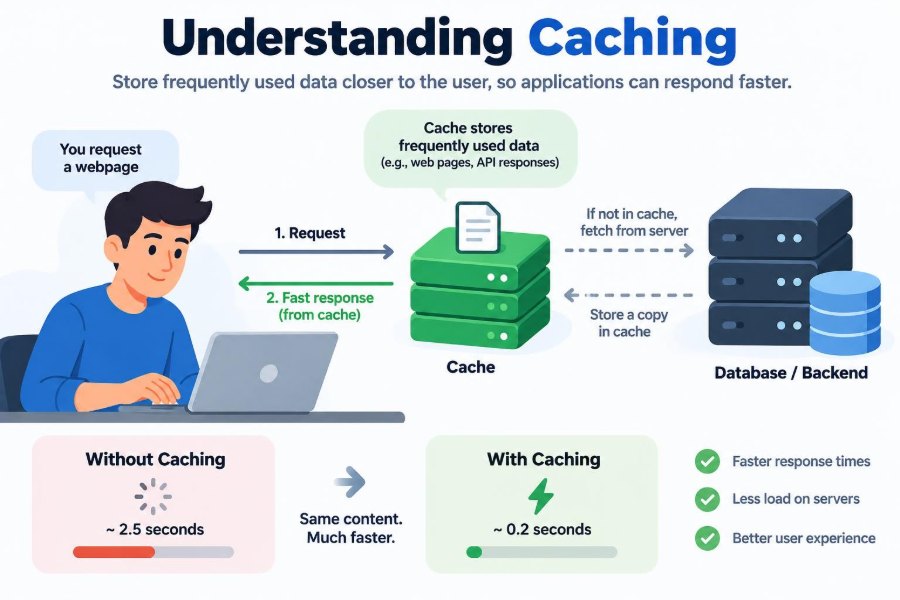
A cache is a temporary store of data that is expensive, slow, or inconvenient to obtain again. When an application needs data, it checks the cache first. If the data is there and still usable, it can avoid repeating the slower work.
The stored item might be a database query result, a rendered web page, an image, a compiled file, an API response, or a computed recommendation. “Temporary” does not always mean seconds; some cached assets can safely remain for days or longer.
🧠 The Familiar Memory Analogy
Imagine looking up a colleague’s extension number. The first time, you search a directory. After using it repeatedly, you remember it. Your memory acts like a cache: it provides a quick answer instead of repeating the full lookup.
This analogy also reveals the risk. If the colleague changes extensions, your remembered answer may be wrong. A useful cache needs rules for both storing answers and deciding when an old answer should no longer be used.
🚦 Why Speed Feels So Noticeable
Users experience delay as a sequence of waits: tapping a button, waiting for a response, then waiting for a page to draw. A cache can remove or shorten part of that sequence, especially when it avoids network travel or repeated database work.
Latency is the time required for an operation to complete. Even a small amount of latency can become visible when a page needs many separate resources. Faster access also makes interfaces feel more direct, which matters for search, navigation, and frequently repeated actions.
🛣️ Where the Time Usually Goes
Fetching data may involve several steps: a browser contacts a server, the server checks permissions, calls another service, queries storage, transforms the result, and sends a response back. Each boundary can add delay and uncertainty.
Caching moves a reusable answer nearer to where it is needed or avoids rebuilding it. The best cache location depends on which part of this path is costly and which data can safely be reused.
🎯 Cache Hits and Cache Misses
A cache hit occurs when the requested item is found and can be used. A cache miss occurs when it is absent, expired, or unsuitable for the request. On a miss, the application retrieves or computes the original value.
The hit rate is the share of requests served by the cache. A high hit rate can reduce work substantially, but it is not a complete success measure. Serving an outdated account balance quickly is worse than fetching the correct one more slowly.
🔑 Cache Keys Define What Is Reused
A cache needs a key: an identifier used to find a stored value. For a product page, a key might include the product ID. For a personalized response, it may also need the user, language, currency, permission level, or experiment variant.
Key design is a correctness problem. If two requests that should differ share one key, one user may receive another user’s data or the wrong localized result. If keys include too many changing details, reuse drops and the cache provides little value.
📦 What Actually Gets Cached
Applications can cache at several levels. Some store raw records; others store final outputs that are ready to display. The right choice depends on the cost of creating the value and how broadly it can be reused.
| Cached item | Typical benefit | Common concern |
|---|---|---|
| Static files such as images and scripts | Fewer downloads and faster page rendering | Users may retain an old file after deployment |
| Database query results | Less database load | Results can become stale after writes |
| API responses | Less repeated service work | Keys must reflect request variations |
| Rendered pages or fragments | Avoids repeated template rendering | Personal content must be handled carefully |
| Computed values | Avoids expensive calculations | Invalidation rules can be complex |
🌐 Browser Caches Serve Repeat Visits
Browsers cache resources such as style sheets, JavaScript files, fonts, and images. When a person revisits a site, the browser may reuse local copies instead of downloading every resource again.
HTTP caching headers tell browsers and intermediate systems how long a response may be reused and whether it must be checked again first. Strong cache policy can make repeat navigation much faster without changing application code.
📍 Edge Caches Move Content Closer
A content delivery network, or CDN, operates servers in multiple locations. It can cache public content near users, reducing the distance a request travels to reach an origin server.
This is particularly useful for large files and broadly shared pages. It does not eliminate the need for origin infrastructure: personalized requests, cache misses, and content updates still require careful handling.
🖥️ Server-Side Caches Reduce Repeated Work
On the server, a cache may live in process memory or in a separate shared caching system. It commonly stores results that would otherwise require database queries, service calls, or computationally expensive transformations.
A shared cache lets multiple application instances reuse the same entries. In-process caches are extremely quick, but each server has its own copy, which can make invalidation and memory limits harder to manage at scale.
📱 Device Caches Support Offline-Friendly Design
Mobile and desktop applications can cache data and assets on the device. This reduces network usage and can let people view recently loaded content when connectivity is weak or absent.
Local data needs clear expectations. A news reader can show older articles with a visible refresh state; a banking app should be much more cautious about presenting sensitive, time-dependent information as current.
🗃️ Database Caches Are Already Working
Databases often maintain internal caches for frequently accessed pages and indexes. Operating systems also cache file data in memory. This means an apparently repeated database query may be faster than a cold query even before an application-level cache is added.
Engineers should not assume every slow request needs another cache. First identify whether the bottleneck is query design, missing indexes, network latency, overloaded storage, or application processing.
🔄 The Cache-Aside Pattern
Cache-aside, also called lazy loading, is a common application pattern. The application checks the cache, retrieves the data from the source on a miss, stores it in the cache, and returns it.
- Read using the cache key.
- On a hit, return the cached value.
- On a miss, load the value from its authoritative source.
- Store the result with an expiration policy.
- Return the result.
Its advantage is simplicity and selective caching. Its weakness is that the first request after expiration pays the full retrieval cost.
✍️ Write-Through and Write-Behind Choices
In a write-through design, updates are written to the cache and the underlying data store together. Reads can then find a current value in the cache, though writes may take longer because they perform more work upfront.
In write-behind designs, writes may reach the cache first and be persisted later. This can improve write throughput, but it introduces failure and durability risks. It is not appropriate when losing a recently accepted update would be unacceptable.
⏳ Time-to-Live Limits Staleness
A time-to-live (TTL) is the period after which a cache entry expires. A short TTL reduces how long an old value can remain, while a long TTL improves reuse and reduces load on the original source.
There is no universally correct duration. A public logo changes rarely; a stock quantity can change frequently. The TTL should reflect the cost of staleness, the rate of change, and the ability to invalidate entries when updates occur.
🧹 Invalidation Is the Difficult Part
Invalidation means removing or replacing cached data when it should no longer be used. It is difficult because one underlying change may affect many derived values: a product update can affect its detail page, search results, category listings, and recommendations.
A practical strategy is to document which writes affect which cache keys. When exact invalidation becomes too complicated, shorter TTLs, versioned keys, or deliberately accepting bounded staleness may be safer than fragile logic.
🏷️ Versioned Assets Avoid Old Deployments
Front-end applications often place a content-derived version in a file name, such as app.a1b2c3.js. When the file changes, its name changes too. Browsers and CDNs can cache the old version for a long time without confusing it with the new one.
This approach is especially effective for immutable assets: files that will never change at the same URL. The HTML that points to those assets generally needs a shorter caching policy so it can reference the newest names.
🕰️ Freshness Is a Product Decision
Not every screen requires the same freshness. A social feed may reasonably show a post a little late. A dashboard may tolerate slightly delayed analytics. A checkout total, access permission, or security setting usually needs tighter correctness guarantees.
Engineers should ask product and domain experts what “current” means for each value. Caching policy is not just infrastructure tuning; it encodes a promise to users about what they are seeing.
👤 Personalization Changes the Equation
Public content is easy to share through a cache because many people can receive the same response. Personalized content is different. A homepage containing a name, recent activity, or private recommendations must not be stored under a key that another visitor can access.
Often, an application caches shared building blocks while generating the personal portion separately. This preserves much of the performance benefit without treating private output as public data.
🔒 Sensitive Data Needs Extra Restraint
Cached data may exist in browser storage, server memory, logs, backups, or a third-party edge system. Sensitive information should only be cached when the design explicitly accounts for access controls, encryption where appropriate, retention, and invalidation.
A response that is safe for one authenticated user is not automatically safe for a shared cache. Correct cache-control directives and careful authentication boundaries matter as much as raw speed.
📈 Caches Protect Systems Under Load
When many requests ask for the same data, caching can prevent the database or downstream service from doing identical work repeatedly. This improves capacity and can help a system remain responsive during predictable bursts.
It is not unlimited protection. A cache can run out of memory, become a bottleneck, or be bypassed by a surge of unique requests. Capacity planning still requires understanding traffic patterns and failure modes.
🐘 The Cache Stampede Problem
A cache stampede happens when many requests miss the same key at about the same time. They may all recompute the same expensive value, overwhelming the very service the cache was meant to protect.
Common mitigations include allowing one request to rebuild the value while others wait, adding small variation to expiration times, serving a briefly stale value during refresh, or precomputing particularly popular entries. The best method depends on whether stale data is acceptable.
🧊 Cold Caches Create Slow Starts
A cache is cold when it has few useful entries, such as after deployment, restart, eviction, or a new feature launch. Early requests then experience misses and may place sudden load on origin systems.
For predictable high-traffic data, teams sometimes warm caches by safely loading selected entries ahead of demand. Warming should be limited and monitored; blindly loading everything can consume memory and create unnecessary work.
🗑️ Eviction Makes Room
Caches have finite space. When full, they evict entries according to a policy, often favoring items that were least recently used, least frequently used, or closest to expiration.
Eviction is not a bug; it is a normal part of cache behavior. Problems arise when a working set—the data actively needed by requests—is larger than available memory, causing constant eviction and reload cycles known as cache churn.
📊 Measure More Than Hit Rate
Useful cache monitoring includes hits, misses, expiration rates, evictions, memory use, response latency, error rates, and load on the original data source. A rising hit rate can conceal a problem if entries are incorrect or if the cache itself is responding slowly.
Observe behavior during deployments, traffic spikes, and source-service failures. Metrics should answer concrete questions: Did caching reduce database pressure? Are users receiving stale data? Which keys consume most memory?
🧪 Test Both the Hit and Miss Paths
A feature can work perfectly on a cache hit and fail when the entry expires. Tests should cover misses, expired entries, malformed cached values, unavailable cache services, and updates that require invalidation.
Also test authorization boundaries. A cache key mistake may not appear in ordinary functional tests, yet it can become a serious privacy issue when different users make similar requests.
🛟 Design for Cache Failure
A cache should usually be an optimization, not the sole source of truth. If it is unavailable, the application should know whether to fall back to the authoritative source, return a controlled error, or use a safe stale response.
Fallbacks need limits. If every request suddenly bypasses a failed cache and hits a fragile database, the fallback can create a larger outage. Rate limits, circuit breakers, and graceful degradation may be necessary for critical systems.
🚫 Common Caching Mistakes
- Caching before measuring: adding complexity when a query, index, or network call should be fixed first.
- Using vague keys: forgetting language, permissions, tenant, or query parameters that change the output.
- Ignoring invalidation: assuming a long TTL is an acceptable substitute for update handling.
- Caching errors indiscriminately: turning a brief upstream failure into a persistent failure for users.
- Storing everything: wasting memory on values that are rarely reused or cheap to compute.
🧭 A Practical Decision Framework
Before caching a value, identify the source of cost. Is the work repeated? Is the result shared? Is it expensive enough to justify added operational complexity? How incorrect would the result be after a delay?
A good first design defines the key, owner of the authoritative data, TTL, invalidation trigger, memory limit, fallback behavior, and metrics. Writing these choices down exposes unanswered questions before they become production incidents.
🧩 Start Small and Learn
Begin with stable, broadly reused data such as static assets, public configuration, or popular read-heavy records. These cases make cache behavior easier to observe and have clearer correctness boundaries.
Then expand only where measurements show meaningful repeated cost. A smaller cache that is understood, monitored, and recoverable is usually more valuable than an ambitious one filled with unclear rules.
✅ The Core Principle: Fast Enough, Fresh Enough
Caching works because it trades some storage and complexity for less repeated work and shorter retrieval paths. Its real value is not merely lower latency; it can reduce strain on databases, services, networks, and user patience.
The trade-off is that a cached answer can differ from the newest answer. Strong designs make that trade-off intentional: they reuse data where reuse is safe, keep sensitive or volatile information under stricter control, and remain functional when the cache is empty or unavailable.
Caching makes applications feel faster when teams deliberately balance speed, freshness, correctness, and resilience rather than optimizing only for the quickest possible response. With clear keys, sensible expiration, careful invalidation, and observability, a cache becomes a reliable part of the system instead of a hidden source of surprises. ⚙️🚀