
A product feels fast in development. A customer opens a dashboard, searches orders, and refreshes a report without noticing the database underneath. Then the product gains users, the tables grow, and a page that once loaded instantly begins to pause.
The first reaction is often to add a larger database server. Sometimes that is appropriate. More often, however, the database is spending time doing avoidable work: reading far too many rows, sorting data it could have found already ordered, repeating identical calculations, or waiting on overloaded connections.
These problems are database bottlenecks: points where retrieving or changing data limits an application’s responsiveness or capacity. They affect user experience, infrastructure cost, background jobs, and even the reliability of deployments.
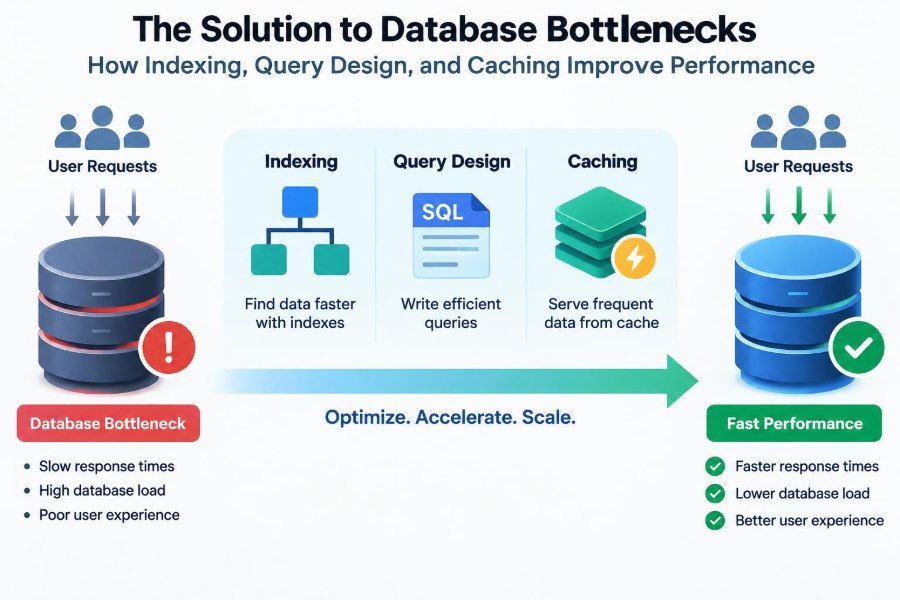
The practical solution is rarely one trick. Good indexes, intentional query design, and carefully chosen caches work together to reduce work at the point where it is most expensive.
🔎 What a Database Bottleneck Actually Is
A bottleneck occurs when database work takes longer than the application can comfortably tolerate. That work may involve disk reads, CPU-intensive sorting, memory pressure, network transfer, lock waits, or simply too many simultaneous requests.
Slow queries are a common symptom, but they are not the whole diagnosis. A query that is reasonably quick alone can still cause trouble when hundreds of requests run it at once. Likewise, a fast query that returns an enormous response can make the application slow after the database has done its part.
📏 Start With a Performance Budget
“Fast” needs context. An administrative report may reasonably take longer than a customer-facing autocomplete box, while a checkout transaction needs predictable behavior even under load.
Set expectations for key operations: acceptable response time, expected request volume, typical result size, and freshness requirements. This turns vague complaints into useful engineering questions, such as whether a search endpoint must return its first page quickly or whether a dashboard may show data that is a minute old.
🩺 Measure Before Changing Anything
Do not add indexes or caches based solely on intuition. Gather evidence from slow-query logs, application tracing, database metrics, and representative production-like data.
For each costly operation, inspect frequency as well as duration. A query taking two seconds once per night may be less urgent than a 30-millisecond query called thousands of times per minute. Also record rows examined, rows returned, temporary-file use, lock waits, and connection-pool saturation where your database exposes them.
🗺️ Read the Query Plan
A query plan, often produced with EXPLAIN or a similar command, describes how the optimizer expects to retrieve data. It may show an index lookup, a full table scan, a join strategy, an estimated number of rows, and an expensive sort or aggregation.
Plans are estimates, not verdicts. Still, they reveal a critical mismatch: a query may return ten rows while examining millions to find them. Compare estimated and actual row counts when your database supports runtime analysis; large differences can indicate stale statistics or data distributions the optimizer did not predict.
📚 Indexes Are Accelerators, Not Magic
An index is a separate data structure that helps a database locate rows without inspecting every row in a table. The familiar analogy is a book index: finding a topic by page number is faster than reading every page.
Most relational indexes use a tree-like structure that supports efficient lookup and ordered traversal. But an index has costs. It consumes storage, must be maintained during inserts, updates, and deletes, and can be ignored when the optimizer judges a table scan cheaper.
🎯 Index Columns Used to Find Rows
Begin with columns regularly used in WHERE clauses, join conditions, and selective filters. A hypothetical orders screen that asks for one customer’s recent purchases benefits from an index that helps locate that customer’s rows.
SELECT id, created_at, total
FROM orders
WHERE customer_id = 42
ORDER BY created_at DESC
LIMIT 20;
An index involving customer_id is a strong candidate because it narrows the search. Whether it should also include created_at depends on the ordering and workload, which leads to composite indexes.
🧩 Design Composite Indexes in Query Order
A composite index covers more than one column. Its column order matters because the index is organized from left to right. For the order query, (customer_id, created_at) can both filter a customer and traverse that customer’s orders in time order.
As a useful starting rule, put equality conditions first, then columns used for range conditions or ordering. This is not universal: database engines differ, and a query plan should decide the final design. Build indexes for real access patterns rather than every possible combination of columns.
↔️ Understand the Leftmost Prefix Rule
An index on (customer_id, created_at) is generally useful for queries filtering by customer_id, and often for queries using both columns. It is usually not an equally good substitute for a query filtering only by created_at.
This is often called the leftmost prefix principle. The database can efficiently navigate the leading part of the index, but cannot always jump directly to values in a later column. Treat composite indexes as ordered tools, not unordered sets.
🧮 Match Indexes to Sorting and Pagination
Sorting can be expensive because the database may need to collect many qualifying rows and order them before returning a small page. An index aligned with the filter and ORDER BY can avoid that extra sort.
Offset pagination becomes progressively costly in large result sets because the database may still process skipped rows. Keyset pagination instead continues from the last seen value, such as created_at plus a unique id. It is typically more stable for timelines and works naturally with a matching index.
🧷 Use Unique and Partial Indexes Deliberately
A unique index enforces a data rule while accelerating lookups. For example, a unique normalized email address can prevent duplicate accounts and make account lookup efficient. Constraints are not merely validation in application code; placing core rules in the database protects all writers.
Some databases also support partial indexes, which index only rows meeting a condition. An index limited to active records can be smaller and more relevant than indexing every historical row. Confirm that the query predicate matches the partial-index condition closely enough for the optimizer to use it.
📦 Covering Indexes Can Avoid Table Reads
A covering index contains all data needed for a query: filter columns, ordering columns, and selected output columns. The database may answer the query from the index itself rather than fetching full table rows.
This can help high-volume read paths, but wide indexes increase storage and write costs. Adding every selected column “just in case” produces bloated indexes. Use coverage only after measurement identifies a meaningful lookup cost.
⚖️ Every Index Makes Writes More Expensive
On every insert, update to indexed data, or delete, the database must update relevant index structures. More indexes can therefore slow write-heavy tables, increase transaction time, and add storage pressure.
Review indexes periodically. Redundant indexes, indexes with little use, and overlapping composites are common in mature systems. Remove them cautiously: confirm workload coverage, deploy safely, and watch production behavior because an index useful only for a periodic job may not appear frequently in short observations.
🚫 Avoid Functions That Hide Indexed Columns
A seemingly harmless expression can prevent an ordinary index from being used efficiently. For example, applying a function to a timestamp column often forces the database to compute that function for many rows.
SELECT * FROM events
WHERE DATE(created_at) = '2025-03-08';
Prefer a range that preserves the raw column: created_at >= start and created_at < end. Some engines offer functional indexes when the expression is genuinely required, but rewriting the predicate is often clearer and more portable.
🔤 Watch for Implicit Conversions and Wildcards
Comparing a numeric column with a text parameter, or using mismatched character encodings, can cause conversion work and alter index choices. Bind parameters using the correct application types rather than relying on automatic coercion.
A prefix search such as name LIKE 'sam%' may use a suitable index. A leading wildcard, name LIKE '%sam%', usually cannot use a conventional ordered index efficiently. For broad text search, consider your database’s full-text capabilities or a purpose-built search system when requirements justify it.
✂️ Select Only the Data You Need
SELECT * is convenient but rarely expresses the actual contract of an endpoint. It can transfer unnecessary data, prevent a compact covering index, expose newly added fields unintentionally, and increase memory use in the application.
Request the columns the screen or service needs. The same principle applies to result counts: fetching thousands of records to display twenty wastes database, network, and application resources. Put limits in the query, not after data reaches the server.
🔗 Make Joins Explicit and Purposeful
Joins are fundamental, not inherently slow. They become costly when join keys lack indexes, when filters arrive too late, or when one-to-many relationships multiply rows unexpectedly.
Index foreign-key columns used in frequent joins, then inspect whether the joined result represents the intended cardinality. If one order has many line items, joining orders to items returns multiple rows per order. A dashboard that expects one row per order may need aggregation, a separate query, or a different data shape.
🪆 Stop the N+1 Query Pattern
N+1 happens when an application fetches a list with one query and then issues an additional query for each item. For example, loading 100 orders and separately fetching each customer turns one page into 101 database round trips.
Use a join, batched lookup with WHERE id IN (...), or an ORM preloading feature as appropriate. The best choice depends on how much related data is needed. Avoid replacing N+1 with one enormous join that duplicates large parent records across every child row.
🧱 Aggregate With Care
COUNT, SUM, grouping, and distinct operations can scan and sort large sets. They are often necessary, but they should have a defined scope: a date range, tenant, status, or other selective filter.
For expensive dashboards, consider precomputed summaries or materialized views where supported. These trade immediate freshness for faster reads and require a refresh strategy. A financial balance or operational control may need transactional accuracy; a trend chart may accept a controlled delay.
🔒 Transactions and Lock Contention Matter
Databases coordinate concurrent changes through transactions and locking or versioning mechanisms. A slow transaction can block other work, particularly when it updates popular rows or holds locks while the application performs unrelated network calls.
Keep transactions short and focused. Read required data, validate, write, and commit promptly. Use consistent update order when multiple rows or tables are involved to reduce deadlock risk, and handle expected deadlock or serialization failures with safe retry logic where the business operation permits it.
🏊 Size the Connection Pool for the Database
A connection pool reuses database connections instead of creating one for every request. It improves efficiency, but a larger pool is not automatically better. Too many active connections can overwhelm CPU, memory, locks, and disk scheduling inside the database.
Set pool limits based on database capacity and the number of application instances. Measure queue time: if requests wait for a connection, investigate query duration and total concurrency before simply raising limits. A pool can protect a stressed database by applying backpressure.
⚡ Know What Caching Solves
A cache stores a previously computed or fetched result so later requests can avoid repeating work. It can live in process memory, a shared cache service, an HTTP cache, a database buffer pool, or a content delivery network. These layers solve different problems.
Caching is most useful for data that is read frequently, expensive to produce, and acceptable to serve with a defined freshness policy. It does not repair incorrect queries, missing indexes, or uncontrolled traffic by itself; it can merely conceal them until cache misses occur.
🗝️ Choose a Cache Pattern
Cache-aside is a common approach: the application checks the cache, reads the database on a miss, then stores the result. It is simple and works well when temporary staleness is acceptable.
Write-through updates cache and database together, simplifying read freshness at the cost of write-path work. Write-behind delays database persistence and introduces durability complexity. For most business applications, cache-aside plus explicit invalidation is easier to reason about than sophisticated write policies.
⏳ Define Freshness and Invalidation
Every cache needs an answer to one question: what happens after the underlying data changes? A time-to-live (TTL) limits how long an entry remains valid, while event-based invalidation removes or updates entries when writes occur.
Neither is free. Short TTLs reduce staleness but lower cache effectiveness; long TTLs improve hit rates but can show old information. Document acceptable staleness per feature. A product catalog description and an account permission check should not necessarily share the same policy.
🌪️ Prevent Cache Stampedes
A cache stampede occurs when many requests miss the same expired key and all recompute it simultaneously. The result can overload the very database the cache was meant to protect.
Common defenses include request coalescing, where one request refreshes while others wait or use a prior value; randomized expiry to avoid synchronized expiration; and controlled stale-while-revalidate behavior. Choose carefully for sensitive data, because serving stale values is a product decision, not merely an optimization.
🧼 Cache Keys Need Boundaries
A cache key must include all inputs that change the answer: record identity, locale, permission scope, query filters, and sometimes application version. Omitting a tenant or user scope can become a data-isolation bug rather than a performance issue.
Keep keys understandable and establish ownership. If a service caches a user profile, identify which write paths invalidate it. Caching arbitrary serialized query results without an invalidation plan tends to create elusive stale-data incidents.
📊 Separate Read Models From Write Models When Needed
Highly normalized tables protect consistency and reduce duplication, but a complex read screen may need data assembled from many tables. Repeating that assembly for every request can become costly.
A read model is a representation shaped for retrieval: a summary table, materialized view, search index, or precomputed document. It introduces synchronization work and possible lag, so use it when the read workload clearly demands it—not as a default replacement for relational design.
🧪 Test With Realistic Data and Concurrency
Performance behavior changes as data grows. A query that scans a small development table may appear perfect even though its cost rises sharply on production-like distributions, especially when one tenant or status value contains most rows.
Test representative query parameters, result sizes, and concurrent traffic. Include cold-cache and warm-cache cases. Load testing should also exercise writes, because a system that reads quickly in isolation may slow down when indexes, locks, and background processing are active.
🚨 Monitor the Whole Request Path
Database time is one part of end-to-end latency. Track application timing, query duration, cache hit rate, connection waits, error rates, CPU, memory, storage latency, replication lag where relevant, and slow queries by normalized query shape.
Alerts should point to user-impacting conditions or sustained resource pressure rather than every brief spike. Good dashboards let an engineer distinguish a cache outage, an inefficient deployment, a lock conflict, and a genuine need for more database capacity.
🛠️ Improve One Bottleneck at a Time
A disciplined optimization loop is straightforward: identify an expensive path, capture its baseline, understand the query plan and call pattern, make one focused change, then measure again. Keep the change only if it improves the target without creating an unacceptable trade-off.
For example, an index might reduce read latency but noticeably slow a bulk import. That result is not failure; it reveals a real system trade-off. You may batch the import, schedule it differently, or select a narrower index rather than declaring either reads or writes the sole priority.
🧭 The Core Principle: Reduce Unnecessary Work
Indexing reduces the rows the database must search. Query design reduces the data, joins, sorts, and round trips a request asks for. Caching avoids repeating work whose result remains useful for a defined period.
These techniques succeed when they are tied to observed access patterns and correctness requirements. An index should serve a query, a query should serve a user need, and a cache should have a clear freshness contract. Scaling hardware remains valuable, but it is most effective after the application stops asking the database to do needless work.
Database performance improves most reliably when engineers measure real workloads, retrieve only what is needed, and make freshness and consistency trade-offs explicit. That mindset turns tuning from guesswork into a repeatable engineering practice. ⚙️📈🗄️