
A small application can feel wonderfully simple. One server runs the code, a database sits nearby, and deployment may be little more than copying files and restarting a process.
Then a promotion, a new customer, or a busy seasonal event arrives. Requests rise, response times stretch, and a harmless configuration difference between environments suddenly becomes an outage.
Teams need a way to run more software reliably without treating every new workload as a new physical-machine project. That need is why virtualization and containers became central to modern infrastructure.
They are powerful tools, but neither is a magic “scale” button. Their real value comes from the way they standardize environments, isolate workloads, and make capacity easier to automate.
🧭 Scaling Starts With a Clear Problem
Scaling means increasing an application’s ability to handle work while maintaining an acceptable experience. Work might mean web requests, queued jobs, database queries, file conversions, or messages from connected devices.
A system can scale vertically by receiving more CPU, memory, or faster storage. It can scale horizontally by adding more running instances. Containers and virtual machines are especially useful for horizontal scaling because they provide repeatable units that can be copied and placed on available infrastructure.
🏢 The Traditional Server Constraint
Historically, an organization might assign one application to one physical server. This reduced interference between systems, but it often left expensive hardware partly idle.
It also made growth slow. Procuring, racking, configuring, and securing another physical server can be reasonable for stable workloads, yet it is a poor fit for demand that changes over hours or days. Better utilization and faster provisioning are the problems virtualization first addressed at scale.
🖥️ What Virtualization Actually Does
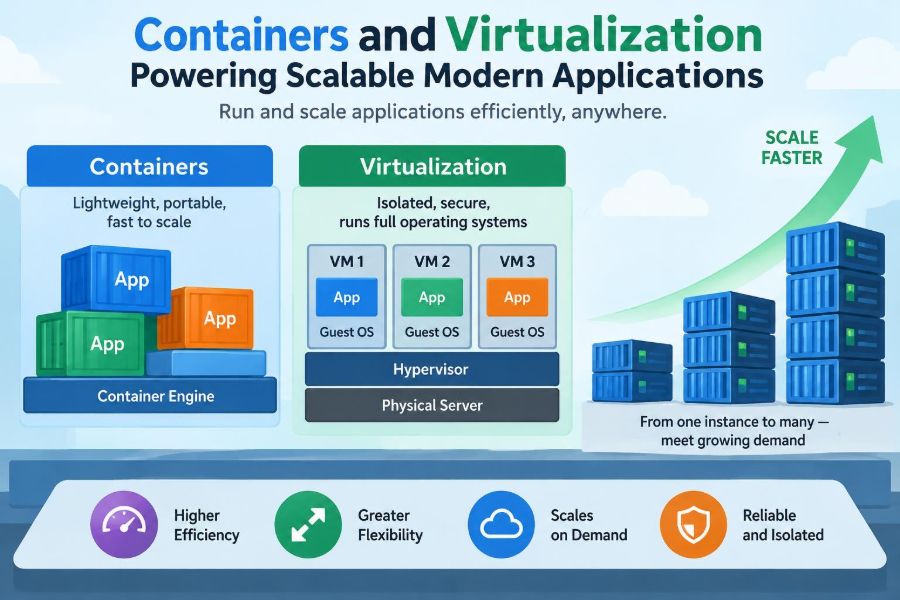
Virtualization uses software to create virtual machines, or VMs. A VM behaves like a separate computer with its own operating system, allocated memory, virtual disks, network interfaces, and applications.
A component called a hypervisor manages the physical host’s resources and presents virtual hardware to each guest operating system. This lets several independent environments share one physical machine while retaining meaningful separation.
📦 What a Container Actually Is
A container packages an application with the files and runtime dependencies it needs to execute. Unlike a VM, a typical container does not include a complete guest operating system.
Instead, containers on a host share the host operating system’s kernel while being separated through operating-system features such as namespaces and resource controls. A container is therefore lighter than a full VM, but it is not merely a zip file and not automatically a security boundary of equal strength to every VM deployment.
🔍 Virtual Machines and Containers Compared
| Characteristic | Virtual machine | Container |
|---|---|---|
| Operating system | Includes a guest OS | Shares the host kernel |
| Startup pattern | Usually boots like a computer | Usually starts like a process |
| Resource overhead | Higher per instance | Usually lower per instance |
| Isolation model | Hardware-virtualized boundary | OS-level isolation controls |
| Best fit | Mixed OS needs and strong separation | Portable, repeatable application services |
The comparison is not a contest with one universal winner. Many production platforms run containers inside VMs, combining flexible packaging with an additional infrastructure boundary.
⚡ Why Fast Startup Changes Operations
A scalable service must respond when demand changes or when an instance fails. Containers often begin quickly because they launch an application process rather than booting a whole operating system.
That faster lifecycle supports practical patterns: create a temporary worker for a queue backlog, replace an unhealthy web instance, or deploy a new version gradually. Startup is still affected by image size, initialization code, database migrations, and dependency checks, so “containerized” does not guarantee instant readiness.
🧳 Immutable Images Reduce Drift
An image is a versioned template used to create containers. Teams can build an image in a controlled pipeline, test that exact artifact, and deploy the same artifact to different environments.
This approach reduces configuration drift: the gradual divergence that occurs when servers are manually adjusted over time. It does not eliminate all differences—credentials, network policies, and external services still vary—but it shrinks the number of moving parts that must be explained during an incident.
🧩 Microservices Are Not Required
Containers are commonly associated with microservices, where a larger product is split into independently deployable services. They can help those services scale separately: image processing may need more workers while account settings need only a few instances.
But a well-structured monolith can also run effectively in a container. Splitting an application too early introduces network calls, distributed tracing, compatibility concerns, and operational overhead. Package first; decompose only where independent ownership, scaling, or release needs justify it.
📈 Horizontal Scaling Needs Statelessness
Adding identical web containers works best when any instance can serve any request. This is called statelessness: request-specific data is not stored only in the memory or local disk of one instance.
For example, a shopping site can place session information in a shared store, upload files to durable object storage, and keep authoritative records in a database. A load balancer can then send the next request to a different instance without confusing the customer.
🧠 State Is Where Architecture Gets Hard
Databases, message brokers, caches, and file systems hold state that must survive restarts and remain consistent. Putting a database in a container may simplify packaging, but it does not remove the need for durable storage, replication, backups, recovery testing, and careful upgrades.
Stateful systems can scale, but their constraints differ from stateless API servers. Data placement, network latency, write coordination, and failure recovery matter more than the speed at which an extra container can start.
⚖️ Load Balancers Distribute the Work
A load balancer receives traffic and directs it to healthy application instances. It may use simple rotation, account for active connections, or route requests based on paths and hostnames.
Health checks are crucial. A process can be alive while unable to serve users because it is stuck, overloaded, or unable to reach a required dependency. Well-designed checks distinguish between “the process exists” and “this instance is ready to accept traffic.”
🎛️ Orchestration Coordinates Many Containers
Running a few containers manually is manageable. Running hundreds across multiple machines requires an orchestrator, a system that schedules workloads, restarts failed instances, connects services, and tracks the desired number of replicas.
Kubernetes is a widely used example, but the general principle matters more than a particular tool. The team declares an intended state—such as five API replicas with defined resource limits—and the platform continually works to make the actual state match it.
🗺️ Scheduling Is a Capacity Decision
An orchestrator chooses where workloads run based on available CPU, memory, constraints, and policies. Good scheduling spreads replicas so one host failure does not remove every copy of a service.
It can also keep related workloads near one another when that reduces latency, or separate them when they compete for scarce resources. Scheduling is therefore not just deployment plumbing; it is an ongoing decision about resilience, cost, and performance.
📏 Resource Requests Prevent Noisy Neighbors
Shared infrastructure creates a “noisy neighbor” risk: one workload consumes disproportionate CPU, memory, disk input/output, or network bandwidth and harms others on the same host.
Resource requests tell the platform what an application normally needs for placement. Limits establish a ceiling, although their exact behavior depends on the resource and platform. Unrealistically low limits can cause throttling or termination; absent limits can let one defective process damage a wider service.
🔄 Autoscaling Is a Feedback Loop
Autoscaling adjusts capacity from observed signals. A web service might add replicas when CPU use or request concurrency remains high; a worker pool might grow when queue depth rises.
The difficult part is choosing a signal that reflects user impact. CPU can be useful, but a service waiting on a slow external API may have low CPU while users wait. Scaling rules also need stabilization to avoid rapidly adding and removing instances when traffic fluctuates.
⏳ Cold Starts and Sudden Spikes
Even rapid container startup takes time. Images must be available, the process must initialize, health checks must pass, and any required connections must be established.
A system facing a sharp traffic spike can run out of ready capacity before autoscaling catches up. Sensible responses include retaining a small buffer of idle capacity, reducing startup work, preloading commonly needed artifacts, and shedding nonessential work when the system is under pressure.
🚦 Safe Deployments Become Easier
Versioned container images make it practical to run old and new application versions side by side. A rolling deployment replaces instances gradually, while a canary deployment sends a small portion of traffic to a new version before broader rollout.
These techniques reduce the blast radius of a bad release, but only if monitoring catches problems and rollback is genuinely possible. Database changes are a frequent complication: an application rollback may fail if the new release made an incompatible schema change.
🧪 Reproducibility Improves Testing
When a developer, test environment, and production platform use the same image, a bug is less likely to be blamed on a missing package or a slightly different runtime version. This supports reliable automated testing and clearer incident investigation.
Reproducibility is a discipline, not an automatic property. Builds should pin important dependencies where appropriate, avoid downloading unpredictable content during startup, and document externally supplied configuration.
🔐 Isolation Is Helpful, Not Absolute
Containers isolate processes, filesystems, network views, and resource access, but they share a kernel. A vulnerability in the runtime, kernel, or overly broad permissions can weaken that isolation.
Practical safeguards include running processes without root privileges where possible, minimizing image contents, restricting capabilities, applying patches, and separating especially sensitive workloads. VMs can provide another layer, but they also require secure configuration and maintenance.
🧱 Supply Chain Security Begins at Build Time
A container image can carry outdated libraries, unnecessary tools, or unintentionally embedded secrets. The convenience of copying an image between environments makes these mistakes portable too.
Use trusted base images, keep them current, scan for known vulnerabilities, and ensure secrets are injected through an appropriate runtime mechanism rather than baked into an image. Scanning findings require judgment: a reported package issue may not be reachable, while an apparently small misconfiguration may be urgent.
🌐 Networking Adds Its Own Complexity
Container platforms often provide service discovery, internal names, virtual networks, and routing rules. These make dynamic workloads possible because instances can appear and disappear without hard-coded IP addresses.
They also create failure modes: incorrect DNS configuration, blocked policies, mismatched ports, and hidden latency between services. Treat network design as part of application design, especially when a formerly in-process function becomes a remote service call.
💾 Persistent Storage Needs Explicit Design
Container filesystems are commonly disposable. If a container is replaced, data written only inside it may vanish. That behavior is useful for clean, repeatable services but dangerous for data that must persist.
Use managed storage, persistent volumes, or external durable services according to the platform. Then test the full lifecycle: restart a workload, move it to another host, restore a backup, and confirm that access permissions and performance still meet requirements.
📊 Observability Must Cross Instance Boundaries
With many short-lived instances, logging into one server is no longer an adequate debugging strategy. Teams need centralized logs, metrics, traces, and meaningful identifiers that follow a request across services.
Observability answers practical questions: Which version handled the failed request? Did latency begin in the API, database, queue, or a dependency? Are failures limited to one zone or affecting every replica? Containers make replacement easy; observability makes diagnosis possible.
💰 Efficiency Does Not Mean Automatic Savings
Containers can improve density by running more workloads on the same infrastructure, and autoscaling can avoid permanently paying for peak capacity. Those advantages depend on accurate resource settings and realistic demand patterns.
Costs can rise when teams overprovision every service, retain excessive idle capacity, move large volumes of data across networks, or operate a complex platform without sufficient expertise. Measure usage and user-facing performance rather than assuming a modern architecture is inherently cheaper.
🧰 A Practical Adoption Path
Adoption is usually safer as an incremental engineering change than as a wholesale rewrite. Start with one service whose dependencies and deployment process are understood.
- Document how it runs, including configuration, ports, storage, and external dependencies.
- Build a small image and run it locally with production-like configuration.
- Add automated tests, health checks, logs, and resource settings.
- Deploy to a controlled environment and practice rollback and failure recovery.
- Scale the pattern only after the operating model is working.
This sequence exposes gaps early, before a large migration makes them harder to untangle.
🚫 Common Mistakes That Limit Scale
- Using local container storage for critical data: replacement then becomes data loss.
- Assuming every service needs Kubernetes: a smaller platform may be more appropriate.
- Ignoring startup and shutdown behavior: deployments can interrupt work or drop requests.
- Setting resource values by guesswork forever: production measurement should refine them.
- Adding services without operational ownership: distributed complexity accumulates quickly.
Most failures are not caused by containers themselves. They result from applying a good mechanism without redesigning the operational practices around it.
🏗️ When Virtual Machines Remain the Better Fit
VMs remain valuable when an application requires a different operating system kernel, stronger default separation, legacy software that expects a full machine, or long-lived administrative control of the environment.
They are also a sensible abstraction for infrastructure teams offering a stable platform to diverse workloads. The choice is not VM versus container in every case; a layered model often lets each solve the problem it handles best.
🧑💻 What Developers Need to Own
Developers do not need to become full-time infrastructure specialists, but scalable packaging changes application responsibilities. Code should handle configuration externally, terminate gracefully, expose useful health signals, and avoid relying on a specific machine’s identity or disk.
Operational feedback belongs in the development loop. If a service cannot explain its failures through logs and metrics, or cannot start predictably, the platform cannot reliably compensate for that weakness.
🤝 What Platform Teams Need to Provide
A productive platform team provides safe defaults and reusable paths: approved base images, deployment templates, secrets handling, observability integrations, access controls, and documentation that reduces repeated decisions.
The goal is not to hide all infrastructure. It is to make the secure, observable, supportable choice easier than the improvised one. Clear ownership boundaries also prevent application teams from being surprised by hidden operational requirements.
🎯 The Core Principle: Repeatable Units Enable Controlled Scale
Containers and virtualization are powerful because they turn runtime environments into manageable units. A VM packages a machine-like environment; a container packages an application runtime. Both let teams provision, replace, move, and standardize workloads more reliably than manually configured servers.
But scale is a property of the whole system: application design, state management, network behavior, capacity planning, deployment safety, security, and observability. The packaging technology creates leverage only when those pieces are designed to work together.
The best use of containers and virtualization is not to make infrastructure disappear, but to make it repeatable enough that teams can scale with confidence and understand the trade-offs they are making. ⚙️📦📈