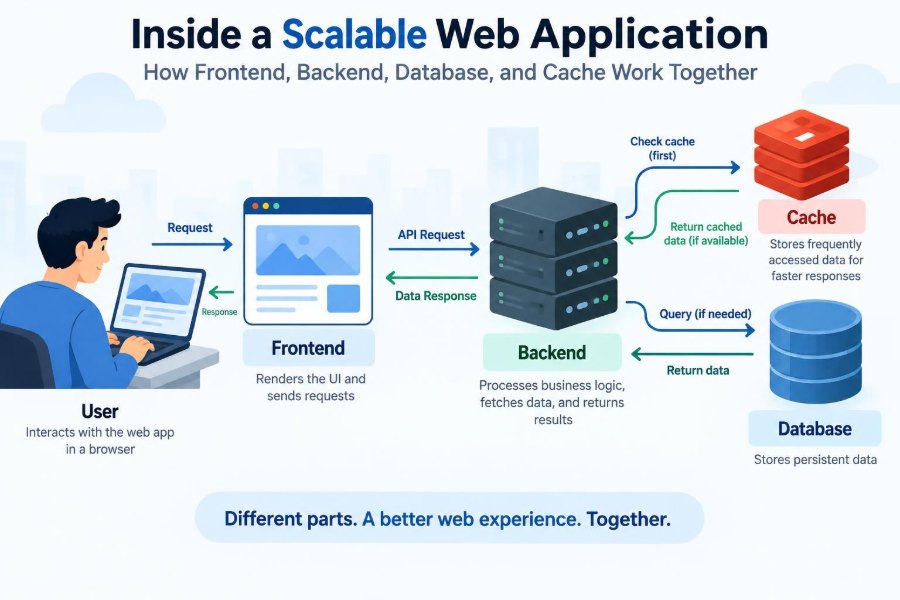

A user opens a shopping app, searches for running shoes, adds a pair to a cart, and checks out. To the user, it feels like one quick interaction with one product.
Behind that screen, several systems have to cooperate. The browser must render a useful interface, a server must validate the request, a database must preserve the order, and a cache may need to serve popular product details quickly.
That cooperation becomes much more visible when traffic grows. A design that feels perfectly adequate for ten people testing a feature can become slow, expensive, or unreliable when thousands of people use it at once.
Understanding the path a request takes through a web application helps engineers make better design decisions. It also gives students a practical mental model for debugging, performance work, and system design conversations.
🧭 A Web Application Is a Team of Systems
A scalable web application is rarely one program doing every job. It is usually a collection of components with clear responsibilities: a frontend for interaction, a backend for application rules, a database for durable data, and a cache for fast temporary access.
These boundaries are useful because each component can be optimized, deployed, or scaled according to its own workload. A page with many readers may need more cache capacity, while a reporting feature may need careful database work instead.
👤 Start with the User’s Request
Consider a hypothetical online bookstore. A reader visits a book page. Their browser requests HTML, JavaScript, styling, images, and then often calls an API for current price, inventory, reviews, or recommendations.
The request may pass through several layers before a response comes back. The key question at every layer is simple: can this system answer correctly, quickly, and safely?
🖥️ The Frontend Is the User-Facing Layer
The frontend is the part of the application that runs in a user’s browser or mobile app. It presents pages, responds to clicks, collects form input, and communicates with backend APIs.
Frameworks can make interfaces easier to organize, but they do not remove fundamental concerns. The frontend still needs to manage loading states, failures, accessibility, form validation, and the difference between data that is fresh and data that may be slightly old.
🎨 Rendering Is More Than Making a Page Look Good
When a page renders, the user needs enough meaningful content to understand what is happening. A blank screen while scripts load may technically work, but it creates a poor experience and can hide failures.
Some applications render much of the page on a server before sending it to the browser. Others render primarily in the browser after JavaScript loads. Many use a hybrid approach. The right choice depends on interaction needs, delivery speed, infrastructure, and team familiarity.
🧾 Frontend State Needs Clear Ownership
State is information that can change while someone uses an application: the signed-in user, a shopping cart, a selected filter, or an unfinished form. Confusion begins when the same fact is copied into several places without a reliable way to keep copies aligned.
For example, a cart count may appear in a header, a cart page, and a checkout panel. A well-designed frontend decides which source is authoritative and how updates propagate, instead of hoping each view independently stays correct.
🔒 Client-Side Validation Improves Experience, Not Trust
A frontend can immediately tell a user that an email address appears malformed or that a password is too short. This is helpful feedback, but browser code is controlled by the user and can be bypassed or altered.
The backend must repeat validation for every security-sensitive rule. It must verify permissions, prices, inventory rules, input shape, and ownership of resources. Never treat a frontend check as authorization.
📨 APIs Form the Boundary Between Frontend and Backend
An API, or application programming interface, defines how one software component asks another for work. A frontend may request GET /products/42, while a backend responds with structured data describing that product.
Good API design makes expectations explicit: required fields, valid responses, error formats, pagination rules, and authentication requirements. That clarity allows frontend and backend teams to work independently without silently relying on accidental behavior.
🚦 Requests First Meet the Edge
Before traffic reaches application code, it commonly passes through edge infrastructure such as a domain name resolver, content delivery network, load balancer, or reverse proxy. These components route requests and can handle concerns that do not belong in business logic.
For instance, a content delivery network can serve static files from locations closer to users. A reverse proxy can terminate encrypted connections and forward requests to healthy application servers.
⚖️ Load Balancing Prevents One Server from Becoming the Bottleneck
A load balancer distributes incoming requests across multiple backend instances. Instead of relying on one machine, an application can run several copies of the same service.
Distribution is not automatically perfect. Long-running requests, uneven user behavior, connection limits, and unhealthy instances can all create imbalance. Health checks and sensible timeouts help the load balancer avoid sending traffic to a server that cannot respond properly.
🧠 The Backend Enforces Application Rules
The backend is where an application usually applies its business rules. In the bookstore example, it decides whether a user can access a purchased ebook, whether a discount is eligible, and whether a requested address can receive an order.
A backend should not merely pass data between the frontend and database. Its job is to protect invariants: rules that must remain true, such as “an order total cannot be negative” or “a user cannot edit another user’s profile.”
🔐 Authentication and Authorization Are Different Jobs
Authentication answers, “Who is making this request?” A session cookie, access token, or similar credential can identify a signed-in user.
Authorization answers, “What may that user do?” A signed-in customer should not automatically be allowed to view another customer’s invoices. Keeping these concepts distinct prevents a common class of access-control mistakes.
🧩 Stateless Services Scale More Easily
A service is stateless when any healthy instance can process a request without needing information stored only in that instance’s memory. Persistent information instead lives in a shared system such as a database, cache, or session store.
This does not mean memory is forbidden. It means correctness does not depend on one particular server receiving the next request. Stateless services are easier to replace, replicate, and recover after failure.
🗃️ The Database Provides Durable Memory
A database stores information that must survive restarts: user accounts, orders, inventory records, messages, and audit entries. For many applications, a relational database is a natural fit because it supports structured data, relationships, and transactions.
Other data models can be useful for particular access patterns. The design should follow how data is queried, updated, related, and protected—not a trend or a label.
🧱 Data Modeling Shapes Future Performance
A schema is the structure used to organize stored data. Decisions such as whether reviews belong in a separate table, which fields are required, and how products relate to categories affect correctness as much as speed.
Model the important domain concepts first. Then examine the queries the application actually needs. A model that looks elegant but makes routine queries difficult will create pressure for workarounds later.
🔍 Indexes Make Some Queries Fast
An index is a data structure that helps a database find matching rows without examining every row. Searching orders by customer identifier or products by a unique code often benefits from an appropriate index.
Indexes have a cost. They consume storage and must be updated when indexed data changes. Adding indexes indiscriminately can slow writes, so query patterns and database measurements should guide the decision.
🔄 Transactions Protect Multi-Step Changes
A transaction groups related database operations so they succeed or fail together. During checkout, an application might create an order, record payment status, and decrease available inventory.
Without careful transaction boundaries, a failure halfway through could leave an order created but inventory unchanged. Transactions reduce this risk, although systems involving external payment providers or separate services require additional coordination strategies.
⚠️ Concurrency Creates Surprising Bugs
Concurrency means multiple requests operate at roughly the same time. Two customers may try to purchase the last item simultaneously, each initially seeing that one item remains.
The database and backend need a safe rule for this race. Options include conditional updates, row-level locking, or a reservation workflow. Reading a value and later writing a new value without protection is often unsafe under real traffic.
⚡ A Cache Trades Perfect Freshness for Speed
A cache stores a temporary copy of data so future requests can avoid slower work. Product descriptions, public profile data, configuration values, and expensive query results are common candidates.
A cache is not simply “a faster database.” Cached data can expire, be evicted, or become stale. Its value comes from reducing repeated work while accepting a carefully chosen freshness policy.
🧊 Cache-Aside Is a Common Pattern
With cache-aside, the application first checks the cache. On a hit, it returns the stored value. On a miss, it reads from the database, places the result in the cache, and returns it.
value = cache.get(key)
if value is missing:
  value = database.query(key)
  cache.set(key, value, short_expiration)
return value
This pattern is simple and flexible, but it requires decisions about key naming, expiration, invalidation, and what happens when many requests miss the same key at once.
⏳ Cache Invalidation Is a Correctness Decision
When the underlying value changes, a cached copy may need to be deleted or updated. If an administrator edits a book price, an old cached price must not remain visible longer than the product’s business rules allow.
Some data can tolerate brief staleness, such as a popular-items list. Other data usually cannot, such as account permissions or an order’s payment status. Choose cache behavior based on the consequences of stale data.
🌊 Prevent Cache Stampedes
A cache stampede occurs when many requests miss the same cache entry and all perform the expensive database query at once. This often happens when a popular key expires abruptly.
Useful mitigations include adding slight variation to expiration times, allowing one request to rebuild the value while others wait or use an older copy, and precomputing extremely popular data. Each choice adds complexity, so use it where demand justifies it.
📬 Asynchronous Work Keeps Requests Responsive
Not every task must finish before the user receives a response. Sending a receipt email, generating a report, processing an image, or notifying another system can often be placed on a queue for background workers.
Queues smooth sudden bursts and isolate slow tasks from interactive requests. They also introduce operational responsibilities: retries, duplicate-message handling, failure visibility, and a plan for messages that repeatedly cannot be processed.
🔁 Design Background Jobs to Be Idempotent
An operation is idempotent when repeating it has the same intended effect as performing it once. This matters because queues commonly deliver a message more than once when a worker fails after doing work but before acknowledging completion.
For example, an email job can record a unique delivery key before sending, or a billing workflow can use an external idempotency key. Retrying blindly without duplicate protection can create duplicate charges, notifications, or records.
📈 Scaling Means Finding the Actual Constraint
Horizontal scaling adds more instances; vertical scaling gives one instance more resources. Both can be useful, but neither solves every bottleneck. More application servers will not repair a slow unindexed query or a database connection pool that is already exhausted.
| Component | Common pressure | Typical response |
|---|---|---|
| Frontend delivery | Large static assets | Compress, cache, and use edge delivery |
| Backend | Too many concurrent requests | Add instances and reduce expensive work |
| Database | Slow or excessive queries | Improve queries, indexes, and data access patterns |
| Cache | Low hit rate or memory pressure | Review keys, expiration, and cacheable data |
Measure before choosing a remedy. A symptom such as “the site is slow” is not yet a diagnosis.
📏 Observability Turns Guessing into Investigation
Observability is the ability to understand a system through its outputs: logs, metrics, traces, and alerts. A request identifier carried across services can connect a frontend error to a backend exception and a slow database query.
Useful signals include error rate, response latency, request volume, resource saturation, queue depth, cache hit rate, and database connection usage. No single metric tells the whole story; the combination reveals where behavior changes.
🩺 Health Checks Need to Reflect Reality
A shallow health check may only prove that a process is running. A deeper readiness check can verify that an instance is prepared to accept traffic, perhaps after loading required configuration or establishing essential connections.
Be cautious about checks that depend on every downstream service. If a dependency has a brief outage, overly strict checks can remove all application instances from the load balancer and make recovery harder.
🛡️ Failure Handling Is Part of the Design
Networks fail, dependencies slow down, and deployments occasionally introduce defects. A resilient application uses timeouts, bounded retries, clear error handling, and limits on how much work any request can trigger.
Retries deserve special care. Retrying a temporary network failure may help, but synchronized retries from many servers can overwhelm an already struggling dependency. Backoff and random delay reduce this risk.
🧯 Graceful Degradation Preserves the Core Journey
When a recommendation service fails, a bookstore can still show the requested book page without recommendations. When analytics is unavailable, the checkout process should usually continue.
This is graceful degradation: identify the critical path and ensure optional features fail independently where possible. It requires deliberate product decisions, because not every feature has the same value or risk.
🧪 Testing Must Cover Boundaries, Not Just Functions
Unit tests check small pieces of logic. They are fast and valuable, but many failures happen at boundaries: an API sends an unexpected field, a migration changes a query, or a cache returns an outdated shape.
Integration tests, contract tests, and focused end-to-end tests provide complementary confidence. The goal is not maximum test count; it is meaningful coverage of the behavior most likely to break users or data.
🚀 Deployments Should Be Safe to Reverse
Scalable systems change continuously, so deployment design matters. Small releases, monitoring during rollout, and a quick rollback path reduce the blast radius of a defect.
Database changes need special attention. A safer pattern is often to add a compatible column or table first, deploy code that can handle both versions, migrate data, and only later remove the old structure.
🧰 A Practical Request Walkthrough
Return to the bookstore’s product page. The browser requests a page and static assets, which may be served from an edge cache. The frontend then calls the product API with the item identifier.
The load balancer selects a healthy backend instance. That backend authenticates the request if needed, checks a cache for public product details, and queries the database only on a cache miss. It applies business rules, returns a response, and records enough telemetry to diagnose trouble later.
When the reader clicks “Buy,” the backend performs more careful work: it validates the current price and availability, writes the order through a transaction, and queues noncritical work such as a receipt email. Different user actions deserve different consistency and latency decisions.
🧱 Common Mistakes in Early Architectures
- Putting business rules only in the frontend: users can bypass browser code and other clients may not share it.
- Using the cache as the source of truth: eviction or expiry can turn a performance optimization into data loss.
- Querying the database repeatedly inside loops: this can create many small queries instead of one efficient query.
- Making every dependency synchronous: optional work can slow or break the main user journey.
- Scaling before measuring: additional servers can conceal, rather than solve, inefficient work.
These are not signs of inexperienced developers alone. They are common consequences of building quickly without making system boundaries and failure modes visible.
🧠 The Core Principle: Make Responsibilities Explicit
The frontend should focus on a clear, accessible experience. The backend should enforce rules and coordinate work. The database should preserve authoritative data. The cache should reduce repeated, safe-to-repeat work.
In practice, boundaries are not walls. Components communicate constantly, and a change in one layer can affect another. Still, explicit responsibilities make those interactions easier to reason about, test, scale, and repair.
The strongest designs do not assume every request will be fast, every dependency will be available, or every copy of data will be fresh forever. They decide what must be correct, what may be delayed, and how the system responds when reality differs from the happy path.
A scalable web application is not a collection of fashionable tools; it is a set of well-defined responsibilities that cooperate reliably under changing demand and imperfect conditions. Build that clarity first, then use measurement to guide the next improvement. ⚙️📈🧩