
A team deploys a new checkout service late on a Friday afternoon. Automated tests are green, the staging environment looks healthy, and the release notes are ready. Then a small difference in production traffic triggers an error path nobody saw: a subset of customers cannot apply a discount code.
If the update goes to everyone at once, the team has a broad outage to diagnose while customers lose trust. If the update reaches only a carefully chosen slice of traffic first, the team can spot the pattern, stop the rollout, and limit the effect.
That is the practical promise of a canary deployment: release software in measured stages, observe what actually happens, and expand only when the evidence supports it.
Canary deployments do not make releases risk-free. They turn a single large bet into a series of smaller, observable decisions. For developers and operations teams, that difference can make production changes calmer, safer, and easier to learn from.
🐤 What a Canary Deployment Is
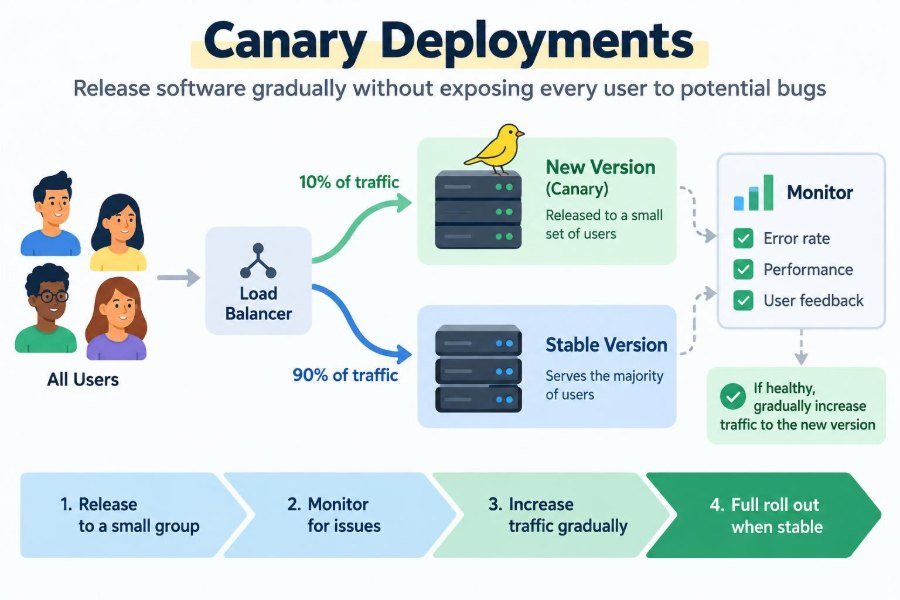
A canary deployment is a release strategy in which a new version of an application is initially exposed to a limited portion of production traffic. Most users continue using the existing stable version while the new version, often called the canary, serves a controlled group.
The team monitors technical and product signals. If the canary behaves acceptably, traffic increases in steps; if it does not, traffic is reduced or returned to the stable version.
🎵 Why It Is Called a Canary
The name refers to the historical practice of taking canaries into coal mines. The analogy is imperfect, but the operational idea is clear: a small, monitored exposure can reveal a dangerous condition before it affects everyone.
In software, the “condition” may be elevated error rates, slow responses, corrupted data, unexpected costs, or a broken user journey. The canary is not a sacrificial user group; it is a deliberately limited release with safeguards.
🚦 The Problem with Big-Bang Releases
A big-bang release sends a new version to all users or all servers at nearly the same time. This can be reasonable for a low-risk internal tool, but it concentrates risk when a change affects payments, identity, data processing, or a heavily used API.
When every request uses the new version, it becomes harder to contain an issue. Rollback may still be possible, but the incident can create a large volume of failed requests, support tickets, and inconsistent records before anyone reacts.
🧪 Why Pre-Production Testing Is Not Enough
Unit, integration, end-to-end, and staging tests are essential. They catch many defects earlier and more cheaply than production monitoring ever can.
Yet production has combinations that test environments rarely reproduce exactly: real traffic bursts, unusual client versions, external provider behavior, account-specific data, caching patterns, and network conditions. A canary complements testing by validating a change under genuine but limited conditions.
🔀 The Basic Release Flow
A typical canary rollout starts by deploying the new version alongside the old one. A routing layer—such as a load balancer, service mesh, API gateway, or application feature flag—sends a small eligible group to the new version.
- Deploy the new version without making it the default.
- Route a small portion of relevant traffic to it.
- Observe predefined health and business signals.
- Increase exposure only when those signals remain within acceptable bounds.
- Pause, investigate, or roll back if the canary violates a guardrail.
The deployment is therefore both a technical action and a sequence of operational decisions.
📊 Choosing Signals That Matter
A rollout needs more than a dashboard full of charts. Teams should define which signals would indicate that the new version is unsafe or ineffective before deployment begins.
Common technical signals include request error rate, latency, timeout rate, resource usage, queue depth, and application exceptions. Product signals can include failed checkout attempts, sign-in completion, successful uploads, or other outcomes tied to the feature being changed.
⚖️ Comparing the Right Groups
Raw canary metrics can mislead. A 2% error rate may look bad or normal depending on the endpoint, time of day, and kinds of requests the canary received.
Whenever possible, compare the canary against the stable version over the same period and for a similar traffic mix. A new version serving only one country, device type, or customer tier should be evaluated against a meaningful baseline for that group.
📈 Traffic Percentage Is Only One Control
Routing 1%, then 5%, then 25% of traffic is a familiar pattern, but percentages are not the only way to define exposure. A small percentage on a high-volume service may still represent many users, while 10% of a low-volume workflow may provide too little evidence.
Teams can target by user cohort, region, tenant, device platform, account type, request header, or endpoint. The best control matches the risk being evaluated.
👥 Selecting a Suitable First Audience
An initial audience should be representative enough to reveal relevant failures while still allowing limited blast radius. Internal users, employee accounts, opt-in beta testers, or low-risk tenants can be useful starting points when the product context allows.
Avoid treating a group as inherently safe to inconvenience. Customers with accessibility needs, critical workflows, or contractual requirements may be poor candidates for early exposure even if they are few in number.
🧭 User-Based and Request-Based Routing
User-based routing keeps a person consistently on one version. It is especially helpful when sessions, preferences, carts, or multistep flows could break if requests alternate between versions.
Request-based routing distributes individual requests independently. It is simpler for stateless services and can gather data quickly, but it requires both versions to handle compatible requests and responses.
| Routing approach | Useful when | Main concern |
|---|---|---|
| User or account cohort | Testing complete customer journeys | Needs reliable session affinity |
| Random request split | Stateless APIs and high traffic | Mixed-version compatibility |
| Region or tenant | Isolation and operational control matter | Traffic may not represent all users |
🧱 Keeping Old and New Versions Compatible
A canary means two versions often run at once. That makes backward and forward compatibility a release requirement, not an optional refinement.
For example, if version two writes a new field into a shared record, version one should tolerate that field. If a new API response changes shape, older clients must not fail simply because an unfamiliar field appears.
🗃️ Database Changes Need Their Own Plan
Database migrations are a common reason canary rollouts become difficult. A destructive schema change can prevent the old version from working, eliminating the ability to roll back safely.
A safer pattern is often expand, migrate, contract: add compatible schema elements first, deploy code that can read both formats, migrate data gradually, and remove old structures only after old code is gone. The exact approach depends on the database and data model, but reversibility should be considered early.
🚩 Feature Flags and Canaries Solve Different Problems
A feature flag controls whether a behavior is active for a selected audience. A canary deployment controls which software version receives selected traffic. They can be used separately or together.
For instance, a team might canary a new service binary while its unfinished feature remains off. Later, the same team can enable the feature for a cohort without deploying again. This separation makes diagnosis easier because code delivery and feature exposure are distinct controls.
🔍 Observability Makes Gradual Delivery Possible
Canaries depend on observability: the ability to infer a system’s state from outputs such as logs, metrics, traces, and user-facing outcomes. Without it, a team is merely sending some users to a new version and hoping for the best.
Version labels should appear consistently in telemetry. An engineer investigating slower requests needs to distinguish whether latency comes from the canary, a downstream dependency, a specific route, or unrelated traffic changes.
⏱️ Deciding How Long to Watch
There is no universal canary duration. High-traffic services may reveal obvious failures quickly, while workflows tied to daily reports, billing cycles, or rare customer actions need more time.
Watch long enough to cover relevant behavior, including background jobs and delayed side effects. At the same time, do not leave a rollout indefinitely ambiguous; define review points and the person or team responsible for the next decision.
🛑 Automated Guardrails and Manual Judgment
Automation can pause or roll back a rollout when metrics cross defined thresholds. This reduces response time for clear failures, such as a sharp increase in server errors.
Not every signal should trigger an automatic reversal. A small metric change may need human context: perhaps an external provider is degraded for both versions, or a marketing campaign changed the traffic mix. Strong systems combine automated protection with clear on-call ownership.
↩️ Rollback Must Be Fast and Tested
A rollback plan is credible only if it has been exercised. Teams should know whether rollback means changing traffic weights, disabling a flag, redeploying an earlier artifact, or repairing data before old code can run again.
Traffic rollback is usually the quickest containment action. It may not undo emails sent, messages published, or records transformed by the new version, which is why side effects deserve special attention.
💥 Managing Side Effects Carefully
Some operations are easy to repeat safely; others are not. Charging a card twice, sending duplicate notifications, or provisioning two accounts are examples of side effects that can turn a small canary bug into a customer problem.
Use techniques such as idempotency keys, deduplication, durable event handling, and compensating actions where appropriate. The core question is practical: if a request is retried, split across versions, or rolled back midway, what happens to the real-world outcome?
🧩 Canarying Services in Distributed Systems
In a microservice system, one canary service may call many stable dependencies. A failure may surface downstream as retries, queue growth, connection saturation, or unexpected request formats rather than as a neat error inside the changed service.
Trace propagation and dependency-aware dashboards help teams see these relationships. A canary should be evaluated not only by its own CPU and error rate, but also by whether it creates harmful pressure elsewhere.
📱 Mobile, Desktop, and Client Releases
Canary concepts also apply to client software, although app-store review and user-controlled update timing limit direct traffic routing. Teams may release an update to a staged audience, use server-side flags for risky behavior, and maintain compatibility with older clients.
Because clients can remain active for a long time, backend changes must often support several versions simultaneously. Gradual release is especially valuable when a new client depends on a changed API contract.
🔐 Security and Privacy Considerations
A canary should not lower security standards. New authentication, authorization, encryption, or data-handling code needs review and testing before it reaches even a small production audience.
Also consider what telemetry captures. Debug logs and traces should help diagnose the release without unnecessarily exposing personal or sensitive data. Limited traffic exposure reduces blast radius, but it does not excuse weak privacy practices.
💰 Cost and Capacity Can Be Canary Signals
Correctness is not the only concern. A new algorithm may return the right answer while using far more memory, database capacity, or third-party API calls than the prior version.
Monitor resource use and cost-related proxies during rollout, especially for changes involving search, machine learning inference, data exports, or polling behavior. A gradual rollout can reveal inefficient behavior before it scales across the entire workload.
🧑💻 A Concrete Checkout Example
Imagine a hypothetical retailer replacing the service that calculates shipping options. The team deploys the new service, routes a small cohort of logged-in users to it, and compares completed checkout rates, calculation latency, and error responses with the stable service.
They also inspect a sample of quoted shipping prices for unexpected differences. If latency rises only for international addresses, the rollout can pause while the team isolates that route instead of exposing every shopper to slow or incorrect quotes.
🧾 What to Decide Before the Deployment
A successful canary starts before the artifact is built. The team should agree on the scope, expected benefits, likely failure modes, and response plan.
- Which users or requests will enter the canary?
- Which metrics and user outcomes will be watched?
- What conditions cause a pause, rollback, or promotion?
- Who can make those decisions, including outside business hours?
- Are old and new versions compatible with data, events, and dependencies?
- How will the team verify that rollback actually contained the issue?
🚧 Common Mistake: Treating a Tiny Sample as Proof
A clean result from a very small canary is encouraging, not conclusive. Rare paths, unusual accounts, and time-dependent processes may not appear until broader exposure.
Increase traffic in deliberate stages, and choose stages based on meaningful risk rather than habit. The objective is not to collect a magical percentage; it is to gather enough evidence while keeping the possible impact acceptable.
📉 Common Mistake: Watching Only Server Errors
Many damaging defects do not create HTTP 500 responses. A page can load successfully while showing the wrong price, silently dropping a preference, or making a key action confusing enough that users abandon it.
Pair infrastructure metrics with application and business signals. For important journeys, synthetic checks and targeted manual verification can add another layer of confidence.
🧯 Common Mistake: Rolling Forward Without an Exit
Teams sometimes assume a hotfix will be faster than rollback. That can be true for a trivial, understood issue, but it is risky when the cause is unclear or data is already affected.
Prefer containment first. Stop expanding traffic, return to a known-safe path when possible, then investigate with less pressure. A rollout process should make the safe decision easy rather than socially costly.
🛠️ Tools Are Helpful, but Process Matters More
Load balancers, Kubernetes rollout controllers, service meshes, feature-management systems, and deployment platforms can all support canary releases. The specific tool matters less than whether it provides reliable routing, visibility, auditability, and rapid reversal.
A sophisticated platform cannot compensate for undefined success criteria or incompatible data changes. Conversely, a modest setup can deliver much of the value when a team uses clear cohorts, sound monitoring, and disciplined decision-making.
📚 Building Organizational Confidence
Teams get better at canaries through routine use. Start with a change whose blast radius is understandable, document what was observed, and improve dashboards and rollback steps after each release.
Over time, gradual delivery can change release culture. Deployments become smaller and more frequent, failures become easier to isolate, and production behavior becomes a source of structured feedback rather than an all-or-nothing event.
🎯 The Core Principle of Canary Deployments
Canary deployment is controlled learning under real conditions. It recognizes that no pre-production environment fully predicts production, while refusing to make every customer absorb the uncertainty of a new release.
The strongest canary practices combine small exposure, compatible system design, meaningful measurements, clear ownership, and a tested path back to safety. Used thoughtfully, they reduce the blast radius of failure without pretending that engineering can eliminate uncertainty.
Release gradually, measure what users and systems actually experience, and expand only when the evidence earns confidence. That is the durable value of a canary deployment. 🐤📊⚙️