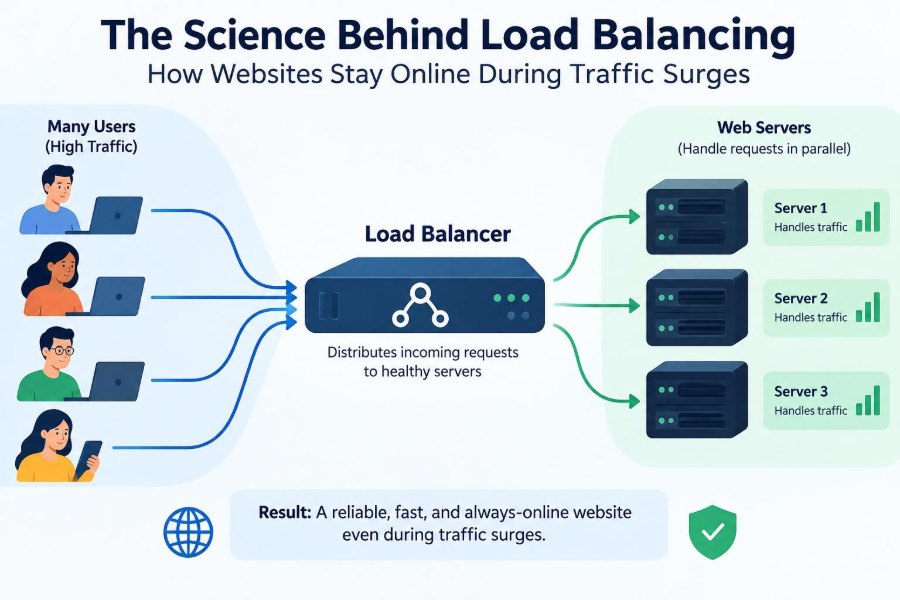

A concert ticket sale opens at noon. Within seconds, thousands of people refresh the same page, add seats to carts, and attempt payment. The website may look calm on the surface, but behind it, servers are receiving a sudden flood of requests.
Or consider a university portal just before an assignment deadline. Students sign in at nearly the same time, upload files, and check submissions. If one machine has to do all the work, a short rush can turn into long waits, errors, or a complete outage.
Load balancing is one of the systems that helps prevent this outcome. It directs incoming work across multiple resources so that no single server becomes an accidental bottleneck.
It is not a magic shield against every failure. But when applications are designed around it, load balancing gives websites room to handle demand, survive component failures, and grow without redesigning everything at once.
🚦 What Load Balancing Actually Means
Load balancing is the process of distributing incoming network traffic or computational work across multiple servers, services, or other resources. A load balancer acts as a traffic director: it receives a request and chooses a suitable destination.
That destination might be one of several web servers running the same application. In other architectures, the decision may route traffic to a database replica, a processing worker, or a service in a different geographic region.
The central goal is simple: keep useful capacity available instead of allowing one resource to become overloaded while others sit idle.
🏪 The Checkout-Line Analogy
A busy shop with one open checkout line is fragile. Even if several employees are available, customers still wait if every person must use the same register. Opening several registers helps, but someone must guide customers toward an appropriate line.
Web servers are similar. Each incoming HTTP request needs CPU time, memory, network connections, and often access to databases or external services. A load balancer assigns requests among available servers much like a staff member directing shoppers.
The analogy has limits: requests vary far more than shopping baskets. A simple page view and a video upload place very different demands on a system.
🌊 Why Traffic Surges Cause Outages
Traffic surges do not only mean “many visitors.” A system can fail because many users perform an expensive action at once: searching a large catalog, generating reports, signing in, or checking out.
As a server approaches saturation, requests begin waiting in queues. Response time rises, clients retry, and those retries create still more work. This feedback loop can make a service deteriorate quickly even when the initial increase in traffic was temporary.
Load balancing helps spread the initial pressure, but it cannot create unlimited capacity. The rest of the application must be able to absorb the work too.
📨 A Request’s Journey Through the System
When a browser requests a page, domain-name resolution usually directs it toward an internet-facing address. That address may represent a load balancer rather than an application server.
The load balancer examines enough information to make a routing decision, then forwards the request to a healthy backend. The backend processes it and returns a response, often through the load balancer to the browser.
This placement gives one component a useful view of incoming traffic. It can enforce policies before requests reach application servers and can stop sending traffic to unhealthy instances.
🧭 Layer 4 and Layer 7 Decisions
Load balancers are commonly described by the network layer where they make decisions. A Layer 4 balancer works mainly with transport information such as IP addresses and TCP or UDP ports. It can route connections quickly without interpreting the application’s content.
A Layer 7 balancer understands application protocols such as HTTP. It can route /images to an image service and /api to an API service, or use HTTP headers, hostnames, and cookies in its decision.
| Approach | Useful when | Trade-off |
|---|---|---|
| Layer 4 | Fast connection-level distribution is sufficient | Less awareness of application intent |
| Layer 7 | Routes depend on URLs, hosts, headers, or request properties | More processing and configuration complexity |
🔁 Round Robin: The Straightforward Strategy
Round robin sends requests to servers in a rotating sequence: first server A, then B, then C, then back to A. It is easy to reason about and works reasonably well when servers are alike and requests cost roughly the same amount.
Real workloads often violate both assumptions. One server may have less capacity, and one request may trigger a fast cached response while another launches a lengthy calculation.
Round robin is therefore a useful baseline, not a universal answer. Its simplicity can be valuable when variability is low and observability is good.
⚖️ Weighted Distribution for Unequal Servers
Infrastructure is not always uniform. During a migration, an application may run on both older and newer machines. A newer server may safely handle more traffic than an older one.
Weighted round robin assigns a larger share of requests to higher-capacity backends. For example, a server with twice the expected capacity can receive a larger routing weight.
Weights are estimates, not guarantees of equal performance. Teams should adjust them using observed latency, error rate, and resource use rather than treating hardware specifications as the entire story.
📉 Least Connections and Active Work
The least-connections method sends a new connection to the backend with the fewest active connections. It can be more suitable than round robin when connections have uneven durations, such as streaming sessions or slow client uploads.
Connection count is still only a proxy for load. A single connection running an expensive database query can consume more resources than many idle persistent connections.
More advanced systems may use signals such as response time, queue depth, CPU utilization, or application-reported load. These signals can improve decisions, but noisy or delayed metrics can also create unstable routing behavior.
🎲 Random Choices Can Be Surprisingly Effective
Random routing sounds careless, but it can distribute a large number of similar requests quite well. A useful variation chooses two candidate servers at random and sends the request to the less busy of those two.
This approach avoids continuously comparing every backend while reducing the chance that a clearly busy server receives more work. It is particularly attractive in large distributed systems where global, perfectly current state is difficult to maintain.
The lesson is broader than any one algorithm: a practical decision made quickly can outperform a theoretically ideal decision based on stale information.
🩺 Health Checks Keep Broken Servers Out of Rotation
A load balancer needs evidence that a backend can serve traffic. Health checks provide it by periodically testing a server, usually through a network connection or a dedicated HTTP endpoint.
A basic check may confirm that a process is listening. A deeper readiness check can verify that the application has finished starting and can reach essential dependencies. These are different questions: a process can be alive while unable to do useful work.
Checks should be designed carefully. If they call an expensive endpoint or depend on a fragile optional service, the monitoring mechanism can create misleading failures.
❤️ Liveness, Readiness, and Real Service Quality
Liveness asks whether an application is running at all. Readiness asks whether it should receive traffic now. A server warming a cache, loading configuration, or reconnecting to a database may be alive but not ready.
Neither signal fully measures user experience. A server can return a quick “healthy” response while ordinary requests take too long. Production monitoring must therefore include request latency, error rates, and dependency behavior.
Health checks are a safety mechanism, not a substitute for observing the actual service customers receive.
🧩 Stateless Services Make Balancing Easier
A stateless application server does not keep essential user-specific session data only in its own memory between requests. Any healthy instance can process a later request from the same user.
This makes distribution flexible. If one instance disappears, another can continue serving the user as long as shared data is available where needed.
Teams often store sessions in a shared session store, use signed tokens, or redesign workflows so that durable state belongs in databases and other purpose-built storage systems. Each choice brings security, consistency, and operational trade-offs.
🍪 Sticky Sessions and Their Cost
Session affinity, often called sticky sessions, sends a user repeatedly to the same backend. It can be a practical bridge for older applications that keep session state in server memory.
The downside is uneven load. One popular user, long-lived connection, or temporarily slow backend can leave traffic concentrated on a particular server. Failover can also interrupt sessions when that server disappears.
Stickiness is sometimes appropriate, especially during modernization, but it should be an explicit constraint rather than an unnoticed default.
🔐 TLS Termination and Encrypted Traffic
HTTPS encrypts traffic using Transport Layer Security, or TLS. A load balancer may terminate TLS: it handles the encrypted connection from the client, then forwards the request internally according to the organization’s security design.
This centralizes certificate management and reduces repeated cryptographic work on individual application servers. It also lets a Layer 7 balancer inspect HTTP routing information.
Internal traffic may be re-encrypted, particularly across untrusted network boundaries. The right choice depends on threat models, compliance obligations, network design, and the sensitivity of the data.
🗺️ Routing by Path, Host, and Header
Application-aware balancing can send different requests to different backend pools. A single public domain might route a storefront to one service, account operations to another, and static assets to a specialized delivery layer.
Routing rules can also use hostnames such as api.example.com, request methods, or selected headers. This supports service decomposition without forcing users to learn many separate addresses.
Rules should stay understandable. An overly elaborate routing layer can become its own source of hard-to-debug behavior, especially when overlapping rules have unclear precedence.
📦 Static Content Needs a Different Path
Images, style sheets, JavaScript bundles, and downloadable files are often requested far more frequently than application pages. Sending every static file through application servers wastes resources that are better used for dynamic work.
Static content may be served by a web server, object storage, or a content delivery network (CDN) with caches near users. The load balancer can route these requests separately.
This is not only about speed. Reducing avoidable application traffic leaves more headroom for actions that require business logic, authentication, or database access.
🗃️ The Database Is Often the Next Bottleneck
Adding web servers does not automatically scale the database. If every application request performs a costly query against one database, the database can become saturated after the web tier is successfully balanced.
Common responses include query optimization, indexing, caching, connection pooling, read replicas, and redesigning access patterns. Each technique solves a different problem and introduces its own consistency or operational concerns.
A balanced frontend paired with an overloaded database still produces a slow website. Capacity planning must follow the entire request path.
🧠 Caching Reduces Work Before It Starts
A cache stores reusable results so the system can answer repeated requests without recomputing them. Browser caches, CDN caches, reverse proxies, application caches, and database caches can all reduce demand at different layers.
For example, a product catalog page that changes occasionally may be cached, while a user’s checkout details should remain dynamic and private. Correct cache keys and expiration rules matter as much as cache speed.
Stale data, accidental sharing of personalized responses, and cache invalidation are genuine risks. Caching should be designed around what users may safely see and how fresh it must be.
📈 Autoscaling Adds Capacity Dynamically
Autoscaling creates or removes application instances in response to demand or schedules. Load balancing and autoscaling work together: new instances must become ready and enter the backend pool; retiring instances must stop receiving new work.
Scaling is not instantaneous. Startup time, image downloads, initialization, warm-up tasks, and dependency limits all affect how quickly new capacity becomes useful.
For predictable events, scheduled capacity can be safer than waiting for a metric threshold. For uncertain demand, autoscaling adds flexibility but needs sensible limits to avoid runaway cost or overload of shared dependencies.
🛑 Graceful Draining Prevents Abrupt Disconnects
Servers need maintenance, deployments, and replacement. Removing an instance immediately can terminate in-flight requests and disrupt users whose long-lived connections are still active.
Connection draining marks a backend as unavailable for new requests while allowing existing work to finish within a defined period. The instance can then shut down or be updated more safely.
Applications should also handle shutdown signals: stop accepting new work, finish or hand off active tasks where possible, and close resources cleanly. Load balancer settings alone cannot make an uncooperative application graceful.
🔄 Deployments Without Taking the Site Down
With multiple healthy instances, teams can update an application gradually. A rolling deployment replaces servers in batches, while a blue-green deployment prepares a separate version and shifts traffic after validation.
Canary releases send a small, controlled portion of traffic to a new version first. This can reveal problems before a broader rollout, provided teams compare meaningful signals such as errors, latency, and business-critical workflow failures.
Load balancing enables these patterns, but database changes require special care. New and old application versions may need to coexist temporarily.
🌍 Geographic Load Balancing
Users far from a data center can experience extra network delay because data must travel farther. Geographic routing can direct users toward a nearby region or toward a region that currently has available capacity.
Regional distribution also supports resilience when an entire location has a problem. However, operating in multiple regions makes data synchronization, failover, debugging, and cost more complicated.
“Nearest” is not always best. Network conditions, legal data-location requirements, and the location of stateful systems can make routing choices more nuanced than a map suggests.
🧱 Redundancy Must Include the Load Balancer
A single load balancer can become a single point of failure. Production architectures commonly use redundant load balancer instances, managed load-balancing services, or distributed edge networks so that traffic control itself is not fragile.
Redundancy is more than duplicating machines. The components need independent failure domains where feasible: separate hosts, network paths, power systems, or regions, depending on the required level of resilience.
Every redundancy design has a cost. The useful question is not whether failure is possible, but which failures the service needs to tolerate and for how long.
🧪 Test Failure, Not Just Peak Throughput
A load test that sends requests to healthy servers can reveal throughput limits, but it does not prove that failover works. Teams should also test what happens when instances become slow, return errors, restart, or lose a dependency.
In a controlled environment, deliberately removing a backend from rotation can validate health-check timing and draining behavior. Testing a failed database connection can expose whether every web server simply retries at once.
These exercises should be planned with safeguards. The purpose is to learn how the system behaves under stress, not to create an uncontrolled incident.
📊 Measure the Signals That Matter
Load balancing decisions and capacity planning depend on visibility. Useful operational signals include request rate, latency at different percentiles, error rate, active connections, backend saturation, queue depth, and health-check transitions.
Percentiles matter because averages can hide painful outliers. If most requests are fast but a smaller group waits several seconds, an average alone may make the service appear healthier than it feels to those users.
Metrics need context. A rising request rate may reflect healthy growth; the same rate combined with rising errors and growing queues points toward capacity or dependency trouble.
⚠️ Retry Storms Can Defeat Good Routing
When a request fails or slows down, clients and services often retry. Retries can recover from brief network glitches, but uncontrolled retries multiply traffic exactly when a system is least able to handle it.
Use timeouts, bounded retry counts, exponential backoff, and jitter, which adds small random variation to retry timing. These practices reduce synchronized waves of repeated requests.
Load balancers also need sensible timeout settings. A timeout that is too short interrupts valid work; one that is too long holds connections and delays failure detection.
🧯 Rate Limits Protect Shared Capacity
Some traffic should not be allowed to consume unlimited resources. Rate limiting restricts how frequently a client, account, API key, or endpoint can make requests over time.
It can protect login endpoints from repeated attempts, preserve API capacity for many customers, and reduce accidental overload from faulty clients. It does not replace authentication, authorization, or application-level abuse controls.
Good limits are communicated clearly and applied thoughtfully. A universal limit may harm legitimate high-volume integrations, while no limit leaves shared systems vulnerable to a small number of aggressive callers.
🛠️ Common Design Mistakes
Many load-balancing problems arise outside the routing algorithm itself. A few recurring mistakes deserve early attention:
- Balancing web traffic while leaving one database, cache, or third-party dependency as an unexamined bottleneck.
- Using health checks that are too shallow to detect unusable servers or too strict to tolerate brief startup conditions.
- Keeping critical session state only in local memory, then discovering that failover breaks user workflows.
- Scaling on CPU alone when queue depth, latency, or connection counts better describe demand.
- Assuming a deployment is safe because instances are healthy, without verifying actual customer journeys.
These are design questions, so they are best addressed before a surge rather than during it.
🧭 Choosing an Approach for Your System
There is no single best load-balancing architecture. A small internal application may need only a reverse proxy and two application instances. A public API may need application-aware routing, rate limits, autoscaling, observability, and carefully managed dependencies.
Start by understanding the workload: Are requests short or long? Is the service stateful? Which dependency limits throughput? How quickly can capacity be added? What failures are acceptable?
Choose the simplest design that meets current reliability needs while leaving a clear path for growth. Complexity is justified when it addresses a concrete risk, not merely because large systems use it.
🎯 The Core Principle: Share Work, Preserve Service
Load balancing is fundamentally about making a system less dependent on any single path. It spreads work among healthy resources, removes failing instances from service, and gives teams a controlled way to add, replace, and update capacity.
Its effectiveness depends on the surrounding design: stateless application behavior where possible, protected dependencies, sensible retries, accurate health signals, and monitoring that reflects user experience. A traffic director cannot repair every weak component behind it.
The most resilient systems treat load balancing as part of a wider discipline: design for variation, expect components to fail, and make recovery a normal operational action rather than an emergency improvisation.
Websites stay online during surges not because one server is endlessly powerful, but because work is distributed, failure is contained, and capacity can adapt. ⚙️🌐📈