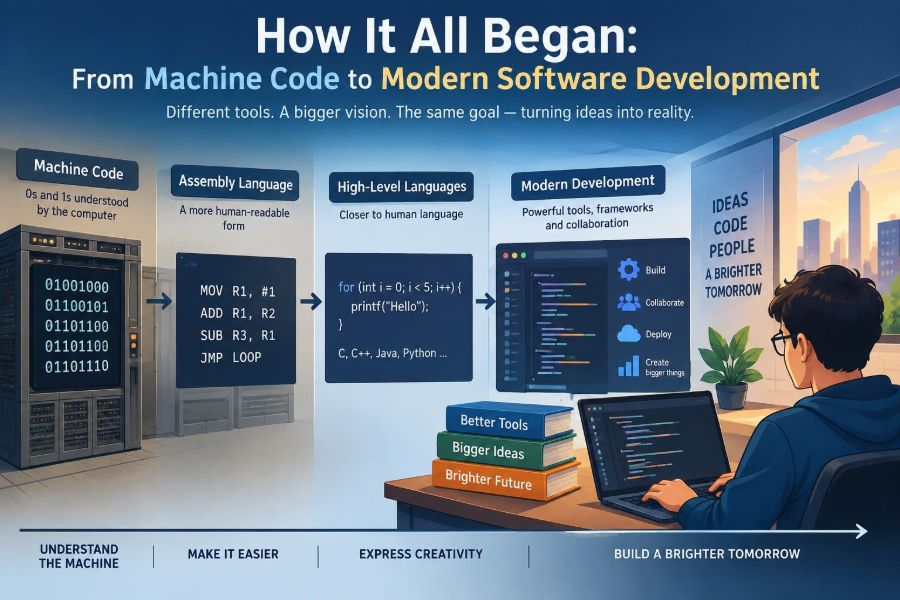

When an app freezes, a website returns the wrong result, or a smart device seems to “think” for itself, it is easy to picture software as something invisible and almost effortless. We tap a screen, make a request, and expect useful behavior.
Behind that familiar experience is a long chain of ideas: instructions represented as numbers, languages designed for humans, tools that coordinate teams, and practices that make change less risky. Modern software development did not appear all at once.
Understanding that history helps programmers make better decisions now. It explains why a compiler sometimes gives cryptic errors, why version control matters, and why a small feature can require careful testing.
The journey from machine code to modern engineering is not a story of old tools becoming irrelevant. It is a story of abstractions: each generation built a more manageable way to tell machines what to do.
🧮 Before Software Meant Programs
The word software generally refers to instructions and data that tell a computer what to do. Early computing ideas existed before electronic, stored-program computers, however. Mechanical calculators and programmable looms showed that a machine could follow a sequence of encoded operations.
A key conceptual shift was separating the machine from its instructions. If a device could be reconfigured simply by changing instructions, it could perform many kinds of work rather than one fixed task.
🔌 Early Computers Were Physical Machines
Some early electronic computers were configured with plugs, switches, and wiring panels. Reprogramming one could mean physically changing connections, a process closer to rewiring equipment than editing a document.
That approach made the cost of a mistake very visible. A misplaced connection could produce incorrect output or prevent a calculation from running at all. It also made rapid experimentation difficult, which encouraged the search for instructions that could be stored and changed more easily.
🗂️ The Stored-Program Idea Changed Everything
A stored-program computer keeps program instructions in memory alongside the data those instructions process. The processor reads an instruction, performs it, then moves to the next instruction according to defined rules.
This is the foundation of general-purpose computing. A single machine can load a payroll calculation in the morning, a scientific simulation later, and a game in the evening. The hardware remains largely the same; the program changes.
🔢 Machine Code: Instructions as Bits
At its lowest practical programming level, a processor understands machine code: binary patterns, usually written as sequences of 0s and 1s. Each pattern represents an operation such as loading a value, adding numbers, comparing values, or jumping to another instruction.
Machine code is specific to a processor architecture. An instruction pattern meaningful to one family of CPUs may be invalid or mean something entirely different on another. This directness can be useful, but it places a heavy mental burden on programmers.
🧠 Why Raw Binary Was So Difficult
Binary offers no natural clue about intent. A line of bits does not tell a reader whether it calculates a tax total, checks a password, or advances a game character.
Programmers also had to remember memory locations and processor details. Consider a hypothetical instruction sequence that adds two values: the author needs to know where each value lives, which register holds the intermediate result, and where control should go next. A tiny change might require adjusting several numeric addresses.
- Instructions were hard to read and review.
- Errors were difficult to locate.
- Programs were tightly tied to particular hardware.
- Maintenance became increasingly expensive as programs grew.
🔤 Assembly Language Added Meaningful Names
Assembly language replaced many numeric patterns with short, human-readable mnemonics. Instead of writing a binary encoding for an addition, a programmer might use an operation name such as ADD.
Labels also replaced raw memory addresses. A programmer could name a location loop or finished, making control flow easier to follow. An assembler translated this notation into the machine code required by a specific processor.
⚙️ Assembly Was Still Close to Hardware
Assembly was a major improvement, but it remained a low-level language. Programmers still worked with registers, memory layout, processor instructions, and explicit control flow.
That closeness remains valuable in areas such as embedded systems, operating system components, boot code, and performance-critical routines. It is not automatically “better” than a higher-level language; it is appropriate when hardware behavior must be controlled precisely.
🏗️ High-Level Languages Raised the Abstraction
High-level languages let programmers describe computations in forms closer to mathematics, business rules, or structured procedures. A statement such as total = price * quantity communicates an intention without exposing which registers the processor uses.
Languages such as FORTRAN, COBOL, Lisp, and later C addressed different needs and styles of problem solving. Their common contribution was abstraction: programmers could focus more on the problem and less on individual processor instructions.
🛠️ Compilers and Interpreters Became Translators
A compiler translates a program into another form before it runs, often machine code or an intermediate representation. An interpreter executes program instructions through another program, usually with less of the source translated into a standalone executable ahead of time.
The boundary is not always sharp. Many modern systems combine compilation, intermediate code, virtual machines, and just-in-time compilation. The practical point is that translation tools allow developers to write expressive code while computers still receive precise executable instructions.
| Approach | What developers write | Typical strength | Typical trade-off |
|---|---|---|---|
| Machine code | Binary instruction patterns | Direct processor control | Extremely difficult to maintain |
| Assembly | Processor-specific mnemonics | Readable low-level operations | Still hardware-dependent |
| High-level language | Structured expressions and abstractions | Faster development and clearer intent | Less direct hardware control |
📦 Libraries Stopped Teams Reinventing Basics
As programming matured, developers collected reusable code into libraries. A library might provide functions for reading files, formatting text, encrypting data, communicating over a network, or drawing a user interface.
Reuse can save substantial effort, but it also creates responsibility. A dependency may contain bugs, security issues, licensing conditions, or breaking updates. Good engineering means understanding what a library does well enough to use it deliberately, not treating it as magic.
🧩 Operating Systems Provided a Common Platform
An operating system manages hardware resources and offers services to programs. It handles tasks such as process scheduling, memory management, file access, device communication, and permissions.
Without these shared services, every application would need to solve low-level hardware problems itself. Operating systems made application development more practical by giving programs a stable interface to machines with varied components.
🖥️ Interfaces Moved Beyond the Command Line
Early interaction often happened through punched cards, printed output, terminals, and command lines. These interfaces were powerful for trained users but could be unforgiving: one mistyped command could fail, and the available options were not always visible.
Graphical user interfaces introduced windows, icons, menus, pointers, and direct manipulation. Later, web and mobile interfaces made software accessible to far larger audiences. This changed software engineering because usability became a core product concern, not merely a decorative layer.
🌐 Networks Turned Programs Into Connected Systems
Networking allowed programs on different computers to exchange information. A local program no longer had to contain every piece of data or every service it needed.
The internet accelerated this change. Web applications, email, online banking, shared documents, and streaming services rely on agreed communication rules called protocols. Connection also introduced new concerns: latency, partial failure, authentication, privacy, and hostile traffic.
🏛️ Databases Made Data Durable and Queryable
Many applications need information to survive after a program stops: customer records, messages, inventory, bookings, or configuration. A database provides organized storage and mechanisms for retrieving and changing that information.
Relational databases popularized tables, relationships, and query languages such as SQL. Other database models fit other patterns, including document, key-value, graph, and time-series storage. The right choice depends on access patterns, consistency needs, scale, and operational constraints—not fashion.
🧱 Structured Programming Tamed Complexity
As programs grew, unrestricted jumps through code made behavior hard to reason about. Structured programming emphasized clear control structures: sequence, selection, and repetition.
In practical terms, this meant organizing code with functions, conditionals, and loops instead of relying heavily on arbitrary jumps. The goal was not stylistic purity. It was making logic easier to inspect, test, modify, and explain.
🧬 Object-Oriented Design Modeled Responsibilities
Object-oriented programming organizes software around objects that combine state with behavior. For example, a BankAccount object might hold a balance and provide operations for deposits and withdrawals.
This style can help model systems with distinct entities and responsibilities. Yet it can also become overcomplicated when teams create deep inheritance trees or turn every small concept into a class. Composition—building behavior by combining smaller pieces—is often simpler than elaborate inheritance.
🧭 Other Programming Paradigms Kept Expanding Choices
No single programming paradigm solves every problem best. Functional programming emphasizes functions, immutable data, and reducing hidden state. Declarative programming lets developers state the desired result rather than each operational step; SQL is a familiar example.
Modern languages often blend styles. A developer might use objects for domain concepts, functional operations for data transformation, and declarative configuration for infrastructure. Knowing the trade-offs is more useful than defending one paradigm as universally superior.
👥 Software Became a Team Sport
Early programs could sometimes be understood by one person or a small group. Modern systems may involve product managers, designers, developers, testers, security specialists, data engineers, operations staff, and support teams.
Coordination became an engineering problem of its own. Clear requirements, shared vocabulary, code review, documentation, and predictable handoffs reduce the chance that a locally sensible decision causes trouble elsewhere.
🧾 Version Control Preserved the Story of Change
Version control records changes to files over time. Systems such as Git let developers create branches, compare versions, combine work, and restore earlier states when necessary.
Its value is not simply backup. A useful history explains why a change was made, supports review before merging, and allows parallel work with less accidental overwriting. A concise commit message can become valuable context months later.
🔍 Code Review Made Quality Collaborative
Code review asks another person to examine a proposed change before it becomes part of the shared codebase. Reviewers may identify incorrect logic, missing edge cases, unclear naming, security concerns, or simpler designs.
Healthy review is not a performance of superiority. The best reviews discuss the code and its consequences, ask questions where context is missing, and balance thoroughness with progress. Automated checks should handle routine formatting so human attention can focus on reasoning.
🧪 Testing Shifted Confidence Left
Testing evolved from checking software near the end of a project to building feedback throughout development. A unit test checks a small piece of behavior; integration tests check components working together; end-to-end tests exercise a user-facing flow.
No test suite proves that software is free of defects. Tests sample behavior under chosen conditions. Still, well-selected tests turn past bugs and critical expectations into repeatable checks, reducing the risk that a later change silently breaks them.
🚦 Continuous Integration Made Feedback Faster
Continuous integration, often shortened to CI, means frequently combining changes into a shared codebase and automatically building and testing them. Problems appear closer to the change that caused them, when context is still fresh.
A sensible CI pipeline may run formatting checks, static analysis, unit tests, security scans, and build steps. The exact pipeline should match the project; an enormous slow suite that developers routinely bypass is less useful than focused, trusted feedback.
🚀 Deployment Became Part of Development
For many teams, writing code is only one part of delivering value. A change must be packaged, configured, released, monitored, and sometimes rolled back. This broader view is commonly associated with DevOps: closer collaboration between development and operations.
Continuous delivery practices aim to keep software in a releasable state. They do not require releasing every change immediately. Rather, they reduce the technical and procedural friction that makes releases risky and rare.
☁️ Cloud Computing Changed Infrastructure Choices
Cloud platforms made computing resources available as on-demand services. Instead of purchasing and operating every server directly, teams can provision virtual machines, databases, storage, and managed services through configuration and APIs.
This can speed experimentation and reduce some operational work, but it does not remove engineering responsibility. Costs can grow unexpectedly, service limits matter, and a poorly designed system remains poorly designed even when hosted in the cloud.
📐 APIs Let Independent Systems Cooperate
An application programming interface, or API, is a defined way for software components to interact. It specifies requests, responses, data formats, and expected behavior.
Good APIs treat compatibility as a design concern. Changing a field name, authentication rule, or response structure may break systems maintained by other teams. Clear contracts, versioning strategies, and realistic error handling help integrations survive change.
🔐 Security Became a Design Requirement
Connected software handles valuable data and controls real actions, so security cannot be postponed until the final review. Authentication confirms identity; authorization determines what an authenticated identity is allowed to do.
Common risks include trusting unvalidated input, exposing secrets in source code, granting broad permissions, and failing to update vulnerable dependencies. Security work includes technical controls, but also careful design, review, monitoring, and incident preparation.
📈 Observability Revealed What Production Is Doing
Software can behave differently in production than in a developer’s environment because of real traffic, data, configurations, and infrastructure conditions. Observability helps teams understand that behavior through signals such as logs, metrics, and traces.
A useful error message includes enough context to diagnose a problem without leaking sensitive data. Good monitoring focuses on user-impacting outcomes—failed requests, slow responses, unavailable functions—not just whether a machine is technically running.
📱 Modern Development Targets Many Environments
Software now runs on servers, browsers, phones, watches, cars, industrial devices, and tiny embedded controllers. Each environment brings constraints involving power, network reliability, screen size, memory, safety, or update mechanisms.
Cross-platform frameworks can share code, while native development may provide deeper platform integration. There is no automatic winner. Teams should weigh performance needs, user experience, skills, long-term maintenance, and the behavior users actually expect.
🤖 AI-Assisted Tools Are Another Layer of Abstraction
Modern tools can suggest code, generate tests, summarize unfamiliar modules, and help search large repositories. Used carefully, they can reduce repetitive work and speed exploration.
They are not substitutes for understanding. Generated code can be incorrect, insecure, inefficient, incompatible with local conventions, or based on an incomplete interpretation of a request. Developers remain accountable for reviewing behavior, tests, licenses, and data-handling implications.
⚠️ The Lasting Risks of Abstraction
Abstraction makes complex systems manageable by hiding details, but hidden does not mean irrelevant. A web developer may rarely write assembly, yet performance still depends on memory, networking, storage, and CPU work. A cloud service may hide servers, yet failures still occur.
Problems often arise when teams use layers they do not understand at all. The solution is not to learn every implementation detail before building anything. It is to learn enough about each dependency and layer to make informed choices and investigate failures.
🧰 Practical Lessons for Learning Software Engineering
Historical knowledge becomes useful when it changes how you learn and work. Build small programs, but also practice reading existing code, debugging failures, and explaining design choices. Those habits connect language syntax to engineering judgment.
- Learn one language deeply enough to understand variables, control flow, functions, errors, and memory concepts.
- Use version control from the beginning, even for personal projects.
- Write tests for important behavior and reproduce bugs before attempting fixes.
- Read documentation rather than relying only on copied snippets.
- Trace a request through an application: interface, API, business logic, database, and logs.
- Ask what assumptions a system makes about inputs, users, networks, and failures.
🧱 Avoid Treating Tools as the Whole Discipline
Beginners sometimes chase every new framework, while experienced teams can become attached to tools that no longer fit their needs. Tools matter, but software engineering is fundamentally about solving problems under constraints.
A framework changes; clear naming, modular design, careful testing, sensible data modeling, and respectful collaboration remain useful across generations of technology. Learn tools in service of these durable skills.
🌉 The Core Idea: Software Is Managed Complexity
The movement from machine code to modern development was driven by a recurring need: humans needed better ways to manage complexity without losing control over what computers do. Languages, libraries, operating systems, frameworks, automated pipelines, and cloud services are all answers to that need.
Every answer adds leverage and introduces new responsibilities. Higher-level tools let a team create more with less direct hardware knowledge, but they demand clear interfaces, testing, security awareness, and thoughtful operations. Good software engineering means choosing the right level of abstraction for the problem and understanding its limits.
From binary instructions to distributed applications, progress in software has come from making intent clearer, change safer, and collaboration more effective. The next tool you learn will fit into that same continuing story. 💾 🧠 🚀