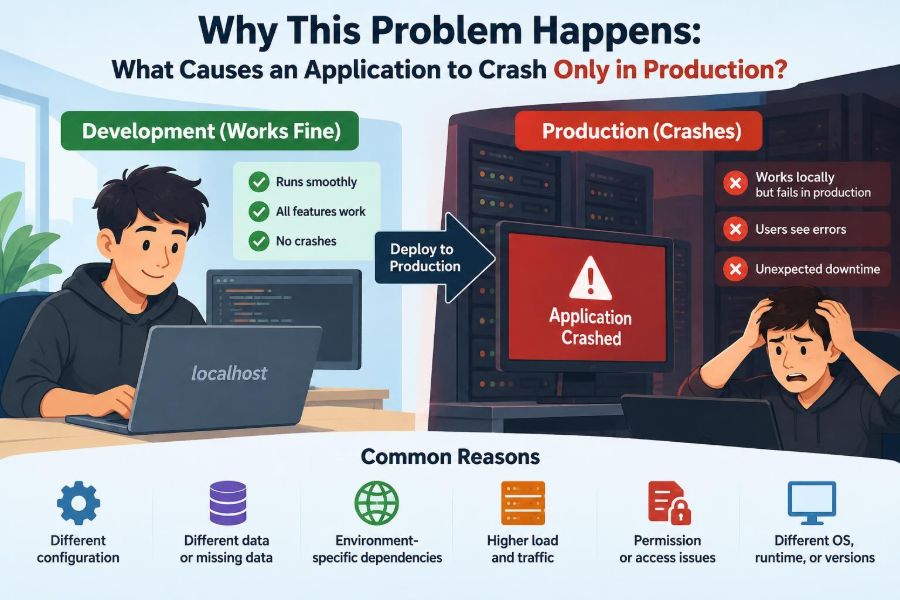

It worked on your laptop. The tests were green, the staging demo was uneventful, and the deployment looked routine. Then real users arrived, an endpoint began returning 500 errors, and a process restarted without a useful explanation.
This is one of software engineering’s most frustrating patterns because it feels irrational. The same code supposedly ran in several places. Yet production is where it fails.
The key word is “supposedly.” Production is not merely a larger copy of a developer machine. It is a distinct system: different data, identity rules, traffic patterns, infrastructure, timing, configuration, and operational constraints all interact with the application.
A production-only crash is rarely magic. It is evidence that an assumption held in development but does not hold in the real operating environment. Finding the failed assumption is the work.
🧭 Production Is a Different System, Not Just a Different Server
An application runs within an ecosystem: operating system, runtime, network, database, secrets store, deployment process, users, and monitoring tools. Changing any one of those can change program behavior.
A local environment may have a permissive database account, an always-warm cache, a small dataset, and one developer using one browser. Production may have restricted access, several application instances, background workers, real integrations, and requests arriving simultaneously.
So the useful initial question is not “Why did production break?” It is “What condition exists in production that our earlier environments did not represent?”
🔍 A Crash Is a Symptom, Not a Root Cause
“The application crashed” describes an outcome, not an explanation. The immediate mechanism might be an uncaught exception, a process termination by the operating system, a failed health check, a runtime panic, or a container restart.
Those mechanisms can have very different causes. A Java service may terminate because its memory limit was exceeded; a Node.js process may fail on an unhandled promise rejection; a Python worker may receive a termination signal after a platform health check fails.
Start by identifying precisely what stopped: the request, a worker, an application process, a container, a virtual machine, or a dependent service. This narrows the investigation dramatically.
📜 Read the Failure Timeline Before Changing Code
When pressure is high, teams often deploy a guess: increase a timeout, add a null check, or roll back a recent change. Those actions can be appropriate, but guessing before collecting evidence can erase useful clues.
Build a small timeline. Record when the first failure happened, what changed shortly beforehand, which users or requests were affected, and whether resource usage or dependency errors changed at the same time.
- Application logs and stack traces
- Container or platform restart events
- Request IDs, trace IDs, and error rates
- CPU, memory, disk, and connection-pool metrics
- Database, queue, and third-party service logs
- Deployment, configuration, and secret-rotation history
A timestamp that aligns with a configuration rollout is more informative than a vague belief that “the new release caused it.”
⚙️ Configuration Drift Changes Runtime Behavior
Configuration drift means environments differ in settings that affect behavior. A missing environment variable, a different feature flag, an incorrect URL, or a production-only timeout can send otherwise correct code down a failing path.
For example, a service might use a local mock payment provider during development but a real provider in production. If the production endpoint requires a header that the application does not send, only production exposes the defect.
Configuration should be treated as versioned, reviewable engineering input. Avoid relying on manually edited dashboard values whose history is unclear.
🔐 Secrets and Permissions Reveal Hidden Assumptions
Development credentials are often broad because convenience matters during local work. Production credentials should usually be narrow: only the actions, tables, storage paths, or cloud resources the service actually needs.
This difference is healthy, but it exposes code that quietly relied on excessive permission. A report-generation feature may work locally because the developer account can read every object, then fail in production when the service account cannot access one archive bucket.
Do not “fix” this by granting unlimited access without investigation. First determine whether the code is accessing the right resource and whether the least-privilege policy is correctly designed.
🗝️ Secrets Can Be Present but Still Invalid
A secret existing in production does not prove it is usable. It can be expired, malformed, mounted under an unexpected name, unavailable at startup, or valid for a different environment.
Common examples include a certificate chain missing an intermediate certificate, a token with the wrong audience, and a database password that was rotated before all running instances refreshed it.
Log enough metadata to diagnose secret loading safely, such as whether a required value was found and which credential version was selected. Never write the secret itself to logs.
📦 Dependency Versions May Not Actually Match
“It uses the same dependency file” is not always equivalent to “it uses the same dependencies.” Loose version ranges, platform-specific packages, cached artifacts, and different build steps can yield different runtime results.
A native library may compile on a developer’s machine but behave differently in a Linux production image. A transitive dependency can change when a build resolves versions again instead of using a lock file.
Reproducible builds reduce this category of failure. Build one immutable artifact, record its version or digest, and promote that artifact through environments rather than rebuilding separately for each one.
🐳 The Runtime Image Matters as Much as the Source Code
Containers help standardize environments, but they do not eliminate differences by themselves. A production image may omit a system package, use a different locale, run as a non-root user, or contain a newer runtime than the development image.
Imagine an image-processing library that relies on installed fonts. A local machine has the font; the lean production image does not. The upload succeeds in testing but crashes only when a user requests a particular generated document.
Test the actual production artifact. A local development command that runs source files directly is valuable, but it is not a substitute for running the packaged application.
🧱 Build-Time and Run-Time Values Are Easy to Confuse
Some frameworks embed environment values while creating a frontend bundle or server artifact. Other values are read only when the process starts. Confusing these stages produces deployments that look correctly configured but still use stale settings.
For instance, changing a client-side API URL after a static web bundle has been built may have no effect if the value was compiled into the JavaScript. Conversely, a server process may require a restart to read updated environment variables.
Document which settings are build-time, startup-time, and dynamically refreshed. This is especially important when one artifact is promoted across several environments.
🗃️ Real Data Breaks Simplified Assumptions
Production data is older, messier, larger, and more varied than most test fixtures. It contains optional fields that were historically blank, unusual Unicode characters, records created by retired systems, and combinations of states that developers did not anticipate.
A hypothetical example: code assumes every customer has a postal code because recent sign-up forms require one. Production includes accounts imported years earlier without postal codes, so a new shipping calculation dereferences a missing value and fails.
The fix is more than adding a defensive check. Decide the business rule for incomplete data: reject it, repair it, use a fallback, or route it for review.
🔄 Schema Migrations and Code Must Be Compatible
Database changes are a common source of production-only failures because deployments may involve a period where old and new application versions overlap. A new process might expect a column before its migration is complete, or an old process might fail after a column is removed.
Safer migrations use an expand-and-contract approach: add compatible structures first, deploy code that can tolerate both forms, migrate data, then remove obsolete structures later.
Also consider migration duration. A change that is instantaneous on a tiny local database can lock a large production table long enough to trigger timeouts and failed health checks.
🧬 Data Shape Includes Encodings, Time Zones, and Locales
Data failures are not limited to null values. Production may receive names with combining characters, dates from multiple time zones, decimal separators based on locale, or text longer than UI examples suggest.
A server configured for UTC can expose a date-boundary bug that was invisible on a developer laptop. A case-sensitive production database can expose queries that appeared valid against a case-insensitive local setup.
Use explicit character encodings, time-zone handling, and comparison rules. Where possible, test representative edge cases instead of assuming defaults are universal.
🚦 Production Traffic Creates Load That Tests Do Not
Load does not merely make an application slower. It can change its behavior. Queues grow, connection pools empty, caches evict useful entries, and retries amplify demand against an already struggling dependency.
A request path that takes 80 milliseconds alone may time out under contention because it waits for a database connection. If timeout handling is poor, exhausted workers can make the whole service unavailable.
Load testing cannot predict every production event, but it can reveal basic capacity boundaries and the failure mode near those boundaries. Test both normal traffic and degraded dependencies.
🧵 Concurrency Exposes Race Conditions
A race condition occurs when correctness depends on the unpredictable order of concurrent operations. It may remain invisible when one person tests locally and appear immediately when many production requests run at once.
Suppose two requests both see that a coupon has one remaining use, then both redeem it before either writes the update. The problem is not necessarily a language-level thread bug; it can occur across separate processes and database transactions.
Use appropriate database constraints, transactions, idempotency keys, locks, or atomic operations. Which tool fits depends on the resource and the consistency the business process requires.
🧠 Memory Limits Can Kill a Healthy-Looking Process
Production platforms often enforce memory limits. When a process exceeds its limit, the operating system or orchestrator may terminate it quickly, sometimes before the application can produce a clean stack trace.
Memory pressure can arise from a true leak, but also from loading a large export into memory, retaining request objects, unbounded caches, or handling several moderate jobs at once.
Compare memory use with the configured limit, inspect restart reasons, and profile representative workloads. Raising the limit may be a sensible short-term mitigation, but it does not explain why memory grew.
📁 Filesystems Are Often Ephemeral or Read-Only
Many production deployments run with an ephemeral filesystem: files written by one process may disappear on restart or be unavailable to another instance. Some images also run with paths that are read-only.
Code that writes uploads, generated reports, or SQLite files beside the application executable can work locally and fail in a container. Multiple instances make the design even less reliable because each instance has its own local disk.
Store durable shared data in an appropriate database or object store. Use temporary directories only for temporary work, and clean them predictably.
🌐 Network Paths Fail in More Ways Than “Offline”
Production requests often cross proxies, load balancers, firewalls, service meshes, DNS resolvers, and separate network zones. Each layer can enforce a timeout, size limit, TLS rule, or routing policy.
A dependency may be reachable from a developer network but blocked from the production subnet. DNS may resolve to IPv6 first in one environment, exposing a client that supports only IPv4.
When debugging, test connectivity from the same production network context. A successful request from a laptop proves little about the route used by the deployed service.
⏱️ Timeout Mismatches Create Cascading Failures
Every layer may have its own deadline: browser, gateway, load balancer, application server, HTTP client, database driver, and downstream service. If these are inconsistent, work may continue after the caller has given up.
For example, a gateway might abandon a request after 30 seconds while the application waits 60 seconds for a dependency. Repeated slow requests then occupy workers that cannot help new callers.
Set deadlines deliberately and propagate them where the platform supports it. A dependency call should generally have a shorter, bounded timeout than the overall request budget.
🔁 Retries Can Help or Multiply Damage
Retries are useful for transient failures such as a brief network interruption. They are harmful when they repeat expensive work, overload a failing dependency, or duplicate a side effect such as charging a card or sending an email.
Production traffic makes this visible because many clients and services may retry simultaneously. A small outage can become a burst of duplicate requests.
Use bounded retries, backoff, jitter, and idempotency where appropriate. “Jitter” means adding randomness to retry timing so clients do not all retry at the same instant.
🔌 Third-Party Services Behave Like Production Dependencies
Mocks usually return clean, fast, predictable responses. Real payment, email, identity, mapping, and analytics services return rate-limit responses, partial data, delayed callbacks, maintenance errors, and evolving API behavior.
Your application should distinguish an expected external failure from an internal programming error. A failed optional analytics call should not necessarily crash an order workflow; a failed identity check may require a carefully designed user-facing response.
Define dependency ownership, timeouts, fallback behavior, and alerting before the integration becomes critical during an incident.
🪝 Background Jobs Fail Outside the Request Path
Some production-only crashes happen in scheduled jobs, queue consumers, report generators, or cleanup tasks rather than in the web request that users see. These paths may receive less routine testing.
A worker can fail because it lacks a required environment variable, processes an unusually old message, or runs concurrently with another worker despite an assumption that only one instance exists.
Give background systems the same operational care as APIs: structured logs, failure alerts, retry policies, dead-letter handling where applicable, and visible queue depth.
❤️ Health Checks Can Restart an Application That Is Still Starting
Platforms use health checks to decide whether traffic should reach an instance and whether an instance should be restarted. Misconfigured checks can create a crash loop even when the application would have become healthy with a little more time.
A startup check should allow initialization tasks such as loading configuration or opening required connections. A readiness check should indicate whether the instance can serve traffic. A liveness check should answer whether it is irrecoverably stuck.
Do not make these checks depend on every optional external service. Otherwise a temporary downstream outage can cause every healthy instance to restart together.
📈 Observability Turns a Mystery into Evidence
Observability is the ability to infer what a system is doing from outputs such as logs, metrics, traces, and events. It does not prevent every bug, but it shortens the path from symptom to explanation.
Use structured logs with fields such as request ID, operation name, error class, and safe resource identifiers. Metrics show trends such as memory growth or connection exhaustion; distributed traces show where a request spent time across services.
Be intentional about privacy. Logs should help operators diagnose a failure without becoming an uncontrolled store of passwords, tokens, personal data, or complete payment details.
🧪 Staging Is Valuable but Cannot Be Production
Staging should resemble production in architecture, deployment method, permissions, and key integrations as closely as practical. It is excellent for catching missing configuration, broken migrations, and packaging errors before users are affected.
But staging often has lower traffic, sanitized data, fewer historical records, and different external-service behavior. Treat it as a risk-reduction environment, not a proof that production cannot fail.
The goal is not a perfectly identical replica at unlimited cost. It is to make the differences known, deliberate, and small enough that they do not hide critical assumptions.
🚩 Feature Flags Reduce Blast Radius, Not Engineering Duty
A feature flag can separate deployment from release. Teams can ship dormant code, enable it for a small audience, and disable it quickly if it causes trouble.
This is especially useful for risky queries, new integrations, and changes whose production behavior is uncertain. However, flags add state and combinations that must be tested; abandoned flags eventually become confusing technical debt.
For each flag, define its owner, default, affected users, monitoring signal, and removal date. A switch is useful only when people know when and why to use it.
🔀 Gradual Rollouts Limit Exposure
Canary releases, phased rollouts, and blue-green deployments give teams different ways to observe a new version before all traffic reaches it. They do not guarantee safety, but they reduce the number of users exposed when a problem appears.
A canary instance can reveal increased error rates or memory use under real conditions. A blue-green setup can provide a rapid route back to a previous environment, provided database changes were designed to remain compatible.
Choose rollout strategies based on the system’s risk, reversibility, and observability. A simple internal tool may need less ceremony than a payment-processing service.
🛠️ Incident Response Should Favor Stabilization First
During an active production incident, the first objective is usually to reduce harm: disable a feature, stop a runaway worker, roll back a safe change, shed nonessential load, or increase capacity when the cause is understood.
Then preserve evidence and investigate. An effective incident note separates observed facts from hypotheses: “memory rose until the container was terminated” is a fact; “there is a memory leak in module X” is a hypothesis until verified.
After recovery, write a blameless review focused on system conditions, detection gaps, decisions, and prevention. Individual blame rarely improves a system designed with hidden failure paths.
🧰 A Practical Investigation Checklist
When an application crashes only in production, work from evidence toward the smallest reproducible difference.
- Identify the failed unit and its exact termination or error signal.
- Correlate the first failure with deployments, configuration changes, traffic shifts, and dependency events.
- Compare artifact version, runtime version, configuration presence, permissions, and resource limits.
- Inspect the triggering request, job, record, or traffic pattern using safe identifiers.
- Reproduce the condition in an environment that uses the production artifact and representative constraints.
- Mitigate user impact, then implement and verify a durable fix.
This sequence avoids the common trap of treating the latest code change as the only possible explanation.
🚫 Common Fixes That Hide Rather Than Solve the Problem
Several responses feel productive but create future incidents: swallowing exceptions, retrying every error indefinitely, granting broad permissions, disabling health checks, or raising every timeout.
These changes may suppress a symptom while increasing risk elsewhere. An ignored exception can corrupt a workflow; an unlimited retry can overwhelm a database; a broader permission can expose sensitive resources.
Prefer a fix that states the intended behavior under failure. If a dependency is unavailable, what should the user see, what work should be delayed, and what signal should wake the team?
🧩 The Core Principle: Production Reveals Unmet Assumptions
Production-only failures happen when the application encounters a condition it was not designed, tested, configured, or observed to handle. That condition may be a missing permission, old record, concurrent request, resource boundary, network rule, or deployment mismatch.
The remedy is not to make production behave more like a laptop in every respect. It is to make the application and delivery process explicit about environmental differences, resilient at known boundaries, and diagnosable when unknown conditions appear.
Reliable systems are built by replacing implicit assumptions with checked configuration, compatible changes, bounded resource use, realistic tests, gradual delivery, and evidence-rich operations.
A production crash is best understood as a mismatch between an assumption and reality; each investigation is an opportunity to make that assumption visible and engineer it away. With disciplined comparisons and useful telemetry, “works on my machine” becomes the start of a diagnosis rather than the end of a conversation. ⚙️🔎🛡️