
A customer opens a banking app to transfer money, a clinician reviews a patient record, or a commuter unlocks a shared bike. In each case, the software is expected to work immediately. People rarely see the checks that made that expectation reasonable.
Yet small defects can have outsized consequences: a button submits a form twice, a discount applies incorrectly, an update erases a saved preference, or a service slows down under normal demand. Testing is the discipline of looking for those failures before users discover them.
Software testing has changed because software itself has changed. Teams once delivered applications on disks or in occasional releases. Many now deploy small changes frequently to cloud services, mobile apps, and interconnected systems.
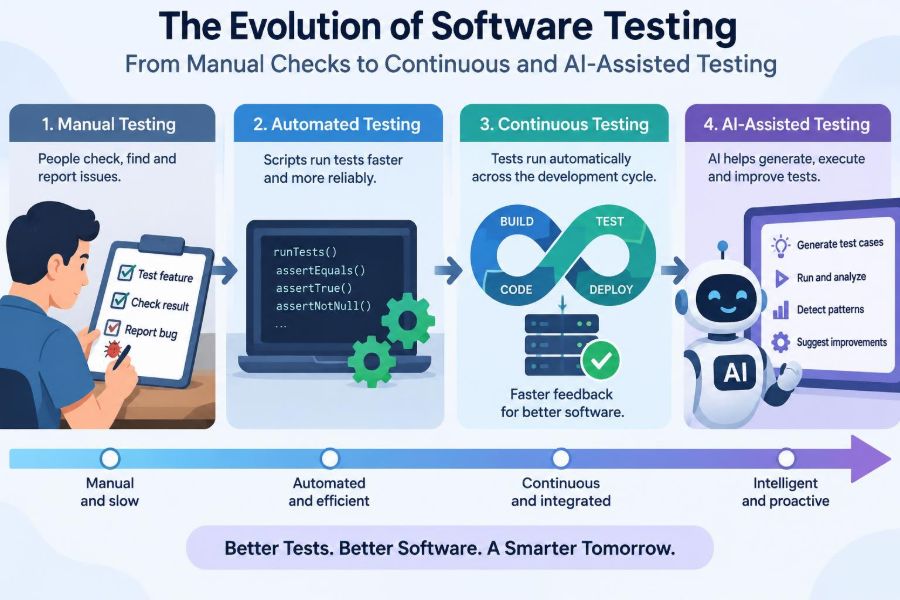
The result is not a simple replacement of manual testing with automation. It is an expanding toolkit: human exploration, repeatable automated checks, rapid feedback pipelines, production monitoring, and increasingly, AI-assisted analysis. Understanding the evolution helps teams choose the right tool for the risk they actually face.
🧭 What Software Testing Really Means
Testing is the process of gathering evidence about whether software behaves as intended and whether it creates unacceptable risks. A test can confirm an expected outcome, reveal a defect, or expose an unclear requirement.
It cannot prove that an application has no bugs. There are usually too many possible inputs, devices, user paths, timing conditions, and external failures to test every combination. The practical goal is useful confidence: enough evidence to make a responsible release decision.
📝 The Era of Manual Checks
In early and smaller software projects, testing often meant a person following a list of steps. A tester might install a build, create an account, enter data, and compare the result with a written requirement.
Manual testing remains valuable because people notice awkward wording, confusing flows, and surprising behavior that a scripted check may not anticipate. It is especially useful when a feature is new, visual, or still changing rapidly.
🔍 Why Human Judgment Still Matters
A test script can verify that a checkout button navigates to a payment page. A human can ask whether the page communicates fees clearly, whether error messages are understandable, and whether the journey feels trustworthy.
This is often called exploratory testing: learning about the product while testing it, following clues, varying inputs, and forming new questions. Skilled exploratory testers do not merely “click around”; they use hypotheses, notes, and domain knowledge to investigate risk.
📋 The Limits of Scripted Manual Testing
Manual regression testing becomes expensive when the same checks must be repeated for every release. A regression test verifies that existing behavior still works after a change elsewhere in the code.
Repetition also creates fatigue. A person may skip a step, miss a subtle difference, or have too little time to cover every browser and scenario before a deadline. This does not make manual work poor quality; it reveals a mismatch between repetitive work and human attention.
🤖 The Rise of Test Automation
Automated tests are programs that set up conditions, exercise software, and compare actual outcomes with expected ones. Once written and maintained, they can run repeatedly with consistent steps.
For example, an automated test can verify that calculating tax for a known order produces the expected total. If a later code change alters that result, the test can fail within seconds. Automation is most effective when it protects behavior that is stable, important, and likely to be checked repeatedly.
🧪 Unit Tests: Fast Checks Close to Code
A unit test exercises a small piece of code, such as a function that validates a password or calculates a shipping charge. Dependencies are often replaced with controlled substitutes so the test focuses on one behavior.
These tests tend to run quickly and help developers catch local mistakes early. They are not enough on their own: a collection of correct units can still fail when connected through real configuration, databases, and user interfaces.
🔗 Integration Tests: Checking the Connections
Integration tests examine whether components work together. They may verify that an API stores data correctly, that a service handles an authentication response, or that a message placed on a queue is processed as expected.
These tests catch problems that unit tests intentionally avoid, including mismatched data formats, incorrect permissions, and faulty configuration. They are usually slower and more complex, so teams should focus them on meaningful boundaries rather than duplicate every unit-level scenario.
🖥️ End-to-End Tests: Following a User Journey
An end-to-end test exercises a complete workflow through a user-facing interface or a realistic API sequence. A retail example might search for an item, add it to a basket, apply a valid voucher, and complete a simulated payment.
Because they cover many layers, these tests can provide persuasive evidence about key journeys. They can also be slower and more fragile than lower-level tests. A sensible suite uses them sparingly for workflows where a broken journey would have significant user or business impact.
🏗️ The Test Pyramid as a Planning Tool
The test pyramid is a common model for balancing automated checks. It suggests having many fast, focused tests at the base and fewer broad, slower tests at the top.
| Test level | Typical strength | Common trade-off |
|---|---|---|
| Unit | Fast feedback on local logic | Cannot verify full system behavior |
| Integration | Checks contracts and component boundaries | Needs realistic environments or dependencies |
| End-to-end | Validates critical user journeys | Often slower and more brittle |
It is a heuristic, not a law. A data platform may need extensive integration coverage, while a safety-sensitive interface may justify more end-to-end checks. The central lesson is to avoid relying solely on slow tests for feedback.
🔁 Regression Testing Becomes Continuous
As release cycles shortened, teams needed feedback before merging code, not days later in a separate test phase. Regression checks increasingly moved into automated build systems.
Instead of treating quality as a gate at the end, teams began testing throughout development. A developer receives a faster signal about a risky change, and the team finds defects while the relevant code and decisions are still fresh.
🚦 Continuous Integration Changes the Feedback Loop
Continuous integration, often shortened to CI, means frequently merging small changes into a shared codebase and automatically building and testing them. A CI pipeline may compile code, run tests, scan dependencies, and publish results.
Its value depends on speed and trust. If feedback arrives hours later, or failures are routinely ignored, developers work around the pipeline rather than using it. A healthy CI system makes the status of a change visible and encourages teams to repair failures promptly.
🚀 Continuous Delivery and Deployment
Continuous delivery keeps software in a releasable state through automated checks and repeatable release steps. A person or business process may still choose when to release.
Continuous deployment goes further: changes that pass the required checks are released automatically. Neither approach means releasing carelessly. They rely on controls such as approvals where needed, feature flags, gradual rollout, observability, and the ability to reverse a harmful change.
🧱 Quality Moves Left, but Not Only Left
“Shift left” means addressing quality earlier: clarifying requirements before coding, reviewing designs, running local tests, and checking changes in CI. Earlier feedback is generally cheaper to act on because fewer later decisions depend on the defect.
But some failures appear only under realistic production traffic, third-party behavior, or real user choices. Mature teams also shift right through monitoring, controlled experiments, and incident learning. Quality is a continuous activity, not a location on a timeline.
🗣️ Testing Starts with Clear Requirements
Many defects begin as ambiguity rather than code. “The report should load quickly” leaves open questions: for which data size, which user roles, under which network conditions, and what counts as quick enough?
Testable requirements describe observable behavior. Teams can discuss examples before implementation: a suspended account cannot log in; a refund over a stated threshold requires review; a report with no records displays an explicit empty state. These examples become shared acceptance criteria.
🤝 Behavior-Driven Examples Create Shared Language
Behavior-driven development, or BDD, uses concrete examples written in language that developers, testers, and product stakeholders can discuss. A scenario often describes a starting condition, an action, and an expected outcome.
Given an expired subscription
When the customer opens premium content
Then the application shows renewal options
The value is not the wording format itself. It is the conversation that exposes assumptions before code is built. Some scenarios may later become automated tests; others remain useful examples for human review.
⚡ Risk-Based Testing Focuses Effort
Not every defect deserves the same testing investment. A typo in a low-traffic help page and an error in payroll calculation do not have the same consequences.
Risk-based testing considers both likelihood and impact. Teams often give more attention to payment flows, permissions, irreversible actions, privacy-sensitive data, complex calculations, and areas changed frequently. This creates a defensible priority when time and environments are limited.
🔐 Security Testing Joins the Everyday Workflow
Security testing asks whether the system protects confidentiality, integrity, and availability. It includes checking authorization boundaries, handling untrusted input safely, protecting secrets, and identifying vulnerable dependencies.
Automated scanners can flag known patterns and dependency issues, but results require judgment. A reported issue may be irrelevant to the deployed configuration, while a business-specific authorization flaw may not be found by a generic scan. Security benefits from layered checks and informed review.
📈 Performance Testing Is More Than Speed
Performance testing examines responsiveness, throughput, and resource use under defined conditions. Load testing evaluates expected demand; stress testing explores behavior beyond expected capacity; endurance testing looks for problems that emerge over longer periods.
A page that responds quickly for one user can still fail under concurrent activity because of database contention, exhausted connections, or a slow dependency. Useful performance tests define a workload and interpret results in the context of infrastructure, data volume, and service-level expectations.
📱 Device, Browser, and Accessibility Coverage
Modern applications operate across different browsers, screen sizes, operating systems, and assistive technologies. A layout that works on one laptop may hide a critical action on a small screen.
Accessibility testing considers whether people can perceive, operate, and understand the product using varied needs and tools, including keyboards and screen readers. Automated checks can catch some structural issues, but manual evaluation remains necessary for focus order, meaningful labels, and understandable interaction.
🧰 Test Environments and Test Data Matter
A test is only as credible as the conditions around it. Differences in configuration, permissions, feature flags, and external services can make a passing test misleading or a failing test hard to reproduce.
Test data deserves equal care. Teams should use realistic but appropriately protected data, avoid exposing sensitive production information, and create known data states when possible. A reliable reset process prevents one test’s leftovers from contaminating another test.
🌩️ Flaky Tests Damage Trust
A flaky test sometimes passes and sometimes fails without a relevant code change. Common causes include timing assumptions, shared state, network instability, uncontrolled clocks, and asynchronous work that has not completed.
Flakiness teaches people to ignore alarms, which is dangerous. Retrying a test may keep a pipeline moving, but it should not be the final fix. Teams need to identify the source, isolate dependencies, wait for meaningful conditions rather than arbitrary delays, or remove an unreliable test until it can be repaired.
🧹 Test Maintenance Is Engineering Work
Tests are code and require design, review, refactoring, and ownership. Poorly named tests, copied setup, and assertions tied to incidental implementation details make a suite costly to change.
A good test explains the behavior it protects and fails for a clear reason. Teams should delete obsolete tests, simplify brittle ones, and treat a consistently failing build as an engineering problem rather than someone else’s queue.
👥 Quality Becomes a Team Responsibility
Older delivery models often positioned testing as a separate final handoff. Modern cross-functional teams distribute quality work: product people clarify outcomes, developers build and test, testers investigate risk, operations specialists shape reliability, and security practitioners advise on threats.
This does not erase specialist roles. It makes expertise available earlier, when it can influence design. A test specialist may lead exploratory work and test strategy; a developer may improve observability; a product manager may sharpen acceptance criteria.
📊 Observability Extends Testing into Production
Observability is the ability to understand a system’s behavior from signals such as logs, metrics, and traces. It helps teams answer questions that pre-release tests cannot fully settle: Which request is slow? Did an error affect one customer segment? Which service dependency changed?
Production monitoring is not permission to skip testing. It is a complementary safety net. Alerts should be tied to meaningful user or system symptoms, and dashboards should support investigation rather than generate noise.
🪂 Safe Releases Reduce Blast Radius
Teams can reduce release risk by exposing a change gradually. Feature flags can enable behavior for selected users; canary releases send a small share of traffic to a new version; rollback procedures provide a path back when signals worsen.
These practices turn deployment into a controlled experiment. They are most useful when paired with clear success measures and monitoring. Releasing gradually without knowing what to watch simply delays the discovery of problems.
🧠 Where AI-Assisted Testing Fits
AI-assisted testing uses machine learning or generative AI tools to support activities such as drafting test cases, summarizing failures, generating varied inputs, suggesting assertions, or identifying patterns in large test logs.
It can reduce routine effort, especially when a team needs a starting point for documentation or wants help navigating unfamiliar code. But generated output is a proposal, not evidence. The tool may misunderstand product rules, invent assumptions, or produce tests that verify the wrong behavior.
🧩 AI Can Help Generate Ideas, Not Replace Oracles
A test needs an oracle: a credible way to decide what the correct outcome should be. For a tax calculation, the oracle may be a specified rule set and carefully checked examples. For a recommendation system, it may involve broader quality measures and human assessment.
AI can suggest edge cases such as blank inputs, unusual characters, or conflicting permissions. A human still needs to validate whether those cases matter and whether the expected result is correct. The hardest part of testing is often defining correctness, not producing more test code.
⚠️ Risks of AI-Generated Test Artifacts
Generated tests can look polished while adding little value. They may mirror implementation details, repeat existing coverage, use unrealistic mocks, or assert only that code runs without checking a meaningful outcome.
- Review generated tests as carefully as production code.
- Keep secrets and sensitive data out of prompts unless approved safeguards exist.
- Prefer small, understandable tests over large opaque generated suites.
- Measure value through defects found, feedback speed, and maintainability—not test count.
AI also does not remove accountability. The team releasing software remains responsible for the quality and safety of what it ships.
🧭 Choosing the Right Test for the Question
Effective testing begins with a question. “Does this calculation follow the rule?” may call for unit tests. “Can this service read the identity provider’s response?” suggests integration tests. “Can a new customer complete signup?” may need end-to-end and exploratory testing.
The best test is not always the most realistic one. It is the fastest reliable test that answers the relevant question, supplemented by broader checks where the risk justifies them.
🛠️ A Practical Path for Improving a Test Strategy
Teams do not need to rebuild everything at once. Start with the failures and delays that cause the most pain, then improve one feedback loop at a time.
- Map critical user journeys and the consequences if they fail.
- Identify slow, manual, flaky, or missing checks around those journeys.
- Add focused automated coverage at the lowest sensible level.
- Run essential checks in CI and make failures visible.
- Improve test data, environments, and release monitoring.
- Review incidents and escaped defects to refine the strategy.
This approach avoids an automation project that produces many tests without improving delivery confidence.
🚧 Common Mistakes to Avoid
One common mistake is treating automation as a target rather than a means. A high number of automated tests says little if they are slow, untrusted, or disconnected from major risks.
Another is assuming a passing pipeline means users will be satisfied. Automated checks may miss unclear content, accessibility barriers, unexpected workflows, and production-specific conditions. Finally, do not let the absence of a dedicated tester become an excuse for unplanned quality work; shared responsibility still needs time, skills, and explicit decisions.
🌱 The Core Principle: Fast Evidence, Thoughtful Judgment
Software testing has evolved from end-of-cycle manual checking into a continuous system of evidence. Automation provides repeatability, CI shortens feedback, delivery practices make change safer, production signals reveal real behavior, and AI can assist with analysis and test creation.
None of these tools removes the need to understand users, requirements, and risk. The strongest approach combines fast automated feedback with human judgment where ambiguity, usability, safety, and novel behavior matter most.
Modern testing is not about finding a single perfect tool; it is about building a dependable flow of evidence that helps people make better release decisions. As software changes faster, that balance of discipline, curiosity, and learning remains the real advantage. ⚙️🧪🚀