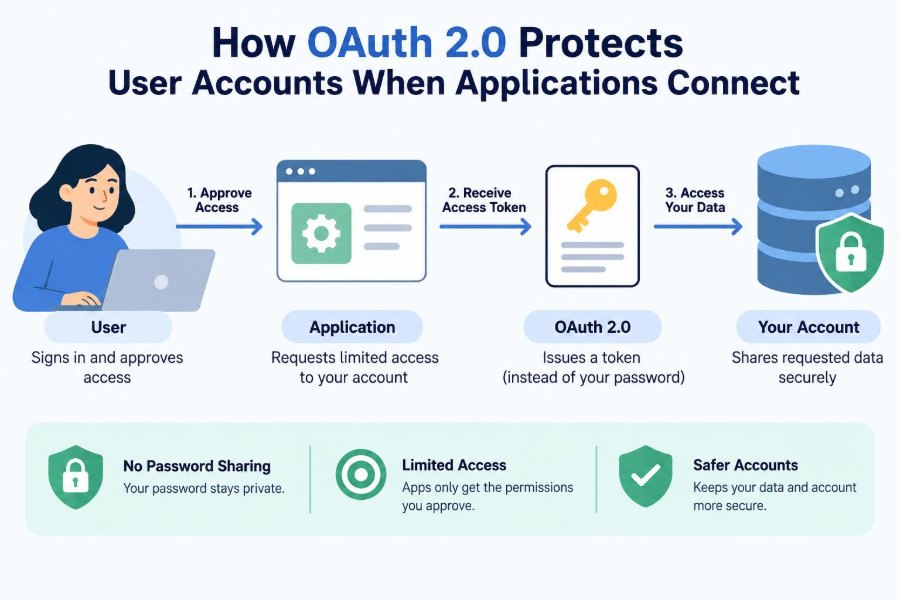

You sign in to a new photo-printing service and it offers a convenient button: “Import pictures from your cloud storage.” The service could ask for your storage password, but that would be a serious warning sign. A password gives it far more power than it needs and is difficult to take back.
Instead, a well-designed connection sends you to the cloud provider’s own sign-in page. You approve a clearly described request, return to the photo service, and the import begins. The photo service never sees your password.
That familiar flow is usually powered by OAuth 2.0. It is a framework for delegated authorization: letting one application act with limited permission on someone’s behalf.
OAuth 2.0 matters because modern software is connected software. Calendars, payment systems, repositories, health portals, and workplace tools exchange data constantly; safe connections need boundaries, consent, and revocation. 🔐
🧩 1. The problem OAuth 2.0 solves
Before delegated authorization became common, an application might ask users to hand over credentials for another service. The application could then impersonate the user directly.
This model creates a dangerous all-or-nothing relationship. The application may retain a reusable password, users cannot easily limit its access, and changing one password can break several integrations.
OAuth 2.0 replaces password sharing with a temporary, scoped credential called an access token. The token represents only the authority granted for a particular connection.
🔐 2. Authentication and authorization are different
Authentication answers “Who are you?” A password, passkey, or security key can help a service authenticate a person.
Authorization answers “What is this person or application allowed to do?” OAuth 2.0 primarily addresses authorization, not the act of signing a person in.
Many login experiences combine both ideas. When an app says “Sign in with,” it often uses OpenID Connect on top of OAuth 2.0 to obtain identity information as well as authorization.
👥 3. Meet the four main roles
OAuth terminology can feel formal, but the roles describe a simple relationship.
- Resource owner: the person or entity that can grant access, often the user.
- Client: the application requesting access, such as a scheduling tool.
- Authorization server: the system that authenticates the owner and records consent.
- Resource server: the API holding protected information, such as calendar events.
Sometimes the authorization server and resource server belong to the same provider. They remain separate roles because issuing permission and serving data are distinct jobs.
🗝️ 4. Tokens replace shared passwords
An access token is a credential a client presents to an API. It says, in effect, that the client has been granted a defined set of permissions.
Unlike a password, a token can be narrowly scoped, short-lived, and revoked without locking the user out of the provider. A token should still be treated as sensitive secret material.
Tokens are not automatically safe simply because they are tokens. Their protection depends on secure transport, careful storage, validation by APIs, and appropriate expiration.
🎯 5. Scopes create useful limits
A scope is a named permission or category of permission requested by a client. A calendar client might ask to read events, while an editing client may need permission to create and update them.
Good scope design makes a consent screen meaningful. Users and administrators should be able to understand what an application can do before approving it.
- Read profile basics
- Read calendar events
- Create calendar events
- Send messages on a user’s behalf
Requesting fewer scopes is a security practice called least privilege. It reduces the harm if the client makes a mistake or is compromised.
🧭 6. The authorization flow at a glance
In a typical user-facing flow, the client redirects the user’s browser to the authorization server. The request identifies the client, requested scopes, and a return location.
The authorization server authenticates the user if necessary and asks for consent. After approval, it redirects the browser back to the client with a short-lived authorization result.
The client then exchanges that result directly with the authorization server for tokens. Finally, it calls the resource server’s API using its access token.
🚦 7. Authorization Code flow is the modern baseline
For browser-based user authorization, the Authorization Code flow is widely used because tokens are not returned directly in the browser’s front-channel redirect.
The redirect carries an authorization code with limited lifetime and intended single use. The client exchanges it at the token endpoint over a protected back-channel.
This separation reduces exposure, but it does not remove the need to secure redirects, validate responses, and protect client-side sessions.
🧪 8. PKCE protects public clients
Mobile apps, desktop apps, and single-page applications often cannot safely keep a long-term client secret. These are known as public clients.
PKCE, pronounced “pixy,” adds a one-time secret generated by the client for each authorization attempt. The client sends a derived challenge first and proves possession of the original verifier during code exchange.
If an attacker intercepts the authorization code, that attacker cannot normally redeem it without the verifier. PKCE is an important defense against authorization-code interception.
🏢 9. Confidential clients have different duties
A web application with a protected server can be a confidential client. It may authenticate to the authorization server using a client secret or another stronger method.
A client secret identifies the application, not the end user. It is not a substitute for user consent, access tokens, or secure implementation.
Secrets belong in managed server-side configuration, not browser code, mobile packages, source repositories, or logs. Treat a leaked client secret as a security incident.
📨 10. Redirect URIs are a security boundary
The redirect URI tells the authorization server where to send a user after approval. An attacker who can influence it may be able to receive codes or tokens intended for a legitimate client.
Authorization servers should require exact, pre-registered redirect URI matching rather than accepting broad patterns or arbitrary destinations. Clients should use only expected callback endpoints.
Developers should not use an incoming redirect parameter as a reason to send users elsewhere without validation. That turns an OAuth callback into an open-redirect opportunity.
🧷 11. State ties the response to the request
The state parameter lets a client connect an incoming authorization response to the browser session that began the request. It is commonly used as a high-entropy, one-time value.
The client stores the expected value before redirecting the user and compares it exactly when the callback arrives. A mismatch means the response should be rejected.
This helps defend against cross-site request forgery and request mix-ups. State may carry application context, but sensitive data should not be placed in it casually.
🪪 12. Access tokens are for APIs
A resource server receives an access token and decides whether to honor the request. It checks the token according to the provider’s design and enforces the represented permissions.
Some access tokens are opaque strings whose meaning is checked with the authorization server. Others are structured, signed tokens that an API can validate locally.
A structured format does not mean an API should trust every field blindly. It must validate relevant properties, such as issuer, intended audience, expiration, and signature where applicable.
⏳ 13. Short lifetimes limit exposure
Access tokens should generally expire. A stolen token that expires soon provides a smaller window for misuse than a credential that works indefinitely.
Expiration is not a complete solution: an attacker can act while a token remains valid. It is one layer in a system that also needs secure storage, monitoring, and revocation options.
APIs should verify time-based validity and return an appropriate error when a token is expired or unacceptable. Clients should handle this predictably rather than retrying forever.
🔄 14. Refresh tokens extend a connection carefully
A refresh token can let a client obtain new access tokens without repeatedly asking the user to authorize. It supports a smoother long-running connection.
Because it can preserve access for longer, a refresh token is often more sensitive than a short-lived access token. It should be issued only where appropriate and stored with strong protections.
Providers may rotate refresh tokens, detect reuse, limit their scope, or revoke them when risk changes. Clients must be ready for refresh to fail and guide the user through reauthorization.
📋 15. Consent should be understandable
A consent screen is where technical authorization becomes a human decision. It should identify the requesting application and describe requested access in language users can evaluate.
Consent is meaningful only when the request is honest and proportionate. An application that asks for broad mailbox access to offer a minor feature creates both trust and security problems.
Organizations may also apply policies that block certain apps or require administrator approval. OAuth supports the mechanics; governance determines which connections are acceptable.
🏷️ 16. OAuth does not automatically provide identity
An access token grants API access; it is not necessarily a reliable description of a signed-in person for the client application. Confusing these purposes can lead to flawed login design.
When an application needs standardized identity information, OpenID Connect adds an identity layer to OAuth 2.0. It introduces concepts such as an ID token and a UserInfo endpoint.
Even then, applications must validate identity responses correctly and use the intended token type for each task. Do not send an ID token to an API as if it were an access token.
⚖️ 17. Token types compared
| Credential | Primary purpose | Typical holder |
|---|---|---|
| Authorization code | Temporary result exchanged for tokens | Client during callback |
| Access token | Call a protected resource API | Client making API requests |
| Refresh token | Obtain new access tokens | Client with continuing access |
| ID token | Convey authentication information to client | Client using OpenID Connect |
These credentials may all appear in one integration, but they are not interchangeable. Using each only for its intended purpose makes systems easier to reason about and secure.
🛡️ 18. Bearer tokens demand careful handling
Many access tokens are bearer tokens: whoever possesses one can use it until it expires or is rejected. The API generally does not need a second proof that the caller is the rightful original recipient.
Clients should send bearer tokens only over HTTPS and avoid putting them in URLs, browser history, referrer data, or diagnostic output. APIs should avoid logging authorization headers.
Where an ecosystem supports sender-constrained tokens, additional mechanisms can bind a token more closely to a client. These approaches can reduce replay risk but add operational complexity.
🧱 19. The resource server must enforce permissions
Issuing a token is only half of authorization. The resource server must verify that the token is acceptable for that API and that the requested operation is permitted.
For example, a token intended for a document API should not automatically work at a payroll API. Audience restrictions and API-side checks help prevent this kind of token confusion.
The API should also enforce resource-level rules. A token with permission to read documents does not necessarily allow reading every document in an organization.
🧨 20. Common implementation mistakes
OAuth incidents often come from integration details rather than a failure of the core idea. Small shortcuts can defeat important security guarantees.
- Accepting redirect URIs that were not precisely registered
- Skipping state validation in browser flows
- Omitting PKCE for public clients
- Putting tokens in URLs or application logs
- Using overly broad scopes “just in case”
- Treating an ID token as API authorization
- Failing to validate a token’s intended audience
A secure library and provider documentation help, but developers still need to understand the checks their application owns.
🕵️ 21. Browser and mobile storage need different thinking
In browser applications, cross-site scripting can expose data accessible to page JavaScript. Strong content security practices and careful dependency management are therefore relevant to token safety.
On mobile platforms, use the operating system’s protected storage facilities where available. Do not assume that obscuring a token in app code makes it secure.
For server-rendered web applications, keeping sensitive tokens on the server and using a protected session cookie can simplify the browser’s exposure. Architecture changes the threat model.
🧰 22. Service-to-service access is not user consent
Some integrations have no human user at the moment of access. A backend job may need to call another backend API using its own application identity.
OAuth 2.0 includes patterns for this situation, commonly called client credentials. The client receives a token representing its own authority rather than delegated user permission.
This is useful, but it should not be misrepresented as user authorization. Design scopes, identities, and audit records so operators can tell the difference.
📡 23. Revocation and disconnect matter
A user should be able to disconnect an application. Administrators also need ways to remove access when an employee leaves, a vendor relationship ends, or suspicious behavior appears.
Revocation can invalidate refresh tokens and sometimes access tokens, depending on the provider and token design. Short access-token lifetimes make revocation effects arrive sooner when immediate invalidation is not available.
Clients should offer a clear disconnect action and delete locally stored credentials when access ends. Removing a UI connection without removing the underlying token is not enough.
📈 24. Logging helps, but secrets do not belong in logs
Teams need observability to diagnose failed authorization, unexpected scopes, and API errors. Useful records may include request correlation identifiers, client identifiers, outcome codes, and non-sensitive timestamps.
Never deliberately log passwords, authorization codes, access tokens, refresh tokens, or complete authorization headers. Redaction should be built into logging infrastructure, not left to memory.
Audit trails can also support investigations by showing which client accessed which resource category and when. Collect only what is needed and protect logs as security-sensitive data.
🧑💻 25. A practical implementation checklist
Start with the provider’s supported flow and current security guidance rather than adapting an old tutorial. Then make the integration’s trust boundaries explicit.
- Register exact redirect URIs and use HTTPS in production.
- Use Authorization Code flow with PKCE for user-facing public clients.
- Generate and validate state for each authorization request.
- Request the smallest set of scopes that delivers the feature.
- Store tokens according to the platform’s security model.
- Validate tokens at the resource server before serving data.
- Provide disconnect, error handling, and reauthorization paths.
Test failure cases as seriously as successful login. Expired tokens, denied consent, invalid state, revoked grants, and unavailable authorization servers are normal operational conditions.
🧠 26. A useful mental model
Think of OAuth 2.0 as a carefully limited valet key, not a master key. The user keeps the account password private while granting an application only the access needed for a particular job.
The authorization server records and issues that grant, the client uses it, and the resource server checks it. Scope, expiration, redirect validation, and revocation are the controls that keep the delegation bounded.
OAuth 2.0 protects accounts best when applications ask for minimal permission, tokens are handled like secrets, and every participant validates its part of the exchange. 🔑🛡️🌐