
A customer opens a shopping app just as a new release goes live. They expect to browse, pay, and receive confirmation without noticing that engineers changed the software underneath them.
Traditional releases can make that expectation difficult. Replacing a running application in place may require stopping processes, updating servers, restarting services, and hoping that the new version behaves correctly under real traffic.
Blue-green deployment offers a calmer alternative. Instead of modifying the live environment directly, a team prepares a second, separate environment and moves traffic only when that version is ready.
The idea sounds simple, but reliable blue-green delivery depends on much more than flipping a routing rule. Databases, sessions, background jobs, caches, observability, and rollback planning all determine whether the switch is genuinely low-risk.
🟦 The Core Idea Behind Blue-Green Deployment
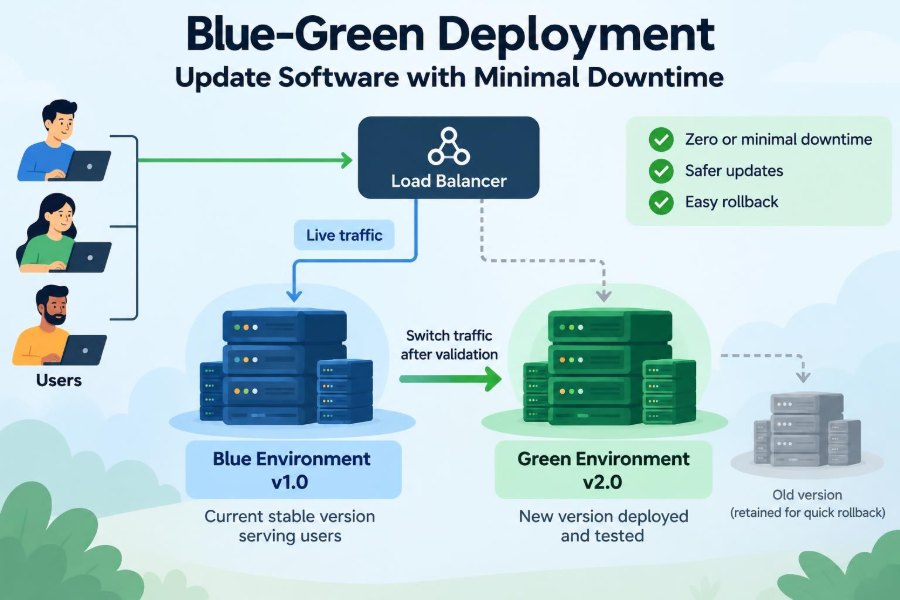
A blue-green deployment uses two production-capable environments that run different releases of the same application. By convention, one is called blue and the other green; the colors have no technical meaning.
One environment receives live user traffic. The other is idle or receives only controlled validation traffic while the team deploys and tests a new version there. Once the new version is accepted, a router, load balancer, proxy, or DNS layer directs production traffic to it.
The old environment remains intact for a period. That preserved version makes reversal much faster than rebuilding an earlier release during an incident.
🚦 Why In-Place Releases Can Interrupt Users
With an in-place deployment, a team updates the servers already serving requests. Individual processes may stop, containers may be replaced, and configuration can change while users are connected.
Rolling deployments reduce this disruption by replacing instances gradually, but they still allow old and new versions to coexist. That can be unsafe when versions interpret requests, cached data, or database records differently.
Blue-green deployment separates preparation from exposure. The new release can start, warm up, and pass checks before it is asked to serve the public.
🔄 The Traffic Switch Is the Critical Moment
The switch usually happens at a traffic-control layer rather than inside application code. Common mechanisms include a reverse proxy, cloud load balancer, Kubernetes service routing configuration, API gateway, or carefully managed DNS record.
For existing connections, the result depends on the protocol and infrastructure. New requests may reach green immediately, while long-running WebSocket connections or file uploads remain attached to blue until they complete or are deliberately drained.
That distinction matters: “minimal downtime” does not automatically mean every user connection changes at the same instant.
🏗️ Two Production-Ready Environments
A real blue-green design requires both sides to be able to serve production traffic. Green cannot merely be a developer test environment with weaker credentials, smaller dependencies, or incomplete configuration.
The environments should be equivalent in the characteristics that affect behavior: runtime versions, secrets, network policies, dependent services, compute capacity, feature flags, and monitoring. Small differences can produce failures that testing does not reveal.
Infrastructure as code is especially useful here. It lets teams describe and reproduce environments instead of relying on undocumented manual setup.
🧪 What Teams Validate Before Sending Live Traffic
Before cutover, green should pass automated checks and targeted release verification. Automated tests cannot predict every production issue, but they can reject obvious faults before customers encounter them.
- Health checks confirm that processes are running and essential dependencies can be reached.
- Smoke tests exercise a small set of critical journeys, such as sign-in, search, checkout, or an API request.
- Configuration checks confirm expected environment variables, certificates, secrets, and routes.
- Performance checks can reveal slow startup, exhausted connection pools, or unexpected resource use.
Validation should focus on the paths that matter most to the business, not simply on whether an HTTP endpoint returns a successful status code.
❤️ Health Checks Need Meaningful Signals
Many platforms use liveness and readiness checks. A liveness check asks whether a process appears alive; it can trigger a restart when a process is stuck. A readiness check asks whether that instance is prepared to receive requests.
A service can be alive but not ready. For example, it may still be loading a large model, establishing database connections, or rebuilding an in-memory cache.
Checks should be lightweight and dependable. A readiness endpoint that performs expensive work on every request can create load precisely when the service is under pressure.
🔥 Warming Up the Green Environment
Applications often perform work lazily: compiling templates, loading configuration, creating connection pools, fetching keys, or populating caches only after the first request. Sending all traffic to a cold green environment can create a brief but noticeable slowdown.
Teams can warm green using controlled synthetic requests that resemble common user actions. They may also preload static assets, establish database connections, or prime safely cacheable data.
Warm-up must avoid side effects. A synthetic checkout should not create real orders, send email, or charge payment methods.
🗺️ A Simple Deployment Flow
A disciplined workflow separates building, validation, release, and cleanup. The exact tooling varies, but the sequence is usually recognizable.
- Build an immutable release artifact, such as a container image or package.
- Deploy that artifact to the inactive environment.
- Apply compatible configuration and run readiness, smoke, and security checks.
- Warm the environment and inspect operational signals.
- Switch production traffic to the new environment.
- Observe the release, keeping the former environment available for rollback.
- After the rollback window, retire, recycle, or prepare the old environment for the next release.
Automation makes this sequence repeatable, but teams should still define who can approve a switch and what conditions require stopping it.
↩️ Rollback Is Fast, Not Automatically Safe
The most attractive property of blue-green deployment is often rollback. If green produces elevated errors after cutover, routing traffic back to blue can be much faster than redeploying old code.
However, rollback is only simple when both versions can safely operate with the same persistent state. If green has already transformed records, emitted irreversible messages, or changed an external system, switching traffic back may not undo those effects.
Fast traffic reversal is not the same as complete business reversal. A rollback plan needs to account for data and side effects, not just application processes.
🗃️ The Database Is Usually the Hard Part
Application servers are comparatively easy to duplicate. A primary database often is not, because two full copies can diverge and because copying production data may be expensive, sensitive, or impractical.
Most blue-green deployments therefore share one database while blue and green coexist. This makes schema compatibility essential: both versions may read and write the same tables during cutover and rollback.
Database changes deserve their own release strategy rather than being treated as a small step inside an application deployment.
🧩 Use Expand-and-Contract Schema Changes
A common safe pattern is called expand and contract. First, expand the schema in a way that old code can tolerate. Later, update application behavior. Only after old code is no longer needed do you remove obsolete structures.
For example, a team might add a nullable column, deploy code that writes both the old and new representation, backfill existing records, then move reads to the new column. The old column is removed in a later release after the rollback window has passed.
This takes more planning than a single destructive migration, but it preserves the ability for blue and green to coexist safely.
⚠️ Avoid Destructive Changes at Cutover
Dropping a table, renaming a column, tightening a constraint, or changing a data type can break the old environment immediately. If those changes occur before a release proves stable, routing back to blue may fail.
When a disruptive migration is unavoidable, teams may need a maintenance window, a versioned API boundary, an intermediate compatibility release, or a more specialized migration plan.
The right decision depends on the data model and operational constraints. Blue-green deployment reduces application interruption; it does not eliminate every kind of migration risk.
👤 Sessions and User State Can Complicate Switching
If session state lives only in one application instance’s memory, a user who begins on blue may lose their session when the next request reaches green. This can appear as an unexplained logout or abandoned workflow.
A better design stores session state in a shared, highly available system or uses signed tokens whose validation keys are available to both environments. The chosen approach must support key rotation and revocation requirements.
Sticky sessions can reduce immediate disruption, but they also delay full cutover and can hide a system that relies too heavily on local state.
📦 Caches Need Version Awareness
Blue and green may share a cache, but cache entries created by one version must be understandable by the other. A changed serialization format, altered key naming convention, or different interpretation of cached values can create subtle faults.
Versioned cache keys are a practical safeguard when formats change. For instance, a release can read and write a new key prefix while older code continues using its existing keys.
Cache invalidation remains a design concern. Clearing a large shared cache at cutover may create a sudden load spike on databases or downstream services.
✉️ Background Jobs and Queues Require Ownership Rules
Web traffic is only one part of many systems. Workers may send notifications, process invoices, generate reports, or consume events from a queue. Running old and new workers simultaneously can be correct, risky, or wasteful depending on job semantics.
Idempotent jobs are safer because repeating the same work produces the intended result rather than duplicate side effects. A payment capture or email notification should also have explicit deduplication and traceability controls where appropriate.
Before cutover, decide whether blue workers drain existing work, whether green workers begin processing immediately, and how message formats remain compatible during the overlap.
📡 Observability Turns a Switch Into an Informed Decision
A traffic switch without monitoring is a guess. Teams need enough visibility to detect whether green is behaving differently from blue under actual demand.
Useful signals include error rates, request latency, saturation of CPU or memory, database connection pressure, queue depth, dependency failures, and key business events such as successful logins or completed purchases.
Logs, metrics, and distributed traces should identify the release version or environment. Otherwise, engineers may see a failure but struggle to establish which version produced it.
📊 Define Release Guardrails Before Deployment
Release decisions are easier when the team agrees in advance on what they will watch and what will trigger rollback. Guardrails are not magic thresholds; they are operational expectations grounded in the service’s normal behavior.
- Which endpoints and user journeys are release-critical?
- Which metrics distinguish ordinary variation from a material regression?
- Who has authority to pause or reverse the release?
- How long will blue remain available after green receives traffic?
- What evidence is required before cleanup begins?
Writing these answers down reduces confusion during a time-sensitive incident.
🎯 Blue-Green Deployment Versus Canary Releases
Blue-green and canary deployment both reduce release risk, but they expose users to new software differently. A blue-green release generally switches traffic from one environment to another in a single controlled change.
A canary release sends a small portion of production traffic to the new version first, then increases that portion if signals remain healthy. It provides gradual real-world exposure, often using weighted routing.
| Approach | Traffic pattern | Primary advantage | Main operational challenge |
|---|---|---|---|
| Blue-green | Move traffic between two complete environments | Rapid route-based rollback | Maintaining two production-capable environments |
| Canary | Increase new-version traffic in stages | Limits initial blast radius | Managing mixed-version behavior |
| Rolling | Replace instances gradually | Usually uses less duplicate capacity | Old and new instances coexist during rollout |
Some organizations combine methods: they prepare green fully, then direct a limited share of traffic to it before completing the switch.
🔁 Blue-Green Deployment Versus Rolling Releases
Rolling deployment replaces instances in batches, keeping enough old instances online to serve requests. It is efficient for systems where versions are compatible and a small amount of mixed-version operation is acceptable.
Blue-green offers a cleaner separation: users are routed to one named release environment or the other. That can simplify troubleshooting because a problem is less likely to be distributed across many partially updated instances.
The trade-off is capacity. Maintaining two ready environments can cost more, especially for workloads that require substantial compute resources or specialized infrastructure.
💸 Capacity and Cost Are Real Constraints
Blue-green deployment often requires enough headroom to run both versions at the same time. For a large service, that may double application-layer capacity temporarily, though shared databases and managed services follow different cost patterns.
Autoscaling, smaller pre-cutover capacity, and short overlap periods can reduce expense, but they must not leave green unable to handle a sudden traffic surge. A release is a poor time to discover that the new environment cannot scale.
For some services, the cost is justified by the value of predictable releases and faster recovery. For others, a rolling or canary approach is a better operational fit.
🔐 Secrets, Certificates, and Configuration Must Match
Many deployment failures are configuration failures rather than code failures. Green may have an expired certificate, a missing encryption key, a different callback URL, or a permission policy that blue does not use.
Configuration should be versioned and reviewed without exposing sensitive values. Secret-management systems can provide environment-specific credentials, but both environments need the correct permissions during the overlap.
Be careful when rotating secrets during a release. If blue must remain rollback-capable, it may need to accept both the old and new credentials for a planned transition period.
🌐 DNS Is Useful but Has Limits
DNS can direct a hostname from blue to green, but caching behavior means clients and intermediary resolvers may not observe the change at exactly the same time. A low time-to-live setting can help, but it does not provide precise, immediate control everywhere.
For fast and controllable cutovers, a load balancer or application gateway is often preferable. It can actively manage targets, perform health checks, and drain connections.
DNS-based switching is still appropriate in some architectures, particularly when changing regions or endpoints, but teams should test realistic propagation behavior rather than assuming instant movement.
🧯 Connection Draining Protects In-Flight Work
When traffic moves to green, blue should usually stop receiving new requests while continuing to serve requests already in progress. This process is called connection draining.
The allowed drain time should reflect the application. A typical web request may finish quickly, while report generation, streaming, or long-lived connections can require a separate shutdown strategy.
After the timeout, remaining connections may need to be closed. The service should handle retries safely, and clients should receive clear failure behavior rather than corrupted partial results.
🧱 Immutable Artifacts Improve Repeatability
An immutable artifact is built once and promoted unchanged through environments. Instead of rebuilding the same source code separately for testing and production, a team deploys the exact artifact that was validated.
This reduces a common source of uncertainty: a production build that differs from the one tested because dependencies, build tools, or generated files changed in between.
Record the artifact version, source revision, configuration version, and deployment time. These details make incident investigation and rollback much more precise.
🛠️ Automation Should Be Boring and Auditable
A good deployment pipeline performs predictable actions: provision or select green, deploy the artifact, wait for readiness, run checks, request approval where needed, switch traffic, and record the result.
Manual commands are sometimes necessary during recovery, but routine releases should not depend on someone remembering a long sequence of shell commands. Automation reduces variance and creates an audit trail.
Still, automation needs safeguards. A pipeline should not promote an unhealthy environment merely because a timer expired or a superficial check passed.
🚧 Common Failure Modes to Plan For
Blue-green deployment changes the failure modes; it does not remove them. The most dangerous mistakes are often assumptions about systems outside the application servers.
- Shared database incompatibility: green writes data that blue cannot read after rollback.
- Incomplete capacity: green passes a light test but fails under full traffic.
- Incorrect routing: traffic reaches a stale, unhealthy, or partially configured target.
- State loss: sessions, uploads, or local files disappear when requests change environments.
- Duplicate processing: both environments consume the same jobs without adequate idempotency.
- Weak visibility: the release version is absent from logs and metrics, slowing diagnosis.
Each failure mode can be tested in advance through rehearsals, failure injection where appropriate, and carefully designed runbooks.
🧠 A Practical Example: Updating an Online Store
Consider a hypothetical online store that introduces a revised discount engine. The team deploys the new application version to green, where it uses the same compatible database schema as blue and receives synthetic catalog and cart requests.
They verify that green can calculate discounts, reserve inventory, and complete a test payment flow against a safe payment test path. They also check that dashboard metrics label requests by release version.
At cutover, new customer requests go to green while blue drains. If discount errors rise unexpectedly, the team can return new traffic to blue—but only because the database migration was designed so blue can still understand the records green created.
📋 A Deployment Checklist for Teams
A checklist is valuable when it captures decisions that are easy to overlook under time pressure. It should be specific to the system, not a generic document that nobody consults.
- Is the inactive environment running the intended immutable artifact?
- Are health, readiness, smoke, and critical user-flow checks passing?
- Can both releases safely share the current database schema, cache, session store, and queues?
- Has green been warmed and sized for expected traffic?
- Are dashboards, alerts, logs, and traces tagged with the release version?
- Is the routing switch and connection-draining behavior understood?
- Is the rollback decision owner identified, and is blue still viable?
If several answers are uncertain, postponing a release is usually less costly than diagnosing preventable failures under live traffic.
👥 Team Practices Matter as Much as Platform Features
Blue-green deployment works best when developers, operations specialists, testers, and product stakeholders share ownership of release quality. A routing feature alone cannot solve unclear requirements or incompatible data changes.
Teams benefit from rehearsing rollback, reviewing migration plans early, and treating production observability as part of the definition of done. Post-release reviews can improve the process without assigning blame.
Over time, the goal is not just faster switching. It is a delivery system in which releases are small, observable, reversible where possible, and understandable by the people operating them.
✅ The Core Principle: Separate Readiness From Exposure
The central idea of blue-green deployment is to prepare a new release away from live users, verify that it is ready, and only then expose it through a controlled traffic change. That separation reduces the need to repair a running production environment while customers wait.
Its strongest advantage is operational clarity: one environment is serving traffic, the other is a known release candidate or rollback target. Its main limitations come from shared state, infrastructure cost, and any change that cannot be safely reversed.
When teams design for compatibility, monitoring, connection handling, and rollback from the beginning, blue-green deployment becomes a practical way to make software updates feel uneventful to users.
Blue-green deployment minimizes downtime by making traffic routing a deliberate final step—not the moment when untested software first meets production. ⚙️🟦🚦