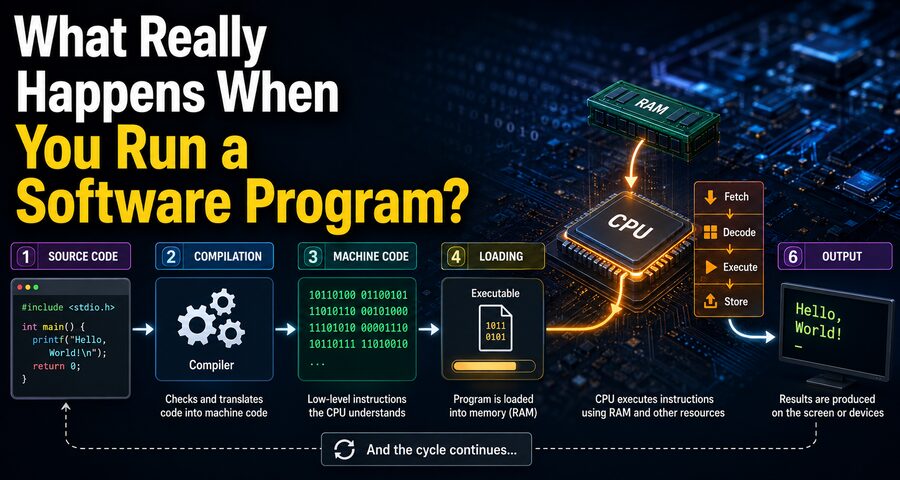

Opening a software program may look simple. You click an icon, tap an app, or type a command, and within seconds the program appears on your screen. Behind that ordinary action, however, a remarkable sequence of events takes place inside the computer.
The operating system must locate the program on storage, read its executable instructions, place important parts into memory, create a running process, prepare resources, connect the program to system libraries, schedule processor time, and begin executing machine instructions.
From that point onward, the program continuously interacts with the CPU, RAM, storage devices, operating system, graphics hardware, network interfaces, and other components.
Understanding this process reveals one of the most important ideas in computer science: a program stored on a disk is not the same thing as a program that is actively running.
So what really happens between clicking an icon and seeing an application come to life? 🚀
📄 A Program Starts as a File
Before software runs, it usually exists as one or more files stored on an SSD, hard drive, flash memory, or another storage device.
For compiled applications, an important file is the executable.
Depending on the operating system, examples include:
.exefiles on Windows- ELF executables on many Linux systems
- Mach-O executables on macOS
An executable contains machine instructions and information telling the operating system how the program should be loaded.
It may also reference libraries containing reusable functionality.
At this point, the program is simply data stored on a device. It is not actively doing anything.
🖱️ You Ask the Operating System to Start It
Suppose you double-click an application icon.
The desktop environment recognizes that the icon corresponds to a particular executable file and sends a request to the operating system to launch it.
The operating system then begins the process of creating a running instance of the program.
This distinction matters:
Program = instructions stored somewhere.
Process = a running instance of those instructions.
You can sometimes run several copies of the same program simultaneously. Each may become a separate process with its own memory and execution state.
🧠 The Operating System Creates a Process
One of the first major steps is creating a process.
The operating system prepares internal records describing the new process.
These records may contain information such as:
- A unique process identifier
- Memory mappings
- Security permissions
- Open files
- CPU state
- Scheduling information
- Environment settings
Operating systems maintain data structures that let them keep track of hundreds or even thousands of processes.
This is how your computer can run a browser, music player, messaging application, antivirus software, system services, and many background tasks at the same time.
💾 The Program Is Loaded Into Memory
Processors generally execute instructions from memory rather than directly from long-term storage.
Therefore, important parts of the executable need to become available in RAM.
The operating system’s program loader reads information from the executable and maps the necessary sections into the process’s virtual address space.
These sections can include:
📜 Code
The program’s machine instructions.
📊 Data
Variables that already have initial values.
🗃️ Uninitialized Data
Memory reserved for variables that begin without explicit stored values.
📚 Libraries
External code that the application depends upon.
Modern systems often use virtual memory, so loading does not always mean copying the entire program into RAM immediately.
Instead, the operating system can map the executable into virtual memory and load individual pages only when the program actually accesses them.
This technique is called demand paging.
🧩 Shared Libraries Are Connected
Programs rarely contain every function they need.
Instead, they frequently use shared libraries supplied by the operating system or software frameworks.
Libraries might provide functions for:
- Opening files
- Drawing windows
- Playing audio
- Creating network connections
- Allocating memory
- Encrypting data
- Displaying text
A loader or dynamic linker resolves references between the program and these libraries.
For example, instead of an application containing its own complete implementation for displaying a window, it may call functions provided by the operating system’s graphical libraries.
This reduces duplication and allows many applications to reuse common functionality.
📍 The CPU Needs Somewhere to Begin
Eventually, the operating system prepares the program’s initial execution state.
The processor uses a special register commonly called the instruction pointer or program counter to keep track of which instruction should execute next.
The loader sets this to the program’s entry point.
The operating system then schedules the new process for execution.
When the process gets CPU time, the processor begins fetching and executing instructions from that starting location.
The software is now truly running. ⚡
⚙️ The CPU Executes Machine Instructions
A CPU does not directly understand source code such as:
print("Hello")
Instead, it executes low-level machine instructions represented internally as binary patterns.
A simplified processor cycle involves:
- Fetch an instruction from memory.
- Decode what the instruction means.
- Execute the required operation.
- Store the result if necessary.
- Move to the next instruction.
This sequence happens incredibly quickly.
Modern processors can execute billions of instruction-related operations every second.
The instructions may tell the CPU to:
- Add numbers
- Compare values
- Move data
- Read memory
- Write memory
- Jump to another instruction
- Call a function
Complex applications ultimately reduce to enormous sequences of these small operations.
🗄️ Where Does a Program Keep Its Data?
A running process needs memory not only for instructions but also for information it creates while running.
Its memory is commonly organized into several logical regions.
📚 The Stack
The stack stores information associated with function calls.
It can contain:
- Local variables
- Function arguments
- Return addresses
- Saved processor state
When a function is called, a new stack frame may be created.
When the function finishes, that frame can be removed.
🧱 The Heap
The heap is used for dynamically allocated memory.
If a program needs memory for an object, image, list, or large data structure whose lifetime is not tied to one function call, it may allocate memory from the heap.
Languages differ in how they manage this memory.
C and C++ often require explicit memory management, while languages such as Java, C#, and many others use garbage collection to reclaim unused objects automatically.
🔐 Each Process Usually Has Its Own Virtual Address Space
Modern operating systems isolate processes from one another.
A process normally behaves as though it has its own private region of memory.
This is achieved using virtual memory.
The addresses used by an application are virtual addresses.
Hardware and the operating system translate them into physical memory locations.
This isolation improves security and reliability.
If one program tries to access memory belonging to another process without permission, the operating system can block it.
Without memory protection, a bug in one application could easily corrupt unrelated software or the operating system itself.
🧮 What If the Program Needs More Memory?
Suppose a video editor opens a very large project.
It may request additional memory from the operating system.
The operating system maps more virtual memory into the process.
Physical RAM may be assigned as needed.
If available RAM becomes scarce, the operating system may move less frequently used memory pages to secondary storage through mechanisms such as paging or swapping.
Because storage is much slower than RAM, excessive paging can make a computer feel slow.
This is one reason systems with insufficient RAM can suffer major performance problems.
⏱️ How Can Many Programs Run at Once?
A computer may have dozens or hundreds of active processes, even though it has only a limited number of CPU cores.
The operating system solves this using a scheduler.
The scheduler decides which thread should run on which processor core and for how long.
A CPU may execute one process for a tiny interval, switch to another, and then switch again.
These changes can happen so quickly that applications appear to run simultaneously.
On multicore processors, several threads can genuinely execute at the same time.
🧵 Processes Can Contain Multiple Threads
A process can have one or more threads.
A thread is an independent sequence of execution within a process.
For example, a web browser might have separate threads for:
- User interface tasks
- Network activity
- JavaScript execution
- Rendering
- Background work
Multiple threads can make an application more responsive and allow work to happen in parallel.
However, they also introduce challenges.
If two threads try to modify the same data simultaneously, programmers must coordinate them using synchronization mechanisms such as locks or atomic operations.
🔄 Context Switching
When the operating system changes the CPU from one running thread to another, it performs a context switch.
The system saves important processor state for the current thread, such as registers and the instruction pointer.
It then restores the saved state of another thread.
The CPU continues as if that other thread had never stopped.
Context switching is essential for multitasking, although frequent switching also introduces some overhead.
🖥️ How Does a Program Display a Window?
If the program has a graphical interface, it must interact with the operating system’s graphical subsystem.
It might request:
“Create a window measuring 1,200 by 800 pixels.”
The operating system or graphical framework creates the necessary structures.
The program then draws:
- Buttons
- Text
- Menus
- Images
- Icons
Modern applications may use the GPU to accelerate graphical rendering.
The GPU specializes in performing many mathematical operations in parallel, making it ideal for graphics, video processing, and certain computational workloads.
⌨️ How Does the Program Know You Clicked Something?
Programs often spend a surprising amount of time waiting.
A graphical application usually runs an event loop.
The operating system generates events such as:
- Mouse movement
- Mouse clicks
- Keyboard input
- Window resizing
- Touch input
- Timer events
The application retrieves these events and responds accordingly.
For example:
- You click a button.
- The operating system detects the mouse input.
- An event is delivered to the application.
- The program determines which button was clicked.
- The appropriate code runs.
- The screen is updated.
This cycle happens constantly while you interact with software.
📁 How Does a Program Read a File?
Applications generally do not directly control the raw hardware sectors of a storage device.
Instead, they ask the operating system to perform file operations.
The program might request:
“Open report.txt for reading.”
This request is performed through a system call.
The operating system checks whether the program has permission to access the file.
If permitted, the operating system locates the data through the file system and retrieves it from storage.
The application receives the requested information through controlled operating-system interfaces.
🛡️ What Is a System Call?
A system call is a controlled request from a program to the operating system kernel.
Programs use system calls for privileged operations such as:
- Reading files
- Writing files
- Creating processes
- Allocating certain resources
- Communicating over networks
- Interacting with hardware
Ordinary applications normally run in a restricted CPU mode called user mode.
The operating system kernel runs with much greater privileges in kernel mode.
This separation prevents applications from freely performing dangerous hardware operations.
🌐 What Happens When Software Uses the Internet?
Suppose a browser needs to download a webpage.
The browser asks the operating system to create a network connection.
Networking software then processes the request through multiple protocol layers.
Depending on the communication, this may involve:
- DNS lookup
- IP addressing
- TCP or QUIC
- TLS encryption
- Wi-Fi or Ethernet hardware
The network interface transmits data as electrical, optical, or radio signals.
When information arrives, the operating system receives it, processes the packets, and delivers relevant data back to the application.
All of this can happen in milliseconds. 🌍📡
🗃️ Programs Often Use Caches
Accessing RAM is faster than storage, and accessing CPU cache is faster than ordinary RAM.
Modern processors contain small, extremely fast memory regions called caches.
Common levels include:
- L1 cache
- L2 cache
- L3 cache
When the CPU needs information, hardware tries to keep frequently used data close to the processor.
If the required information is already in a cache, the CPU can retrieve it quickly.
If it must wait for data from RAM, execution may take much longer by processor standards.
Efficient software often benefits greatly from using memory in ways that work well with CPU caching.
🚨 What Happens If the Program Crashes?
A program can fail for many reasons.
For example, it may:
- Access invalid memory
- Divide by zero in an unsupported context
- Encounter an unhandled exception
- Run out of resources
- Execute an illegal instruction
- Trigger a serious software bug
The processor or operating system may detect the problem.
The operating system can terminate the affected process while allowing other applications to continue running.
This isolation is one of the major benefits of modern operating-system design.
A crashing calculator should not normally crash your entire computer.
🧹 What Happens When You Close a Program?
When you exit an application, the program may first perform cleanup tasks.
It can:
- Save preferences
- Write unsaved data
- Close files
- End network connections
- Stop worker threads
- Release application resources
The process then terminates.
The operating system reclaims its resources.
Memory pages can be reused by other processes.
Open handles are closed.
Scheduling entries are removed.
The program’s executable file remains on storage, but the running process no longer exists.
The software has returned from an active computational system to ordinary stored data.
🧑💻 What About Interpreted Programs?
Not every program is distributed as native machine code.
Languages such as Python and JavaScript are often executed through interpreters or runtime environments.
Suppose you run a Python script.
The operating system may actually start the Python interpreter.
The interpreter reads your Python source code and performs the necessary operations.
Some runtimes use bytecode as an intermediate representation.
Others use Just-In-Time compilation, or JIT, to convert frequently executed code into native machine instructions while the program runs.
So the path from source code to CPU execution can vary considerably between programming languages.
☕ Virtual Machines and Managed Runtimes
Some languages use virtual-machine environments.
Java, for example, commonly compiles source code into Java bytecode.
The Java Virtual Machine then executes or compiles that bytecode for the actual processor.
Managed runtimes can provide useful features such as:
- Automatic memory management
- Runtime optimization
- Security checks
- Portability
This extra software layer changes exactly how the program executes, but ultimately the physical CPU still performs machine instructions.
📦 Why Programs Start Faster the Second Time
You may notice that an application sometimes opens faster after you have recently used it.
One reason is caching.
The operating system may retain frequently accessed program data in RAM.
When the application is launched again, some information may already be available in memory instead of requiring slower storage access.
SSDs have also dramatically reduced application startup times compared with traditional hard drives because they can retrieve data much more quickly.
⚡ What Determines Program Performance?
The speed of a running program depends on much more than CPU clock frequency.
Important factors include:
- Algorithm efficiency
- CPU architecture
- Number of processor cores
- RAM speed
- Cache behavior
- Storage speed
- GPU performance
- Network latency
- Operating-system scheduling
A poorly designed algorithm can remain slow even on powerful hardware.
Likewise, highly optimized software can accomplish impressive amounts of work on relatively modest hardware.
🔐 Permissions and Security Checks
Modern operating systems do not automatically trust every application.
Before and during execution, security mechanisms may examine what the program is allowed to do.
Applications can have restrictions involving:
- File access
- Camera access
- Microphone access
- Network access
- Location data
- Administrator privileges
Mobile operating systems often use strong sandboxing, which restricts applications to specific areas of the system.
Desktop operating systems also increasingly use permissions, application signing, sandboxing, and malware detection to make execution safer.
🧬 From Source Code to Running Program
The complete journey can be summarized like this:
A programmer writes source code.
A compiler, interpreter, or runtime transforms that code into operations the machine can execute.
The program is stored on a storage device.
When launched, the operating system creates a process and prepares its virtual memory.
Necessary executable code and libraries become accessible.
Threads are scheduled onto CPU cores.
The CPU fetches, decodes, and executes machine instructions.
The program requests services from the operating system whenever it needs files, networking, memory, or hardware access.
The process continues until the application exits or is terminated.
What looks like a single click is therefore the beginning of an intricate partnership between software and hardware. 💻⚙️
🌟 Final Thoughts
Running a software program is far more complicated than simply “opening a file.”
The executable stored on your SSD is initially passive data. When you launch it, the operating system transforms it into an active process, creates a virtual memory environment, maps executable instructions and libraries, initializes execution, and allows one or more threads to run on CPU cores.
The processor then carries out machine instructions at extraordinary speed while the operating system manages memory, files, security, networking, input devices, graphics, and access to hardware.
Meanwhile, caches try to keep frequently needed data close to the processor, the scheduler shares CPU time among applications, and virtual-memory systems keep processes isolated from one another.
Even a simple application can involve millions of interactions between hardware and software every second. ⚡
When you type a character, click a button, load a file, stream a video, or connect to a website, layers of software coordinate with processors, memory chips, storage devices, graphics hardware, and network interfaces to make the result appear almost effortless.
So the next time you double-click an application and it opens instantly, remember what has happened behind the scenes: a stored collection of binary instructions has been transformed into an active computational process, given memory and processor time, connected to the operating system, and brought to life by billions of precisely coordinated electronic operations. 🧠💻🚀