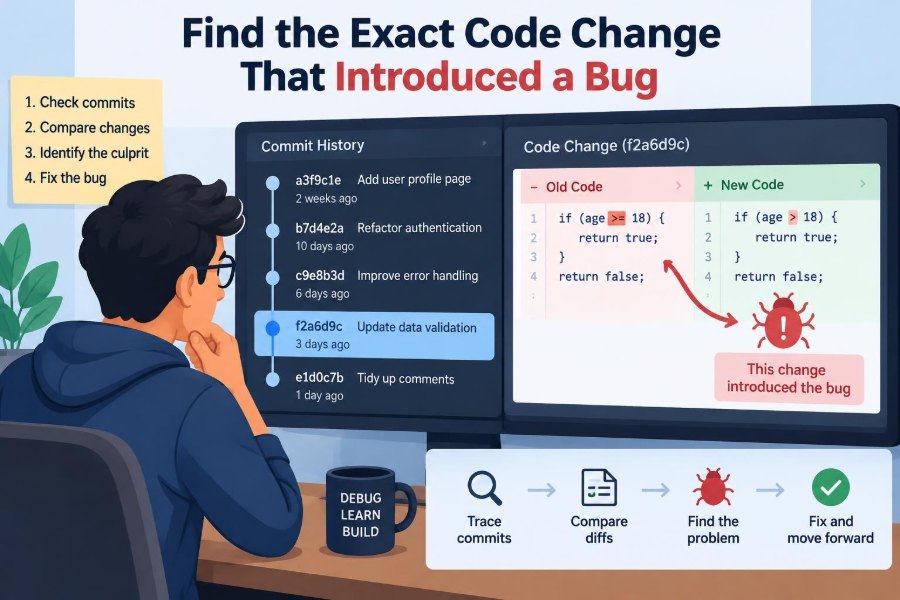

A production issue arrives with an unhelpful description: checkout sometimes fails after a discount is applied. The error appeared this morning, but the relevant service has received dozens of changes over the last month. Logs point to a null value, yet the stack trace lands in code that has not changed.
This is the kind of bug that tempts teams into broad code searches, speculative fixes, and long debugging calls. Those activities can reveal clues, but they do not answer the most useful question: which code change made a previously working behavior fail?
Finding that change turns an uncertain investigation into a bounded historical search. It can reveal an incorrect assumption, a missing test, an unexpected interaction between branches, or a deployment mismatch—not merely the line that happened to throw an exception.
Version control is more than a backup system. Used carefully, it is an experimental instrument: it lets you compare known-good and known-bad states, test a hypothesis, and narrow hundreds of commits to one causative change.
🧭 Start with the Bug’s Observable Behavior
Before opening commit history, state what is actually broken in terms another person could verify. “The pricing code is wrong” is a theory. “A cart containing a percentage coupon returns a 500 response when its subtotal is zero” is an observable behavior.
Capture the input, expected result, actual result, environment, and approximate first occurrence. This description becomes the test used throughout the investigation. Without it, a bisect can identify a commit that changes something while leaving the real failure ambiguous.
- What request, user action, or job triggers the bug?
- What output, error, state transition, or performance change proves failure?
- Does it happen consistently, or only under identifiable conditions?
- Which release, environment, or customer report establishes that it exists?
🎯 Define What “Introduced” Really Means
A commit can introduce a defect without containing the final visible failure. For example, a migration may store a new null value, while a later query change assumes the value is always present. The bug appears only when both changes are deployed.
In practice, the target is often the first revision where the chosen reproducer fails. That is a precise and valuable answer, even if later investigation finds contributing conditions. Be explicit about this definition in incident notes and code review follow-ups.
🧪 Build a Reliable Reproducer First
Automated bisection depends on a repeatable verdict: good or bad. A focused regression test is ideal because it runs quickly and makes the result visible. It may be a unit test, an integration test, a script that calls a local endpoint, or a command that checks a generated artifact.
For the checkout example, a useful test might create a zero-subtotal cart, apply a percentage coupon, and assert that the API returns a valid price breakdown. Keep it narrow. A giant end-to-end suite can be valuable evidence, but it is a poor first probe if each run takes twenty minutes.
# Example of a small reproducibility command
./scripts/reproduce-zero-total-coupon.sh
A reproducer need not begin as permanent production-quality test code. During diagnosis, a short script can be enough. Once the cause is understood, convert the scenario into an appropriately maintained regression test when feasible.
🔁 Separate Deterministic Failures from Flaky Ones
A deterministic bug produces the same outcome from the same revision and controlled inputs. A flaky bug may depend on timing, random data, network responses, concurrency, cache state, or external services. Treating a flaky test as a simple yes-or-no oracle can send a bisect in the wrong direction.
Run a proposed reproducer several times against a known bad revision and a known good revision. If outcomes vary, record the rate and suspected variables. You may need a controlled clock, seeded randomness, isolated database, recorded service response, or a test that repeats the operation.
When uncertainty remains, use Git’s skip result rather than guessing. A skipped commit preserves the integrity of the search; a guessed classification can falsely identify an innocent change.
📍 Find a Known-Good and a Known-Bad Revision
Every historical search needs endpoints. The bad endpoint is usually the deployed release, branch head, or commit confirmed to fail. The good endpoint should be a revision where the same reproducer passes—not simply an older commit that “probably worked.”
Release tags are particularly useful because they connect code history to shipped behavior. If no tag exists, use deployment records, build metadata, container image digests, or the commit SHA recorded by the application.
The interval matters more than age. A good commit from two days before the report may reduce a search from thousands of commits to a few dozen.
🗺️ Understand the History You Are Searching
Git history is a graph, not always a straight line. Feature branches, merge commits, rebases, cherry-picks, and release branches affect which commits lie between two points. Before bisecting, inspect the path and confirm that the bad revision is a descendant of the good one for the history you intend to search.
git log --oneline --graph GOOD..BAD
git merge-base GOOD BAD
If the production release was built from a release branch, investigate that branch rather than assuming main is equivalent. A correct diagnosis on the wrong ancestry path is still operationally useless.
⚖️ Choose the Right Search Method
Binary search is usually the fastest approach when there are many candidate commits and a reliable test. Git bisect repeatedly checks a midpoint, discarding roughly half of the remaining range after each result.
Manual comparison is often better when the interval contains only a few commits, when compiling old revisions is expensive, or when a change is obvious after reviewing a focused diff. The goal is not to use the most sophisticated command; it is to obtain trustworthy evidence efficiently.
| Situation | Useful approach | Main caution |
|---|---|---|
| Repeatable failure across many commits | Automated Git bisect | Ensure the command has reliable exit behavior |
| Small, readable commit range | Manual diff and targeted checkout | Do not assume the largest diff is guilty |
| Flaky or environment-sensitive issue | Controlled experiments with skipped commits | Avoid forced good/bad guesses |
| Regression tied to a release artifact | Compare build and deployment metadata | Source commit may not match the artifact |
🔍 Use Git Bisect as a Controlled Experiment
Git bisect formalizes the question: given one good revision and one bad revision, where does the behavior change? Begin with the endpoint commits, then test each checkout Git selects.
git bisect start
git bisect bad BAD_SHA
git bisect good GOOD_SHA
# test the selected revision
git bisect good   # if the reproducer passes
git bisect bad    # if the reproducer fails
Git eventually reports the first bad commit according to your classifications. This result is strong evidence, not a final explanation. The next task is to inspect why that change makes the test fail.
🤖 Automate the Bisect When the Test Is Fast
If the reproducer can run unattended, let Git invoke it. This reduces manual mistakes and makes the investigation reproducible for a teammate. The command must return zero for good, a nonzero value for bad, and a special skip code when the revision cannot be evaluated.
git bisect start BAD_SHA GOOD_SHA
git bisect run ./scripts/reproduce-zero-total-coupon.sh
Automation pays off most when setup is isolated and predictable: temporary databases, local dependencies, fixed fixtures, and no prompts. A five-second test across many commits is far more practical than repeatedly rebuilding an entire distributed environment by hand.
🚧 Treat Build Failures as Missing Evidence
Old revisions may not compile with current toolchains, may require removed credentials, or may lack migrations expected by the test harness. A build failure does not mean the revision is good or bad. It means the experiment did not run.
Mark such revisions as skipped:
git bisect skipToo many skips can leave several possible first bad commits. At that point, improve the historical build environment, use a compatible container image, inspect adjacent commits manually, or narrow the range using release information. Do not turn “cannot build” into “good” merely to finish the search.
🧱 Keep the Test Environment Historically Plausible
Source code from the past may expect a different schema, dependency lockfile, feature flag default, or runtime version. Testing every commit against today’s infrastructure can manufacture failures that never existed at the time.
Prefer the project’s lockfiles, development containers, and migration procedures from each revision. Where that is impractical, document the mismatch. The question is whether a code change caused the production behavior, not whether old code satisfies modern tooling.
🧬 Include Configuration, Schemas, and Generated Inputs
Many regressions are not introduced in application source files. A feature flag default, SQL migration, dependency update, API schema, build configuration, or generated client can alter behavior just as decisively.
When defining the good and bad states, identify the full relevant artifact set. If a deployment combines application commit A with configuration revision B, a source-only bisect may correctly find no cause because the cause lives elsewhere.
🏷️ Verify the Deployed Artifact Before Blaming a Commit
A commit in a repository is not automatically the code serving users. Build pipelines may select another branch, deploy a stale image, apply a hotfix, or package uncommitted generated files. Confirm the revision embedded in the failing artifact whenever possible.
Useful clues include release tags, build logs, image labels, source maps, package versions, and application endpoints that expose build metadata. This verification prevents an elegant but irrelevant investigation into code that was never deployed.
🧩 Read the Candidate Commit Beyond Its Diff
Once bisect identifies a likely commit, read its message, complete diff, surrounding functions, tests, and call sites. A single changed line may expose an assumption established elsewhere.
Suppose a commit replaces discount || 0 with a helper that expects a populated money object. The visible null error is easy to explain, but the deeper question is why a zero-subtotal cart can lack that object. The correct fix may be validation at the boundary, a safer helper contract, or both.
Also inspect what the commit deliberately did not change. Missing tests, unhandled alternate paths, and incomplete migrations frequently reveal the real gap.
🔗 Distinguish the Trigger from Contributing Changes
A difficult bug often has a chain of causes. One commit may create invalid state, another may make that state reachable, and a third may turn it into a visible error. Calling every one “the introducing commit” creates confusion.
Describe roles precisely:
- Triggering change: the first revision where the chosen regression test fails.
- Contributing change: a prior condition that made failure possible.
- Exposure change: a deployment, traffic pattern, or flag that made users encounter it.
- Detection gap: the missing test, alert, or validation that allowed it through.
This language supports fair incident analysis and leads to fixes that address more than the nearest symptom.
🧑🔬 Confirm Causation with a Reversal Test
The strongest practical confirmation is a small experiment: revert the suspect behavior on the bad revision, or apply it to the last good revision, then rerun the reproducer. If the result changes as predicted, confidence rises substantially.
Be careful with broad reverts. A commit may depend on later refactors, and its removal can create a different failure. Often a minimal temporary patch that restores one condition is more informative than a literal revert.
🪄 Use Blame for Context, Not Verdicts
git blame shows which commit last modified each line. It is useful for finding the history of a condition, the author’s nearby rationale, or a refactor that moved code. It does not prove that the shown commit introduced the bug.
Formatting changes, file moves, and large refactors can obscure blame. Use options that follow moved or copied lines when helpful, then inspect the actual commit and its parents. Blame answers “who last touched this line?”; bisect answers “when did this behavior change?”
📜 Search Commit Messages and Issue Context
History is easier to interpret when paired with intent. Search for feature names, error text, flag names, migration identifiers, and domain terms. A commit message may explain a trade-off that the diff alone cannot show.
git log --all --oneline --grep='coupon'
git log -S'calculateDiscount' -- path/to/file
The -S form searches for commits where the count of an exact text changes. It is useful for locating the introduction or removal of a symbol, but it cannot find semantic equivalents with different wording. Combine it with normal code review.
🧠 Beware Semantic Changes Hidden in Refactors
Large refactors can preserve most tests while changing evaluation order, default values, object lifetimes, error handling, or data ownership. A renamed method may now run before validation; an extracted helper may receive a broader range of inputs than its old caller did.
When a bisect lands on a refactor, reduce the behavior to a simple before-and-after statement. For example: “Previously an absent tax record produced zero; now it reaches currency conversion and throws.” That statement is more actionable than “the refactor broke it.”
🌿 Handle Merge Commits and Cherry-Picks Carefully
A merge commit may introduce a failure because two independently valid branches interact. For example, one branch changes a payload shape while another changes a consumer’s assumptions. Testing only individual feature commits may miss the integration defect.
Cherry-picks complicate authorship and timing because the same patch can appear under different hashes on different branches. Track patch content and deployment lineage, not just commit IDs. If a merge is the first bad revision, test its parents to learn whether the problem is in one side or in the combination.
🧵 Investigate Concurrency Bugs with Different Evidence
Race conditions rarely provide a clean good-or-bad outcome. A commit may widen a timing window without failing every run. Increase observability: add event IDs, timestamps, lock acquisition traces, deterministic schedulers, or stress loops where the language and tooling support them.
For these bugs, bisect can still narrow the historical window, but conclusions should reflect uncertainty. “This change makes the race reproducible under the test schedule” is more defensible than claiming it alone causes every production occurrence.
🌐 Isolate External Dependencies
A failure involving payment gateways, clocks, queues, browsers, or third-party APIs can change independently of your repository. If possible, replace the external dependency with a stable fake, recorded response, local emulator, or contract fixture during the historical search.
Isolation is not about pretending production is simple. It separates two questions: whether your code changed behavior and whether an outside system changed its behavior. Both may need investigation, but mixing them makes the evidence weak.
📈 Use Observability to Narrow the Time Window
Logs, traces, metrics, error reports, and audit records can identify when a new error signature first appeared or which deployment correlates with it. They are especially useful when users report a bug long after it was introduced.
Correlation is only a starting point. A metric spike after deployment could reflect traffic, delayed background work, a flag rollout, or a partner change. Use observability to select candidate revisions, then reproduce and test them.
🧰 Make the Search Faster with Small Test Seams
Code that is hard to test across history is often tightly coupled to time, filesystem state, network clients, global configuration, or databases. Introduce narrow seams where they improve design: injectable clocks, explicit configuration objects, stable fixtures, and interfaces around external services.
Do not redesign a system solely to make one bisect convenient. But a small diagnostic seam can become a long-term quality improvement by making future regressions cheaper to isolate.
📝 Record the Investigation as You Go
Keep a short timeline of tested revisions, commands, environment assumptions, outcomes, skipped commits, and links to relevant deployment information. This prevents repeated work and lets another engineer review the conclusion.
A compact record might say: release 2.4 passes; release 2.5 fails; automated test identifies commit X; reverting the new null-handling path restores expected behavior; a feature flag exposed the affected input two days later. This is far more useful than “fixed a coupon issue.”
🛡️ Turn the Discovery into a Regression Defense
After fixing the bug, preserve the smallest test that captures the incorrect behavior. Place it at the appropriate level: a unit test for a pure calculation, an integration test for a database interaction, or an end-to-end test when the failure depends on multiple components.
Also consider defenses at the boundary. Input validation, schema constraints, exhaustive type handling, runtime assertions, and safer defaults can prevent similar invalid states. A regression test protects the known path; better contracts reduce nearby unknown paths.
🚫 Avoid Common Historical-Debugging Traps
Several habits make root-cause work slower or less reliable:
- Starting from code suspicion instead of a concrete failing behavior.
- Marking commits good or bad when the test did not actually run.
- Bisecting the current main branch instead of the deployed release lineage.
- Assuming the author of the candidate commit caused the incident through negligence.
- Stopping at the throwing line instead of tracing the invalid state backward.
- Writing a broad fix before confirming that it changes the reproducer.
These are process errors, not personal failings. A disciplined investigation exists precisely because complex systems make intuitive explanations unreliable.
🤝 Keep the Process Blameless and Collaborative
Finding a commit is not the same as finding a person to blame. Every code change is made with the information, tests, deadlines, and system constraints available at the time. A healthy team uses the result to improve contracts, review practices, test coverage, release controls, and documentation.
Share the evidence early when a change crosses team boundaries. The original author often has context about intended behavior, hidden compatibility constraints, or incomplete follow-up work that accelerates the diagnosis.
✅ A Practical End-to-End Workflow
For most regressions, the investigation can follow a compact sequence:
- Describe the failure in observable terms.
- Create a focused reproducer and verify it on both endpoints.
- Identify a confirmed good revision and the actual deployed bad revision.
- Check ancestry, branch, configuration, and artifact provenance.
- Bisect manually or automatically, skipping unevaluable revisions.
- Read the candidate commit in its surrounding code and history.
- Confirm the mechanism with a targeted reversal or minimal patch.
- Fix the defect, add regression coverage, and document contributing conditions.
This workflow is intentionally evidence-driven. It does not eliminate judgment, but it ensures judgment is applied after the search space has been reduced.
🔑 The Core Principle: Debug Behavior Across Time
Difficult bugs become more manageable when you stop asking only “where is the bad line?” and start asking “between which two verified program states did this behavior change?” That shift connects debugging to experiments rather than intuition.
The exact first bad commit is valuable because it supplies a narrow, reviewable explanation. Yet the best outcome goes further: explain the mechanism, identify contributing conditions, preserve a regression test, and strengthen the system boundary that allowed the defect through.
The fastest route to a trustworthy root cause is a repeatable failing behavior, verified good and bad revisions, and a disciplined search through history. That method turns version control from a record of past work into an active tool for building more reliable software. ⚙️🔍🛠️