
A developer opens a pull request with a familiar problem: the feature works, but the edge cases are unclear, the test suite is thin, and a configuration file has failed in an unfamiliar way. A few years ago, the next steps might have meant searching documentation, reading old tickets, and asking a teammate for context.
Now, the developer may first ask an AI assistant to explain the stack trace, draft test cases, summarize the relevant module, or suggest a migration plan. None of those outputs should be accepted blindly. But they can change where the work begins.
This shift matters because software engineering is not only the act of typing code. It includes understanding systems, making trade-offs, reviewing changes, testing assumptions, communicating decisions, and maintaining software after release.
AI-assisted development is changing each of those activities. The useful question is not whether an assistant can produce code; it is how teams can redesign their workflows so that speed improves without weakening engineering judgment.
🧭 What AI-Assisted Development Actually Means
AI-assisted development is the use of AI systems to support software work, such as generating code, explaining existing code, writing tests, summarizing documentation, or helping investigate failures. It does not describe a single tool or a fully autonomous process.
In practice, assistance can appear inside an editor, a chat interface, a code review system, or an internal engineering platform. The common feature is that a model produces a useful draft, explanation, transformation, or suggestion from the context it receives.
The word assisted matters. A responsible workflow still gives people ownership of requirements, decisions, verification, and outcomes.
📈 Why the Workflow Is Changing Now
Software projects contain a large amount of repeatable cognitive work: translating a requirement into a starting implementation, locating relevant files, converting formats, writing routine tests, and explaining error messages. AI tools are increasingly capable of accelerating these early passes.
At the same time, modern codebases are often distributed across services, repositories, infrastructure definitions, and third-party dependencies. Engineers lose time not just writing code, but rebuilding context. An assistant can reduce some of that search and synthesis work when it has accurate, appropriately scoped information.
The result is not simply “faster coding.” It is a change in how engineers allocate attention.
🧠 From Code Production to Decision Quality
When routine implementation becomes easier to draft, the scarce skill shifts toward deciding what should be built, what constraints apply, and how correctness will be demonstrated. A clean-looking function can still be wrong for the product, unsafe for users, or incompatible with surrounding services.
Consider a request to add an account deletion endpoint. An assistant may generate a controller quickly. The harder questions are whether data must be retained for legal or operational reasons, whether background jobs must be canceled, and how downstream systems learn about the deletion.
AI makes decision quality more visible because it can make implementation appear deceptively complete.
⌨️ The New Shape of Daily Coding
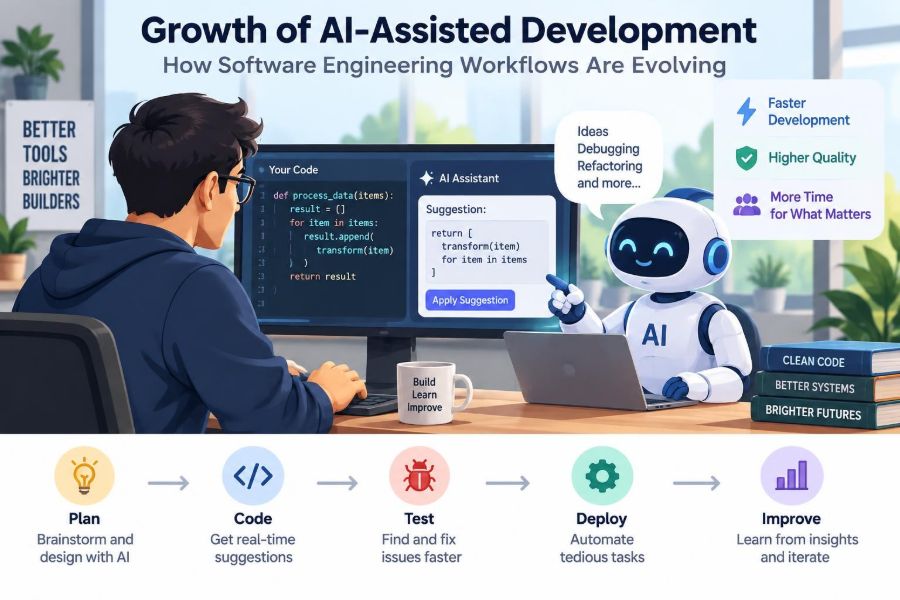
Many developers now move through a loop of intent, prompt, draft, inspection, modification, and verification. Instead of writing every line from a blank file, they may ask for a skeleton, compare approaches, or request an explanation before editing the result.
This can be especially helpful for boilerplate: data-transfer objects, serialization code, repetitive mappings, test fixtures, and standard integration patterns. It can also help an engineer get unstuck after encountering an unfamiliar library.
However, a productive loop remains interactive. The developer should reshape the request, inspect the diff, and use the project’s own tools to establish that the change behaves as intended.
🔍 Context Determines Usefulness
An AI response is only as reliable as the task framing and context available to it. A generic prompt such as “fix this bug” often leads to generic guesses. A useful request describes expected behavior, actual behavior, constraints, relevant code, and the environment in which the problem occurs.
For example, a request can specify that a service must remain backward-compatible with an existing API client, must not add dependencies, and must preserve idempotency. Idempotency means that repeating an operation produces the same intended effect rather than duplicating it.
Good context does not guarantee a correct answer, but it gives both the tool and the engineer a clearer problem to solve.
🗺️ Faster Codebase Orientation
Joining an unfamiliar project often involves tracing data flow, learning naming conventions, finding ownership boundaries, and understanding why apparently odd code exists. AI can help summarize a module or propose a map of likely entry points.
That summary should be treated as a starting hypothesis. Mature systems contain exceptions created by migrations, performance constraints, previous incidents, and business rules that are not obvious from a single directory.
A practical pattern is to ask for a guided reading path: identify the request entry point, the main domain logic, persistence boundaries, tests, and observability code. Then validate that map by reading the source and running the system where possible.
🧩 Requirements Still Need Human Interpretation
Natural-language requirements are frequently incomplete. “Allow users to export their data” leaves open questions about file format, authorization, export scope, rate limits, deletion of temporary files, and accessibility.
An assistant can turn ambiguity into a useful checklist, but it cannot reliably discover unstated organizational priorities on its own. Product owners, domain experts, security teams, and engineers still need to resolve those decisions.
Before generation begins, teams benefit from writing down acceptance criteria: observable conditions that tell everyone when a feature is complete. These criteria give AI-generated work something concrete to be tested against.
🏗️ Architecture Remains a Human Responsibility
Architecture concerns the structure and long-term consequences of a system: service boundaries, data ownership, failure modes, deployment strategy, and operational cost. These decisions depend heavily on organizational context and future uncertainty.
An AI assistant can compare familiar architectural patterns or identify implications of a proposed design. It may be useful as a challenger: “What could fail if we introduce this cache?” or “What contracts change if this process becomes asynchronous?”
But pattern recognition is not the same as accountability. The team that operates the system must own the architecture and document the reasons behind consequential choices.
🧪 Test Generation Is a Starting Point, Not Proof
Generating unit tests is one of the most practical uses of AI assistance. A model can propose ordinary cases, boundary values, mocks, and test names quickly, especially when a function’s contract is clear.
The limitation is subtle: generated tests often reflect the implementation that was provided, rather than independently challenging it. If both code and tests share the same mistaken assumption, a green test suite can create false confidence.
Ask questions that force adversarial thinking:
- What input could violate this assumption?
- What happens when an external dependency times out?
- Can this operation be repeated safely?
- Which authorization or validation rule is missing?
Integration, contract, and end-to-end tests remain essential where component interactions matter.
🐛 Debugging Becomes More Conversational
Error messages often point to where a failure surfaced, not where it began. AI can translate a stack trace, explain an exception class, suggest instrumentation, or help construct a minimal reproduction.
That is valuable when debugging crosses unfamiliar technologies. Yet a model may confidently identify a plausible cause without access to the production state, exact configuration, or full timeline of events.
A disciplined debugging workflow still starts with evidence: logs, metrics, traces, recent changes, reproducible inputs, and controlled experiments. Use AI to generate hypotheses, then test each hypothesis against the system.
📚 Documentation Can Become Part of the Work
Documentation is often postponed because creating it feels separate from delivering a feature. AI can lower that friction by drafting API descriptions, setup instructions, decision records, changelog entries, and code comments from a reviewed change.
Drafting is not the same as maintaining truth. Documentation must be checked against actual behavior, and owners should update it when contracts change.
A strong practice is to include documentation review in the definition of done. If a change introduces a new operational step or user-facing behavior, its explanation should be reviewed with the code rather than added later from memory.
🔄 Pull Requests Need Better Review Habits
AI can make pull requests larger because producing a broad change is easier than before. Large diffs are difficult to review, whether written by a person or generated with assistance.
Reviewers should focus on behavior, design fit, security, tests, and maintainability rather than trying to inspect every line with equal intensity. Small, coherent changes remain easier to understand and revert.
Useful review questions include:
- Does this solve the stated problem without changing unrelated behavior?
- Where are the highest-risk assumptions verified?
- Does the code match local conventions and architectural boundaries?
- Can a future engineer understand why this approach was chosen?
🛡️ Security Requires Explicit Guardrails
Code suggested by an AI tool can include insecure defaults, outdated APIs, weak validation, or unsafe handling of secrets. The risk is not unique to AI; copied snippets and rushed work create similar problems. Assistance can simply increase the volume of code that needs scrutiny.
Teams should avoid sharing secrets, private keys, customer information, or sensitive production logs with tools that are not approved for that data. They should also understand retention, access, and training policies for the tools they use.
Security scanning, dependency review, threat modeling for sensitive changes, and human security expertise remain necessary controls.
🔐 Privacy and Data Boundaries Matter
Prompts can accidentally expose more than source code. A pasted support ticket might contain names, email addresses, account identifiers, or details about an incident. A database sample may contain personal or regulated data.
Organizations need clear rules about which tools may receive which classes of information. In many environments, approved internal tools, redacted examples, or synthetic data are safer choices.
Convenience should not silently redefine a team’s data-handling practices. Engineers need a simple escalation path when they are unsure whether a prompt is appropriate.
⚖️ Generated Code Still Has Ownership
A codebase does not become less owned because some code began as an AI draft. The developer who submits a change and the team that merges it are responsible for its behavior, maintenance burden, and compliance with project standards.
This means generated code deserves the same questions as any other contribution: Is it licensed appropriately for the organization’s use? Does it introduce a dependency? Is it understandable? Can the team support it six months from now?
Ownership is a useful antidote to passive acceptance. If no one can explain a generated change, it is not ready to ship.
🧰 Tool Use Should Be Matched to Risk
Not every task deserves the same level of automation. A formatting transformation has a different risk profile from a payment calculation or an authorization change.
| Task type | Useful AI role | Required human control |
|---|---|---|
| Routine scaffolding | Draft files and repetitive structures | Review conventions and compile/test output |
| Bug investigation | Generate hypotheses and explain traces | Confirm with evidence and reproduction |
| Security-sensitive logic | Suggest checklists and edge cases | Specialist review and security testing |
| Architecture change | Compare options and document trade-offs | Team decision, operational planning, ownership |
Risk-based use prevents two unhelpful extremes: banning assistance for harmless work or trusting it for decisions that demand deep accountability.
📏 Evaluation Must Go Beyond “It Compiles”
Compilation and passing unit tests are necessary signals, but they do not establish that a change is useful or safe. A feature may compile while violating a performance budget, returning misleading errors, or creating a confusing user experience.
Teams can evaluate changes at several levels: correctness against acceptance criteria, test coverage of important behavior, observability in production, accessibility where relevant, and operational impact.
For AI-assisted work, it is especially helpful to ask, “What evidence would make us comfortable deploying this?” That question changes verification from an afterthought into a planned activity.
🚦 Continuous Integration Becomes More Valuable
Continuous integration, often shortened to CI, automatically builds and tests changes before they are merged. As code can be drafted more quickly, CI becomes an even more important quality gate.
A useful pipeline may run formatting checks, static analysis, unit and integration tests, dependency checks, and deployment validation appropriate to the system. Static analysis examines source code for certain patterns without executing it.
Automation cannot catch every defect, but it provides consistent feedback and reduces reliance on reviewers noticing routine problems in increasingly busy diffs.
📊 Observability Closes the Feedback Loop
Production behavior is the final test of many engineering assumptions. Observability is the ability to understand a system through signals such as logs, metrics, traces, and meaningful alerts.
When a change is drafted quickly, teams should be equally deliberate about how they will detect harm. For example, a new asynchronous job may need a failure metric, an alert threshold, structured error logs, and a dashboard showing processing delay.
AI can help draft instrumentation code or explain telemetry, but teams must decide which signals represent user impact and when a response is required.
👩💻 Junior Engineers Need Deliberate Learning
AI can shorten the time needed to produce a plausible answer, which is helpful for learning momentum. It can also bypass the productive struggle through which developers learn to trace control flow, read documentation, and form debugging habits.
Junior engineers benefit from using assistance as a tutor rather than a replacement. They can ask for an explanation of alternatives, request hints before a solution, or compare their own approach with a generated one.
Mentors should review reasoning, not only output. Asking “why does this work?” and “what would break it?” develops judgment that remains useful when tools are unavailable or wrong.
🧑🏫 Senior Engineers Gain Leverage—and New Duties
Experienced engineers can use AI to accelerate exploration, generate review checklists, reduce repetitive implementation, and communicate complex ideas in different forms. Their system knowledge helps them identify when a polished answer does not fit local reality.
That advantage also creates a leadership responsibility. Senior engineers can establish prompt examples, review standards, approved tool boundaries, and lightweight templates for high-risk changes.
The goal is not to centralize all expertise. It is to make sound practices easy for the rest of the team to adopt.
🤝 Collaboration Depends on Shared Context
Software is built by teams, and individual AI conversations can become a new form of hidden work. If a developer discovers an important constraint through an assistant but never records it, teammates may repeat the investigation or unknowingly make conflicting decisions.
Important conclusions belong in shared artifacts: tickets, design notes, pull request descriptions, runbooks, and code comments where appropriate. The source of truth should be accessible to people, not trapped in a private chat history.
AI can accelerate individual work; healthy engineering practices turn that work into collective progress.
🧱 Legacy Systems Need Extra Caution
Legacy systems often contain undocumented dependencies and behavior that looks unnecessary until it protects an old client, a billing process, or a fragile deployment path. AI may recommend modernization based on general best practices while missing those hidden constraints.
Before changing legacy code, establish a behavioral baseline with tests, logs, or carefully observed scenarios. Make incremental changes and retain a clear rollback path.
Assistants are useful for translating old syntax, summarizing tangled modules, and proposing refactoring steps. They are less reliable as authorities on why a long-lived system behaves the way it does.
💸 Speed Has Costs as Well as Benefits
Faster drafting can create more work downstream if teams merge poorly understood changes, accumulate duplicate abstractions, or defer cleanup. The apparent time saved in implementation can reappear as review friction, incident response, and maintenance cost.
There is also a cognitive cost when engineers stop reading generated code closely. Familiarity with a system is built through sustained contact with its details, not merely through successful prompts.
The most sustainable measure of productivity is not lines produced. It is the ability to deliver valuable changes reliably and keep the system understandable afterward.
🧯 Common Failure Modes to Watch For
Several patterns repeatedly weaken AI-assisted workflows. They are manageable when teams recognize them early.
- Prompt-and-paste: merging output without understanding it.
- False precision: accepting a confident explanation without checking evidence.
- Context leakage: placing sensitive data into an unapproved service.
- Test theater: generating tests that only confirm the same flawed implementation.
- Abstraction sprawl: accepting extra layers because they look sophisticated.
- Invisible decisions: failing to record important trade-offs made during exploration.
Each failure mode is ultimately a workflow problem, not merely a model problem.
✅ A Practical Workflow for AI-Assisted Changes
A repeatable process helps teams use assistance without surrendering control:
- Clarify the problem, constraints, and acceptance criteria.
- Provide only approved, relevant context to the tool.
- Request a plan or small draft rather than a sweeping change.
- Read and revise the output as if it came from a new teammate.
- Run automated checks and add tests that challenge assumptions.
- Request focused human review for design, risk, and behavior.
- Deploy gradually when the change has meaningful operational risk.
- Observe results and document decisions that future work will depend on.
This process may seem slower than one-click generation, but it is designed for dependable delivery rather than momentary output.
📝 Prompts Work Best as Engineering Requests
A useful prompt resembles a concise engineering ticket. It states the goal, names relevant constraints, includes examples, and asks for a bounded output.
For instance, instead of asking, “Write a cache,” an engineer might ask for a design sketch for an in-memory cache with a time-to-live policy, thread-safety requirements, a maximum size, and tests for expiration. The answer can then be assessed against a real contract.
Ask the assistant to state assumptions and identify uncertainties. This makes hidden gaps easier to review and turns an answer into a basis for technical discussion.
🔮 The Role Is Evolving, Not Disappearing
Software engineering roles have changed before as compilers, frameworks, cloud platforms, and automated testing became normal. Each shift removed some low-level work while raising expectations elsewhere.
AI assistance is likely to continue that pattern. Engineers may spend less time on mechanical translation and more time on specification, integration, verification, risk management, and communication across technical and business boundaries.
The exact tools will change quickly. The durable capabilities are problem framing, systems thinking, careful evaluation, and responsibility for consequences.
🌱 Building a Team Culture of Responsible Experimentation
Teams do not need a perfect policy before trying AI-assisted practices, but they do need boundaries. Start with low-risk tasks, identify approved tools and data rules, and collect examples of what worked and what failed.
Review workflow outcomes rather than treating adoption as a contest. Did onboarding improve? Did review load increase? Were incidents easier or harder to diagnose? Did the team preserve clarity about ownership?
Small experiments with honest retrospectives create better practices than either blanket enthusiasm or blanket resistance.
🎯 The Core Principle: Accelerate Work, Not Accountability
AI-assisted development can reduce friction in coding, investigation, documentation, and learning. Its greatest value appears when it gives engineers more time for the parts of software work that require context, judgment, and care.
The right standard is not whether an assistant produced an answer. It is whether the team can explain the change, verify its behavior, operate it safely, and maintain it over time.
Tools can draft implementation; engineers must still define quality, manage risk, and remain accountable to the people who depend on the software.
The healthiest AI-assisted workflow treats generated output as a fast first draft and human engineering judgment as the final authority. Used this way, AI can strengthen—not replace—the disciplined work of building dependable software. ⚙️🧠🤝