
You tap “Place order,” and the button keeps spinning. For a moment, the delay is ambiguous: did the request work, did the app freeze, or should you tap again? A few extra seconds can turn a routine action into uncertainty.
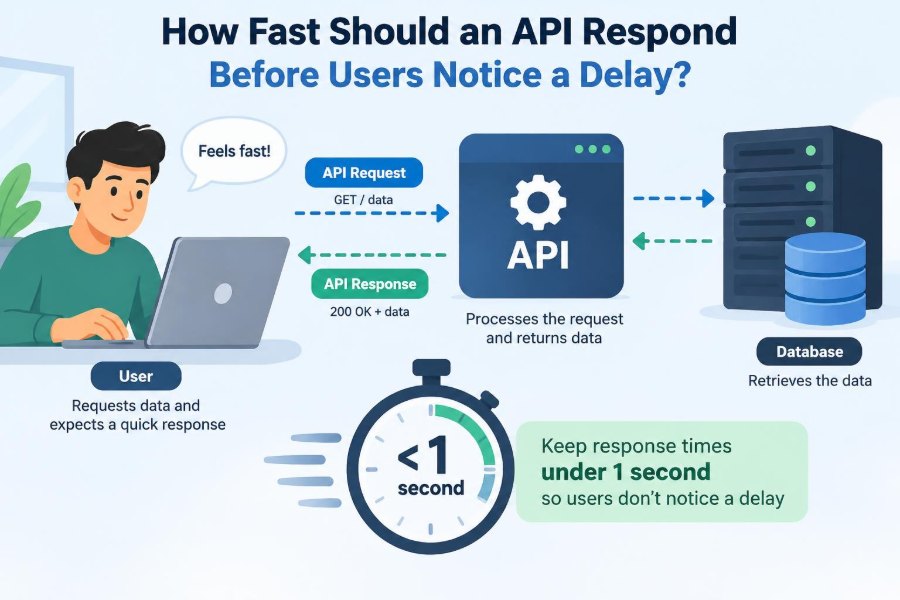
That experience is often shaped by an API: the interface that lets a mobile app, website, or another service ask a backend system for data or request an action. APIs sit behind product searches, bank transfers, messaging, maps, and dashboards.
Response time matters because people do not experience an API directly. They experience a screen that reacts late, a checkout that feels unreliable, or a workflow that interrupts concentration.
So, how fast is fast enough? There is no single universal number. A useful answer depends on the action, the user’s expectations, the network, and what the system can safely do when it cannot respond immediately.
⏱️ API Speed Is a User-Experience Decision
An API can return a technically successful response and still create a poor experience. If a search suggestion appears after the user has already typed three more characters, it is no longer useful. If a payment confirmation arrives slowly but clearly communicates progress, users may tolerate it.
The practical question is not simply “How low is our latency?” It is “How quickly does this result need to arrive to remain useful and trustworthy?”
🧭 Start With the User’s Task
Different tasks create different time budgets. A person dragging a map expects the interface to keep up with their hand. A person generating a large financial report may accept a background job and a notification later.
Classify endpoints by the interaction they support: direct manipulation, navigation, lookup, form submission, transaction, or background processing. This prevents teams from treating every API call as equally urgent.
👀 What “Noticeable” Usually Means
People often notice delay before they can describe it. A small pause can make an interface feel less connected to an action; a longer pause can make it feel broken. Perception is also affected by animation, feedback, and whether the user has a clear next step.
A response that misses its usefulness window is more damaging than a response that is merely slow in a dashboard metric. Timing must therefore be evaluated in the context of the full interaction.
📏 Use Latency Ranges, Not a Magic Number
Teams commonly use rough interaction ranges as design guidance rather than laws. Immediate feedback generally needs to feel nearly continuous; short waits can work for ordinary requests; longer work needs explicit progress or an asynchronous design.
| User situation | Useful response pattern | Typical design implication |
|---|---|---|
| Typing, dragging, hovering | Near-immediate visible reaction | Cache, predict, or reduce round trips |
| Opening a familiar screen | Quick content or useful skeleton state | Prioritize essential data |
| Submitting a normal form | Prompt acknowledgement | Disable duplicates and show status |
| Generating complex output | Accepted request plus later completion | Use a job queue and progress state |
These ranges are not promises about every network or device. They are a way to connect performance decisions to human expectations.
🔄 Separate Response Time From End-to-End Wait
API latency is only one part of the delay a user sees. The client may need to prepare a request, establish or reuse a connection, wait for DNS or transport work, parse the response, update application state, and render the screen.
A backend endpoint that completes quickly can still feel slow if the application sends several dependent requests or renders inefficiently. Measure the end-to-end interaction, not just server timing.
🧩 Know the Parts of Request Latency
A useful latency breakdown includes client work, network travel, gateway or load-balancer processing, application logic, database access, calls to other services, and response transfer. Each segment needs different remedies.
For example, adding database indexes will not repair delay caused by a distant user on a poor connection. Conversely, a faster network cannot rescue an endpoint blocked on a slow downstream service.
🌐 Distance and Network Variability Matter
Networks are variable by nature. Mobile radios change conditions, packets may be retransmitted, and users can be far from the region where an application runs. A local development test hides much of this reality.
Design targets should account for realistic client geography and connection quality. Test under constrained network conditions, and avoid assuming that a low latency inside one cloud region represents the customer experience.
📊 Percentiles Reveal What Averages Hide
An average can look healthy while a meaningful group of requests is painfully slow. One very fast request can offset one very slow request in an average, although the user who received the slow result does not experience an average.
Track percentiles such as p50, p95, and p99. The p50 describes a middle request; p95 and p99 describe slower portions of the distribution. They help expose queueing, contention, cache misses, and unstable dependencies.
🎯 Define a Latency Objective for Each Endpoint
A service-level objective, or SLO, is a target for reliability or performance over a chosen period. A latency SLO might specify that a high percentage of successful requests should complete below a chosen threshold.
Choose the threshold from the user task and the endpoint’s place in a workflow. A profile lookup and an autocomplete endpoint should not inherit the same target just because they both use HTTP.
🧮 Build a Latency Budget
A latency budget allocates a total user-facing time target across components. If a page must become useful quickly, the client, gateway, API, database, and any dependent services cannot each consume most of that budget.
This makes trade-offs visible. Adding a new remote call may be functionally convenient, but it spends budget and introduces another potential source of variance.
🔗 Fan-Out Can Multiply Waiting
A common API pattern is aggregation: one endpoint calls several services to build a response. If those calls run sequentially, their delays add. If they run in parallel, the slowest required dependency can determine the final response.
Fan-out is sometimes appropriate, especially for a composed screen. But it should prompt careful questions: which data is essential now, which can load later, and which can be served from a cached or previously known value?
🗄️ Database Queries Often Dominate
Database work frequently becomes the main delay because it may scan large data sets, join many tables, compete for locks, or transfer more rows than the application needs. An endpoint can look simple while its query plan is expensive.
Inspect real query behavior, not only query text. Select only needed columns, paginate unbounded collections, index access patterns deliberately, and watch for repeated queries triggered inside loops.
📦 Payload Size Is Part of Performance
Large responses take time to serialize, transmit, parse, store, and render. They also cost more on constrained connections. Returning every possible field “just in case” makes ordinary interactions slower.
Use pagination, field selection where appropriate, compact representations, and separate endpoints for detail views. Compression can reduce transfer size, but it also uses CPU, so validate it against actual payloads and traffic.
⚡ Caching Helps When Data Can Be Slightly Old
Caching stores a reusable result closer to where it is needed. Browser caches, content delivery networks, in-memory application caches, and database caches solve different problems.
The trade-off is freshness. A product image can often be cached aggressively; an account balance or inventory check may require more careful invalidation or a fresh read. A fast wrong answer is not a performance win.
🧵 Queues Turn Long Work Into Manageable Work
Some actions should not stay inside a request-response cycle. Exporting a large file, processing video, sending many notifications, or reconciling external records can take an unpredictable amount of time.
Instead, accept the request, create a job, and return a status or job identifier. A worker processes the job asynchronously, while the client polls, receives an event, or checks a notification. This protects interactive capacity and gives users an honest model of progress.
✅ Acknowledgement Is Not Completion
An API can quickly acknowledge that it has accepted work without claiming that the work is finished. This distinction is crucial for actions with durable consequences, such as orders, payments, or account changes.
Response designs should communicate state precisely: received, processing, completed, failed, or requires action. Avoid returning a reassuring success message when the system has only placed work on a queue.
🖱️ Immediate Feedback Reduces Uncertainty
The interface should react to an action before all backend work is complete when doing so is safe. A pressed button state, a spinner with meaningful text, or a new draft item can reassure users that input was received.
Optimistic UI updates go further by showing the expected outcome immediately. They work well for reversible actions, such as liking a post, but require a clear rollback path if the request fails.
🧱 Loading States Should Explain the Wait
A blank screen offers no information. A skeleton layout can show where content will appear, while a progress indicator can tell users that a known multi-step task is advancing.
Do not use motion merely to disguise delay. If a request is waiting on a long operation, say what is happening and provide a recovery option when appropriate, such as retrying, saving a draft, or continuing elsewhere.
🚦 Timeouts Protect Capacity and Attention
Without timeouts, a slow dependency can tie up connections, threads, memory, and user patience. A timeout sets a maximum time the caller is willing to wait before taking another path.
Timeout values should reflect the caller’s budget, not an arbitrary global default. They must also be coordinated across layers: a client should not wait far longer than an upstream gateway, and a service should leave time for its own fallback behavior.
🔁 Retries Need Restraint
Retries can help with temporary failures, but they can amplify an overloaded system. If many clients retry at once, the service receives more work precisely when it is least able to handle it.
Retry only failures likely to be transient, limit attempts, use backoff with randomness, and respect cancellation. For writes, use idempotency keys or equivalent safeguards so a retry does not create two orders or charge twice.
🛡️ Design Graceful Degradation
When a nonessential dependency is slow, the best response may be to omit its feature temporarily rather than block the whole screen. A retail page might show product details first and load personalized recommendations later.
Decide what is critical before an outage occurs. Fallbacks can include cached values, a simplified response, a clear unavailable state, or delayed refresh. They should be tested, because untested fallback code often fails under pressure.
📉 Queueing Makes Systems Slow Suddenly
As utilization approaches a resource limit, waiting time can rise sharply. A small increase in incoming work may create a backlog at a database connection pool, worker queue, CPU-bound service, or downstream API.
This is why capacity planning is not only about average throughput. Monitor saturation signals such as queue depth, active connections, CPU pressure, and pool exhaustion alongside latency percentiles.
🔍 Trace One Request Across Services
Logs show individual events, metrics show aggregate behavior, and distributed traces show the path of one request through multiple components. Together, they make diagnosis far more concrete.
When an endpoint slows, ask where time was spent: waiting for a connection, executing a query, calling a dependency, or serializing a response. Instrumentation should include meaningful request identifiers and durations without exposing sensitive user data.
🧪 Test the Slow Paths Deliberately
Happy-path tests on a fast local machine do not reveal timeouts, partial failures, large payloads, cold caches, or mobile-network behavior. Performance testing should include representative data sizes and realistic concurrency.
Introduce controlled delay in nonproduction environments to check whether the client stays understandable and whether timeouts, retries, and fallbacks behave as intended. The goal is not to make every dependency fast in a test; it is to make slow behavior safe and comprehensible.
📱 Mobile Clients Need Special Care
Mobile apps may be backgrounded, lose connectivity, switch networks, or operate with limited battery and data. A design that assumes a stable, always-open connection will produce confusing failures.
Minimize unnecessary calls, batch independent updates thoughtfully, cache useful offline data, and make synchronization conflict rules explicit. Do not silently discard user work just because a request could not finish before a connection changed.
💳 Transactions Need Correctness Before Speed
For money movement, reservations, health records, permissions, and other sensitive operations, a fast response cannot substitute for a correct one. Some checks and durable writes legitimately take time.
Improve the surrounding experience instead: acknowledge receipt, expose a reliable status, prevent accidental duplicates, and make pending states visible. Users can accept a wait more readily when the system clearly protects the outcome they care about.
🧠 Avoid Premature Micro-Optimization
Replacing a clear query with obscure code, introducing a cache without an invalidation plan, or splitting a service solely to chase a tiny benchmark gain can create larger operational problems. Performance engineering is most effective when guided by observed bottlenecks.
Start with measurement, identify the slowest meaningful portion of the user journey, and change one well-understood cause. Then measure again. Readability, correctness, and maintainability are performance features when they help teams diagnose and safely improve systems.
🗣️ Set Expectations With Product and Design Teams
Latency targets should not be invented by engineering alone after a screen is designed. Product, design, and engineering need a shared understanding of which interactions must feel immediate, which may be asynchronous, and what users will see during delays.
This conversation turns “make it fast” into decisions that can be built and tested: show partial results, defer optional data, display pending status, or redesign a workflow around a background job.
🧰 A Practical Triage Checklist
When users report that an API-backed feature feels slow, work from the experience toward the system rather than guessing from a single server graph.
- Reproduce the full journey on representative devices and networks.
- Check percentiles and error rates by endpoint, region, and client version.
- Trace slow requests to identify the longest wait.
- Inspect database queries, dependency calls, payload sizes, and queueing.
- Decide whether to optimize, cache, defer, simplify, or communicate progress.
- Verify that timeouts, retries, and duplicate-write protections still behave correctly.
🏁 The Core Principle: Fast Enough for the Moment
There is no responsible universal API response-time target. The right target is shaped by the user’s current task, the cost of a wrong or duplicate action, the variability of real networks, and the architecture behind the request.
Make interactive work responsive, move unpredictable work out of the request path, measure tail latency rather than averages alone, and give users clear feedback whenever a wait is unavoidable. The goal is not maximum speed at any cost; it is a system that feels dependable while remaining correct and operable.
An API is fast enough when it delivers a useful, trustworthy outcome within the expectation created by the user’s action—and communicates honestly when it cannot. ⚙️⏱️📱