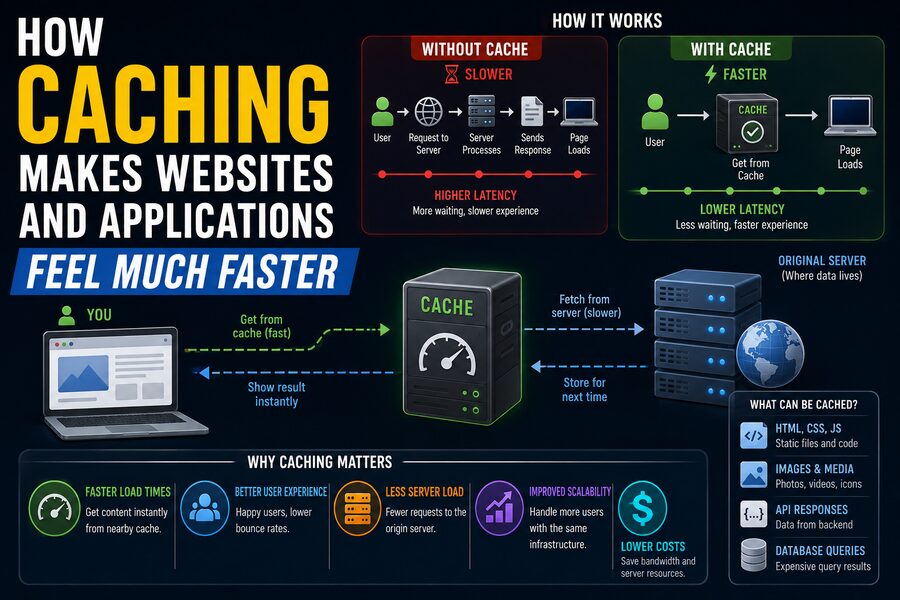

When you open a website for the second time and it appears almost instantly, or when an app loads familiar content without making you wait, there is a good chance caching is helping behind the scenes. 🚀
Caching is one of the most important performance techniques in modern computing. It works by keeping copies of frequently used data in a location that is faster or closer to access than the original source.
Instead of repeatedly downloading, calculating, or retrieving the same information from a distant server or database, the system can reuse a previously stored result.
The idea is simple:
If you already have the answer, do not compute or fetch it again unless you need to.
This small principle can dramatically improve the speed of websites, mobile apps, databases, cloud systems, and even computer processors.
🧠 What Is a Cache?
A cache is a temporary storage area that keeps data likely to be needed again.
Suppose a website needs to display the same company logo on every page.
Without caching, your browser might have to download that image from the server every time you open a new page.
With caching, the browser downloads the logo once and stores a local copy.
The next time the image is needed, the browser can load it directly from your device. 💻
Because local storage is usually much faster than communicating with a remote server over the internet, the page appears more quickly.
Caches exist at many different layers of a computing system, including:
- Web browsers
- Mobile applications
- Web servers
- Databases
- Content delivery networks
- Operating systems
- CPUs
- Cloud infrastructure
Each cache tries to reduce repeated work.
🌐 Why Fetching Data Over the Internet Takes Time
When a web page requests information from a server, several steps may occur.
Your device may need to:
- Determine where the server is located.
- Establish a network connection.
- Send a request.
- Wait for the server to process it.
- Receive the response.
- Download the data.
Even when each step is fast, the delays add up.
Network latency can become especially noticeable when the server is far away geographically.
For example, a user in India accessing a server located in North America may experience significantly more network delay than a user accessing a nearby server.
Caching reduces the need for some of these trips across the network. 🌍
🖥️ Browser Caching
One of the most familiar forms of caching occurs inside the web browser.
When you visit a website, your browser may download resources such as:
- Images
- CSS stylesheets
- JavaScript files
- Fonts
- Icons
- Videos
- Documents
If the website allows these files to be cached, the browser stores copies locally.
When you revisit the site, the browser can sometimes reuse those files instead of downloading them again.
This is why a website’s first visit may take longer than later visits.
The browser has already collected many of the resources it needs.
📦 Cache-Control Headers
Web servers can tell browsers how caching should behave using HTTP headers.
One important header is:
Cache-Control
A server might indicate that a resource can safely be reused for a certain amount of time.
For example, a static image that rarely changes might be cached for days or months.
A rapidly changing account balance should usually have much stricter caching rules.
Caching therefore depends not only on speed, but also on freshness.
The system must balance two questions:
Can I reuse this cached copy?
and:
Could the original data have changed?
⏰ Time to Live
Cached data is often given an expiration period known as Time to Live, or TTL.
Suppose a weather application caches a forecast for five minutes.
During those five minutes, repeated requests may reuse the cached value.
After the TTL expires, the application requests fresh information from the source.
A shorter TTL provides fresher data but results in more requests.
A longer TTL reduces server load but increases the chance of showing outdated information.
Choosing an appropriate TTL is an important design decision. ⌛
🎯 Cache Hits and Cache Misses
Two terms are fundamental to understanding caching.
A cache hit occurs when the requested data is already available in the cache.
That is the ideal situation.
The system returns the cached data quickly.
A cache miss occurs when the data is not available.
The system must then retrieve or calculate it from the original source.
For example:
Request → Cache → Data found → Cache hit ⚡
or:
Request → Cache → Not found → Database → Cache miss
The more requests that produce cache hits, the more useful the cache usually becomes.
📊 Cache Hit Rate
The cache hit rate measures how often requested data is successfully found in the cache.
A simplified formula is:
Cache Hit Rate = Cache Hits ÷ Total Cache Requests
Suppose an application receives 1,000 requests.
If 900 are served from cache, the hit rate is:
900 ÷ 1000 = 90%
A high hit rate can significantly reduce database queries, network requests, and CPU work.
However, maximizing the hit rate is not always the only goal.
A cache must also avoid serving incorrect or stale information.
🗄️ Server-Side Caching
Caching does not happen only inside the user’s browser.
Web servers can also cache data.
Imagine an online store displaying a list of bestselling products.
Generating this list might require a complicated database query.
If thousands of visitors request the same list every minute, running the query separately for every visitor would waste resources.
Instead, the application can calculate the result once and store it in a server-side cache.
Subsequent visitors receive the cached result almost immediately. 🛒
After a certain period, the cache can be refreshed.
This reduces load on the database and improves response time.
🧮 Caching Expensive Calculations
Sometimes the expensive part of an application is not downloading data—it is calculating it.
Suppose an analytics dashboard needs to analyze millions of sales records to produce a monthly report.
Running the full calculation every time someone opens the dashboard could be slow.
Instead, the application can calculate the report once, cache the result, and reuse it.
This technique is sometimes called memoization when used at the level of function results.
For example:
calculate_report(month) → result
If the application later requests the same report for the same month, it can return the stored result rather than repeating the computation.
🧠 CPU Caches Work on the Same Basic Idea
Caching is so useful that computer processors use it internally.
Modern CPUs contain extremely fast memory known as CPU cache.
Common levels include:
- L1 cache
- L2 cache
- L3 cache
These caches store data and instructions the processor is likely to need soon.
The CPU cache is much faster than main system memory.
If the processor repeatedly uses the same data, keeping it nearby can save enormous amounts of time.
Although CPU caching operates at a much lower level than website caching, the principle is essentially the same:
Keep frequently needed information close to where it will be used. ⚙️
🌍 Content Delivery Networks
One of the most powerful forms of web caching is the Content Delivery Network, or CDN.
A CDN operates servers in many geographic locations.
Instead of every user downloading content from one central server, the CDN stores cached copies of resources closer to users.
Imagine the original website server is in the United States.
A user in Singapore requests a large image.
Without a CDN, the image may travel across the internet from the United States.
With a CDN, a cached copy might already exist on a server in Singapore or another nearby location. 🌏
The shorter distance can reduce latency and make the website feel much faster.
🖼️ What Content Is Commonly Cached by CDNs?
CDNs often cache static content such as:
- Images
- Videos
- JavaScript
- CSS
- Software downloads
- Fonts
- Documents
Modern CDNs can sometimes cache more dynamic content as well.
Popular websites may serve enormous amounts of traffic through CDN caches rather than directly from their main infrastructure.
This reduces bandwidth usage and protects origin servers from excessive load.
🗃️ Database Caching
Databases can be extremely powerful, but repeated queries may become expensive at large scale.
Imagine a social media app where millions of users repeatedly request the same popular profile.
Rather than executing a database query every time, the application can store frequently requested profile data in a fast in-memory cache.
Technologies such as Redis and Memcached are commonly used for this purpose.
Memory access is often significantly faster than performing complex database operations.
A typical workflow might be:
Application → Cache → Database
The application checks the cache first.
If the information exists, it returns immediately.
If not, it queries the database and may store the result in the cache for future requests.
💾 Why In-Memory Caching Is So Fast
Traditional databases often store data on persistent storage such as SSDs.
Caching systems frequently keep data in RAM.
RAM is much faster to access than persistent storage.
This makes in-memory caches ideal for information that is requested repeatedly.
However, RAM is relatively expensive and limited.
That means a cache cannot store everything forever.
It needs strategies for deciding which data to keep and which data to remove.
🗑️ Cache Eviction
When a cache becomes full, some stored items must be removed.
This process is called cache eviction.
One common strategy is Least Recently Used, or LRU.
An LRU cache tends to remove items that have not been accessed recently.
The assumption is that recently used data is more likely to be needed again soon.
Other strategies may include:
- Least Frequently Used
- First In, First Out
- Random replacement
- Size-based eviction
- Priority-based eviction
The best policy depends on how the application uses data.
🔥 Why Popular Data Benefits Most
Caches are especially effective because many applications have uneven access patterns.
Users do not request every piece of information equally often.
A few pages, products, videos, or database records may receive enormous amounts of traffic.
For example, a news website may have millions of articles, but one breaking story could receive most of the day’s traffic.
Caching that popular article provides an enormous performance benefit.
This behavior is often related to the principle of locality—systems tend to reuse the same data or nearby data repeatedly.
📍 Temporal and Spatial Locality
Computer science often describes two important forms of locality.
Temporal locality means that if data was recently used, it is likely to be used again soon.
For example, a user who opens a profile page may refresh it several times.
Spatial locality means that if one piece of data is used, nearby data may also be needed.
Processors take advantage of spatial locality by loading blocks of nearby memory.
Web applications may do something similar by preloading related resources.
Caching works well because many real workloads naturally exhibit these patterns.
⚠️ The Biggest Problem: Stale Data
Caching creates an important challenge:
What happens when the original data changes?
Suppose an online store caches the price of a product as:
$50
The store then changes the price to:
$40
If the cache still contains the old value, some users may continue seeing $50.
This is called stale data.
Keeping cached copies synchronized with the original source is one of the hardest problems in distributed systems.
♻️ Cache Invalidation
Removing or updating cached data after the original changes is called cache invalidation.
There are several strategies.
One approach is expiration.
The system allows cached data to live for a limited time.
Another approach is explicit invalidation.
When the original data changes, the application immediately removes the cached copy.
A third approach is versioning.
Instead of overwriting an old resource, a new URL or version number is generated.
For example:
app-v1.js
might become:
app-v2.js
The browser sees the new name and downloads the new file.
Cache invalidation sounds simple but can become extremely complicated in large distributed systems. 🔄
🧩 Cache-Aside Pattern
A common application design is known as the cache-aside pattern.
The application itself manages the cache.
When data is requested:
- Check the cache.
- If found, return it.
- If not found, query the database.
- Store the result in the cache.
- Return the result.
This pattern is popular because it is straightforward and flexible.
The cache only fills with data that users actually request.
✍️ Write-Through Caching
Another strategy is write-through caching.
When the application changes data, it writes the update to both the cache and the underlying storage system.
This helps keep the two copies synchronized.
The advantage is that future reads can immediately use fresh cached data.
The disadvantage is that every write may require additional work.
Write-through caching is useful when read performance is important and consistency requirements are relatively strong.
🕒 Write-Back Caching
With write-back, sometimes called write-behind caching, changes may first be written to the cache.
The system updates persistent storage later.
This can make writes much faster.
However, it introduces risk.
If the cache fails before the changes reach persistent storage, data could be lost unless the system includes appropriate durability mechanisms.
Write-back approaches therefore require careful engineering.
🚀 How Caching Helps Websites Survive Traffic Spikes
Imagine a website normally receives 1,000 requests per second.
Suddenly, a major event causes traffic to rise to 100,000 requests per second.
If every request requires expensive database work, the system may become overloaded.
Caching can absorb much of this traffic.
If thousands of users request the same page, cached copies can serve those requests without repeatedly contacting the database.
CDNs can further distribute the traffic across many geographic locations.
This makes caching an important part of website scalability.
🛡️ Caching Can Improve Reliability
Caching is primarily used for performance, but it can also improve reliability.
Suppose a service temporarily cannot reach an external data provider.
If a recent cached copy exists, the application may still be able to display useful information.
Some systems intentionally serve stale-but-recent cached data during temporary failures.
For example, showing a five-minute-old weather forecast may be better than showing nothing.
However, this approach is inappropriate for data that must always be current, such as certain financial transactions or authentication decisions.
📱 Mobile Apps Depend Heavily on Caching
Caching is especially valuable on smartphones because mobile networks can be slow, expensive, or temporarily unavailable.
Apps may cache:
- Profile information
- Images
- Messages
- Map tiles
- News articles
- Music
- Video metadata
This can make the app feel responsive even when network quality is poor.
Some applications support offline operation almost entirely through local caches and synchronized storage.
For example, a mapping application may cache previously downloaded map areas so they remain available without an internet connection. 🗺️
🎥 Streaming Services Use Caching Too
Video and music streaming platforms serve enormous files to huge numbers of users.
Sending every video from one central data center would be inefficient.
Popular content is therefore commonly cached closer to users through distributed infrastructure.
If millions of people watch the same popular show, nearby caching servers can repeatedly deliver the same video segments.
This reduces long-distance network traffic and improves playback reliability.
Caching also helps prevent buffering because content can be delivered from servers with lower latency. 🎬
🔐 Not Everything Should Be Cached
Caching must be used carefully.
Highly sensitive or personalized information may require strict rules.
Examples include:
- Banking information
- Medical records
- Authentication tokens
- Private messages
- Account-specific pages
A shared cache must never accidentally serve one user’s private information to another user.
Developers therefore need to control cache keys, permissions, expiration settings, and HTTP headers correctly.
Performance must never come at the cost of privacy or security. 🔒
🧹 Why Clearing the Cache Sometimes Fixes Problems
Users are often told to “clear the cache” when a website behaves strangely.
Why can this help?
A browser may occasionally retain an outdated or corrupted cached file.
Suppose a website releases a new JavaScript file, but the browser continues using an incompatible older version.
The page may break.
Clearing the browser cache forces the browser to discard stored copies and download fresh resources.
This can solve problems caused by stale assets.
However, clearing caches unnecessarily may temporarily make websites load more slowly because resources must be downloaded again.
🔄 Cache Warming
Sometimes engineers intentionally fill a cache before users request data.
This is known as cache warming.
Suppose a major online event is about to begin.
The system knows millions of users will soon request the same homepage, images, and product information.
Engineers can preload those resources into caches.
When traffic arrives, the data is already available.
This reduces the large number of cache misses that might otherwise occur immediately after deployment or restart.
🌨️ The Cache Stampede Problem
Caching can sometimes create unusual problems.
Imagine a popular cached item expires.
At that exact moment, 100,000 users request it.
All 100,000 requests may discover that the cache is empty.
If they all query the database simultaneously, the database could be overwhelmed.
This is known as a cache stampede or thundering-herd problem.
Systems can reduce this risk by allowing only one request to refresh the cached value while others wait or temporarily use an older copy.
They can also add small variations to expiration times so many cached items do not expire simultaneously.
🏗️ Multi-Level Caching
Large systems often use several caches at once.
A request might encounter:
Browser cache → CDN cache → Web server cache → Application cache → Database cache
If the browser already has the resource, the request may never leave the user’s computer.
If the browser misses, the CDN might have it.
If the CDN misses, the web server may have a cached response.
Only if all these layers miss does the request reach the original database or computation.
This layered architecture can dramatically reduce latency and infrastructure load. ⚡
📉 Caching Reduces Cost
Performance is not the only benefit.
Caching can reduce operating expenses.
Database queries consume computing resources.
Network transfers consume bandwidth.
External APIs may charge per request.
Heavy calculations consume CPU or GPU time.
If a cached result avoids repeating these operations, the system saves money.
At large scale, even a small improvement in cache hit rate can result in substantial cost savings. 💰
🧠 Why Caching Feels Faster Than It Sounds
Human perception is highly sensitive to delay.
An extra second can make an application feel sluggish.
A response that arrives in a few tens of milliseconds often feels almost instantaneous.
Caching works by moving data closer to the user and eliminating repeated work.
Instead of:
Request → Internet → Server → Database → Calculation → Internet → User
the path might become:
Request → Local cache → User
That is a dramatic reduction in work.
⚖️ The Tradeoff Between Speed and Freshness
Caching always involves a tradeoff.
Fresh data is safest when retrieved directly from the source every time.
But doing so can be slow and expensive.
Cached data is fast but may become outdated.
Engineers therefore choose caching strategies based on how often information changes and how harmful stale data would be.
A website logo can safely be cached for a long time.
A live sports score may need frequent updates.
A bank balance may require extremely careful consistency.
There is no single caching policy that works for every type of data.
✅ The Bottom Line
Caching makes websites and applications feel faster by storing reusable data in places where it can be retrieved more quickly than from the original source.
Browsers cache images and scripts.
Servers cache generated pages and database results.
CDNs keep copies of popular content near users around the world.
Applications use in-memory caches to avoid repeated database queries.
Processors even use tiny high-speed caches to avoid repeatedly waiting for slower memory.
The performance improvement comes from avoiding unnecessary work. 🚀
Instead of repeatedly asking a distant server, re-running a complex calculation, or querying a database for the same information, the system asks a much faster question:
“Do I already have a recent copy?”
If the answer is yes, the result can be returned almost immediately.
Caching introduces challenges such as stale data, invalidation, limited storage, and security concerns, but when designed carefully, it is one of the most effective techniques for improving software performance.
That is why so many fast digital experiences—from streaming video and social media to online stores and cloud applications—depend on caching at multiple layers.
What feels like an instant response is often possible because somewhere in the system, the answer was already waiting. ⚡💾