
A team has finished a new checkout flow. The code is tested, reviewed, and deployed to production—but the product manager is not ready for every customer to see it. Support needs a briefing, marketing has a launch date, and the team wants to watch for errors first.
Without feature flags, the usual choice is uncomfortable: delay deployment until launch day, or deploy and hope nothing needs to change. If a serious problem appears, rolling back may mean redeploying older code while other unrelated fixes are already live.
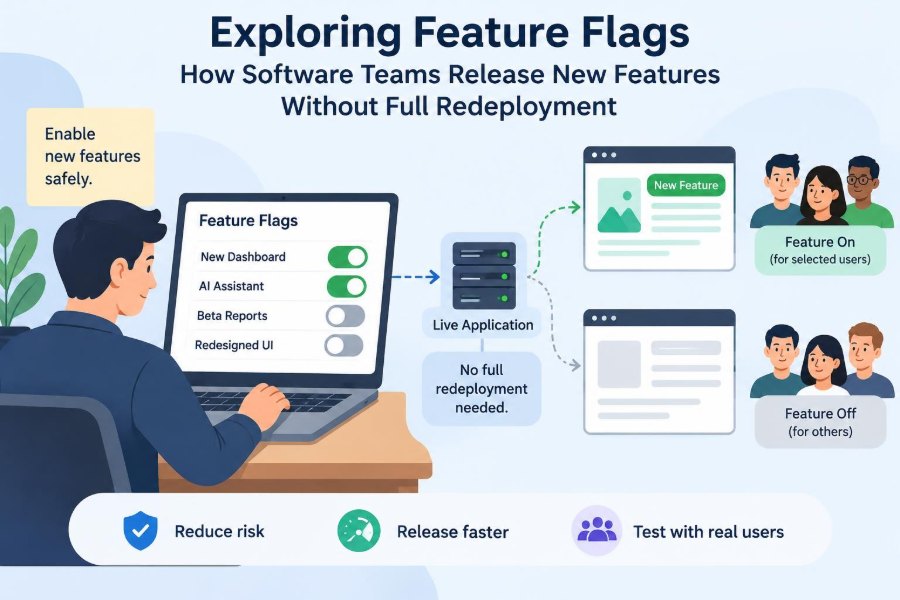
Feature flags, also called feature toggles, separate deploying code from releasing behavior. The application can contain a feature that remains inactive until a rule says it should be available.
This sounds simple—a conditional statement around new behavior—but dependable feature flagging is a product, operations, and engineering discipline. Used well, it reduces release risk. Used carelessly, it creates hidden paths, stale code, and confusing production behavior.
🧩 What a Feature Flag Is
A feature flag is a runtime decision point that changes what an application does or shows. It may decide whether to render a new page, call a new service, enable a configuration option, or use a revised algorithm.
Conceptually, a flag asks: for this request, user, tenant, or environment, should the new behavior run? The answer may come from a simple configuration file, a database, or a dedicated flag-management service.
if (flags.isEnabled("new-checkout", user)) {
  showNewCheckout();
} else {
  showExistingCheckout();
}
The conditional is small. Its consequences can be large because it creates two possible production experiences.
🚀 Deployment and Release Are Different Events
A deployment moves a software artifact—such as a web application, mobile backend, or service version—into an environment. A release makes functionality available to people who can use it.
Traditionally, these happened together. A feature flag decouples them. Teams can deploy unfinished or dormant code safely only when the inactive path is genuinely safe: no accidental access, no destructive background work, and no required data migration left incomplete.
This separation lets teams release when business and operational conditions are right rather than tying every decision to a deployment window.
🎚️ The Basic Runtime Decision
At runtime, the application evaluates a flag key and a context. The context might include an environment, user identifier, account plan, region, application version, or an internal-test marker.
A rule engine evaluates those attributes and returns a variation, often a boolean such as on or off. More advanced flags return strings, numbers, or structured configuration values.
For request-critical paths, the evaluation must be fast and predictable. Most mature implementations keep a locally cached copy of flag rules so a network delay does not affect every page load.
🧱 The Parts of a Flag System
A practical flag system has more than an if statement. It needs a reliable way to define flags, distribute changes, evaluate rules, and explain results.
- Flag definition: a key, owner, purpose, default, and expected removal date.
- Targeting rules: conditions that determine who receives a variation.
- SDK or library: application code that evaluates flags consistently.
- Management interface: a controlled place to change rules and review history.
- Observability: logs, metrics, traces, and dashboards that reveal flag state.
A lightweight internal solution can work for small needs, but governance becomes more valuable as flags spread across services and teams.
🧭 Common Types of Feature Flags
Flags differ by purpose and expected lifetime. Treating every flag as the same kind encourages poor cleanup and risky permissions.
| Type | Main purpose | Typical lifetime |
|---|---|---|
| Release flag | Hide incomplete or gradually released work | Short-term |
| Experiment flag | Assign variations for product learning | Until analysis ends |
| Operational flag | Reduce load or disable an optional capability | May be long-lived |
| Permission flag | Control access by plan, role, or entitlement | Often long-lived |
| Kill switch | Quickly stop risky behavior | As long as the risk exists |
A permanent entitlement rule deserves stronger design than a temporary release toggle. It is part of the product’s authorization model, not just rollout plumbing.
🌱 Release Flags for Work in Progress
Release flags let teams merge incrementally instead of maintaining a long-lived branch for weeks. A new workflow can be built in small changes behind a disabled flag, reducing painful merge conflicts and late integration surprises.
However, “hidden” does not mean “unreviewed.” The dormant path still needs automated tests, security review where relevant, and careful handling of database writes or background jobs.
A good release flag has an explicit moment when the old path will be removed. It is a bridge, not a permanent fork in the road.
🧪 Experiment Flags and Product Questions
Experiment flags support controlled comparisons, such as showing one onboarding sequence to one group and another sequence to a comparable group. Their goal is not merely gradual delivery; it is answering a product question.
Valid experiments require more than a switch. Teams need a stable assignment method, meaningful success measures, enough time to observe behavior, and awareness of confounding changes. Changing several things at once makes results harder to interpret.
Experiments may also involve privacy, consent, accessibility, or fairness concerns. Those considerations should be addressed before assigning people to variants.
🛡️ Operational Flags and Kill Switches
An operational flag changes system behavior to protect reliability. For example, a service might disable expensive recommendation calculations during unusually high load and fall back to a simpler result.
A kill switch is a focused operational control that turns off a problematic feature quickly. It is most useful when the fallback path is known and tested before an incident.
Do not mistake a kill switch for a substitute for engineering quality. If disabling a capability corrupts workflow state or leaves requests half-complete, the switch may create a second incident.
👥 Targeting Specific Audiences
Targeting allows a team to begin with employees, selected testers, one customer account, or a market segment. This limits the “blast radius”: the number of people affected if the feature behaves unexpectedly.
A hypothetical invoicing feature might first be enabled for the finance team’s internal account, then a few volunteer businesses, then a broader eligible audience. Each stage provides real operating feedback before exposure grows.
Targeting rules should use trustworthy attributes. If an account’s plan or region is stale, customers can receive the wrong experience.
📊 Percentage Rollouts and Stable Bucketing
A percentage rollout exposes a feature to a controlled portion of eligible users. The essential detail is stable bucketing: the same user should normally remain in the same variation across sessions.
Systems commonly hash a stable identifier and a flag key, then map the result into a range. Raising a rollout from 10% to 25% should preserve the original 10% group while adding users predictably.
Randomly deciding on every request causes flickering interfaces and inconsistent behavior. For a workflow, assignment may need to be stable at the account, device, or transaction level rather than the individual-user level.
🔍 Context Determines the Right Variation
Flag evaluation context is the set of facts supplied to a flag system. A service may send a user ID, organization ID, country, software version, and whether the request comes from an employee account.
Context should be minimal and purposeful. Sending unnecessary personal data increases privacy and security exposure without improving a rollout. Prefer internal identifiers and derived attributes where possible.
Define attribute meanings centrally. A field called region can mean billing location, current network location, or account market; inconsistent meanings lead to hard-to-debug targeting.
📱 Client-Side and Server-Side Evaluation
Client-side evaluation lets a browser or mobile application decide which variation to display. It can improve responsiveness, but the client must receive enough rule data to evaluate safely.
Server-side evaluation keeps rules and sensitive logic on trusted infrastructure. The server can send only the chosen result to the client, which is often safer for pricing, permissions, or internal-only functionality.
Never rely on a client-visible flag as an authorization boundary. A hidden button does not protect an API. The server must independently enforce who is allowed to perform a protected action.
🗃️ Database Changes Need a Different Plan
Feature flags can hide application behavior, but they cannot make an incompatible schema change safe by themselves. Databases often require a staged migration strategy.
A common approach is expand, migrate, contract: add a backward-compatible structure, deploy code that can work with old and new forms, move data or traffic gradually, then remove obsolete structures after the old code is gone.
If a new feature writes data that old code cannot understand, a rollback becomes more difficult. Plan the data contract before enabling the flag.
🔄 Backward Compatibility Makes Rollback Possible
A flag provides a fast rollback only when the old path remains functional. That means preserving compatible APIs, event formats, and data assumptions until the rollout is complete.
Consider a new payment integration. Turning off its interface is not enough if orders created through it leave records the existing fulfillment process cannot handle. Rollback must be evaluated across the full workflow.
Write down what “off” means: hide the entry point, stop new requests, use a fallback, or reverse a completed action. These are different operational actions.
🧰 Flags Are Not Configuration Management
Feature flags and application configuration overlap, but they solve different problems. Configuration usually defines stable operational settings: a database endpoint, retry limit, or storage bucket. Flags control a deliberate variation in behavior or audience.
Using flags for every setting produces an unmanageable dashboard of unexplained switches. Using static configuration for fast, targeted rollouts makes changes slow and may require redeployment.
A useful rule is to ask whether the value needs audience targeting, staged exposure, rapid reversal, or experimentation. If not, ordinary configuration may be clearer.
⚡ Fast Changes Require Safe Delivery
One attraction of flags is changing behavior without a new deployment. That convenience makes controls essential. A malformed rule, accidental full rollout, or incorrect default can affect production immediately.
Use validation before publishing rules, sensible defaults in the application, and change histories that show who changed what and when. For high-impact flags, require review or restrict changes to designated operators.
Also decide how SDKs behave when the flag provider is unavailable. A documented fallback prevents uncertainty during an outage.
📈 Measure the Rollout, Not Just the Errors
A successful rollout is not simply one with no exceptions. Teams should observe whether the new variation performs its intended task and whether it changes latency, conversion steps, support contacts, queue depth, or other relevant signals.
Attach the evaluated variation to logs, traces, and metrics where practical. When an error rises, engineers can then ask whether it is concentrated among users receiving the new path.
Avoid recording sensitive context casually. Observability should help diagnose behavior without turning telemetry into an unnecessary data store.
🧾 Make Flag State Visible During Debugging
“It works for me” is not useful when two people are assigned different variations. Support staff and developers need a safe way to determine which flag result applied to a particular session or account.
Useful diagnostics include the evaluated variation, rule reason, flag version, and application version. They should be available to authorized staff without exposing internal rules or customer information publicly.
For complex cases, an audit trail of rollout changes can reveal that an issue began when a targeting rule changed rather than when code was deployed.
✅ Test Both Sides of Every Flag
Every conditional path is software that can break. At minimum, automated tests should exercise the enabled and disabled behavior, including the default result when flag data is unavailable.
Integration tests matter when a flag changes data flow, messaging, APIs, or background processing. End-to-end tests are especially useful for critical user journeys, though they should not be the only defense.
- Test default values and malformed context.
- Test eligible and ineligible users.
- Test transition behavior when a rollout changes.
- Test the fallback path used by a kill switch.
The more variations interact, the more targeted tests and careful design are needed.
🕸️ Flag Combinations Create Complexity
Two independent boolean flags create four possible combinations; more flags quickly create paths that no one intentionally designed. This is sometimes called a combinatorial explosion.
Do not stack unrelated flags around the same workflow without considering their interactions. A new search ranking flag, a new cache flag, and an experiment flag may each work alone while failing together.
Prefer clear ownership, narrow scope, and a small number of variations. If several flags must coordinate, model the workflow explicitly rather than hoping nested conditions remain understandable.
🧹 Flag Debt Is Real Technical Debt
A temporary flag that survives its rollout leaves both old and new code in the system. It increases test burden, makes refactoring riskier, and obscures which behavior is intended.
Flag debt accumulates quietly because each individual toggle seems harmless. Months later, a team may find an old default protects a path nobody has exercised recently.
Set an owner and removal date when creating a temporary flag. Once a decision is final, remove the flag, obsolete implementation, tests tied only to the obsolete path, and unused targeting rules together.
🗓️ Build Cleanup Into the Delivery Process
Cleanup works best as a planned delivery step, not a vague promise. Track temporary flags in the team’s normal work system and review overdue ones in maintenance planning.
A useful lifecycle is simple: create disabled, test internally, roll out gradually, decide, set the final behavior, and delete the toggle. The deletion change deserves review because it permanently removes a safety option.
Long-lived operational and permission flags should also be reviewed periodically. Their continued existence may be justified, but their owners, rules, and fallback behavior should remain current.
🔐 Security and Access Control
Flag-management systems can alter customer experience and, in some cases, operational safety. Access should follow least privilege: people receive only the ability to view, edit, or approve the flags needed for their role.
Audit logs, protected credentials, and separation between test and production environments reduce the chance that a routine experiment changes live behavior accidentally. Sensitive flag names can also reveal unreleased product plans, so treat metadata thoughtfully.
Most importantly, flags must not replace server-side authorization. A rollout rule chooses an experience; authorization decides whether an action is permitted.
👩💻 Ownership Extends Beyond Engineering
Feature releases often involve product managers, designers, support teams, data analysts, security reviewers, and operations staff. A flag is the coordination point, but it does not remove the need for shared release criteria.
Before widening a rollout, agree on what signals matter, who can pause it, how support should identify affected users, and what communication customers need. A technically reversible release can still be confusing if frontline teams are unprepared.
Clear ownership answers a basic question during pressure: who has authority to change this flag now?
🧪 A Practical Rollout Sequence
A disciplined rollout does not need to be bureaucratic. It needs deliberate checkpoints matched to the risk of the feature.
- Deploy code with a safe default and a tested fallback.
- Enable the feature for internal users or a controlled test account.
- Verify key workflows, telemetry, and support readiness.
- Expand to a small eligible audience using stable targeting.
- Monitor agreed signals and pause if assumptions fail.
- Increase exposure, make the final decision, then remove temporary paths.
High-risk changes—such as payments, identity, or data deletion—may need additional review, canary infrastructure, and recovery planning.
🚫 Common Mistakes to Avoid
The most common failure is using a flag as a shortcut for unclear design. A switch cannot fix missing requirements, untested migrations, or an unsafe fallback.
- Creating vague names such as
new-flow-v2with no owner or purpose. - Defaulting to “on” when a provider outage should favor safety.
- Using browser flags to protect privileged actions.
- Rolling out by percentage without stable assignment.
- Leaving experimental code and rules after the decision is made.
- Changing several flags simultaneously and losing the ability to explain results.
These mistakes are preventable when feature flagging is treated as production engineering rather than a collection of convenient switches.
🧭 Choosing Whether a Flag Is Worth It
Not every change needs a flag. A tiny internal copy correction may be safer and simpler as a normal deployment. Each flag adds code paths, tests, monitoring needs, and cleanup work.
A flag is usually justified when a feature has meaningful uncertainty, needs progressive exposure, requires a rapid disable option, serves different audiences, or must be coordinated with a launch schedule.
Ask three questions: what risk does this flag reduce, what is the safe default, and when will we remove it? If those answers are unclear, redesign the release plan.
🌐 Feature Flags in Distributed Systems
In a system of many services, a flag can create version-skew problems. One service may understand a new event field while another still assumes the old format. Propagation delays can also mean different instances briefly evaluate different rule versions.
Design service contracts to tolerate staged change. Version messages where needed, make consumers resilient to additive fields, and avoid requiring every service to flip at precisely the same moment.
For cross-service workflows, document which component owns the decision. Re-evaluating a user-facing rollout independently in each service can produce inconsistent results.
🧠 The Core Principle: Control Exposure, Then Simplify
Feature flags are best understood as controlled exposure. They let software teams learn from real use, limit the impact of problems, and choose when a deployed capability becomes available.
That control works only when teams pair it with compatible data changes, tested fallback paths, targeted monitoring, secure access, and prompt cleanup. A flag is not magic; it is an operational mechanism that adds temporary complexity in exchange for safer decisions.
The strongest practice is therefore two-part: release gradually when uncertainty is real, then simplify decisively when the decision is complete.
Feature flags make releases safer when teams treat each toggle as a temporary, observable, and accountable production decision—not merely an on/off switch. ⚙️🧭🚀