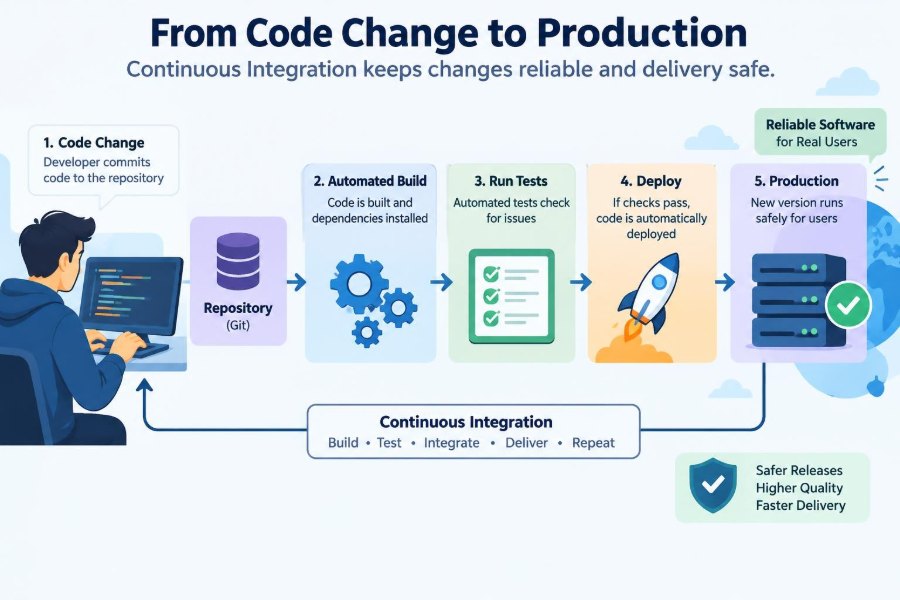

A developer fixes a small checkout bug, pushes a branch, and opens a pull request. The change may be only a few lines long, but it can still affect taxes, inventory, email receipts, or the database query used by thousands of customers.
Without a dependable process, the team has a difficult choice: release quickly and hope the change behaves, or delay every release for lengthy manual checking. Neither option scales well as a codebase and team grow.
Continuous integration, often shortened to CI, is the set of practices and automated checks that makes frequent code changes less risky. It is not a magic button, and it is not the same thing as automatically deploying to customers.
To understand how a change reaches production safely, it helps to follow its journey: from a developer’s machine, through shared verification and review, into a deployable artifact, and finally into a carefully monitored live environment.
🧩 The Problem CI Was Created to Solve
Software is assembled from many interacting parts. When several people modify those parts independently for days or weeks, combining their work can become painful. This is called integration risk: changes that work separately may fail when they meet.
A payment feature might alter an API response while another branch changes the web client that reads it. Neither developer necessarily made a mistake, but the combined system can still break.
CI reduces the size and frequency of those unknowns. Teams merge smaller changes into a shared codebase often, then use automated checks to discover incompatibilities close to the moment they were introduced.
🔄 What Continuous Integration Actually Means
Continuous integration is a development practice in which developers regularly integrate their work into a shared repository and each integration is validated by an automated build and test process.
The word continuous does not mean every commit must instantly reach users. It means integration happens routinely rather than being postponed until the end of a project phase.
A useful CI system provides rapid, trustworthy feedback. If a proposed change cannot compile, violates a rule, or breaks an expected behavior, the team learns before that change is treated as ready to merge.
🛤️ CI, Continuous Delivery, and Continuous Deployment
These terms are related but describe different boundaries. Confusing them can lead teams to expect a pipeline to make decisions it was never designed to make.
| Practice | Main outcome | Typical release decision |
|---|---|---|
| Continuous integration | Changes are merged and verified frequently | Code is safe to integrate |
| Continuous delivery | Verified software is kept ready to release | A person or process may choose when to release |
| Continuous deployment | Eligible changes deploy to production automatically | The pipeline releases after required checks pass |
A team can practice CI without continuous deployment. For example, a healthcare product may build and test every merge but require formal approval before a production release. The common goal is still to make releases routine, repeatable, and observable.
💻 The Journey Begins on a Developer’s Machine
Good pipelines begin before the remote server sees a commit. A developer runs the application, writes tests for a behavior, checks formatting, and reviews the local diff.
Local checks are deliberately fast. They catch obvious problems without requiring a developer to wait for a remote workflow. A pre-commit hook might reject badly formatted code, while a local unit test can expose a flawed calculation.
These checks are a convenience, not a security boundary. The central CI system must repeat important validation because local tools can be misconfigured, skipped, or run on a different environment.
🌿 Branches Create a Safe Place to Work
Most teams use a short-lived branch for a focused change. The branch isolates unfinished work from the shared main branch while still allowing CI to evaluate it.
The goal is not to accumulate a giant branch full of unrelated work. Long-lived branches drift away from the code other people are merging, increasing conflicts and making test results less representative.
A small branch named for one outcome—such as correcting invoice rounding—creates a reviewable unit of work. It is easier to test, easier to revert, and easier to understand later than a broad “cleanup” branch.
📬 Pull Requests Turn Changes into Conversations
A pull request, also called a merge request on some platforms, proposes combining one branch into another. It gives reviewers a focused view of the code, tests, description, and automated check results.
Review is more than proofreading. A reviewer can ask whether an edge case was considered, whether a database migration can run safely, or whether the change exposes information that should remain private.
Effective pull requests explain intent and risk. “Adds a timeout” is less useful than “limits the report query to prevent requests from occupying a worker indefinitely; includes a fallback message and a test for timeout handling.”
🏗️ A Pipeline Turns a Commit into Evidence
A CI pipeline is an ordered or coordinated set of automated jobs triggered by an event such as a push, pull request update, merge, or release tag. Its purpose is to produce evidence that a change meets defined expectations.
Typical jobs install dependencies, compile or package the application, run tests, analyze source code, and publish results. Some jobs can run in parallel; others depend on an earlier output.
The pipeline configuration is itself code. Keeping it in the repository allows teams to review changes to build and deployment behavior alongside application changes.
🧱 Reproducible Builds Reduce “Works on My Machine” Failures
A build should behave predictably regardless of who starts it. Reproducibility means using known versions of tools and dependencies, explicit build commands, and a controlled execution environment.
If one developer uses a newer compiler or an undeclared system library, their machine may produce a result the CI runner cannot reproduce. Dependency lockfiles, containerized build environments, and version-pinned tools reduce this gap.
Perfectly identical builds can be difficult in some ecosystems, but the practical aim is clear: avoid relying on hidden state, local configuration, or accidental versions.
⚡ Fast Feedback Shapes Developer Behavior
A check that reports a clear failure in minutes is much more likely to be acted on than one that fails after a long queue and an hour of testing. Speed is therefore part of pipeline quality, not merely an engineering luxury.
Teams often divide checks by purpose. Formatting, type checking, and focused unit tests run early; slower browser, integration, or security checks may run in parallel or after the fast gate passes.
Speed must not be purchased by removing meaningful verification. A better approach is to optimize slow tests, cache safe dependencies, split independent work, and reserve expensive environments for the checks that truly require them.
🧪 Unit Tests Check Small Pieces of Logic
Unit tests exercise a narrow unit of behavior, such as a price calculation, parser, validator, or service method. They are usually quick because they avoid real networks, browsers, and databases.
For example, a unit test can verify that a discount is rejected when its expiry date has passed. It should describe the expected behavior, not merely mirror the current implementation.
High unit-test coverage does not prove a system works as a whole. It can still be valuable evidence, especially when tests cover meaningful decisions, unusual inputs, and previously fixed defects.
🔗 Integration Tests Check Boundaries
Integration tests examine whether components work together across a real boundary: application code and a database, a service and a message queue, or an API and its serializer.
These tests catch errors that isolated unit tests often miss, including incorrect query syntax, migration assumptions, malformed JSON, and authentication configuration. They are typically slower and need more setup.
A practical test suite uses integration tests selectively around risky boundaries. Trying to test every possible behavior through the entire stack can make feedback so slow and fragile that developers stop trusting it.
🖥️ End-to-End Tests Simulate Important User Journeys
End-to-end tests drive the system through flows resembling user behavior, perhaps logging in, adding an item to a cart, and submitting an order in a test environment. They provide confidence that layers cooperate from the outside.
They also have limitations. Browser timing, asynchronous services, and test data can make them slower and more prone to intermittent failure than unit tests.
Use them for the journeys whose failure would be especially costly, not as the only testing strategy. A login flow, a critical payment handoff, or account recovery may justify end-to-end coverage; a simple formatting rule usually does not.
🧹 Static Analysis Finds Problems Without Running the App
Static analysis examines source code or compiled artifacts without exercising the full program. Linters enforce conventions and flag suspicious patterns, while type checkers identify incompatible values and missing cases in languages that support them.
Other analyzers may identify dead code, overly complex functions, unsafe API use, or likely null-reference errors. These tools are useful because they apply the same rules consistently on every change.
A warning is not automatically a defect. Teams should tune rules, explain intentional exceptions, and avoid creating a noisy dashboard that reviewers learn to ignore.
🔐 Security Checks Belong in the Normal Flow
Security is not a final checkbox before launch. CI can check known dependency vulnerabilities, scan code for exposed credentials, inspect container images, and enforce basic policies before artifacts are promoted.
These checks have boundaries. A scanner may miss a business-logic flaw, and a vulnerability notice may not apply in the way a dependency is actually used. Results need triage rather than blind acceptance or dismissal.
The immediate rule is straightforward: never store production passwords, tokens, or private keys in source control. Pipelines should receive secrets from a protected secret-management mechanism with restricted access and auditing where available.
📦 Artifacts Are the Things You Actually Release
An artifact is the output produced by a build: a package, executable, container image, mobile bundle, or static site archive. Source code is not always what gets deployed directly.
Building once and promoting the same artifact through environments reduces uncertainty. If staging receives one image but production rebuilds from the same commit later, changed dependencies or tools can produce a different result.
Artifacts should be versioned and traceable to the source revision, build process, and test results that created them. This makes investigation and rollback much more practical.
🏷️ Versioning Makes Changes Traceable
A version, commit identifier, or immutable image digest lets teams answer a basic operational question: what is running right now? Meaningful traceability connects a deployment to its code review, pipeline run, and release notes.
Human-friendly release names can help communication, while immutable machine identifiers protect precision. A mutable label such as latest is convenient but ambiguous when it points to different artifacts over time.
For a production incident, the ability to identify the exact artifact matters more than having a fashionable versioning scheme.
🗃️ Database Changes Need Their Own Safety Plan
Application code can often be rolled back quickly. Data changes are more complicated because a migration may transform or delete information, and older code may not understand the new schema.
A safer pattern is often expand and contract. First add a compatible column or table, deploy code that can work with both old and new forms, migrate data, switch reads and writes, then remove the old structure later.
For example, renaming a database column in one step can break older application instances during a rolling deployment. Adding the new column and temporarily supporting both names is more work, but it reduces coupling between deployment timing and data safety.
🚦 Quality Gates Decide What May Progress
A quality gate is a defined condition that must pass before a change moves forward. It might require a successful build, required review approval, passing tests, a vulnerability policy check, or confirmation that an artifact was created.
Gates should reflect real risk. Requiring approval for every documentation typo can add friction with little benefit, while requiring migration validation for a schema change is sensible.
Too many weak gates create ritual. Too few leave reviewers relying on intuition. The best gates are understandable, automated where possible, and connected to consequences the team has actually experienced or can reasonably anticipate.
🌍 Environments Provide Layers of Confidence
Teams commonly use environments such as development, test, staging, and production. Each has a different purpose: rapid experimentation, automated verification, realistic validation, or service to real users.
Staging is useful when it resembles production in important ways, such as configuration shape, service topology, or data volume characteristics. It is less useful when it is stale, manually configured, or so different that passing there says little about production.
No pre-production environment can perfectly predict live traffic, third-party behavior, or human usage. That is why safe production rollout and monitoring remain necessary.
🎛️ Configuration Must Travel Separately from Code
The same artifact may need different settings in different environments: database endpoints, logging levels, feature availability, and external service credentials. These are configuration, not reasons to create a fresh production-only build.
Configuration should be explicit, reviewed when appropriate, and validated early. A syntactically valid but incorrect URL or missing environment variable can cause an immediate production outage.
Keep secrets separate from ordinary settings, and do not print them in build logs. Access should follow least privilege: a job receives only the credentials it needs for its assigned action.
🚀 Deployment Is a Process, Not a Single Command
A deployment makes an artifact available in an environment. Depending on the system, that may mean updating virtual machines, replacing containers, publishing a serverless function, or uploading static files.
Reliable deployment automation records what was deployed and checks whether the new version becomes healthy. Health checks may confirm that a process is alive, but stronger readiness checks also confirm it can serve the work it claims to handle.
Idempotent deployment steps are especially valuable. Running an operation twice should not produce an unexpected second effect, such as creating duplicate infrastructure or applying a destructive action twice.
🐦 Progressive Delivery Limits the Blast Radius
Rather than sending a new version to every user at once, teams can release it gradually. This limits the blast radius: the number of users and systems affected if an assumption is wrong.
Common rollout patterns
- Rolling deployment: replace instances in batches while old instances continue serving traffic.
- Canary release: direct a small portion of traffic to the new version and observe it before expansion.
- Blue-green deployment: prepare a separate new environment, then switch traffic when it is ready.
- Feature flag rollout: deploy code but enable a capability for selected users or conditions.
Each pattern has trade-offs. Canary releases require meaningful metrics, blue-green approaches can cost more infrastructure, and feature flags create cleanup work if left behind indefinitely.
🚩 Feature Flags Separate Release from Exposure
A feature flag is a runtime control that changes whether a capability is available. It allows a team to deploy dormant code, test it internally, or enable it for a carefully chosen audience.
Flags are useful for gradual rollout and quick mitigation, but they are not a substitute for testing. Every active combination can increase complexity, particularly when multiple flags interact.
Give each flag an owner, purpose, and removal plan. A temporary flag that survives for years becomes hidden branching logic that few people understand.
📈 Observability Shows What Happened After Release
Once code runs in production, teams need evidence of its real behavior. Observability combines signals such as logs, metrics, traces, error reports, and user-facing indicators to help explain a system’s state.
Metrics might reveal rising error rates or request latency. Structured logs can identify the failing operation, while distributed traces can show where a request slowed across several services.
Monitoring should focus on service outcomes as well as infrastructure. A server can be healthy while customers cannot complete checkout because an upstream dependency rejects requests.
🧯 Rollback and Roll-Forward Are Different Recovery Choices
When a deployment causes harm, the fastest response is not always the same. A rollback returns to a previously known artifact; a roll-forward deploys a corrective change.
Rollback is attractive when the issue is clearly introduced by the new version and the previous version remains compatible with current data. It is harder after irreversible migrations, external side effects, or security fixes that must not be undone.
Teams should practice recovery paths before an incident. A rollback plan that exists only in a document may fail under pressure because permissions, artifact retention, or database compatibility were never tested.
🧱 Pipeline Failures Must Be Trustworthy
A flaky test passes and fails without a relevant code change. It is more damaging than a consistently failing test because it trains people to rerun jobs until they turn green.
Treat flaky checks as defects in engineering infrastructure. Capture failure data, isolate shared state, control timing where possible, and either repair or temporarily remove a misleading gate.
The same principle applies to unreliable runners and unclear error messages. CI is a feedback system; feedback that is slow, random, or incomprehensible cannot support safe decisions.
👥 Ownership Makes Automation Sustainable
A pipeline is not finished when its YAML file first works. Dependencies change, test environments decay, new services appear, and a once-fast build can become a daily bottleneck.
Ownership does not mean one person must fix every failure. It means the team knows who maintains shared build rules, who can approve deployment changes, and where to report problems.
Product teams should still own the quality of their changes. Platform or developer-experience teams can provide secure, reusable foundations, but they cannot infer an application’s business risks without collaboration.
🧭 A Practical Path for a Growing Team
A small team does not need a vast enterprise pipeline on day one. Start with the controls that give the clearest risk reduction: a protected main branch, automated build, focused tests, code review, and a reproducible artifact.
Then improve based on actual pain. If configuration errors recur, add validation. If releases are stressful, automate deployment and record versions. If a critical user flow breaks, add an appropriately scoped integration or end-to-end test.
- Keep changes small enough to review and diagnose.
- Make the main branch consistently usable.
- Automate repeated checks before adding manual ceremony.
- Promote the same verified artifact between environments.
- Deploy progressively when failure impact justifies it.
- Observe production and rehearse recovery.
⚖️ CI Cannot Eliminate All Risk
Automated checks verify only what they are designed to verify. A test suite may not model an unusual customer workflow, a third-party outage, unclear requirements, or a harmful product decision.
There is also a cost to every check: compute time, maintenance, and delayed feedback. Strong engineering judgment means selecting controls that are proportionate to the system’s risk and revisiting those choices as the system changes.
CI makes risk visible and manageable; it does not make software infallible. That distinction keeps teams alert without turning the pipeline into theater.
🧠 The Core Principle: Build Confidence in Small Steps
Safe delivery is not created by one impressive tool or a long checklist at the end of a project. It comes from a chain of small, credible decisions: a focused change, clear review, repeatable build, relevant tests, traceable artifact, cautious rollout, and real production feedback.
When each step produces evidence, release decisions become less dependent on optimism or heroics. Developers can move quickly because problems are discovered while their scope is still small and their context is still fresh.
The strongest CI practice is therefore cultural as well as technical: treat integration, testing, deployment, and recovery as shared parts of building software—not as someone else’s final hurdle.
Continuous integration helps code reach production safely by replacing large, uncertain release events with frequent, observable, and reversible steps. That is how speed and care can reinforce each other rather than compete. ⚙️🧪🚀