
A washing machine senses an unbalanced load and changes its spin cycle before the drum shakes itself loose. A car adjusts fuel delivery thousands of times during a journey. A factory conveyor pauses when a guard door opens, then restarts only when conditions are safe.
None of these decisions requires a person to press a button at exactly the right moment. They are made by embedded software: code built into a physical product to observe the world, make constrained decisions, and control hardware.
For manufacturers, this software is no longer a small add-on hidden behind the casing. It shapes product capability, production efficiency, safety behavior, maintenance costs, and the experience customers have long after purchase.
Understanding embedded systems also changes how we view ordinary products. The useful question is not simply whether a machine is digital, but how its software turns noisy sensor readings and electrical signals into dependable physical action.
🧩 What Embedded Software Actually Is
Embedded software is software designed for a specific device or machine rather than for general-purpose use on a laptop or phone. It runs on dedicated electronics and is closely tied to sensors, motors, valves, displays, batteries, and communication hardware.
A thermostat is a simple example. Its software reads temperature, compares that reading with a target, and switches heating or cooling equipment on or off. A robotic welding cell applies the same basic pattern at far greater scale: it coordinates movement, safety interlocks, welding parameters, and feedback from multiple sensors.
The word embedded describes both the location and the role of the code. It is part of the product itself, often invisible to the user, and it must operate within the limits of that product’s hardware.
🏭 Why Manufacturers Depend on It
Manufacturers use embedded software to make machines repeat actions accurately, adapt to changing conditions, and expose useful controls without requiring constant human supervision. Mechanical design still matters, but software increasingly determines how flexibly that mechanical design can be used.
The same motor and pump assembly, for example, can support different operating modes through software: quiet operation, energy-saving behavior, rapid output, or a carefully controlled ramp-up. This lets a manufacturer create product variants without redesigning every physical component.
In industrial equipment, embedded control can also capture operating data, enforce safe sequences, and make faults easier to diagnose. The result is not necessarily a fully autonomous factory; often it is a machine that gives operators clearer information and more predictable behavior.
🧠 The Control Loop at the Center
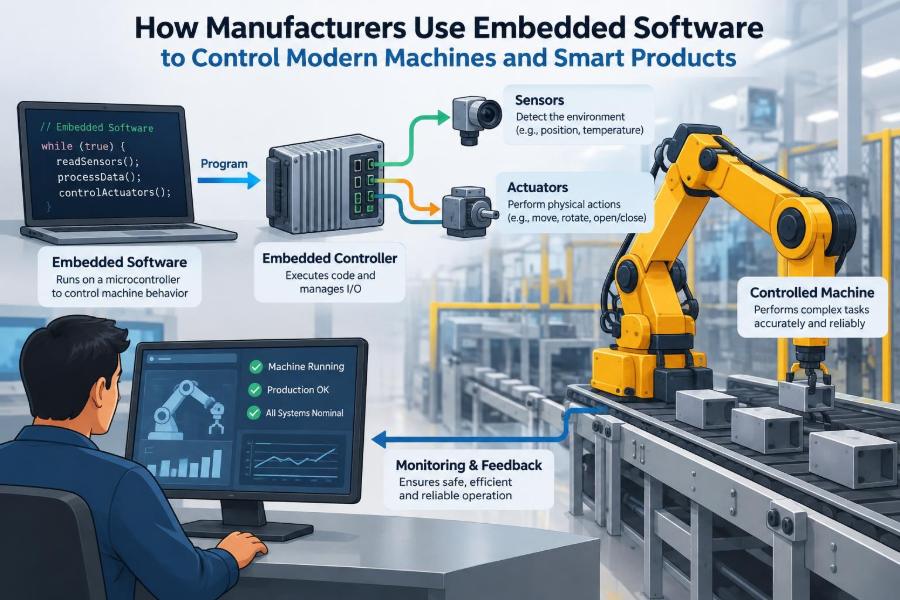
Most embedded control follows a loop: sense, decide, act, and check again. A sensor measures something in the physical system, such as pressure or position. Software interprets the measurement, commands an actuator, then observes the result.
Consider a refrigerated display case. If a temperature sensor indicates that the air is warming, the controller may start a compressor or fan. It then continues measuring, rather than assuming the command solved the problem.
This feedback loop distinguishes control software from a fixed timer. A timer can run a motor for ten seconds. A controller can run it until a measured condition is reached, while responding if the condition changes unexpectedly.
📥 Sensors Give Software a View of Reality
Software cannot directly see pressure, heat, speed, vibration, or liquid level. Sensors convert those physical properties into electrical signals that electronics can read. The design challenge is that a sensor reading is rarely a perfect statement of reality.
Readings can be noisy, delayed, poorly calibrated, or affected by environment. A temperature sensor near a heat source may not represent the temperature of the material that matters. A wheel-speed sensor may momentarily report an implausible value because of interference or a damaged connection.
Embedded software therefore filters readings, checks whether values are plausible, and sometimes compares multiple sources. Good control begins with knowing what a measurement means, how accurate it needs to be, and what to do when it is unavailable.
⚡ Actuators Turn Decisions Into Motion
Actuators are components that create a physical effect from an electrical command. They include electric motors, relays, solenoid valves, heaters, pumps, brakes, lights, and speakers.
A controller usually does not drive a high-power actuator directly. Instead, it sends a low-power control signal to a driver circuit, which safely handles the required current or voltage. That separation protects sensitive electronics and makes power behavior easier to manage.
Commands also need appropriate limits. Instantly applying full motor power may damage a mechanism, trip a power supply, or create unsafe motion. Software can use controlled acceleration, maximum duty cycles, and position limits to make physical actions gentler and repeatable.
⏱️ Real-Time Means Deadlines Matter
Many embedded systems are real-time systems. This does not mean they are merely fast. It means a result must arrive within a known time limit for the system to work correctly.
If a dashboard animation appears a little late, the consequence is usually minor. If a motor controller receives a critical position update too late, the machine may move incorrectly. In safety-related equipment, missed timing deadlines can require the system to enter a safe state.
Engineers therefore consider worst-case timing, not only average performance. They ask how long code can take when communication is busy, memory is under pressure, or several tasks need attention at once.
🧮 Microcontrollers Fit Inside Products
A microcontroller is a compact computer chip commonly used in embedded products. It combines a processor, memory, input/output connections, timers, and interfaces for communicating with peripherals.
Unlike a desktop computer, a microcontroller often has limited memory and energy available. It may start running its program immediately after power is applied, perform one narrow set of responsibilities, and remain in service for years.
More demanding products may use several controllers. One might manage a motor, another a touchscreen, and another battery monitoring. Dividing duties can simplify timing and safety boundaries, but it also introduces communication and integration work.
🧱 Firmware Is the Product-Level Code
Embedded software stored on a device is often called firmware. The term emphasizes that the code is closely coupled to hardware and traditionally changed less often than ordinary application software.
That distinction is becoming less rigid. Connected devices may receive firmware updates after sale to correct defects, improve compatibility, or add carefully validated features. Yet updating a physical product carries more risk than refreshing a web page.
A failed update can leave a device unusable or, worse, alter important operating behavior. Manufacturers need a recovery plan, verification checks, and a clear understanding of which changes are appropriate for equipment already in the field.
🔄 State Machines Make Behavior Predictable
Many machines are easiest to model as a state machine: the machine is in one defined state and moves to another only when specified conditions occur. A packaging machine might have states such as idle, loading, sealing, ejecting, fault, and emergency stop.
State-based design prevents ambiguous commands. The machine should not begin sealing while a safety guard is open, and it should not eject a package until the sealing step reports completion.
This approach also helps testing. Engineers can ask what every input should do in every state, including unexpected inputs. Undefined behavior is often where expensive faults and confusing operator experiences begin.
🎛️ Closed-Loop Control Handles Variation
Real machines vary. Material thickness changes, supply voltage shifts, loads differ, and components age. Closed-loop control compensates by measuring the outcome and adjusting the command.
A simple cruise-control-like system compares measured speed with a target speed and changes motor effort. More sophisticated systems may use a control algorithm that considers present error, how long error has persisted, and how quickly it is changing.
Closed-loop control is powerful, but it depends on sensible tuning and trustworthy measurements. An overly aggressive controller can repeatedly overshoot its target, producing oscillation rather than stability.
🔧 Open-Loop Control Still Has a Place
Open-loop control commands an action without measuring whether the desired result occurred. Running a small fan at a fixed setting or opening a valve for a known interval can be sufficient when conditions are stable and consequences are limited.
It is often simpler and less expensive because it may need fewer sensors and less software. But it cannot automatically compensate for a blocked fan, changed load, or worn mechanism.
The practical choice is not that closed loop is always superior. Manufacturers select the level of feedback that the product’s accuracy, risk, cost, and operating environment justify.
🦾 Motion Control Coordinates Machines
Robots, CNC equipment, elevators, and automated assembly tools require precise motion control. Software plans how motors accelerate, decelerate, and coordinate so that mechanisms reach a position without exceeding physical limits.
Position feedback may come from encoders, which report motor or shaft movement. Limit switches can provide a simpler confirmation that a moving part has reached an endpoint. The controller uses this feedback to detect stalls, establish reference positions, or correct drift.
A useful analogy is choreography. Each axis must move at the proper time and speed, while the overall system observes constraints such as collision zones, payload limits, and guarded areas.
🛑 Safety Logic Is Not a Convenience Feature
Manufacturing equipment can create heat, force, sharp motion, electrical hazards, and pressure. Software participates in safety, but a safe design usually relies on more than one line of code or one sensor.
For example, a machine may use physical guards, emergency-stop circuits, redundant sensing, mechanical brakes, and software-controlled shutdown sequences. The exact design depends on the application and applicable requirements; safety-critical systems require specialized engineering, validation, and regulatory context.
Fail-safe behavior means considering what happens when something goes wrong: a wire disconnects, a sensor disagrees, power dips, or a controller resets. The preferable response is often to remove energy or prevent motion rather than continue with uncertain information.
🔐 Security Protects Physical Behavior
Once a product can communicate over a network, security becomes part of machine control. An unauthorized command, altered configuration, or malicious firmware update can affect a physical process rather than only a screen.
Useful protections include authenticated updates, access control, protected credentials, encrypted communications where appropriate, and logs that help investigate changes. Security also includes basic operational choices, such as not exposing maintenance interfaces to every network user.
Connectivity should be deliberate. A remote feature may offer real value for monitoring or support, but every connection expands the system that must be designed, maintained, and defended.
📡 Industrial Networks Connect the Pieces
Modern equipment often contains distributed components: drives, sensors, controllers, operator panels, barcode readers, and supervisory systems. Industrial communication networks let these parts exchange commands and status.
Different networks make different trade-offs involving speed, deterministic timing, distance, fault tolerance, and interoperability. The critical question is not which protocol sounds most advanced, but whether communication arrives reliably enough for its intended role.
Engineers also define what should happen when communication fails. A display may show stale data, a process may continue briefly using local control, or motion may stop. These choices should be explicit rather than accidental consequences of a timeout.
🖥️ Human-Machine Interfaces Shape Safe Use
A human-machine interface, or HMI, is the panel, display, controls, indicators, or software screen through which people operate equipment. It turns internal machine states into information an operator can act on.
A good HMI does not overwhelm users with raw values. It identifies the current mode, shows actionable alarms, explains why a start command is blocked, and makes normal workflows clear. Color alone should not carry a critical warning because environments and users vary.
Designers should also consider maintenance personnel. A technician needs diagnostic detail; an operator in production may need a concise next step. One screen rarely serves both needs equally well.
🧪 Testing Must Include the Physical World
Software tests that pass on a developer’s computer do not prove that a machine behaves correctly. Embedded testing needs to account for real sensors, electrical noise, timing, power transitions, mechanical load, and unusual operating sequences.
Manufacturers commonly use simulators or hardware-in-the-loop setups, where some real electronics interact with simulated inputs. This allows teams to exercise dangerous, rare, or costly conditions before testing on a complete machine.
Field testing still matters because the operating environment reveals assumptions. A controller tested in a clean lab may behave differently around vibration, temperature changes, long cable runs, or production materials with natural variation.
🐞 Debugging Requires Evidence
When a machine fails intermittently, the cause may be software, wiring, mechanics, timing, power quality, or a combination. Guessing wastes time and can lead to changes that hide the original problem.
Useful diagnostics include event logs, fault codes, sensor histories, timestamps, and captured communications. The system should record enough context to reconstruct what it believed was happening without storing unlimited data.
Diagnostic design is a product decision, not an afterthought. If a device cannot explain why it stopped, technicians may replace working parts or wait for a fault to recur before they can act.
📈 Data Enables Condition Monitoring
Embedded devices can measure operating hours, temperature trends, vibration, current draw, error counts, and cycle history. When interpreted carefully, this data supports condition monitoring: looking for signs that maintenance may be needed before a failure interrupts operation.
A rising motor current under a similar load, for example, could suggest increasing friction. It is a clue, not a diagnosis by itself. Sensors can drift, operating conditions change, and a meaningful pattern requires domain knowledge.
The most useful monitoring focuses on decisions. Collecting every possible signal creates storage and analysis burdens if nobody has defined which deviations matter or what action follows an alert.
♻️ Energy Management Is Often Software-Driven
Software can reduce unnecessary energy use by scheduling standby modes, modulating motor speed, managing heating cycles, and avoiding simultaneous high-power actions. In battery-powered products, it may spend most of its effort keeping the electronics asleep until an event occurs.
These strategies have trade-offs. Aggressive power saving can delay a response or reduce sensing frequency. A system needs enough awareness to wake at the right time and enough reserve capacity for safety-related functions.
Energy behavior should be tested across realistic conditions. A mode that saves power in a nominal scenario may be less useful if it causes frequent restarts, poor thermal control, or a frustrating delay for users.
🧾 Traceability Supports Quality Control
Manufacturers often need to know which hardware revision, firmware version, calibration data, and configuration belong to a specific unit. This traceability helps teams investigate failures and control changes across production.
Imagine two identical-looking machines with different motor drivers. Firmware that is safe for one may not be valid for the other. Explicit identification prevents technicians and automated tools from applying the wrong configuration.
Traceability also supports disciplined manufacturing. It connects test results at the factory with the software and components actually shipped, rather than relying on handwritten assumptions or loosely managed files.
🧰 Configuration Can Be More Dangerous Than Code
Many products use the same firmware across several models, with behavior determined by configuration values. These might specify motor limits, sensor scaling, regional settings, or installed options.
This flexibility is valuable, but an incorrect parameter can make a well-written program behave unsafely or poorly. A speed limit set for one mechanism may be inappropriate for a smaller or heavier version.
Manufacturers reduce this risk through controlled configuration tools, validation rules, versioning, and production checks. Treating configuration as informal data is a common source of hard-to-reproduce problems.
🔁 Updates Need a Lifecycle Plan
A firmware update process should answer more than how to transfer a file. It must address compatibility, integrity checks, power loss during installation, rollback or recovery, and communication with customers or service teams.
For some products, updates are performed only by trained technicians using controlled equipment. For others, remote updates are appropriate if the device can authenticate the package and recover safely from interruption.
Long-lived machines also create a support question: how long will replacement parts, development tools, security fixes, and knowledge remain available? Embedded software is part of the product’s lifecycle, not just its launch.
🧑🤝🧑 Hardware and Software Teams Must Co-Design
Embedded development works best when electrical, mechanical, manufacturing, test, service, and software teams make decisions together. Software cannot compensate for every poor sensor placement, inaccessible connector, or undersized power supply.
Likewise, hardware choices affect code complexity. Adding a reliable position sensor may simplify control logic. Choosing a component with limited diagnostics may make fault detection harder for the lifetime of the product.
Early prototypes should test interfaces between disciplines, not only individual parts. The key question is whether the full system behaves acceptably under realistic constraints.
⚠️ Common Embedded Software Mistakes
Recurring failures often come from reasonable assumptions that were never challenged in physical conditions. Recognizing them helps teams design better reviews and tests.
- Assuming sensor values are always valid: disconnected or noisy inputs need defined handling.
- Ignoring startup and shutdown: many faults occur during power transitions, not normal operation.
- Testing only the happy path: jams, invalid commands, delayed messages, and interrupted updates need coverage.
- Using unexplained constants: named, documented limits are safer to review and change than mysterious numeric values.
- Adding connectivity without ownership: connected products need a plan for credentials, updates, and incident response.
🧭 A Practical Development Path
A reliable process starts by defining behavior before writing detailed code. Teams identify inputs, outputs, operating modes, limits, hazards, timing requirements, and what constitutes a fault.
- Describe the physical process and its normal and abnormal states.
- Specify measurable requirements, including response times and safe behavior.
- Prototype sensors and actuators early to expose real-world constraints.
- Build modular control logic with clear interfaces and diagnostics.
- Test at unit, subsystem, hardware-in-the-loop, and complete-machine levels.
- Plan manufacturing configuration, service access, updates, and long-term support.
This path is iterative. Test results often reveal that an earlier requirement was incomplete or that a physical design change is more sensible than adding complex software workarounds.
🎓 Skills That Matter for Engineers
People entering embedded work benefit from programming fundamentals, but strong code alone is not enough. They need comfort with digital and analog signals, timing, debugging tools, communication interfaces, and basic control concepts.
Equally valuable are systems-thinking habits: reading a datasheet carefully, asking what happens on failure, separating observed facts from assumptions, and communicating clearly with specialists from other disciplines.
A practical learning project might be a small controller that reads a sensor, drives an actuator, logs faults, and handles a deliberately disconnected input safely. The lesson is not the gadget; it is learning to connect software behavior to physical evidence.
🌍 Smart Products Change Customer Expectations
Customers increasingly expect products to provide status, guidance, diagnostics, and improved behavior over time. Embedded software can meet those expectations, but it also raises expectations for reliability and privacy.
A connected appliance that reports a clear maintenance need may save a service visit. The same appliance can become frustrating if its core function depends unnecessarily on a cloud service or if an update changes familiar behavior without explanation.
The strongest smart-product decisions keep the essential local function dependable. Digital features should support the product’s purpose, not distract from it.
🔮 The Direction of Machine Intelligence
More products are combining embedded control with edge processing, where some analysis happens on the device rather than being sent elsewhere. This can reduce response delay and keep useful functions available when a connection is absent.
Machine-learning methods may help classify patterns such as unusual vibration or visual defects, but they do not remove the need for conventional controls, clear limits, and validation. A model’s output is another input to assess, not a substitute for engineering judgment.
As systems gain capability, explainability and maintainability become more valuable. Operators and technicians still need to know what the machine is doing and how to return it to a reliable state.
✅ The Core Principle: Control With Evidence and Limits
Embedded software gives manufacturers a way to turn hardware into responsive products and repeatable processes. Its value comes from the connection between measurement, decision, action, and verification—not from adding code for its own sake.
The most dependable systems acknowledge uncertainty. They validate inputs, respect timing and physical limits, handle faults deliberately, and provide people with meaningful ways to operate and maintain the machine.
Whether the product is a simple appliance or a complex production line, the core engineering task is the same: make the digital logic behave responsibly in an imperfect physical world.
Modern machines become truly useful when embedded software translates real-world evidence into safe, timely, and understandable action. ⚙️🏭🔍