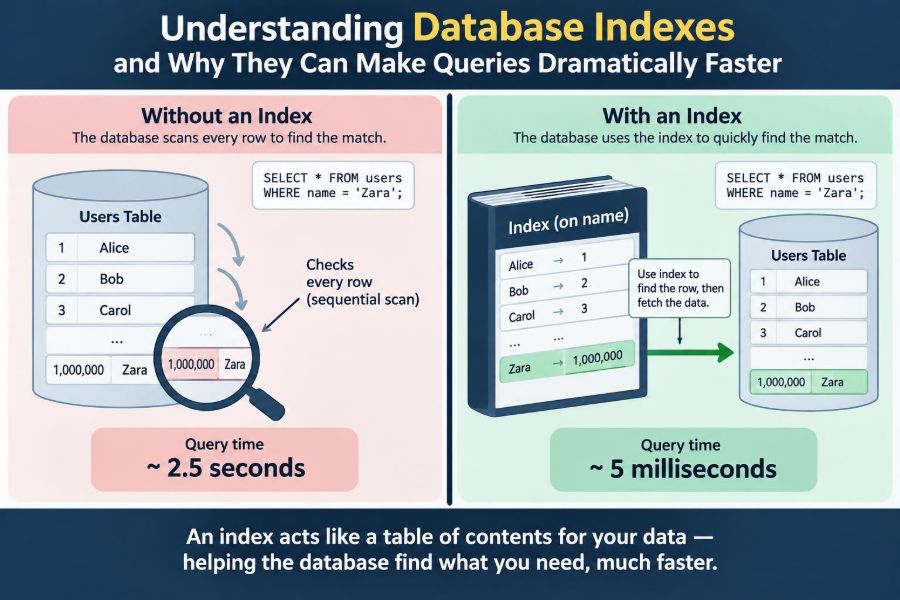

A product search page feels quick with a few hundred items. Months later, after the catalog grows, the same page begins to hesitate. A query that once returned almost instantly now keeps users waiting, even though the application code looks unchanged.
That shift often leads teams to suspect the network, add more servers, or rewrite SQL. Sometimes those actions help. But a much smaller database design choice is frequently responsible: whether the database has an efficient way to find the rows being requested.
Database indexes provide that way. They can turn a query from “inspect nearly everything” into “navigate directly to the relevant records.” They are not free, though: every index consumes storage and makes some writes more expensive.
Understanding indexes means learning to ask a practical question: what path will the database take to locate this data? That question is useful whether you are designing a new schema, debugging a slow endpoint, or reviewing a migration before it reaches production.
📚 The Library Analogy
Imagine finding every book by a particular author in a large library. Without a catalog, you would inspect books one shelf at a time. With a catalog organized by author, you look up the name and go to a much smaller location.
An index is that catalog. It stores selected column values in an ordered or otherwise searchable structure, along with enough information to locate the corresponding table rows. The database can use it to avoid reading unrelated data.
The analogy has a limit: a database index is maintained automatically as rows change. That maintenance is precisely why indexes accelerate reads but add work to inserts, updates, and deletes.
🗃️ Tables Are Not Automatically Easy to Search
A table is a logical collection of rows. Its physical storage depends on the database engine and table design, but it should not be assumed to be arranged helpfully for every possible query.
If an application asks for orders where customer_id = 842, the database needs a strategy. In the absence of a suitable index, it may perform a table scan: read rows sequentially, test the condition for each one, and keep the matches.
For a tiny table, that is often perfectly reasonable. For a large table accessed frequently, repeatedly examining unrelated rows can become costly in disk reads, memory pressure, CPU time, and contention for shared resources.
🔎 What an Index Actually Stores
Conceptually, an index contains entries such as a search key and a row locator. For an index on email, an entry might associate an email value with the location or identifier of the user row that contains it.
Many engines implement common indexes using a B-tree or closely related structure. The exact internal details vary, but the essential benefit is ordered navigation: the engine can follow a small sequence of branches toward the requested key instead of comparing against every row.
Indexes are separate data structures, not magical annotations. They occupy pages on disk and in memory, can become fragmented or require statistics updates depending on the engine, and must remain consistent with the table.
⚡ Why Seeking Beats Scanning
A scan does work proportional to the amount of data it reads. An index seek starts near the relevant portion of an index and reads a narrow range of entries, which is especially effective when a query needs a small fraction of the table.
Consider a hypothetical table containing millions of event records. Looking for one event by a unique event ID is an ideal indexing case: a scan checks a vast number of nonmatching records, while an index seek can locate the matching entry directly.
The difference is not merely raw speed. Doing less work also leaves database capacity available for other requests, which can improve overall responsiveness under load.
🧭 The Query Optimizer Chooses a Plan
Writing an index does not force every query to use it. Database engines use a query optimizer, which estimates the cost of possible execution plans and selects one it expects to be efficient.
A plan may use an index seek, an index range scan, a full table scan, joins in a particular order, sorting, or other operations. The optimizer relies on metadata and statistics about data distribution to make its estimates.
This explains an important debugging lesson: “an index exists” and “the query is fast” are not equivalent statements. The index must match the query, and the optimizer must reasonably judge it useful.
📈 Selectivity Determines Much of an Index’s Value
Selectivity describes how effectively a condition narrows the result set. A search for one email address is highly selective because it commonly identifies one row. A condition such as is_active = true may match a large share of a table.
An index on a low-selectivity column can still help in the right situation, particularly when combined with other conditions or when the matching rows are physically easy to retrieve. On its own, however, it may lead the engine to fetch so many rows that a scan is cheaper.
Ask not only “is this column filtered?” but also “how many rows will this filter likely return?” That is a better starting point for index design.
🪪 Primary Keys Usually Create an Index
A primary key identifies each row uniquely and, in most relational database systems, is backed by a unique index or equivalent structure. It makes lookups by that key efficient while enforcing the rule that duplicate key values are not allowed.
For example, SELECT * FROM users WHERE id = 123 normally benefits from the primary-key index. This is one reason surrogate identifiers such as integer or UUID-based IDs are common in application schemas.
Primary keys solve one access pattern, not every access pattern. A users table may also be queried by email, organization, creation date, or status; each pattern must be evaluated separately.
🔐 Unique Indexes Protect Data Quality
A unique index rejects duplicate values for its indexed key or key combination. It can make lookups efficient, but its deeper role is enforcing a business rule at the database boundary.
If every account must have a distinct email address, a unique constraint or unique index prevents race conditions that application-only validation can miss. Two simultaneous requests might both see an email as available before either writes it; the database can still reject the second conflicting write.
For nullable columns, uniqueness behavior differs among database products. Verify the semantics in the documentation for your engine rather than assuming all databases treat multiple null values identically.
🧩 Single-Column Indexes Fit Simple Lookups
A single-column index is often appropriate when queries regularly filter by one independent, selective attribute. Examples include a user lookup by email, a session lookup by token, or a product lookup by SKU.
It is tempting to add one index for every column that appears in a WHERE clause. That approach usually creates redundant structures and write overhead without guaranteeing an efficient plan.
Queries with multiple filters often need an index that reflects the filters together. Separate indexes may sometimes be combined by an engine, but a deliberately chosen composite index is frequently more predictable and efficient.
🧱 Composite Indexes Serve Multi-Column Queries
A composite, or multi-column, index stores keys in a defined column order. Suppose a common query is:
SELECT id, created_at
FROM orders
WHERE customer_id = ?
  AND status = ?
ORDER BY created_at DESC;
An index beginning with (customer_id, status, created_at) may help the engine filter the equality conditions and read matching entries in the requested order. The best index still depends on the actual query shape and database capabilities.
Column order matters because the index is ordered lexicographically: first by the first column, then by the second among matching first-column values, and so on.
➡️ The Leftmost Prefix Rule
For a conventional B-tree composite index on (tenant_id, created_at, id), a query filtering by tenant_id can often use the leading part of the index. A query filtering only by created_at generally cannot use that ordering as effectively.
This is often called the leftmost prefix principle. It is a useful mental model, though optimizer behavior and specialized index types can add nuance.
Place columns based on real query patterns, not a universal slogan. Equality predicates commonly come before a range predicate, while columns needed for sorting may belong later when that lets the database avoid a separate sort.
📏 Range Conditions Change the Picture
Range predicates include conditions such as created_at >= ?, price BETWEEN ? AND ?, and prefix searches such as name LIKE 'sam%'. Ordered indexes are often valuable for these queries because matching entries occupy a contiguous range.
In a composite index, a range condition can limit how much of the columns after it help with navigation. For instance, with (region, created_at, status), filtering by one region and a date range may efficiently narrow the first two keys, but status may be less useful for further seeking.
This does not make the index wrong. It simply means index order must be tested against the important query, including its ranges and sort requirements.
↕️ Indexes Can Avoid Expensive Sorting
Sorting a large intermediate result can consume memory and CPU, and may spill to temporary disk storage depending on the engine and workload. If an index already presents qualifying rows in the required order, the database may avoid that extra operation.
For example, a feed query scoped to one author and ordered by newest first may benefit from an index aligned with (author_id, published_at DESC), where descending key support is available and appropriate.
Direction and ordering details vary by database. Use the execution plan to verify whether the expected sort disappeared rather than relying on intuition alone.
📦 Covering Indexes Can Avoid Table Lookups
An index is covering when it contains all columns a query needs for filtering, joining, ordering, and returning results. The engine can answer the query from the index itself, avoiding a trip back to the table for each matching row.
Suppose a dashboard lists an order’s ID, status, and creation time for a customer. If those values are available in an index designed for that access pattern, an index-only scan may be possible in engines that support it.
Some databases allow non-key columns to be included in an index specifically for coverage. This can be valuable for heavily used read paths, but wider indexes use more space and require more maintenance.
🧳 Wide Indexes Have a Cost
Adding extra columns to make an index cover queries sounds attractive until the index becomes large. Wider entries mean fewer entries fit on a page, more I/O may be needed, and cache efficiency can decline.
Large text fields, JSON documents, or rarely returned columns are usually poor candidates for a general-purpose covering index. Index only what the workload repeatedly needs, not every field a table happens to contain.
Think of an index as a compact navigation aid. If it becomes a duplicate copy of the table, it loses much of its advantage.
✍️ Every Write Updates Relevant Indexes
When a row is inserted, the database must add entries to each applicable index. When an indexed value changes, the old entry and new entry must be maintained. Deletions also remove or mark entries as no longer valid according to the engine’s storage model.
A table with many indexes can therefore have slow write-heavy behavior even if individual reads are fast. Bulk imports, high-volume event ingestion, and frequently updated records are especially sensitive to unnecessary indexes.
This is the central trade-off: indexes exchange additional storage and write work for faster reads. The right balance follows the workload rather than an abstract ideal.
🧾 Foreign Keys Often Need Supporting Indexes
A foreign key enforces referential integrity, such as requiring every order’s customer_id to reference an existing customer. The constraint is not identical to an index, and databases differ in whether they automatically create supporting indexes.
Indexing the referencing column is often useful. It helps joins from orders to customers and can help the database check related rows when a parent row is updated or deleted.
Check the schema generated by your migration tools and the behavior of your specific database. Do not assume a foreign-key declaration automatically optimizes every join involving it.
🔗 Join Performance Depends on Both Sides
Indexes commonly improve joins because joins need to find matching rows across tables. If a query finds a small set of customers and then looks up their orders, an index on orders.customer_id can be highly useful.
But join performance is broader than one indexed column. The number of rows entering each join, filter placement, join order, available memory, data distribution, and the selected join algorithm all matter.
When diagnosing a slow join, inspect the full plan. Adding an index to a visibly named join column can help, but it can also miss the real issue: an earlier filter producing far more rows than expected.
🧮 Functions Can Hide Indexed Values
Indexes work best when the query can search using the indexed representation of a column. Applying a function to that column may prevent an ordinary index from being used efficiently.
For example, WHERE DATE(created_at) = ? asks the database to calculate a date for many values. A range is often friendlier to an index: created_at >= start_of_day AND created_at < start_of_next_day.
Other common trouble spots include wrapping numeric fields in expressions, calling case-conversion functions during search, or relying on implicit type casts. Some engines offer functional or expression indexes, which can be appropriate when the transformed lookup is genuinely required.
🔤 Text Search Needs the Right Index Type
A B-tree is excellent for exact matches, ordered ranges, and often prefix searches. It is generally not the best answer for arbitrary substring matching such as LIKE '%wireless%', where the beginning of the value is unknown.
Full-text indexes, trigram-style indexes, and search systems use different structures to support word-based, linguistic, or substring search. Their behavior around ranking, stemming, language, and punctuation varies substantially.
Choosing the wrong index type can deliver disappointing results even when an index exists. Match the index to the operator and search behavior users actually need.
🗺️ Specialized Data Requires Specialized Indexes
Many databases provide index types beyond ordinary B-trees. Spatial indexes can support geographic relationships, while engine-specific structures may help arrays, JSON fields, ranges, or other non-scalar data.
These indexes are powerful because they encode the access patterns of their data types. They also come with their own operators, limitations, and maintenance characteristics.
Use specialized indexes when a measured workload requires them. They should be a deliberate response to a query pattern, not an attempt to optimize unfamiliar data blindly.
🧪 Read the Execution Plan, Not Just the SQL
An execution plan shows how the database intends to run a query. Commands such as EXPLAIN and, in many systems, EXPLAIN ANALYZE reveal whether it scans a table, seeks an index, sorts results, or performs expensive join work.
Plans require interpretation. An estimated plan reflects the optimizer’s prediction, while an analyzed plan typically includes actual execution information and may run the query. Avoid using an analyzing command carelessly on a costly or modifying statement.
Useful questions include:
- How many rows were estimated and how many were actually processed?
- Is the scan reading most of a large table?
- Is a sort or temporary operation dominating the work?
- Is an index lookup followed by many table-row fetches?
A plan turns index tuning from guesswork into an evidence-based investigation.
📊 Statistics Help the Optimizer Make Decisions
The optimizer needs an estimate of how many rows conditions will match. It typically gets this from statistics about column values, distributions, and sometimes correlations between columns.
Stale or incomplete statistics can make a good index appear unattractive, or cause the engine to choose an inefficient join order. Sudden data growth, uneven distributions, and large batch changes can expose these estimation problems.
Statistics maintenance is database-specific. Learn how your platform gathers and refreshes them, especially for important tables that change significantly over time.
🧱 Clustered and Secondary Indexes Differ
In some systems, a clustered index determines or closely influences the physical organization of table data. In others, the terms and implementation differ. Secondary indexes usually store a key plus a locator that leads to the underlying row.
This distinction matters because a secondary-index match may require an additional lookup to retrieve columns not present in the index. If a query returns many rows, those repeated lookups can become expensive.
Do not transfer assumptions between database products. The same schema design may have different storage and performance consequences in PostgreSQL, MySQL, SQL Server, SQLite, or a managed cloud database.
🚫 More Indexes Is Not a Performance Strategy
An index added without a known query can impose permanent costs while providing little benefit. Duplicate and overlapping indexes are common examples: an index on (a, b) may make a separate index on a redundant for some workloads, but not always.
Indexes can also compete for cache space. A useful table page may be evicted to hold an index page that no important query uses.
Review indexes periodically, particularly after features change. Base removal decisions on observed query behavior and constraint requirements, not solely on whether an index appears unused in a limited observation window.
🛠️ A Practical Index Design Workflow
Start with the workload, not the schema diagram. Identify the queries that are slow, frequent, user-facing, or expensive during peak traffic.
- Capture the exact query shape, parameters, returned columns, joins, filters, and ordering.
- Inspect its execution plan and measure under representative data where possible.
- Design the narrowest index that supports the critical predicates and ordering.
- Add the index through a safe migration process suited to the database and deployment constraints.
- Re-check the plan and observe read and write behavior after release.
This workflow prevents “index by habit” decisions. It also recognizes that a query may need a rewrite, pagination strategy, schema change, or cache before another index.
🧯 Build Indexes Safely in Production
Creating an index can consume substantial I/O and may take time on a large table. Some database engines offer online or concurrent index-building options that reduce blocking, but these options have conditions and operational trade-offs.
Test migrations on data volumes that resemble production when practical. Monitor duration, lock behavior, replication impact, disk headroom, and failure handling. A technically correct index can still cause an operational incident if deployed carelessly.
For very large systems, teams may schedule maintenance windows, use engine-specific online operations, or roll out schema changes in stages. The safe method depends on the database version and workload.
🪤 Common Indexing Mistakes
Several mistakes recur because they sound plausible at first:
- Indexing every column: this increases write cost and clutter without guaranteeing useful plans.
- Ignoring composite key order: the right columns in the wrong order may not serve the target query.
- Using functions on indexed columns: this can turn a seekable predicate into broad work.
- Optimizing only development data: small, uniform datasets conceal production-scale behavior.
- Assuming an index must be used: a scan can be the correct plan when many rows match.
The remedy is consistent: examine representative queries, plans, data distribution, and write consequences together.
🧠 Indexes Are Workload-Specific Design
The same table can need different indexes in different applications. An analytics workflow that scans broad date ranges has different needs from an API that retrieves one customer’s most recent records.
Indexes should evolve with product behavior. A new filter in a popular interface, a reporting job, or a tenant-aware access rule can change which access paths matter most.
That makes index design an ongoing engineering activity. Schema migrations, query reviews, observability, and capacity planning all contribute to keeping the database efficient.
🎯 The Core Principle: Help the Database Do Less Work
An index is valuable when it gives the database a cheaper route to the rows and ordering a query needs. It is not valuable merely because it exists or because a column looks important.
Good index decisions connect a real query pattern to a suitable data structure, then validate the result with an execution plan and realistic workload. They also account for the cost of maintaining that structure as data changes.
The most durable takeaway is simple: design indexes around the work your database repeatedly performs, and verify that they reduce total work rather than moving it somewhere else.
Database indexes make queries dramatically faster when they let the engine find a small, well-ordered slice of data instead of searching through everything. Learn the query, inspect the plan, and treat each index as a deliberate trade-off. ⚙️🔎📚