
A customer places an order on a familiar website. A warehouse worker prints the packing slip. Finance records the invoice. None of them sees the fragile 15-year-old application behind the scenes, the one that still runs a critical batch job every night.
The engineering team knows that application is becoming harder to change. A small pricing update can require editing code nobody fully understands, scheduling an outage, and hoping an unrelated workflow does not fail. Replacing it all at once sounds appealing—until the business asks how long it will be unavailable.
This is the central legacy modernization problem: the system cannot simply stop while its replacement is built. Customers, employees, partners, and downstream systems still depend on it every day.
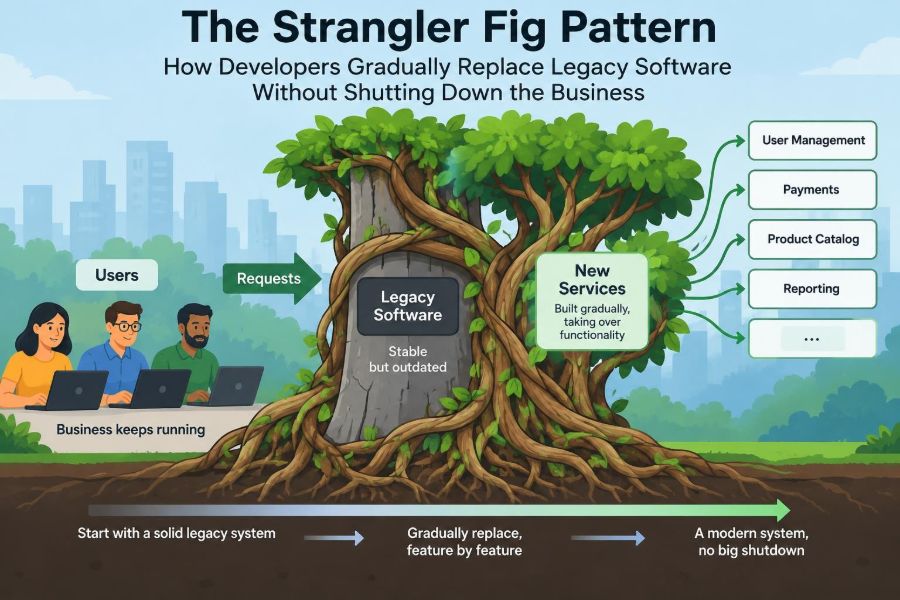
The Strangler Fig pattern offers a practical alternative. Instead of attempting one risky rewrite, teams gradually route capabilities from the old system to new components, verify each change in production, and retire the old parts only when they are genuinely no longer needed.
🌿 What the Strangler Fig Pattern Means
The pattern is named after strangler figs, plants that grow around a host tree over time. In software, the metaphor describes a new system that is introduced around an existing one, progressively taking over its responsibilities.
A team places a controlled entry point in front of a legacy application. New requests are initially sent to the old application as usual. As replacement capabilities become ready, the entry point directs selected requests to the new implementation instead.
The goal is not to copy the old system blindly. It is to replace business capabilities safely while the business continues operating.
🏚️ Why Legacy Systems Are Difficult to Replace
“Legacy” does not necessarily mean old, poorly written, or useless. A system becomes legacy when changing it is disproportionately difficult or risky compared with the value of the change.
Its real complexity often lies outside the source code. It may contain undocumented rules, manual workarounds, data corrections, scheduled jobs, integrations, and assumptions made by users over many years.
A replacement project that focuses only on screens and database tables can miss these operational dependencies. The new software may look modern while failing to support the work people actually do.
🚫 Why a Big-Bang Rewrite Often Fails
A big-bang rewrite attempts to build a complete replacement, switch everyone to it on a chosen date, and turn the old system off. This can work for a small, bounded application, but it becomes hazardous when the existing system is broad and business-critical.
During a long rewrite, the old system keeps changing. New regulations, product rules, customer requests, and defect fixes create a moving target. The replacement team must either reproduce those changes or accept an increasingly inaccurate result.
Big-bang programs also delay learning. Teams may discover critical omissions only near launch, when reversing course is expensive and the pressure to proceed is greatest.
🧭 The Core Migration Loop
The Strangler Fig approach is a repeated loop rather than a single implementation phase. Teams identify one capability, understand its behavior, build a replacement, redirect a limited set of traffic, observe the outcome, and expand only when confidence grows.
- Choose a business capability with clear boundaries.
- Document its inputs, outputs, rules, data, and dependencies.
- Build the new component and its integration path.
- Route a small, controllable slice of real traffic to it.
- Measure correctness, performance, and operational impact.
- Move more traffic, then remove the retired legacy path.
Each loop should leave the organization with a working improvement, not merely a promise of value later.
🚪 Establishing a Controlled Entry Point
Most migrations need a place where requests can be observed and directed. Depending on the system, this may be an API gateway, reverse proxy, message router, web frontend, integration layer, or even a carefully designed database access boundary.
This entry point is often called a facade. It presents a stable interface to callers while hiding whether a request is handled by old code or new code.
The facade should contain routing and compatibility concerns, not slowly become the new place where all business logic accumulates. If every special rule lands there, the team has created another monolith at the front door.
🧩 Choose Capabilities, Not Random Code Modules
The most useful migration units are usually business capabilities: calculating shipping options, managing customer addresses, generating invoices, or processing returns. These units correspond to outcomes people recognize and can often be tested independently.
Replacing a technical layer first—such as every database repository or utility class—can produce a great deal of work without reducing business risk. It may also preserve the old system’s internal structure even when that structure is the problem.
A capability boundary does not need to be perfect. It needs to be understandable enough to create a testable contract and a manageable first step.
🗺️ Map the Existing Behavior Before Rebuilding It
Before changing a legacy function, investigate how it behaves in reality. Read code, inspect logs, talk to support staff, observe users, review interface contracts, and examine unusual records in production data.
Write down both explicit requirements and discovered behavior. A discount calculation may include old exceptions for a particular customer group; an export may deliberately format fields for a partner’s aging import tool.
Not every behavior deserves preservation. The point of mapping is to make a conscious decision: retain it, change it with business approval, or retire it because it is no longer needed.
🔍 Use Domain Language to Find Better Boundaries
Domain-driven design can help teams describe the system in the language of the business. If operations talks about “returns authorization,” “inspection,” and “refund,” those concepts are stronger starting points than vague technical labels such as “module 7.”
A bounded context is an area where terms and rules have a consistent meaning. For example, “customer” may mean a buyer in sales but a legal account in billing. Treating them as identical everywhere can create damaging coupling.
The Strangler Fig pattern does not require formal domain-driven design, but shared language makes migration scope, ownership, and acceptance criteria much clearer.
🎯 Pick the First Slice Carefully
The first slice should be small enough to finish and meaningful enough to prove the approach. A read-only customer profile page or a self-contained notification workflow may be a better starting point than order fulfillment across five departments.
Avoid choosing a trivial feature solely because it is easy. A migration that never touches deployment, routing, observability, data, or operational support may not reveal the problems that matter later.
Look for a capability with a clear owner, measurable outcomes, limited dependencies, and a safe fallback path.
📦 Separate Reads from Writes When Possible
Reading data is often easier to migrate than changing it. A new application can read information from a legacy source and present it through a modern interface without immediately taking ownership of updates.
Writes require stronger guarantees. When an address change is submitted, which system is authoritative? What happens if one update succeeds and another fails? How will duplicate messages or retries be handled?
A common sequence is to migrate read experiences first, then introduce new write paths after data ownership and failure handling are explicit. This is useful, but it is not a universal rule; sometimes the business value is in a new write workflow, and that may justify tackling it earlier.
🗃️ Define Data Ownership Explicitly
During migration, two systems may need the same information. That does not mean both should independently own and update it indefinitely.
For each important data set, define the source of truth at each stage. A legacy customer database might remain authoritative while a new service consumes changes. Later, ownership can move to the new service, with the legacy application receiving a compatible copy only while necessary.
Ambiguous ownership creates conflicting updates, difficult reconciliation, and arguments during incidents. A simple written ownership map can prevent many of these problems.
🔄 Synchronize Data with Purpose
Teams commonly use batch exports, change data capture, events, APIs, or temporary replication to move information between old and new systems. The right method depends on freshness needs, reliability requirements, volume, and what the legacy platform can support.
Synchronization is not free. Every copy introduces questions about delay, ordering, duplicates, failed deliveries, and corrections. Design consumers to tolerate repeated messages and out-of-order arrival where the technology cannot guarantee otherwise.
Temporary synchronization should have an exit plan. Otherwise, a migration bridge can become a permanent and poorly understood integration.
🧾 Treat Interfaces as Contracts
An interface contract defines what callers can send, what they receive, which errors are possible, and what timing or consistency they can expect. It applies to APIs, files, database views, message schemas, and user-facing workflows.
When replacing a legacy function, preserve the contract where compatibility matters. If a partner expects a particular field or error code, changing it without coordination can break their process even if the new internal code is correct.
At the same time, do not let every historical quirk become permanent. Version an interface or introduce a translation layer when a cleaner contract is worth the transition cost.
🪞 Compare Outputs with Shadow Traffic
Shadow traffic sends a copy of a real request to the new implementation while the legacy system remains responsible for the actual response. The team compares outputs, side effects, latency, and errors without exposing the new result to users.
For example, a new tax calculation service can calculate taxes in parallel with the old engine. Differences can be recorded and investigated before the new service makes production decisions.
Shadowing is safest for read-only or carefully isolated operations. Replaying real write requests can accidentally create duplicate orders, send duplicate emails, or charge a customer twice unless side effects are suppressed.
🧪 Use Parallel Runs for High-Risk Decisions
A parallel run goes beyond one request comparison. For a defined period, both systems process the same business inputs and their results are reconciled. This is particularly useful for financial calculations, reporting, payroll-like workflows, or rules with many edge cases.
Parallel operation can reveal differences, but a difference is not automatically a defect in the new system. The old system may contain a bug, a manual correction, or an outdated rule. Someone with domain authority must decide which outcome is correct.
Plan reconciliation work before starting. A dashboard full of unexplained mismatches creates noise rather than confidence.
🚦 Release Gradually with Feature Flags
Feature flags allow teams to enable a new path for a selected group rather than everyone at once. Routing can be limited by internal users, tenant, region, account type, request percentage, or a specific workflow.
This turns deployment into a reversible operational decision. Code may already be deployed, while activation happens only when monitoring and support coverage are ready.
Flags need ownership and cleanup dates. Old flags multiply possible system states, make testing harder, and conceal which path is truly active.
↩️ Design a Real Rollback Path
A rollback plan must be more than “turn the flag off.” Consider what happens after the new path writes data, emits events, or calls external systems. Can the old path understand that state? Is compensation needed? Will users see inconsistent results?
For each migration slice, define the conditions that trigger rollback and the person or team authorized to make that decision. Clear thresholds reduce hesitation during an incident.
Sometimes the safest response is a forward fix rather than rollback, especially after irreversible external actions. The right choice depends on the capability, which is why failure analysis belongs in the design stage.
📊 Observe the Migration, Not Just the New Service
Standard service metrics—error rate, latency, throughput, and resource use—are necessary but incomplete. A strangler migration also needs signals that show whether routing, data synchronization, and business outcomes are behaving correctly.
- How many requests reached old and new paths?
- How many responses or calculations differed during comparison?
- Are synchronization delays growing?
- Are support contacts or manual corrections changing?
- Can a transaction be traced across both systems?
Correlation IDs carried through gateways, queues, and services make cross-system diagnosis much faster when a request takes an unexpected route.
🧱 Keep the New Architecture Worth Moving Toward
A gradual migration can accidentally recreate the old monolith with newer tools. This happens when teams copy existing tables, call patterns, and shared utility layers without reconsidering why the legacy design became difficult to change.
New components should have clear responsibilities, independently understandable interfaces, and ownership boundaries that match how teams work. They do not need to become dozens of tiny services; unnecessary distribution brings network failures, deployment overhead, and operational complexity.
The aim is appropriate separation, not a particular fashionable architecture.
🔗 Manage Dependencies at the Edges
Legacy systems are frequently connected to payment providers, identity services, reporting tools, vendors, printers, file shares, and other internal applications. A capability may look isolated until one of these edges is discovered.
Adapters can isolate awkward protocols or vendor-specific formats behind a stable internal interface. This lets the new capability use a clear model while leaving external compatibility concerns at the boundary.
Document every dependency uncovered during migration. The map will rarely be complete at the start, but it should become more accurate with each slice.
👥 Include Operations and Support Early
Modernization changes more than code. Support teams may need new diagnostic tools, operations teams may need alerts and runbooks, and business users may need changed screens or procedures.
Invite these groups into discovery and rollout planning. They often know where failures occur, which reports are relied upon, and which “minor” steps are actually essential at month-end or during peak demand.
A technically successful release can still harm the business if nobody can investigate failures or complete an exception workflow.
🧑⚖️ Preserve Compliance, Security, and Audit Needs
Replacement work can alter access control, retention, audit trails, encryption, and data flows. These concerns should be examined for every slice, not deferred until the end when the system is already partly live.
For example, a new service that exposes customer data may need authorization checks equivalent to—or deliberately improved from—the legacy application. Logging must be useful for audits without unnecessarily exposing sensitive information.
Requirements differ by organization and jurisdiction, so teams should involve the appropriate security, privacy, legal, and compliance specialists rather than assuming a generic checklist is sufficient.
💸 Fund the Work as Product Delivery
The pattern works best when modernization is connected to useful business outcomes. A new returns capability might reduce manual handling, while a replacement reporting path might make information available sooner to decision-makers.
Purely technical risk reduction is also legitimate, but it needs visible milestones. Funding a multi-year “rewrite” with no usable increments makes prioritization difficult and erodes confidence.
Describe each slice in terms of the risk removed, capability improved, or constraint eliminated. This makes trade-offs understandable beyond the engineering team.
⏱️ Expect a Period of Double Running
For a while, the organization may operate old and new code, duplicate data paths, compatibility adapters, and additional monitoring. That overlap costs money and attention.
It is usually the price of reducing cutover risk, not evidence that the approach is failing. The danger is allowing temporary complexity to remain forever because nobody owns its removal.
Track migration scaffolding as first-class work: bridges, flags, replicas, translators, old endpoints, and scheduled jobs should all have a retirement decision.
⚠️ Common Failure Modes
The pattern is disciplined incremental change, not a guarantee of success. Several mistakes recur across migrations.
- Starting without a target architecture: teams move code but never reduce coupling or clarify ownership.
- Creating permanent dual writes: two systems mutate the same facts and slowly diverge.
- Ignoring nonfunctional behavior: the new path is correct but too slow, unreliable, or costly at real volume.
- Routing by guesswork: incomplete rules send related requests to different systems unpredictably.
- Never deleting legacy code: the old path survives “just in case” and continues consuming maintenance effort.
Each issue is easier to address when the migration is measured in small, accountable slices.
🛠️ A Hypothetical Order-System Migration
Imagine a retailer with a legacy order platform. Rather than replacing checkout, warehouse allocation, invoices, and returns at once, the team begins with order-status tracking. A facade routes status queries to a new read service that receives order updates from the legacy platform.
After monitoring data freshness and comparing displayed statuses, the team moves customer-facing tracking fully to the new service. Next, it replaces the notification workflow, which now consumes the same order events.
Only later does the team migrate order amendments and fulfillment decisions, where writes and inventory dependencies make failure handling more demanding. At each stage, the legacy platform handles less responsibility, but the retailer continues taking orders.
📋 A Practical Readiness Checklist
Before moving a capability, teams should be able to answer concrete questions. Uncertainty is normal; unexamined uncertainty is risky.
- What business outcome and user journey are being migrated?
- Who owns the rules and can resolve behavior differences?
- Which systems, data stores, jobs, and people depend on it?
- Who owns each important piece of data during this stage?
- How will traffic be routed, observed, and rolled back?
- What tests, comparisons, and operational signals demonstrate confidence?
- What legacy artifacts can be deleted after the transition?
If the last question has no answer, the work may be adding a new layer rather than completing a replacement.
📈 Decide When a Slice Is Actually Complete
A migration slice is not complete merely because the new code is deployed. It is complete when the new path is operating reliably, the business accepts its behavior, support can handle it, and obsolete dependencies have been removed or formally scheduled for removal.
Define completion criteria early. They might include all intended traffic routed to the new path, reconciliations within agreed expectations, dashboards in place, runbooks updated, and the old endpoint disabled.
Completion matters because it converts temporary coexistence into permanent simplification.
🌳 When the Pattern Is a Poor Fit
The Strangler Fig pattern is less suitable when a system is genuinely small, isolated, and easy to replace in a short planned outage. It can also be difficult when the legacy platform offers no practical interception point and cannot expose data safely.
Some tightly coupled changes require coordinated replacement, particularly when a fundamental data model or external protocol cannot coexist in old and new forms. Even then, incremental discovery, compatibility testing, and staged rollout principles may still reduce risk.
The choice is not between “strangle everything” and “big bang always.” It is a decision about where gradual substitution provides meaningful control.
🧠 The Core Principle: Replace Responsibility, Then Retire It
The deepest lesson is simple: modernization succeeds when responsibility moves deliberately. New software should take over a clearly defined job, prove it can perform that job in real conditions, and allow the old implementation to be removed.
That sequence avoids both reckless cutovers and endless parallel systems. It acknowledges that legacy software contains valuable behavior while refusing to let historical structure dictate the future.
The Strangler Fig pattern turns a risky replacement program into a series of observable, reversible, business-aware decisions.
Legacy modernization is rarely about finding a perfect rewrite moment. It is about creating safe paths from the system you have to the system you need, one retired responsibility at a time. 🌿⚙️🚀