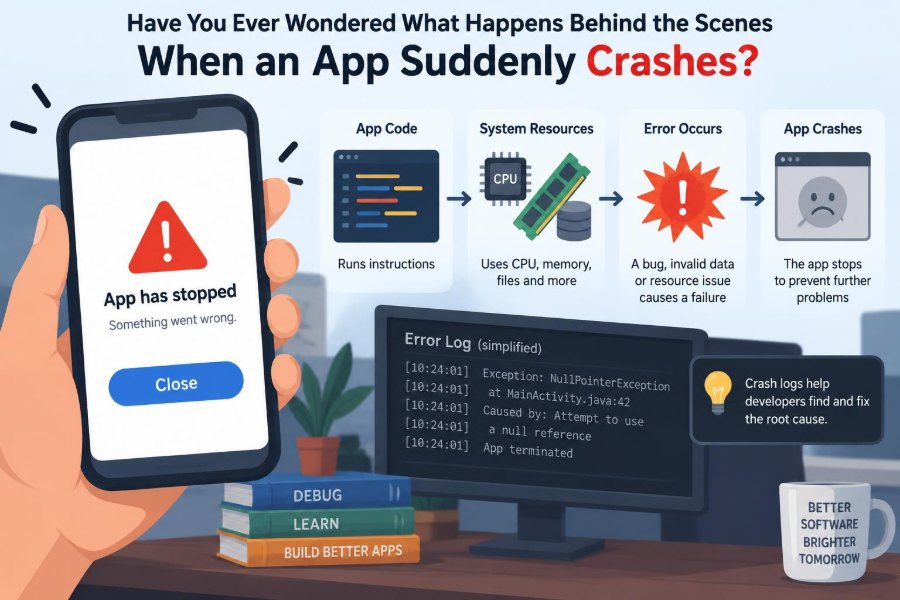

You are halfway through sending a message, editing a photo, or paying for an order when the app freezes. The screen disappears, the operating system shows an error, and your work may be gone.
To a user, an app crash feels like a single event: it worked, then it did not. Inside the device, however, a crash is usually the end of a chain of decisions involving code, memory, data, operating-system rules, and sometimes outside services.
Understanding that chain makes crashes less mysterious. It also helps developers diagnose failures systematically instead of treating every error report as a vague complaint.
A crash is not always proof of careless programming. Complex software runs in changing environments, and a small unhandled condition can become a visible failure. What matters is how the system detects, contains, reports, and learns from it.
💥 What “Crash” Actually Means
An application crash occurs when a program stops running unexpectedly or is forcibly terminated. It may close immediately, become unresponsive until the operating system ends it, or return the user to the home screen.
In technical terms, the process running the app reaches a state it cannot safely continue from. That can happen because the app explicitly aborts, the programming runtime raises an unhandled exception, or the operating system terminates the process.
🧩 An App Is More Than Its Screens
What users call “the app” is commonly a collection of components: interface code, business logic, stored data, third-party libraries, network clients, media decoders, and background tasks.
Each component has assumptions. A screen may assume an account exists, a parser may assume received data follows a format, and an image loader may assume sufficient memory is available. A crash happens when an assumption fails and no safe fallback handles it.
🔄 The Normal Journey of a User Action
Consider a hypothetical tap on a “Place order” button. The app validates the cart, reads local state, sends a request to a server, interprets the response, updates storage, and redraws the screen.
Every stage can fail independently. The server might send an unexpected field, the network may disappear, or a background task may update the same data at the wrong time. The final crash can appear near the button tap even when the underlying defect lies elsewhere.
⚠️ Exceptions Are Signals, Not Automatically Disasters
An exception is a signal that normal execution encountered an unusual condition: dividing by zero, opening a missing file, parsing invalid data, or accessing an object that does not exist.
Exceptions are useful because they preserve information about what went wrong. They become crashes when no suitable code catches and handles them at the right level. A missing profile picture, for example, should usually trigger a placeholder image—not terminate the entire app.
🧠 The Call Stack Tells the Story Backward
As code calls functions, the runtime records the chain of active calls in a call stack. Think of it as a stack of return addresses: the current function is on top, while earlier callers sit below it.
When an unhandled exception occurs, a crash report often includes a stack trace. It identifies the failing function and the path that led to it. Developers read it from the top to locate the immediate failure, then downward to understand the context.
loadAvatar(user)
  └─ decodeImage(file)
      └─ readBytes(path)  ← file was missing
This trace does not always reveal the root cause by itself. The missing file may result from a failed download, deleted cache entry, or incorrect path created much earlier.
🕳️ Null and Missing-Value Failures
One common crash occurs when code expects a value but receives nothing. Different languages express this as null, nil, None, or an absent optional value.
A profile object may lack an address, for instance, yet code tries to read the address’s postal code. Safer code checks whether the optional information exists, supplies a default, or changes the interface so the missing state is explicit.
📏 Index and Boundary Errors
Collections such as arrays and lists have valid positions. If a list contains three items, positions 0, 1, and 2 are valid in many languages; position 3 is not.
Boundary bugs often appear after a list changes size. A user deletes an item while another task still expects it, or a server returns an empty result where the app expected at least one entry. Defensive checks prevent a small data mismatch from becoming a process-ending error.
🧮 Type and Data-Format Mismatches
Programs depend on types: text, numbers, dates, objects, and other structured values. A crash can occur when code treats one kind as another, such as converting the text “unknown” into a number.
External data deserves particular caution. APIs evolve, users enter imperfect values, and older app versions may encounter newer formats. Parsing code should validate input, tolerate optional fields where sensible, and report unexpected data with enough context to investigate.
🧵 Concurrency Creates Timing-Dependent Bugs
Modern apps perform multiple activities at once: rendering a screen, downloading content, writing a database record, and processing notifications. This is concurrency.
Concurrency improves responsiveness, but it introduces ordering problems. One task may remove data just as another task reads it. Such a race condition may only happen under certain timing, making it frustratingly difficult to reproduce.
🔒 Shared State Needs Clear Ownership
Shared mutable state is data that more than one task can change. A shopping cart, cached session, or in-memory list can become inconsistent if updates overlap without coordination.
Tools such as locks, queues, transactions, immutable data structures, and actor-style message passing can help. The best choice depends on the platform, but the goal is consistent: make it clear who may change a piece of data and when.
🧠 Memory Pressure Can End a Healthy-Looking App
An app needs memory for code, images, documents, network responses, and temporary calculations. If it requests more memory than the environment can provide, allocation can fail or the operating system may terminate the process.
Large images are a familiar source. A photograph may look modest on screen while requiring substantial uncompressed memory. Loading several full-resolution photos at once can exhaust a mobile device faster than developers expect.
🪣 Memory Leaks Accumulate Quietly
A memory leak happens when an app retains data it no longer needs. The program may work well at first, then consume more memory through repeated navigation, scrolling, or background processing.
Leaks are not the only memory problem. Excessive temporary allocations can also cause pauses or pressure. Profiling tools show which objects remain alive and where they were allocated, turning a vague “it crashes after a while” report into an inspectable pattern.
📱 The Operating System Is Also Making Decisions
Applications do not own the device. The operating system allocates CPU time, memory, files, permissions, graphics resources, and background execution opportunities among many processes.
It may terminate an app that exceeds resource limits, violates platform rules, or remains unresponsive. From the user’s perspective, this can look identical to a code crash, but the diagnostic evidence and remedy are different.
⏳ Freezes, Hangs, and Watchdogs
A freeze means the process still exists but is not responding. It may be stuck in an infinite loop, waiting on a lock, or doing expensive work on the interface thread.
Many platforms use a watchdog mechanism to detect an app that blocks essential responsiveness for too long. The system may then terminate it. The lesson is not merely “make code fast”; it is to keep user-interface work short and move slow operations off the critical path.
🌐 Network Failures Should Rarely Be Crashes
Networks are unreliable by nature. Connections time out, devices change between Wi-Fi and mobile data, servers return errors, and requests can arrive out of order.
These conditions should generally produce a recoverable state: a retry option, cached content, a clear message, or a queued action. Treating an unavailable connection as an impossible event turns a routine environmental condition into an avoidable crash.
🗄️ Storage and Database Problems Have Their Own Rules
Local storage can be full, unavailable, corrupted, or changed by an app update. Database migrations—the steps that adapt stored data to a new schema—are especially sensitive because old data must remain understandable to new code.
A migration should be tested against realistic older data and failure paths. If data cannot be safely transformed, an app may need a recovery strategy rather than blindly continuing with inconsistent records.
🔌 Third-Party Libraries Extend the Failure Surface
Apps often use libraries for analytics, payments, maps, authentication, image loading, and more. These dependencies save time, but their behavior becomes part of the app’s behavior.
A library defect, incompatible update, or unexpected initialization order can trigger a crash outside the team’s own source code. Dependency versions, release notes, testing, and a minimal update strategy reduce surprises without eliminating all risk.
🧬 Native Code and Platform Boundaries
Some apps combine managed code with native code, often written in languages such as C or C++. Native code can be valuable for performance or access to platform capabilities, but it has fewer automatic safety checks in many environments.
Invalid memory access, incorrect resource handling, or calling a platform API with invalid arguments can cause abrupt low-level failures. These reports may be harder to interpret because the stack trace can include system libraries and machine-level details.
🛡️ Permissions and Security Constraints
Camera, location, contacts, files, and notifications may require user permission. An app that assumes access has been granted can fail when the user declines, revokes, or has never been asked.
Security rules can also restrict file locations, background behavior, and communication methods. Good software treats denied access as a normal branch of the user journey, explains the consequence plainly, and avoids repeatedly demanding permission without context.
🧪 Why the Developer Cannot Always Reproduce It
A crash report might come from a particular device model, operating-system version, locale, account state, network condition, and sequence of actions. Recreating all of those details is not always possible.
This does not make the report useless. Developers can narrow the search by comparing versions, reading stack traces, checking breadcrumbs from recent actions, inspecting affected data, and building a small test case around the suspected path.
📋 What a Useful Crash Report Contains
Crash reporting systems collect diagnostic information when a process ends unexpectedly. The most useful reports balance detail with privacy: enough context to debug, but not private messages, passwords, tokens, or unnecessary personal content.
| Signal | Why it helps |
|---|---|
| Exception type and message | Describes the immediate failure condition. |
| Stack trace | Shows the code path active at failure. |
| App and operating-system version | Helps identify compatibility or release-specific issues. |
| Device and memory context | Can reveal resource-related patterns. |
| Recent non-sensitive events | Provides clues about the path leading to the crash. |
Reports are clues, not verdicts. A strong investigation checks whether the apparent failing line is the cause, a symptom, or simply the first place invalid state became visible.
🔍 Logs, Metrics, and Traces Answer Different Questions
Logs record discrete messages, such as a failed request or an unexpected value. Metrics summarize behavior over time, such as error counts or request latency. Traces connect work across components, which is useful when a user action travels through several services.
Used together, these tools provide context. A stack trace might show a parser failure; logs may reveal the payload shape; service telemetry may show that a backend deployment began returning a changed response.
🧭 Reproduce Before You Rewrite
A common reaction to a crash is to add broad try/catch blocks everywhere. That may suppress the visible failure while leaving corrupted state, incomplete transactions, or a confusing interface behind.
Instead, identify the failure mode, reproduce it when feasible, and decide what safe behavior should replace the crash. A failed save might preserve the draft and offer retry; a malformed cached item might be discarded and refreshed.
🩹 Fix the Root Cause, Then Add a Guardrail
The strongest fix usually has two parts. First, correct the faulty assumption or sequence that creates invalid state. Second, add validation or recovery at the boundary where failure could still occur.
For example, if an API sometimes omits an optional field, fix the contract or client model, then ensure the interface can render a sensible missing-value state. Guardrails reduce harm; they should not hide recurring defects from the team.
✅ Testing Finds Classes of Failures
No test suite proves an app will never crash. Tests are samples of behavior, and real environments have more combinations than any team can exhaustively execute.
Different tests catch different risks:
- Unit tests check small pieces of logic, including edge cases.
- Integration tests check boundaries between components, storage, or services.
- UI tests exercise user flows and visible states.
- Stress and lifecycle tests expose memory, timing, rotation, suspension, and resume problems.
The valuable habit is to add a regression test after a meaningful bug, when the behavior can be represented reliably.
🚦 Gradual Releases Limit the Blast Radius
Releasing a new version to a subset of users first can reveal defects that escaped internal testing. Real devices, account histories, and network conditions introduce variety that controlled environments cannot fully mirror.
Gradual rollout is not a substitute for testing. It is a risk-control measure that gives teams time to monitor errors, pause distribution, or roll back a harmful change before it reaches everyone.
🧰 Defensive Programming Is Thoughtful, Not Paranoid
Defensive programming means anticipating realistic failure at boundaries: user input, file systems, networks, permissions, external services, and concurrent tasks. It does not mean burying every line under repetitive checks.
Useful defenses make invalid states harder to create, validate data when it enters the system, use types to express absence or failure, and provide recovery that users can understand. Excessive silent fallback can be harmful if it conceals a serious data problem.
🧑💻 What Users Can Do When an App Crashes
Users cannot debug the code, but they can provide information that shortens the investigation. Note what happened immediately before the crash, whether it repeats, and whether the issue began after an update or particular action.
- Restart the app, then the device if the issue affects more than one app.
- Check for an app or operating-system update.
- Confirm available storage and network connectivity where relevant.
- Use the app’s support channel and avoid including passwords or sensitive account details.
- For a payment, upload, or submission, verify the outcome before retrying to avoid duplicates.
🤝 A Crash Is Also a Product Experience
Technical reliability affects trust. If a crash happens during a form, purchase, or creative task, the immediate loss may be the user’s unsaved effort rather than merely a closed screen.
Autosave, idempotent server operations, clear recovery messages, and preserved drafts can reduce the damage when failures occur. Idempotent means repeating an operation does not accidentally create additional effects, such as submitting the same order twice.
📚 The Core Principle: Design for Imperfect Conditions
Apps crash when assumptions meet reality: data is incomplete, timing changes, memory is scarce, a dependency behaves differently, or an error goes unhandled. The mechanics vary, but the engineering response is consistent.
Build clear boundaries, represent failure explicitly, observe real behavior responsibly, reproduce issues carefully, and recover safely where recovery is possible. A stable app is not one that assumes nothing will go wrong; it is one that knows what to do when something does.
Behind every sudden crash is a failure path that can be understood, measured, and often redesigned into a safer experience. That mindset turns a frustrating disappearance into a practical engineering problem—and a chance to build more resilient software. ⚙️🛠️📱